1. פּראָדוקט איבערview
The CHOETECH B695 is a versatile 10000mAh magnetic power bank designed for convenient charging of multiple devices. It features both wireless charging capabilities and multiple wired output options, including built-in USB-C and Lightning cables. Its compact design and integrated safety features make it an ideal portable power solution.

בילד: פאָרנט און הינטן view of the CHOETECH B695 Magnetic Power Bank, showcasinג זײַן קאָמפּאַקטן דיזײַן און פֿאַרשידענע פּאָרץ.
שליסל פֿעיִקייטן:
- 10000mAh קאַפּאַציטעט: גיט ampדי מאַכט פֿאַר קייפל טשאַרדזשיז.
- 2-אין-1 טשאַרדזשינג: Supports both magnetic wireless charging and wired charging.
- געבויט-אין קאַבלעס: Integrated USB-C and Lightning cables for direct device connection.
- קייפל אַוטפּוץ: Includes USB-A, Type-C (input/output), and dedicated wireless charging for phones and watches.
- מאַגנעטיק אַליינמאַנט: Ensures secure and efficient wireless charging for compatible devices.
- געפירט דיגיטאַל ווייַז: Clearly indicates remaining battery percentage.
- Comprehensive Safety Protection: Built-in safeguards against overcharge, overdischarge, overcurrent, overvoltage, temperature, short circuit, overpower, recovery, and electromagnetic field issues.
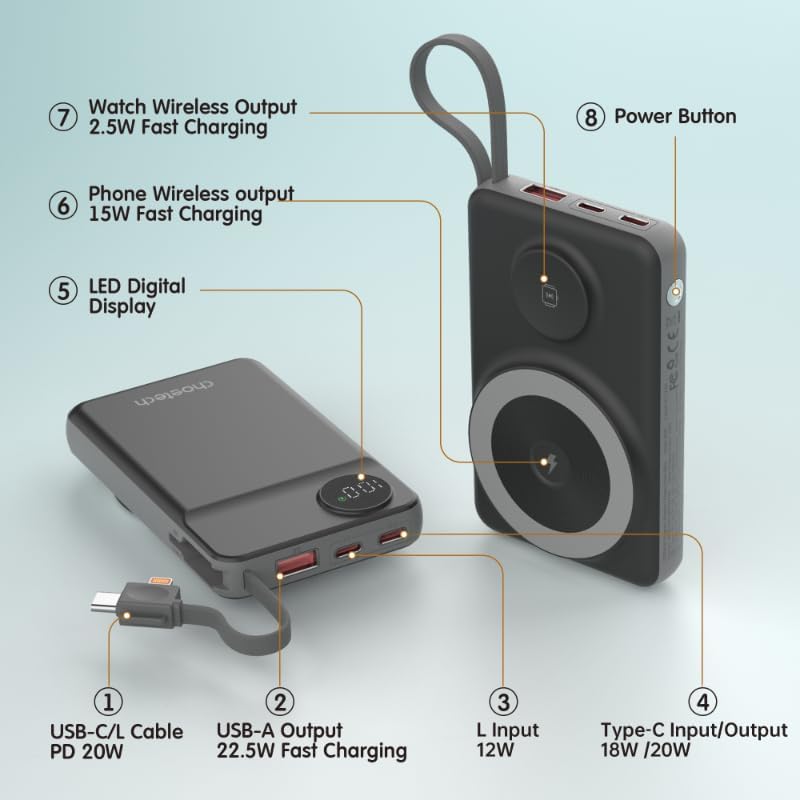
Image: Detailed diagram labeling the ports and features of the CHOETECH B695, including USB-C/L cable, USB-A output, L input, Type-C input/output, LED display, phone wireless output, watch wireless output, and power button.
2. אָנהייבן: אויפֿשטעלן
2.1 אויפלאָדן די פּאַוער באַנק
Before initial use, fully charge your CHOETECH B695 power bank. This ensures optimal performance and battery longevity.
- Connect a compatible USB-C charging cable (not included) to the Type-C Input/Output port (4) on the power bank.
- Connect the other end of the cable to a USB wall adapter (not included).
- The LED Digital Display (5) will show the charging progress. It will display "100" when fully charged.
- Alternatively, you can use the built-in Lightning input (3) to charge the power bank with a Lightning cable and adapter.
באַמערקונג: For fastest charging of the power bank, use a PD (Power Delivery) compatible wall adapter with the Type-C port.
3. אַפּערייטינג ינסטרוקטיאָנס
3.1 קאָנטראָלירונג די באַטאַרייע מדרגה
Press the Power Button (8) once to activate the LED Digital Display (5), which will show the current battery percentage.
3.2 דראָטיקע טשאַרדזשינג
The CHOETECH B695 offers multiple wired charging options:
- Using Built-in USB-C/L Cable (1):
- Pull out the integrated USB-C or Lightning cable from its storage slot.
- Connect the appropriate cable end to your device's charging port.
- טשאַרדזשינג וועט אָנהייבן אויטאָמאַטיש.
- Using USB-A Output (2):
- Connect your device's USB charging cable to the USB-A Output port (2).
- Connect the other end of your cable to your device.
- אויפלאָדן וועט אָנהייבן.
- Using Type-C Input/Output (4):
- Connect your device's USB-C charging cable to the Type-C Input/Output port (4).
- Connect the other end of your cable to your device.
- אויפלאָדן וועט אָנהייבן.

Image: The CHOETECH B695 power bank connected to a smartphone via its built-in USB-C cable, demonstrating wired charging.
3.3 Wireless Charging (Phone)
The power bank supports magnetic wireless charging for compatible smartphones (e.g., iPhone 12 series and newer, or Android phones with magnetic cases).
- זייט זיכער אז די פּאַוער באַנק איז גענוג אויפגעלאָדן.
- Align your compatible smartphone with the larger magnetic charging pad (6) on the power bank.
- The phone should snap into place magnetically, and wireless charging will begin.

Image: A smartphone magnetically attached to the larger wireless charging pad and a smartwatch on the smaller pad of the CHOETECH B695, illustrating simultaneous wireless charging.
3.4 Wireless Charging (Watch)
The power bank includes a dedicated smaller magnetic charging pad for smartwatches.
- זייט זיכער אז די פּאַוער באַנק איז גענוג אויפגעלאָדן.
- Place your compatible smartwatch onto the smaller magnetic charging pad (7).
- The watch should align magnetically, and wireless charging will begin.
3.5 גלייכצייטיגע אויפלאדונג
The CHOETECH B695 can charge multiple devices simultaneously using a combination of its wired and wireless outputs.

Image: The CHOETECH B695 power bank connected to and wirelessly charging multiple devices, including smartphones and a smartwatch, demonstrating its multi-output capability.
4. Safety Information and Protection Features
The CHOETECH B695 is equipped with multiple safety mechanisms to protect your devices and the power bank itself.
- אָווערטשאַרדזש שוץ: Prevents the battery from being charged beyond its capacity.
- איבער-אויסלאדונג שוץ: Protects the battery from being fully depleted, extending its lifespan.
- אָווערקוררענט שוץ: זיכערהייטן קעגן איבערגעטריבענעם קראַנט שטראָם.
- אָווערוואָלtagE שוץ: באַשיצט קעגן וואָלtage סערגעס.
- טעמפּעראַטור שוץ: Monitors and regulates the internal temperature to prevent overheating.
- קורץ קרייַז שוץ: אויטאָמאַטיש שליסט זיך אויס אין פאַל פון אַ קורץ קרייַז.
- אָוווערפּאַוער שוץ: Prevents power output beyond safe limits.
- אָפּזוך שוץ: Allows the device to recover from protection states.
- Electromagnetic Field Protection: Shields against harmful electromagnetic interference.

Image: An infographic detailing the nine safety protection features integrated into the CHOETECH B695 power bank, including overcharge, overdischarge, overcurrent, overvoltage, temperature, short circuit, overpower, recovery, and electromagnetic field protection.
וויכטיק: Do not expose the power bank to extreme temperatures, direct sunlight, or water. Do not disassemble or attempt to repair the device. Keep out of reach of children.
5. וישאַלט
- רייניקונג: Use a soft, dry cloth to clean the power bank. Avoid liquid cleaners.
- סטאָרידזש: האַלט די פּאַוער באַנק אין אַ קיל, טרוקן אָרט אַוועק פון דירעקט זונשייַן און עקסטרעמע טעמפּעראַטורן.
- באַטערי געזונט: כּדי צו האַלטן די באַטאַריע געזונט, זאָל מען גאָר אויפלאָדן און אויסלאָדן די פּאַוער באַנק לפּחות איין מאָל יעדע דריי חדשים אויב זי ווערט נישט רעגולער גענוצט.
- קאַבלע זאָרגן: Handle the built-in cables gently. Avoid excessive bending or pulling to prevent damage.
6. טראָובלעשאָאָטינג
6.1 פּאַוער באַנק לאָדט זיך נישט אויף
- Ensure the charging cable is securely connected to both the power bank's input port and the wall adapter.
- איבערצייגט אז דער וואנט אדאפטער ארבעט ריכטיג און איז אריינגעשטעקט אין א לעבעדיגע עלעקטרישע ווענטיל.
- Try a different USB-C or Lightning charging cable and wall adapter.
6.2 דעווייס לאדט זיך נישט אויף פון פאוער באנק
- ווייערד טשאַרדזשינג:
- קאָנטראָלירט צי די פּאַוער באַנק האט גענוג אָפּצאָל (זעט די LED דיספּליי).
- זיכער מאַכן אַז דער טשאַרדזשינג קאַבל איז זיכער פארבונדן צו ביידע די פּאַוער באַנק'ס אַוטפּוט פּאָרט און דיין מיטל.
- פרובירט אן אנדערן טשאַרדזשינג קאַבל אדער אן אנדערן אַוטפּוט פּאָרט אויף דער פּאַוער באַנק.
- Press the power button once to activate output if necessary.
- ווירעלעסס טשאַרדזשינג:
- Ensure your device is compatible with magnetic wireless charging.
- Remove any thick cases or metallic objects from your device that might interfere with wireless charging.
- Ensure your device is correctly aligned with the magnetic charging pad on the power bank.
- קוק אויב די מאַכט באַנק האט גענוג אָפּצאָל.
6.3 לאַנגזאַם טשאַרדזשינג
- Ensure you are using a fast-charging compatible cable and adapter for both charging the power bank and charging your devices.
- Some devices may limit charging speed when multiple devices are connected simultaneously.
- Environmental factors (e.g., high temperature) can affect charging efficiency.
6.4 LED Display Not Working
- דריקן די מאַכט קנעפּל פעסט.
- If the power bank is completely depleted, the display may not light up until it receives some charge.
7. ספּעסאַפאַקיישאַנז
| מאָדעל | B695 |
| באַטאַרייע קאַפּאַציטעט | 10000 מאַה |
| געבויט-אין קאַבלע רעזולטאַט | USB-C/L Cable PD 20W |
| וסב-א רעזולטאַט | 22.5 וו שנעל טשאַרדזשינג |
| טיפּ-C אַרייַנשרייַב / רעזולטאַט | 18W / 20W |
| בליץ אַרייַנשרייַב | 12 וו |
| Phone Wireless Output | 15 וו שנעל טשאַרדזשינג |
| וואַך ווירעלעסס רעזולטאַט | 2.5 וו שנעל טשאַרדזשינג |
| Dimensions (L x W x Thickness) | 7.7L x 9.7W x 16.2T סענטימעטער |
| פּונקט וואָג | 0.05 קילאָגראַמס (50 ג) |
| קאָליר | שוואַרץ |
8. וואָראַנטי און שטיצן
CHOETECH products are designed and manufactured to the highest quality standards. For warranty information and customer support, please refer to the warranty card included with your purchase or visit the official CHOETECH webפּלאַץ.
If you encounter any issues or have questions regarding your CHOETECH B695 power bank, please contact CHOETECH customer service for assistance.