1. הקדמה
This manual provides detailed instructions for the installation, operation, and maintenance of your HBEZON 60x32 Inch LED Medicine Cabinet. Please read this manual thoroughly before installation and use to ensure proper function and safety. Keep this manual for future reference.

Image 1.1: The HBEZON 60x32 Inch LED Medicine Cabinet featuring integrated lighting and a mirrored surface.
2. וויכטיק סאַפעטי אינפֿאָרמאַציע
ביטע האַלטן די פאלגענדע זיכערהייט מיטלען צו פאַרמייַדן שאָדן אָדער שעדיקן צו דעם פּראָדוקט:
- Always unplug the electrical outlet and USB port before installation or cleaning.
- Use appropriate safety gear when handling glass components.
- Ensure the cabinet is securely mounted to the wall to prevent tipping.
- Keep the cabinet area clear of flammable materials.
- Do not exceed the weight capacity of the cabinet to prevent structural damage or injury.
3. פּראָדוקט פֿעיִקייטן
- 3 Color Lighting Modes & Adjustable Brightness: High-brightness 6000 Lumens LED light strip with warm, natural, and cold white modes. Brightness is adjustable from 0% to 100%.
- זכּרון פֿונקציע: Remembers your last light setting.
- אַנטי-נעפּל פונקציע: Keeps the mirror clear in steamy environments.
- Electrical Outlet & USB Port: Built-in for convenient device charging.
- Soft-Close DTC Hinges: Rustproof hinges with silent buffering technology for smooth and quiet door closure.
- פּלאַץ-שפּאָרן פּלאַן: Adjustable shelves maximize storage.
- Recessed or Surface Wall-Mounted: Detachable glass panels allow for flexible installation.
- דוראַבאַל קאַנסטראַקשאַן: Aluminum frame designed to withstand bathroom humidity.

בילד 3.1: איבערview of key features including lighting, anti-fog, and power options.
4. ספּעסאַפאַקיישאַנז
| אַטריביוט | דעטאַל |
|---|---|
| סאָרט | HBEZON |
| מאָדעל נאָמען | RAIL (Model 6032) |
| קאָליר | זילבער |
| פּראָדוקט דימענשאַנז | 5"ד רענטגענ 60"וו רענטגענ 32"ה |
| מאַונטינג טיפּ | Wall Mount, Recessed Mount |
| וואָג לימיט | 60 פונט |
| פּונקט וואָג | 120 פונט |
| נומער פון שעלוועס | 3 |
| ראַם מאַטעריאַל | אַלומינום |
| שפּיץ מאַטעריאַל טיפּ | גלאז |
| צוריק מאַטעריאַל טיפּ | שפּיגל |
| אַסעמבלי פארלאנגט | יא |
5. פּעקל אינהאַלט
באַשטעטיקן אַז אַלע קאָמפּאָנענטן זענען פאַראַן איידער איר הייבט אָן די אינסטאַלאַציע:
- מעדיצין קאַבינעט מיט שפּיגל
- מאַונטינג ייַזנוואַרג
- שעלוועס (3)
6. אינסטאַלאַציע (סעטאַפּ)
The HBEZON medicine cabinet can be installed as either a surface-mounted or recessed unit. Professional installation is recommended due to the weight and electrical components.
6.1 דימענשאַנז און קאַטאַוט
Refer to the diagram below for product and recessed cutout dimensions. Accurate measurements are crucial for a successful installation.
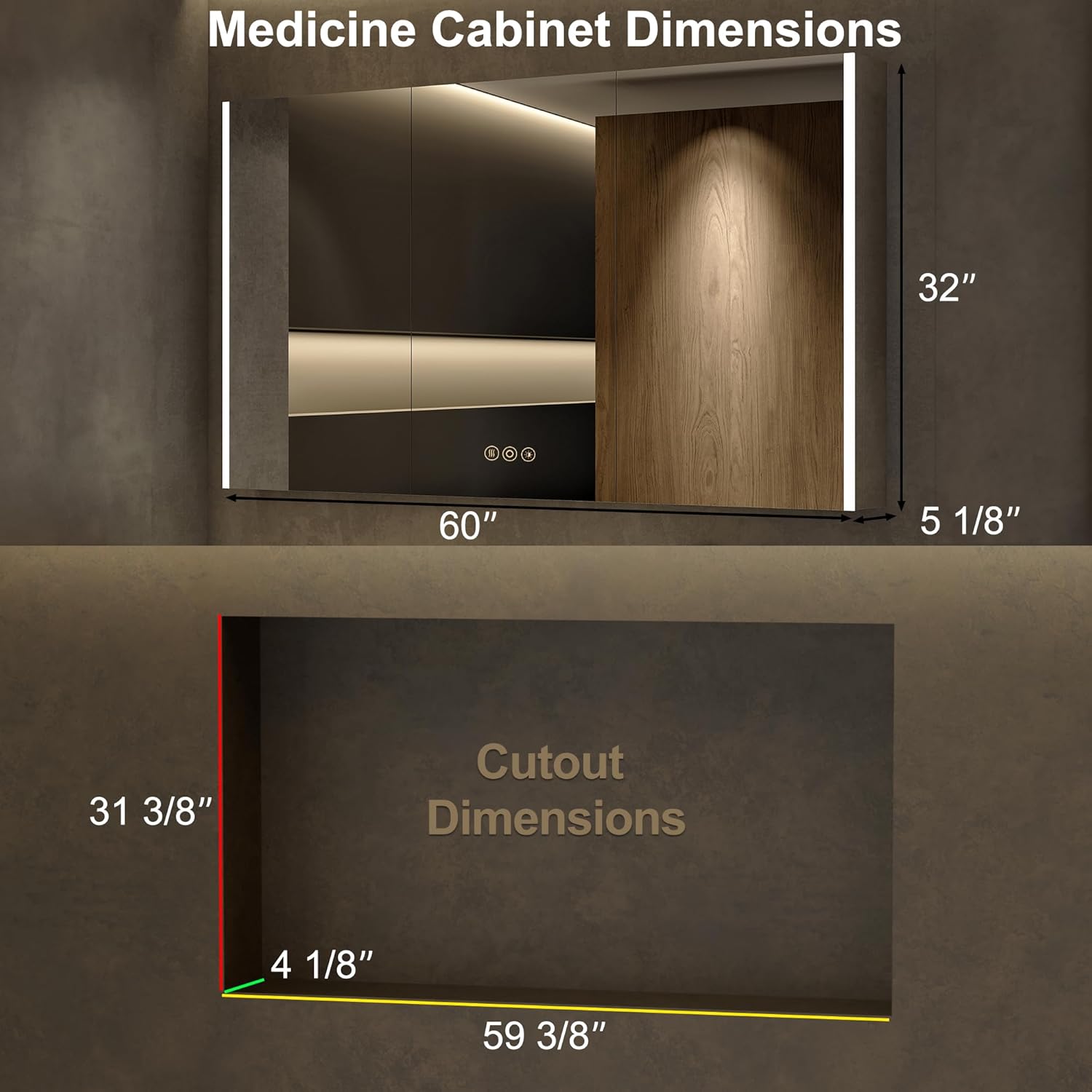
Image 6.1: Product and Recessed Cutout Dimensions.
6.2 מאַונטינג אָפּציעס
Choose between surface mount (cabinet sits on the wall) or recessed mount (cabinet fits into a wall cutout). Detachable glass panels facilitate recessed installation.

Image 6.2: Recessed vs. Surface Mount Installation.
6.3 עלעקטריקאַל קאַנעקשאַן
The cabinet requires a hardwired connection. Consult a qualified electrician for installation to ensure compliance with local electrical codes. A wall switch (not included) is typically used to control the power supply to the cabinet.

בילד 6.3: אינעווייניק view showing electrical outlets and USB ports.
7. אָפּעראַציע
The medicine cabinet features smart touch controls integrated into the mirror surface.
7.1 ליגהטינג קאָנטראָל
- מאַכט אויף / אַוועק: Short press the power icon on the mirror to turn the LED lights on or off.
- קאָליר טעמפּעראַטור אַדזשאַסטמאַנט: Short press the color temperature icon to cycle through warm (2700K), natural (4000K), and cold white (6500K) lighting modes.
- ברייטנאַס דיממער: Long press the brightness icon to adjust the light intensity from 0% to 100%. Release when the desired brightness is reached.
- זכּרון פֿונקציע: The cabinet will remember your last selected light setting (color mode and brightness) when powered on again.

Image 7.1: Adjusting LED Light Color Temperature.

Image 7.2: Brightness Dimmer and Memory Function.
7.2 אַנטי-נעפּל פונקציע
Activate the anti-fog function by pressing the dedicated anti-fog icon on the mirror. This will heat the mirror surface to prevent condensation. Turn off the anti-fog function when not needed to conserve energy.

Image 7.3: Anti-Fog Function in operation.
7.3 Electrical Outlets and USB Ports
The internal electrical outlets and USB ports provide convenient power for small appliances and charging devices. Ensure the cabinet door is open when using these ports to prevent obstruction and allow for proper ventilation.
7.4 אַדזשאַסטאַבאַל שעלוועס
The glass shelves inside the cabinet are adjustable to accommodate items of various heights. Carefully lift and reposition the shelves to suit your storage needs.

Image 7.4: Spacious interior with adjustable shelves.
7.5 פּראָדוקט ווידעא
Video 7.5: An official product video demonstrating the features and functionality of the HBEZON LED Medicine Cabinet, including lighting adjustments, anti-fog, and internal storage.
8. וישאַלט
- רייניקונג דער שפּיגל: ניצן אַ ווייך, דamp cloth and a mild glass cleaner. Avoid abrasive cleaners or harsh chemicals that could damage the mirror surface or electronic components.
- Cleaning the Cabinet Interior: Wipe down interior surfaces and shelves with a soft, damp cloth. Ensure the power is disconnected before cleaning any electrical components.
- שאַרניר זאָרג: The soft-close hinges are designed for durability. Avoid forcing the doors open or closed.
9. טראָובלעשאָאָטינג
If you encounter any issues with your medicine cabinet, refer to the following common solutions:
- לייץ נישט ארבעטן:
- Check the main power supply to the cabinet.
- Ensure the wall switch (if installed) is in the "on" position.
- Verify that the touch control is being pressed correctly.
- Anti-Fog Not Activating:
- Confirm the anti-fog touch icon has been pressed.
- Allow a few minutes for the defogger to heat up.
- Electrical Outlets/USB Ports Not Functioning:
- Ensure the main power to the cabinet is active.
- Check if the internal power switch for the outlets/USB is engaged (if applicable).
- טירן שליסן זיך נישט גלאט:
- Inspect hinges for any obstructions or damage.
- זיכער מאַכן אַז דער קאַבינעט איז גלייך און זיכער אינסטאַלירט.
For issues not covered here, please contact HBEZON customer support.
10. וואָראַנטי און שטיצן
For warranty information or technical assistance, please contact HBEZON customer support. Refer to your purchase documentation for specific warranty terms and contact details.
פאַבריקאַנט: HBEZON
פֿאַר נאָך שטיצן, באַזוכן די HBEZON Store on Amazon.


