1. הקדמה
This manual provides detailed instructions for the installation, operation, and maintenance of your Bisofice 80mm Thermal Receipt Printer, Model POS-8370. This high-speed direct thermal printer is designed for various business environments, offering reliable performance with an auto-cutter and versatile connectivity options.
2. פּעקל אינהאַלט
ביטע באַשטעטיקן אַז אַלע זאכן וואָס זענען ליסטעד אונטן זענען אַרייַנגערעכנט אין דיין פּעקל:
- 1 x Bisofice Thermal Receipt Printer (Model POS-8370)
- 1 x מאַכט קאַבלע
- קסנומקס רענטגענ וסב קאַבלע
- 1 x Paper Roll (80*30mm)
- 1 x באַניצער מאַנואַל (דאָס דאָקומענט)
3. פּראָדוקט איבערview
The Bisofice POS-8370 is an efficient thermal receipt printer featuring a compact design and robust functionality. It utilizes direct thermal printing technology, eliminating the need for ink cartridges or ribbons, which reduces operational costs.

פראָנט view of the Bisofice Thermal Receipt Printer, showing the paper output slot and control panel.
שליסל פֿעיִקייטן:
- הויך-גיכקייַט דרוקן: Up to 220mm/s for efficient transaction processing.
- אויטאָ קאַטער: Partial auto-cutter for clean and precise receipt separation.
- צווייענדיק קאַנעקטיוויטי: USB and LAN interfaces for flexible integration with various systems.
- ברייט קאַמפּאַטאַבילאַטי: Supports Win2003/XP/7/8/10, Linux, and MAC OS. Compatible with ESC/POS print commands.
- Large Paper Bin: Accommodates thermal paper rolls up to 83mm in diameter, reducing frequent paper changes.
- Wall Hanging Design: Features two hanging holes on the bottom for convenient wall mounting, saving counter space.
- Clear Printing: 203DPI resolution ensures crisp and readable receipts.

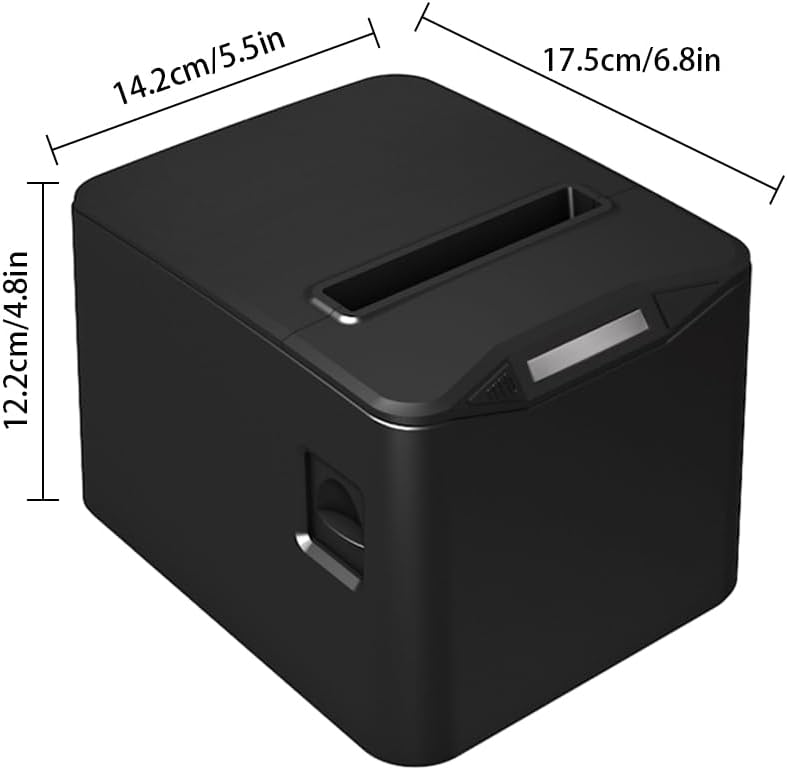
Diagram illustrating the dimensions of the printer: 17.5cm (6.8in) length, 14.2cm (5.5in) width, and 12.2cm (4.8in) height.

The printer operates without ribbons or ink, using only thermal paper rolls, shown alongside the device.

The printer features bottom holes for convenient wall mounting, demonstrated in a kitchen environment.

The printer's internal mechanism, showing its capacity for a large thermal paper roll with a maximum diameter of 83mm.
4. סעטאַפּ
4.1 אַנפּאַקינג
Carefully remove the printer and all accessories from the packaging. Retain the packaging for future transport or storage.
4.2 קאַנעקטינג מאַכט
- זיכער מאַכן אַז דער דרוקער'ס מאַכט קנעפּל איז אין דער אויסגעלאָשן פּאָזיציע.
- Connect the power cable to the printer's power input port.
- שטעקט אריין דעם אנדערן עק פונעם עלעקטרישן קאבל אין א געווענליכן עלעקטרישן אויסגאבע.
4.3 לאָדן טערמיש פּאַפּיר
- Press the cover open button (if available) or gently lift the top cover of the printer.
- Insert the thermal paper roll into the paper bin, ensuring the printing side of the paper faces upwards and feeds out from the top.
- ציעט א קליין שטיק פּאַפּיר ארויס פאַרביי דעם קאַטער.
- מאַכט פעסט צו דעם אויבערשטן דעקל ביז עס קליקט אַרײַן אין פּלאַץ.

The printer actively printing a receipt, demonstrating proper paper loading and output.
4.4 קאַנעקטינג צו אַ קאָמפּיוטער
The printer supports both USB and LAN connections.
- USB קשר: Connect one end of the provided USB cable to the printer's USB port and the other end to an available USB port on your computer.
- לאַן קאַנעקשאַן: פֿאַרבינדט אַן עטערנעט קאַבל פֿון דעם דרוקער'ס לאַן פּאָרט צו אייער נעץ ראַוטער אָדער סוויטש.
4.5 דרייווער ינסטאַלירונג
Before using the printer, you must install the appropriate driver on your computer. The driver supports Windows, Linux, and MAC OS.
אראפקאפיע די לעצטע שאָפער פֿון דער באַאַמטער webפּלאַץ: http://www.cnfujun.com/d/33פֿאָלגט די אינסטרוקציעס אויף דעם עקראַן פֿאַר אינסטאַלירן.
5. אָפּעראַציע
5.1 פּאַוערינג אויף / אַוועק
- To power on, flip the power switch to the 'ON' position. The indicator light will illuminate.
- צו אויסלעשן, דרייט דעם מאַכט קנעפּל צו די 'אויס' פּאָזיציע.
5.2 דרוקן
Once the printer is connected and drivers are installed, you can send print jobs from your application. The printer supports ESC/POS commands and can print various content types, including multi-language text, images, logos, 1D barcodes (UPC-A, UPC-E, JAN13, JAN8, CODE39, ITF, CODABAR, CODE93, CODE128), and 2D barcodes (QR CODE, PDF417).
אַן עקסample of a clearly printed receipt, highlighting the 203dpi resolution and 100KM print head life.
5.3 Cash Drawer Connection
The printer supports cash drawer driving. Connect your cash drawer to the dedicated port on the printer. The cash drawer will open automatically upon receiving the appropriate print command.
6. וישאַלט
6.1 רייניקונג די פּרינטער
רעגולערע רייניקונג העלפט אויפהאלטן די דרוק קוואַליטעט און פארלענגערט די לעבנסדויער פונעם דרוקער.
- זיכער מאַכן אַז דער דרוקער איז אויסגעלאָשן און נישט אַרויסגעטראָגן פֿון דער מאַכט איידער איר רייניקט עס.
- ניצן אַ ווייך, לינט-פֿרייַ שטאָף דampened with isopropyl alcohol to gently wipe the thermal print head. Avoid touching the print head with bare hands.
- רייניקט דעם פּאַפּיר־וועג און די ראָולערס צו באַזײַטיקן יעדן פּאַפּיר־שטויב אָדער דעבריס.
- ווישט אָפּ די אויסערלעכע זייט פֿון דרוקער מיט אַ ווייכן, טרוקענעם שטאָף.
6.2 פּאַפּיר ראָל פאַרבייַט
Replace the thermal paper roll when it runs out or when the red line appears, indicating low paper. Refer to section 4.3 for detailed instructions on loading thermal paper.
7. טראָובלעשאָאָטינג
אויב איר טרעפט פּראָבלעמען מיט אייער דרוקער, זעט די פאלגענדע געוויינטלעכע פּראָבלעמען און לייזונגען:
- Printer not powering on: קאָנטראָלירט די פֿאַרבינדונג פֿון דער מאַכט קאַבל און זיכערט זיך אַז די מאַכט אַוטלעט פֿונקציאָנירט.
- No printing: Verify that the printer is powered on, connected correctly (USB/LAN), and the driver is installed. Check for paper jams or if the paper roll is empty.
- שלעכטע דרוק קוואַליטעט: Ensure you are using thermal paper. Clean the thermal print head as described in section 6.1.
- פּאַפּיר קלעם: Power off the printer, open the cover, carefully remove any jammed paper, and then close the cover and power on.
- Auto-cutter not working: Ensure no paper debris is obstructing the cutter. If the issue persists, contact support.
8. ספּעסאַפאַקיישאַנז
| שטריך | באַשרייַבונג |
|---|---|
| מאָדעל | POS-8370 |
| דרוק מעטאָד | דירעקט ליניע טערמאַל |
| ינטערפייסיז | USB + LAN |
| דרוק באַפֿעל | ESC / POS קאַמפּאַטאַבאַל |
| דרוק ספּיד | 220מם/ס |
| האַכלאָטע | 203DPI (8 dots/mm) |
| TPH Reliability (Print Head Life) | 100 קילאמעטער |
| אַוטאָ קאַטער | פּאַרטיייש |
| קאַטער לעבן | 1 מיליאָן קאַץ |
| פּאַפּיר טייפּס | טערמישע ראָל פּאַפּיר |
| פּאַפּיר ברייט | 79.5 ± 0.5 מם |
| פּאַפּיר זעמל דיאַמעטער | Max φ 83mm |
| דרוק ברייט | 72 מם |
| פּאַפּיר גרעב | 0.06-0.08 מם |
| אַרייַנשרייַב באַפער | 96K ביטעס |
| NV פלאַש | 256K ביטעס |
| Supported OS Drivers | Win2003 / WinXP / Win7 / WIN8 / WIN10; Linux; MAC; |
| מאַכט אַרייַנשרייַב | AC 110V/220V, 50~60Hz |
| מאַכט רעזולטאַט | DC 24V/2.5A |
| פּראָדוקט גרייס | 17.5 רענטגענ 14.2 רענטגענ 12.2 סענטימעטער (6.8 רענטגענ 5.5 רענטגענ 4.8 אין) |
| פּראָדוקט וואָג | 0.84 קג (29.6 אַז) |
| געשטיצטע 1D קאָודז | UPC-A / UPC-E / JAN13 (EAN13) / JAN8 (EAN8) / CODE39 / ITF / CODABAR / CODE93 / CODE128 |
| געשטיצטע 2D קאָודז | QR CODE, PDF417 |
9. וואָראַנטי און שטיצן
Bisofice products are manufactured to high-quality standards. For warranty information, technical support, or service inquiries, please refer to the contact information provided with your purchase or visit the official Bisofice website. Please have your product model (POS-8370) and purchase details ready when contacting support.


