1. פּראָדוקט איבערview
The Jackery Solar Generator 1000 Plus is a portable power station designed to provide reliable electricity for various applications, including off-grid living, outdoor campינג, און נויטפאַל מאַכט אויסtages. It features a 1264Wh capacity, 2000W rated output (4000W peak), and is bundled with two 100W mini solar panels for renewable charging.

Image: The Jackery Solar Generator 1000 Plus power station shown with two foldable solar panels.
This unit is equipped with advanced LiFePO4 battery cells, offering enhanced durability and a long lifespan. It supports multiple output ports for versatile device charging and can be controlled via a mobile application.
2. וואָס איז אין דער קעסטל
- Jackery Solar Generator 1000 Plus Portable Power Station
- 2 x Jackery SolarSaga 100W Mini Solar Panels
- אַק טשאַרדזשינג קאַבלע
- מאַשין טשאַרדזשינג קאַבלע
- באַניצער מאַנואַל און וואָראַנטי קאָרט
3. סעטאַפּ גייד
3.1 ערשט טשאַרדזשינג
Before first use, it is recommended to fully charge the Jackery Solar Generator 1000 Plus.
- וואנט טשאַרדזשינג: Connect the AC charging cable to the power station and a standard wall outlet. The unit can be fully charged in approximately 100 minutes (1.7 hours).
- זונ טשאַרדזשינג: Unfold the SolarSaga 100W Mini Solar Panels and connect them to the power station. For optimal charging, position the panels directly towards the sun. With up to four 200W SolarSaga panels (or equivalent 100W panels), a full recharge can be achieved in approximately 2 hours under ideal sunlight conditions.
- מאַשין טשאַרדזשינג: Use the provided car charging cable to charge the power station from your vehicle's 12V outlet. This method typically takes longer, around 7 hours for a full charge.
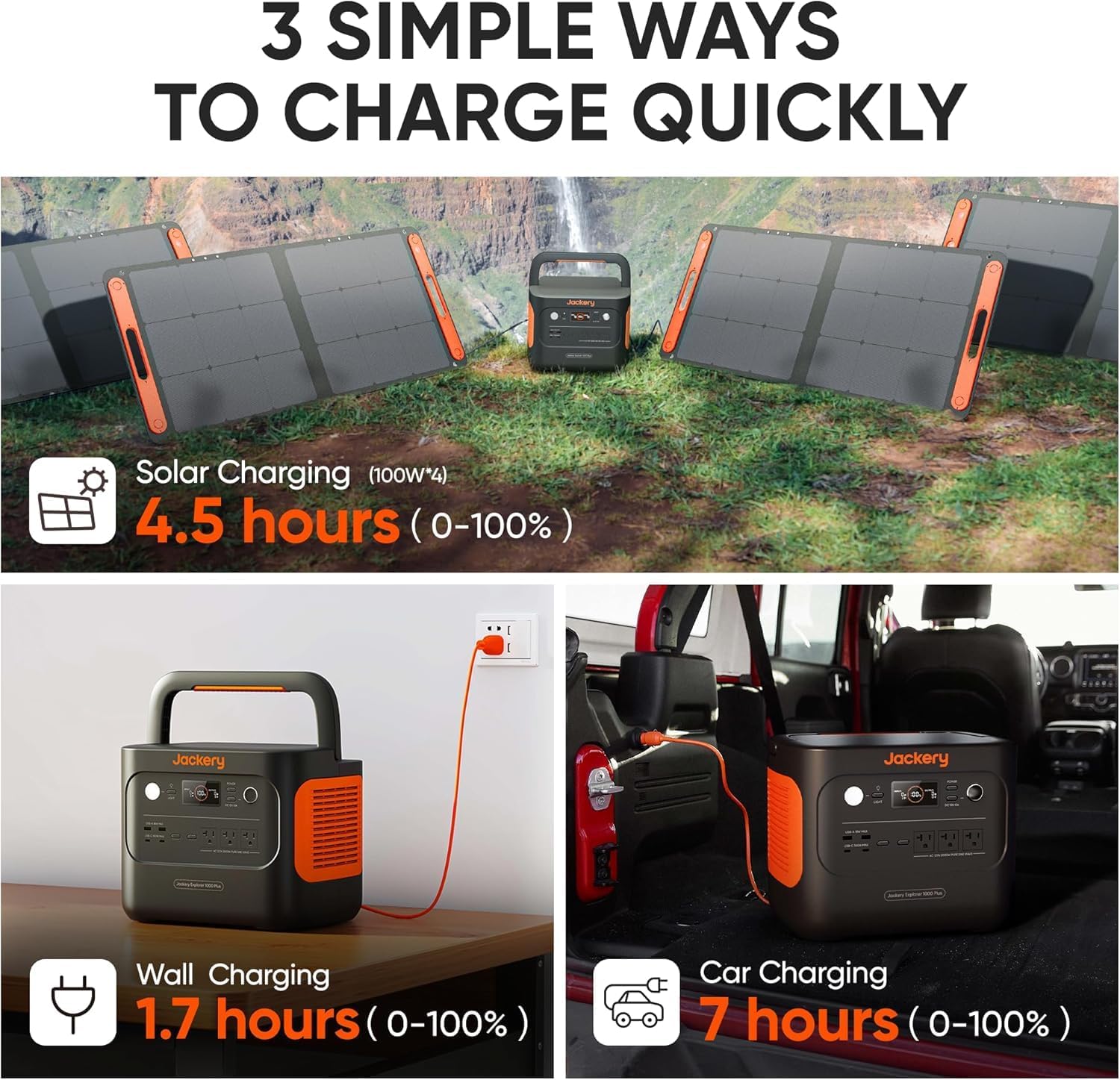
Image: Illustration of the three primary charging methods: solar, wall, and car charging.
3.2 Connecting Solar Panels
To connect the SolarSaga 100W Mini Solar Panels:
- Unfold the solar panels and place them in direct sunlight.
- Locate the DC input port on the Jackery 1000 Plus.
- Connect the output cable from the solar panels to the DC input port on the power station.
- The display on the power station will indicate incoming solar power.

Image: The Jackery Solar Generator 1000 Plus kit deployed outdoors with solar panels.
3.3 מאָביל אַפּ סעטאַפּ
The Jackery 1000 Plus can be monitored and controlled via a mobile application:
- Download the Jackery app from the App Store (iOS) or Google Play Store (Android).
- Follow the in-app instructions to connect your power station via Bluetooth or Wi-Fi.
- The app allows real-time monitoring of battery status, input/output power, and customizable settings.

Image: A user interacting with the Jackery mobile application to monitor and control the power station.
4. אַפּערייטינג ינסטרוקטיאָנס
4.1 צושטעלן מאַכט צו דעוויסעס
The Jackery 1000 Plus provides multiple output ports:
- AC אַוטלעץ (2x 2000W): For standard household appliances. The unit provides 2000W continuous output and 4000W peak power.
- USB-A פּאָרץ (2x): For charging smartphones, tablets, and other USB-A compatible devices.
- יו-עס-בי-סי פּאָרטן (2x פּי-די 100 וואט): For fast charging laptops, modern smartphones, and other USB-C devices.
- DC Car Port (1x): For 12V DC devices, such as portable refrigerators or car accessories.
To use, simply plug your device into the appropriate port and ensure the corresponding output button on the power station is activated.

Image: The Jackery 1000 Plus demonstrating its capability to power multiple devices simultaneously.
4.2 Emergency Power Supply (EPS) Function
The EPS feature allows the power station to act as an uninterruptible power supply for connected devices. In the event of a grid power failure, the unit will automatically switch to battery power within 0.02 seconds, providing a seamless transition and continuous power to essential devices.

Image: The power station providing light and power during an emergency, highlighting its EPS feature.
4.3 שטילע אָפּעראַציע
The Jackery 1000 Plus operates at a low noise level of approximately 30dB, comparable to a library environment. This ensures minimal disturbance during use, even in quiet settings like bedrooms or offices.
5. וישאַלט
5.1 באַטעריע לאַנגלעבעדיקייט
The power station utilizes advanced LiFePO4 battery cells, designed for long-term reliability. These batteries are rated for 4,000 charge cycles to 70% capacity, providing a lifespan of up to 10 years with regular use. The integrated Battery Management System (BMS) offers multiple layers of protection to ensure safety and extend battery life.

Image: Visual representation of the power station's internal battery structure and its long-term durability.
5.2 סטאָרידזש
When not in use for extended periods, activate the ultra-long standby mode to reduce power consumption and preserve battery life. Store the unit in a cool, dry place away from direct sunlight and extreme temperatures.
5.3 רייניקונג
To clean the exterior of the power station, use a soft, dry cloth. Avoid using abrasive cleaners or solvents that could damage the surface. Ensure all ports are free of dust and debris.
6. טראָובלעשאָאָטינג
6.1 אָווערלאָאַד פּראַטעקשאַן
The Jackery 1000 Plus features built-in surge protection. If a connected appliance draws more power than the unit's rated output (2000W continuous, 4000W peak), the power station will automatically shut off to prevent damage. If this occurs:
- Disconnect the overloaded device.
- Turn off the power station.
- Wait a few minutes, then restart the power station.
- ענשור אַז די גאַנץ וואַטtage of connected devices does not exceed the power station's capacity.
6.2 קיין מאַכט אַרויסגאַנג
If the power station is not providing power:
- Check if the power station is turned on and has sufficient battery charge.
- Ensure the specific output port (AC, USB-A, USB-C, DC) is activated.
- Verify that the connected device is functioning correctly and its cable is securely plugged in.
- If charging via solar, ensure panels are in direct sunlight and properly connected.
7. ספּעסאַפאַקיישאַנז
| שטריך | באַשרייַבונג |
|---|---|
| מאָדעל נאָמען | JE-1000C |
| קאַפּאַציטעט | 1264ווה |
| רייטאַד רעזולטאַט | 2000 וו |
| שפּיץ מאַכט | 4000 וו |
| באַטערי טיפּ | LiFePO4 |
| טשאַרדזש סייקאַלז | 4000 סייקאַלז צו 70% קאַפּאַציטעט |
| אַק רעזולטאַט | 2 x 120V~60Hz, 2000W (4000W Peak) |
| וסב-א רעזולטאַט | 2 x 18W Max (5V, 2.4A) |
| וסב-C רעזולטאַט | 2 x 100W Max (5V, 9V, 12V, 15V, 20V up to 5A) |
| DC Car Port Output | 1 רענטגענ 12 וו, 10 אַ |
| אַק אַרייַנשרייַב | 120 וו ~ 60 הז, 15 אַ מאַקס |
| זונ פּאַנעל ינפּוט | DC 12-60V, 11A, 500W Max |
| דימענסיעס (L X W X H) | 11.24" x 10.24" x 14" |
| פּונקט וואָג | 52 פונט |
| אַפּערייטינג טעמפּעראַטור | 14-113 ° F (-10-45 ° C) |
| ספּעציעלע פֿעיִקייטן | Fast Charging, Expandable Batteries, EPS, Solar Charging |
| UPC | 810182240466 |
8. וואָראַנטי און שטיצן
Jackery is committed to providing excellent customer service. For any questions, technical support, or warranty inquiries, please contact Jackery customer support. Refer to the warranty card included in your product packaging for specific warranty terms and conditions.
You can typically find support contact information on the official Jackery website or through the Jackery mobile application.


