1. הקדמה
Thank you for choosing the Hama WK-300 Multi-Device Wireless Keyboard. This compact office keyboard is designed for wireless control of computers, smartphones, and tablets, offering versatile connectivity via Bluetooth or a 2.4 GHz radio connection with a USB-A receiver. It allows simultaneous connection to up to three devices, providing a seamless experience for various tasks.
2. זיכערקייַט אינסטרוקציעס
- דו זאלסט נישט עפענען די מיטל אָדער פאָרזעצן צו אַרבעטן עס אויב עס ווערט דאַמידזשד.
- דו זאלסט נישט פּרווון צו דינען אָדער פאַרריכטן די פּראָדוקט זיך. לאָזן קיין סערוויס אַרבעט צו קוואַלאַפייד עקספּערץ.
- באַשיצן די פּראָדוקט פון שמוץ, נעץ און אָוווערכיטינג, און נוצן עס בלויז אין טרוקן ינווייראַנמאַנץ.
- האַלטן דעם פּראָדוקט, ווי אַלע עלעקטריקאַל פּראָדוקטן, אויס פון די דערגרייכן פון קינדער.
- דו זאלסט נישט נוצן דעם פּראָדוקט אין געביטן ווו די נוצן פון עלעקטראָניש דעוויסעס איז נישט דערלויבט.
- דיספּאָוזד פון פּאַקקאַגינג מאַטעריאַל מיד לויט לאָוקאַלי אָנווענדלעך רעגיאַליישאַנז.
3. פּעקל אינהאַלט
Please check that the package contains the following items:
- 1 Hama WK-300 Multi-Device Wireless Keyboard
- 1 USB-A Receiver (typically stored in the battery compartment)
- 1 ינסטרוקטיאָן מאַנואַל
באַמערקונג: AAA batteries are required for operation and are not included in the package.
4. סעטאַפּ
4.1 באַטאַרייע ייַנמאָנטירונג
- געפינט די באַטעריע אָפּטייל אויף דער אונטערשטער זייט פון דער קלאַוויאַטור.
- עפענען די באַטאַרייע אָפּטייל דעקן.
- אַרײַנשטעלן איין AAA באַטאַרייע, און זיכער מאַכן אַז די פּאָלאַריטעט איז ריכטיק (+/-).
- פאַרמאַכן די באַטאַרייע אָפּטייל דעקן סיקיורלי.
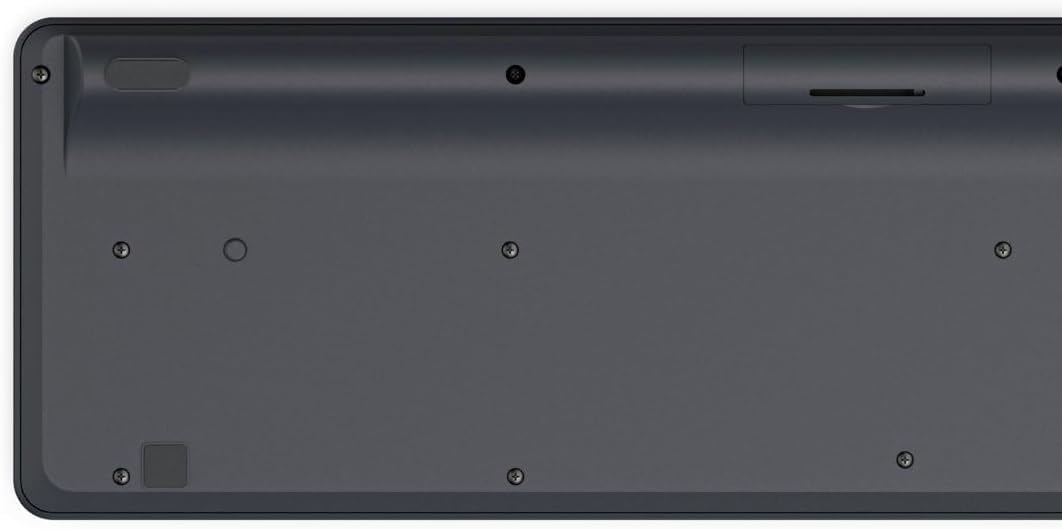
Image: Underside of the Hama WK-300 keyboard, illustrating the battery compartment and the storage slot for the USB receiver.
4.2 קאַנעקטינג צו דעוויסעס
The Hama WK-300 keyboard supports connection to up to three devices simultaneously via 2.4 GHz radio (channel 1) and Bluetooth (channels 2 and 3).
4.2.1 2.4 GHz Radio Connection (Channel 1)
- Remove the USB-A receiver from its storage slot in the battery compartment.
- Plug the USB-A receiver into a free USB port on your computer.
- Switch the keyboard to channel 1 (usually indicated by a switch or button on the keyboard). The keyboard should automatically connect to your computer.
4.2.2 Bluetooth Connection (Channels 2 & 3)
- Switch the keyboard to either channel 2 or channel 3.
- Press and hold the pairing button (refer to keyboard layout for exact location, often combined with the channel switch) until the indicator light flashes, signifying pairing mode.
- On your device (smartphone, tablet, computer), go to Bluetooth settings and search for new devices.
- Select "Hama WK-300" from the list of available devices to complete the pairing process.
4.3 וועקסלען צווישן דעוויסעס
To switch between connected devices, simply press the corresponding channel button (1, 2, or 3) on the keyboard. The keyboard will instantly connect to the selected device.
5. אפערירן די קלאַוויאַטור
5.1 Basic Typing Functions
The Hama WK-300 features a QWERTY layout with quiet keys, ensuring a comfortable and undisturbed typing experience. Simply begin typing after connecting to your device.

בילד: פון אויבן אַראָפּ view of the Hama WK-300 keyboard, highlighting its 90% layout and key functions, including the Fn key for multimedia controls.
5.2 Multimedia Functions (Fn Keys)
The F keys (F1-F12) have secondary assignments for multimedia control. To activate these functions, press and hold the Fn key simultaneously with the desired F key. This allows for quick control of media playback, volume, and other system functions without navigating through system settings.
5.3 AI Assist Button
The dedicated Assist button activates a cross-program AI assistant, enhancing productivity by providing quick access to intelligent features.
5.4 מאַכט שפּאָרן
The keyboard is battery-operated and designed for efficiency, making it ideal for mobile use. It will enter a low-power state after a period of inactivity to conserve battery life.
6. וישאַלט
6.1 רייניקן די קלאַוויאַטור
To clean your keyboard, ensure it is turned off and disconnected from any devices. Use a soft, lint-free cloth slightly dampened with water or a mild cleaning solution. Avoid excessive moisture and abrasive cleaners. Do not immerse the keyboard in water.
6.2 באַטערי פאַרבייַט
When the keyboard's performance diminishes or it stops responding, it may be time to replace the AAA battery. Follow the battery installation steps outlined in Section 4.1.
7. טראָובלעשאָאָטינג
- קלאַוויאַטור פֿאַרבינדט זיך נישט: Ensure the keyboard has fresh batteries and is switched to the correct channel (1 for 2.4 GHz, 2 or 3 for Bluetooth). For Bluetooth, ensure the keyboard is in pairing mode and your device's Bluetooth is enabled. For 2.4 GHz, ensure the USB receiver is properly inserted into your device.
- קנעפּלעך רעאַגירן נישט: Check battery level. If using 2.4 GHz, try plugging the USB receiver into a different USB port. If using Bluetooth, try re-pairing the keyboard with your device.
- אומגעריכטע פֿאַרבינדונג: Ensure there are no strong interference sources nearby (e.g., other wireless devices, large metal objects). Try moving closer to your device.
- מולטימעדיאַ שליסלען נישט ארבעטן: זייט זיכער אז איר דריקט די Fn key simultaneously with the desired F key.
8. ספּעסאַפאַקיישאַנז
| סאָרט | חמא |
| מאָדעל נומער | 182641 |
| קאָליר | שוואַרץ |
| קאַנעקטיוויטי | 2.4 GHz Radio (USB-A receiver), Bluetooth (2 channels) |
| נומער פון דעוויסעס | Up to 3 simultaneous devices |
| קלאַוויאַטור אויסלייג | QWERTY |
| פּראָדוקט דימענשאַנז (LxWxH) | 16 X 43.8 X 2.6 סענטימעטער |
| פּונקט וואָג | 447 ג |
| באַטעריז פארלאנגט | קסנומקס אַאַאַ באַטאַרייע (נישט אַרייַנגערעכנט) |
9. וואָראַנטי
The Hama WK-300 Multi-Device Wireless Keyboard comes with a 5 יאָר וואָראַנטי. Please retain your proof of purchase for warranty claims. For detailed warranty terms and conditions, refer to the official Hama webפּלאַץ אָדער קאָנטאַקט קונה שטיצן.
10. שטיצן
For further assistance, technical support, or to inquire about spare parts, please contact Hama customer service. You can find contact information on the official Hama webפּלאַץ (www.hama.com) or through your local retailer.