הקדמה
This manual provides instructions for the Incase Wireless Desktop 900 Keyboard and Mouse Combo, designed by Microsoft. This wireless peripheral set offers a full-size keyboard with quiet-touch keys and a dual-handed mouse, providing a comfortable and efficient user experience. The system features a reliable wireless connection and extended battery life, ensuring precision performance for your personal computer, laptop, or tablet.

Image: The Incase Wireless Desktop 900 Keyboard, Mouse, and USB receiver.
פּעקל אינהאַלט
- Incase Wireless Desktop 900 Keyboard
- Incase Wireless Desktop 900 Mouse
- וסב ווירעלעסס ופנעמער
- 2 AAA Batteries (pre-installed in keyboard)
- 2 AA Batteries (pre-installed in mouse)
סעטאַפּ
1. באַטאַרייע ייַנמאָנטירונג
The keyboard requires two AAA batteries, and the mouse requires two AA batteries. These are included and typically pre-installed. If replacement is needed, follow these steps:
- קלאַוויאַטור: Locate the battery compartment on the underside of the keyboard. Open the cover, insert two AAA batteries, ensuring correct polarity (+/-), then close the cover.
- מויז: Locate the battery compartment on the underside of the mouse. Open the cover, insert two AA batteries, ensuring correct polarity (+/-), then close the cover.

Image: Underside of the keyboard and mouse, indicating battery compartments and the mouse's power switch.
2. קאַנעקטינג די ופנעמער
The Incase Wireless Desktop 900 uses a single USB receiver for both the keyboard and mouse.
- געפֿינען אַן בנימצא וסב-א פּאָרט אויף דיין קאָמפּיוטער.
- Plug the USB wireless receiver firmly into the USB-A port.
- Your computer should automatically detect and install the necessary drivers. The keyboard and mouse are now ready for use.
אַפּערייטינג ינסטראַקשאַנז
קלאַוויאַטור פֿעיִקייטן
- Quiet-Touch Keys: Designed to provide a comfortable and quiet typing experience, reducing noise during use.
- גאַנץ גרייס אויסלייג: Includes a standard alphanumeric section, function keys, and a dedicated numeric keypad for comprehensive data entry.
- Customizable Hotkeys: Features dedicated hotkeys for quick access to common functions. Customization options may be available through your operating system's settings.
מויז פֿעיִקייטן
- אַמבידעקסטראָוס פּלאַן: The mouse is symmetrically designed for comfortable use by both left and right-handed individuals.
- Precision Navigation: Offers accurate and responsive cursor control for various tasks.
- סקראָל ראָד: Facilitates easy scrolling through documents and web בלעטער.
- מאַכט סוויטש: Located on the underside of the mouse, allowing you to turn it off to conserve battery life when not in use.

Image: Diagram illustrating key features such as quiet-touch keys, customizable hotkeys, and 30 ft wireless connectivity.
וישאַלט
רייניקונג
צו האַלטן אָפּטימאַלע פאָרשטעלונג און אויסזען:
- Use a soft, lint-free cloth to wipe down the surfaces of the keyboard and mouse.
- פאר עקשנות שמוץ, לייכט דampווייקט דעם שטאָף מיט וואַסער אָדער אַ מילדער, נישט-שרייַבנדיקער רייניקונג לייזונג. פֿאַרמייַדט איבעריקע פֿײַכטקייט.
- Do not use harsh chemicals, solvents, or abrasive cleaners, as these can damage the product's finish.
באַטערי פאַרבייַט
Replace batteries when device performance degrades or stops. Refer to the 'Battery Installation' section for detailed instructions. Always use new batteries of the specified type (2 AAA for keyboard, 2 AA for mouse) and dispose of old batteries responsibly.
טראָובלעשאָאָטינג
If you encounter issues with your Incase Wireless Desktop 900, try the following solutions:
- No Connection/Unresponsive Devices:
- Ensure the USB receiver is securely plugged into a working USB-A port on your computer.
- Check battery levels in both the keyboard and mouse. Replace if necessary.
- Ensure the mouse power switch (located on the underside) is in the "ON" position.
- פרובירט אריינצושטעקן דעם USB ריסיווער אין אן אנדער USB פארט אויף אייער קאמפיוטער.
- Move the keyboard and mouse closer to the USB receiver to rule out range issues (maximum 30 feet).
- פארשפעטיקטע אדער אומגעריכטע פאָרשטעלונג:
- Reduce interference by moving other wireless devices (e.g., Wi-Fi routers, cordless phones) away from the USB receiver.
- Ensure a clear line of sight between the keyboard/mouse and the USB receiver.
ספּעסאַפאַקיישאַנז
| קאַנעקטיוויטי | יו-עס-בי וויירלעס (2.4 גיגאהערץ) |
| ווירעלעסס ראַנגע | אַרויף צו 30 פֿיס (10 מעטער) |
| קלאַוויאַטור באַטעריז | 2 X AAA (אַרייַנגערעכנט) |
| מויז באַטעריעס | 2 x AA (אַרייַנגערעכנט) |
| קלאַוויאַטור דימענסיאָנס | בעערעך. 16.8 X 6.1 X 1.1 אינטשעס (42.7 X 15.5 X 2.8 סענטימעטער) |
| מויז דימענשאַנז | בעערעך. 4.4 X 2.5 X 1.6 אינטשעס (11.2 X 6.4 X 4.1 סענטימעטער) |
| פּונקט וואָג | 1.8 pounds (0.82 kg) (combined) |
| קאַמפּאַטאַבאַל דעוויסעס | פערזענלעכער קאמפיוטער, לעפטאפ, טאבלעט |
| ספּעציעלע פֿעיִקייטן | Quiet Touch Keys, Ambidextrous Mouse Design, Customizable Hotkeys, AES 128-bit Encryption, Two-Year Battery Life (average) |
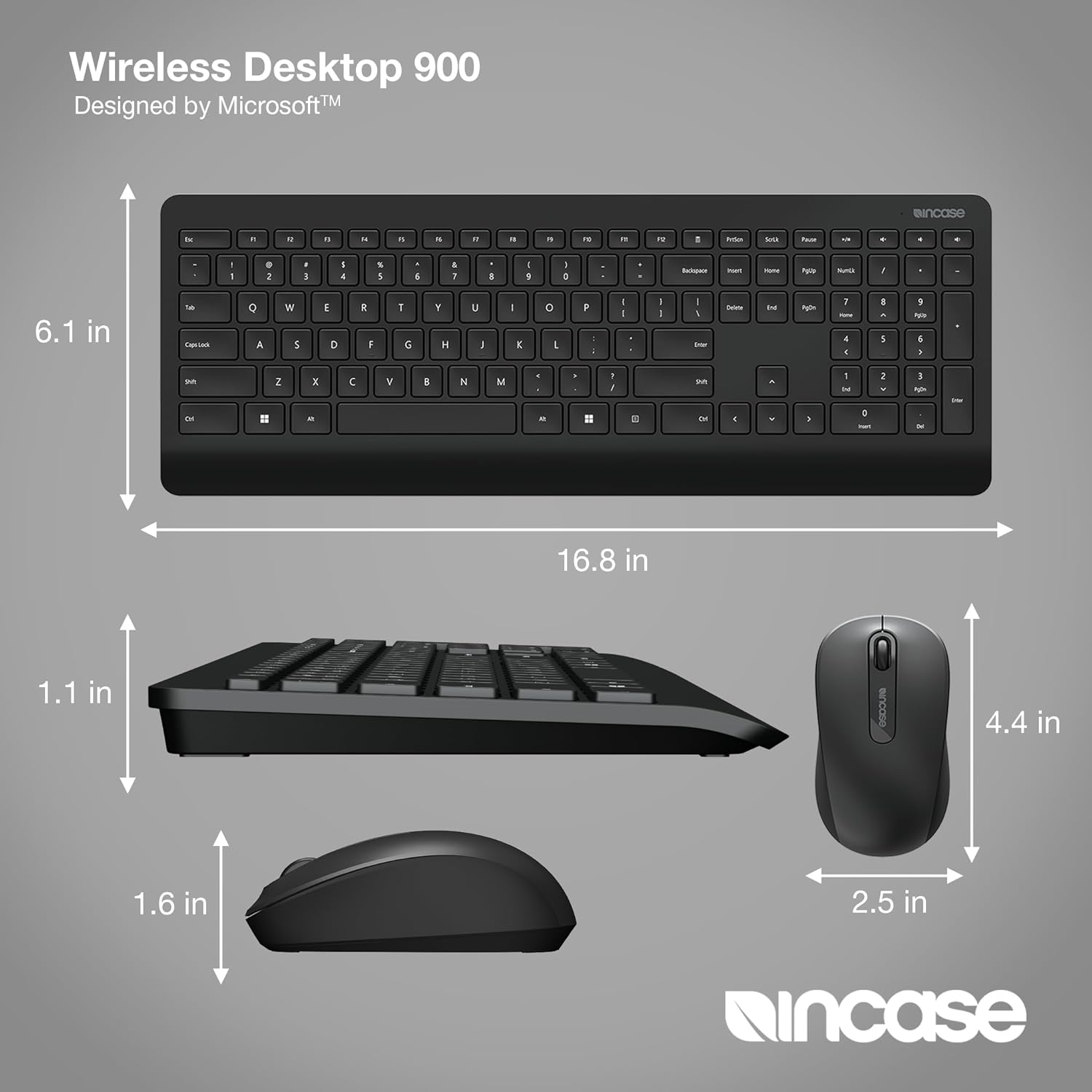
Image: Detailed dimensions of the Incase Wireless Desktop 900 Keyboard and Mouse.
וואָראַנטי און שטיצן
For detailed warranty information, product registration, and technical support, please visit the official Incase webזייטל אדער קאנטאקט זייער קאסטומער סערוויס דעפארטמענט. האלט אייער קויף קוויטל אלס באווייז פון קויפן פאר יעדע גאראנטיע טענות.


