הקדמה
This manual provides comprehensive instructions for the setup, operation, maintenance, and troubleshooting of your COLMI C8 MAX Smartwatch. Please read this manual carefully before using the device to ensure proper functionality and longevity.

פיגורע 1: The COLMI C8 MAX Smartwatch in gold with a beige strap, displaying the main watch face with fitness data and time.
1. סעטאַפּ
1.1 אויספּאַקן און קאָמפּאָנענטן
ביים עפענען דעם פּעקל, זיכער מאַכן אַז אַלע קאָמפּאָנענטן זענען פאַראַן:
- COLMI C8 MAX Smartwatch
- Replacement Strap (if included in your package)
- טשאַרדזשינג קאַבלע
- באַניצער מאַנואַל (דעם דאָקומענט)
1.2 טשאַרדזשינג די מיטל
Before first use, fully charge your smartwatch. Connect the magnetic charging cable to the charging points on the back of the watch and plug the USB end into a standard USB power adapter (not included).
- טשאַרדזשינג צייט: בערך 2 שעה פֿאַר אַ פולע טשאַרדזשינג.
- Battery capacity: 250 mAh Lithium Polymer.
1.3 פּאַוערינג אויף / אַוועק
- צו מאַכט אויף: Press and hold the side button until the COLMI logo appears.
- צו מאַכט אַוועק: From the watch face, swipe down to access quick settings, or navigate to 'Settings' > 'System' > 'Power Off'. Confirm your selection.
1.4 אַפּ אינסטאַלאַציע און פּערינג
To unlock the full features of your COLMI C8 MAX Smartwatch, you need to install the companion application on your smartphone or tablet. The watch is compatible with both Android and iOS operating systems.
- Scan the QR code provided in the quick start guide or search for the official COLMI app in your device's app store (Google Play Store for Android, Apple App Store for iOS).
- אראפקאפיע און ינסטאַלירן די אַפּלאַקיישאַן.
- עפֿענען די אַפּ און נאָכגיין די ינסטראַקשאַנז אויף דעם עקראַן צו שאַפֿן אַ חשבון אָדער קלאָץ אין.
- אַקטיווירן בלועטוט אויף דיין סמאַרטפאָון/טאַבלעט.
- אין דער אַפּ, נאַוויגירט צו דער דעווייס פּערינג סעקציע און סעלעקטירט "Add Device" אדער ענלעך.
- The app will search for available devices. Select "COLMI C8 MAX" from the list.
- Confirm the pairing request on both your smartphone and the smartwatch. The watch utilizes Bluetooth 5.3 for stable connectivity.
2. אפערירן די סמאַרטוואַטש
2.1 אַרויסווייַזונג און נאַוויגאַציע
The COLMI C8 MAX features a 1.93-inch IPS touchscreen with a resolution of 240 x 288 pixels, offering clear visuals and responsive touch control.
- סוויפּ אַרויף: צוטריט נאָוטאַפאַקיישאַנז.
- שלעפּ אַראָפּ: Access quick settings (brightness, battery, DND, etc.).
- שלעפּן לינקס / רעכט: Navigate through widgets and main functions (activity, heart rate, weather, etc.).
- צאַפּן: אויסקלייבן אַן אייטעם אָדער עפֿענען אַן אַפּליקאַציע.
- דריקן די זייט קנעפל: צוריק צום זייגער־פּנים אָדער עפֿנט דאָס אַפּ־מעניו.
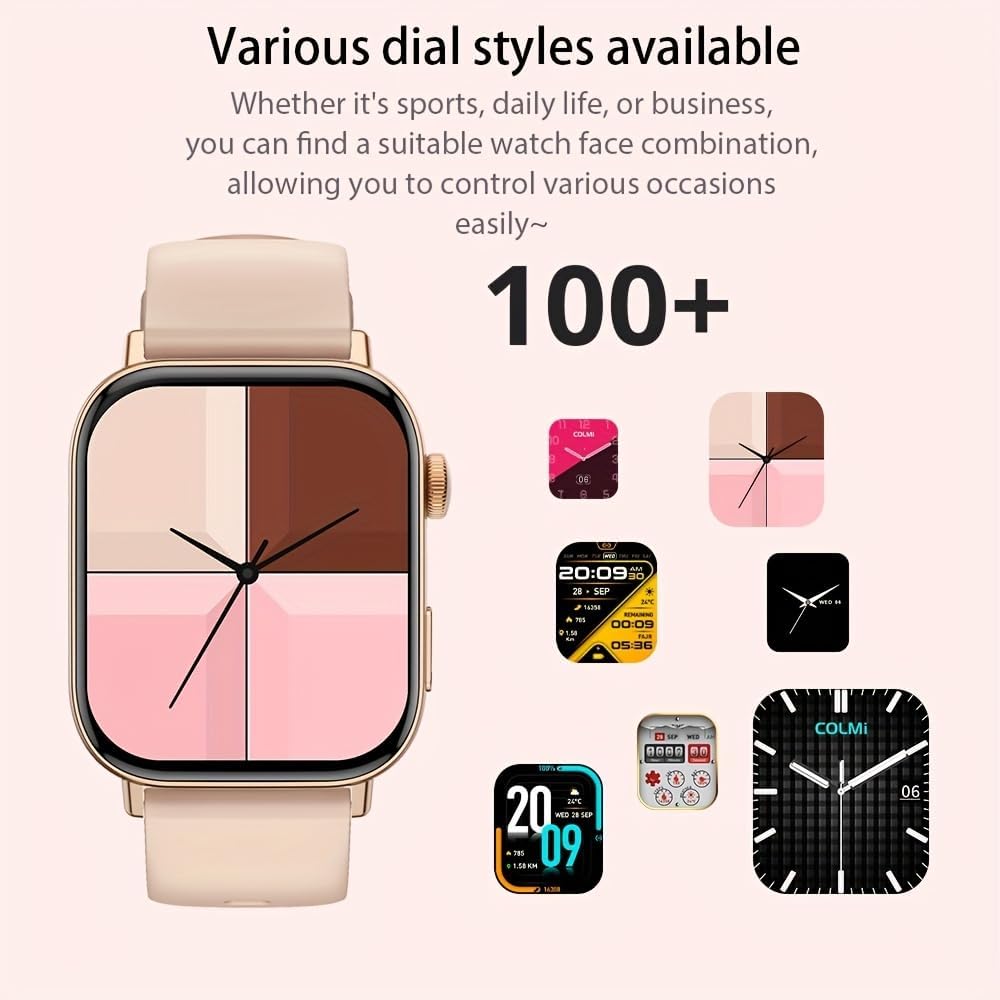
פיגורע 2: The smartwatch showcasing a selection of its over 100 available dial styles, allowing for personalization.
2.2 Core Features and Functions
The COLMI C8 MAX is equipped with a wide range of features to support your daily activities and health monitoring.
- פיטנעסס טראַקינג: Monitor steps, distance, calories burned, and active minutes. Includes a pedometer, heart rate monitor, and multi-sport modes (over 100 sports modes available, including walking, running, cycling, football, basketball, table tennis, badminton, mountaineering, rope jumping).

פיגורע 3: The smartwatch highlighting its extensive range of over 100 sports tracking modes, suitable for various physical activities.
- שלאָף מאָניטאָרינג: טראַקט שלאָף פּאַטערנז און קוואַליטעט.
- קאָמוניקאַציע:
- Wireless Calling: Make and receive calls directly from your wrist. Access recent calls, dial pad, and contacts.
- אָנזאָג נאָטיפיקאַטיאָנס: Receive alerts for SMS, WhatsApp, emails, and other social media applications (Facebook, Snapchat, Twitter, Telegram, Instagram, LinkedIn).

פיגורע 4: The smartwatch demonstrating its wireless calling feature, showing an incoming call notification on the display.

פיגורע 5: The watch's ability to synchronize information and notifications from a connected smartphone, including messages from WhatsApp and other platforms.
- AI Voice Assistant: Use voice commands to interact with your watch for tasks like making calls, checking weather, or playing music.

פיגורע 6: Illustration of the intelligent voice assistant function, showing examples of voice commands and responses on the watch screen.
- אנדערע פֿעיִקייטן: Calendar, alarm clock, countdown timer, remote camera control, sedentary reminder, menstruation management.
3. וישאַלט
3.1 וואַסער קעגנשטעל (IP68)
The COLMI C8 MAX Smartwatch has an IP68 water resistance rating, meaning it is protected against dust ingress and can withstand immersion in water up to 1.5 meters for 30 minutes. It is suitable for daily use, hand washing, and light rain. However, it is not recommended for hot showers, saunas, or diving, as steam and hot water can compromise the seals.
3.2 רייניקן אייער סמאַרטוואַטש
כדי צו אויפהאלטן דעם אויסזען און פונקציאנאליטעט פון אייער אפאראט:
- ווישט דעם עקראַן און קערפּער מיט אַ ווייכן, לינט-פֿרייע שטאָף.
- פֿאַר שווערן שמוץ, אַ ביסל דampשווענק דעם שטאָף מיט וואַסער. פֿאַרמייַדט ניצן שאַרפע כעמיקאַלן אָדער אַברייסיוו מאַטעריאַלן.
- Clean the charging contacts regularly to ensure efficient charging.
- If the strap gets dirty, clean it according to its material type (e.g., silicone straps can be washed with mild soap and water).
3.3 באַטעריע לעבן אָפּטימיזאַציע
The smartwatch offers a battery life of 5-10 days depending on usage, with an average life of 240 hours. To maximize battery life:
- רעדוצירן פאַרשטעלן ברייטנאַס.
- דיאַקטיווירן אומנייטיקע נאָוטאַפאַקיישאַנז.
- Limit continuous heart rate monitoring if not required.
- אויסלעשן "שטענדיק-אן דיספלעי" אויב פאראן.
4. טראָובלעשאָאָטינג
If you encounter issues with your COLMI C8 MAX Smartwatch, refer to the following common problems and solutions:
| פּראָבלעם | מעגלעך לייזונג |
|---|---|
| די זייגער גייט נישט אן. | זיכער מאַכן אַז די זייגער איז גאָר אויפגעלאָדן. פֿאַרבינדט עס צום טשאַרדזשער פֿאַר לפּחות 30 מינוט. |
| קען נישט פאַרבינדן מיטן סמאַרטפאָן. |
|
| נאָוטאַפאַקיישאַנז זענען נישט באקומען. |
|
| נישט פּינקטלעכע פֿיטנעס דאַטן. |
|
| די פאַרשטעלן איז ניט ריספּאַנדאַבאַל. | Restart the watch by pressing and holding the side button until it reboots. |
4.1 פאַבריק באַשטעטיק
If problems persist, you may need to perform a factory reset. This will erase all data on the watch and restore it to its original settings. Navigate to 'Settings' > 'System' > 'Reset' or 'Factory Reset' on your smartwatch and confirm.
5. ספּעסאַפאַקיישאַנז
| שטריך | דעטאַל |
|---|---|
| מאָדעל נאָמען | C8 מאַקס |
| סאָרט | COLMI |
| ווייַז | 1.93-inch IPS Touchscreen, 240 x 288 pixels |
| באַטאַרייע קאַפּאַציטעט | 250 מאַה ליטהיום פּאָלימער |
| באַטערי לעבן | 5-10 days (typical usage), 240 hours average life |
| וואַסער קעגנשטעל | IP68 |
| זכּרון | 128 MB Storage, 640 KB RAM |
| קאַנעקטיוויטי | בלועטאָאָטה 5.3 |
| קאַמפּאַטאַבילאַטי | Android & iOS Smartphones/Tablets |
| דימענשאַנז | 10 X 9 X 6.5 סענטימעטער |
| וואָג | 200 ג |
| אַרייַנגערעכנט קאַמפּאָונאַנץ | Smartwatch, User Manual |
6. וואָראַנטי און שטיצן
The COLMI C8 MAX Smartwatch comes with a manufacturer's warranty. Please refer to the warranty card included in your product packaging for specific terms and conditions, including warranty duration and coverage details.
For technical support, product inquiries, or warranty claims, please contact COLMI customer service through their official website or the contact information provided in your product documentation. Ensure you have your product model number (C8 Max) and purchase details ready when contacting support.


