הקדמה
Welcome to the user manual for your new COLMI C8 Max Smartwatch. This guide provides comprehensive instructions on how to set up, operate, maintain, and troubleshoot your device. Please read this manual carefully to ensure optimal performance and longevity of your smartwatch.
The COLMI C8 Max is a versatile fitness smartwatch featuring a 1.93-inch IPS touch screen, IP68 water resistance, and a long-lasting battery. It supports various sports modes, communication features, and smart functions, compatible with both Android and iOS devices.
זיכערקייַט אינפֿאָרמאַציע
To ensure safe and proper use of your COLMI C8 Max Smartwatch, please observe the following precautions:
- באַטערי זיכערקייַט: Do not disassemble, puncture, or modify the built-in lithium polymer battery. Avoid exposing the device to extreme temperatures (below -10°C or above 50°C) or direct sunlight for prolonged periods. Use only the provided charging cable.
- וואַסער קעגנשטעל (IP68): The device is IP68 rated, meaning it is resistant to dust and can withstand immersion in fresh water up to 1.5 meters for 30 minutes. It is suitable for daily use, hand washing, and light rain. Do not use it in hot water, saunas, or during diving. Avoid contact with seawater or corrosive liquids.
- Medical Disclaimer: The COLMI C8 Max is not a medical device. Data obtained from the watch, such as heart rate or activity tracking, is for reference only and should not be used for medical diagnosis, treatment, or prevention of disease. Consult a medical professional for any health concerns.
- רייניקונג און זאָרגן: Clean the watch regularly with a soft, dry cloth. Avoid using harsh chemicals, detergents, or abrasive cleaners. Ensure the charging contacts are clean and dry before charging.
- באַזייַטיקונג: Dispose of the device and its battery responsibly according to local regulations. Do not dispose of it with household waste.
סעטאַפּ
פּעקל אינהאַלט
איידער איר הייבט אן, ביטע זיכער מאכן אז אלע זאכן זענען פאראן אין אייער פעקל:
- קאָלמי C8 מאַקס סמאַרטוואַטש
- מאַגנעטיק טשאַרדזשינג קאַבלע
- באַניצער מאַנואַל (דעם דאָקומענט)
טשאַרדזשינג די מיטל
For first-time use, fully charge your smartwatch. Connect the magnetic charging cable to the charging contacts on the back of the watch and plug the USB end into a standard USB power adapter (5V/1A recommended) or a computer USB port. The watch screen will display the charging status.
A full charge typically takes approximately 2.5 hours. The battery life can last between 5 to 10 days depending on usage patterns.

Image: The COLMI C8 Max Smartwatch, showing its sleek design and the included charging cable, ready for initial setup.
מאַכט אויף / אַוועק
- מאַכט אויף: Press and hold the side button for a few seconds until the COLMI logo appears.
- מאַכט אַוועק: From the watch face, swipe down to access the quick settings, then tap the power icon, or go to Settings > System > Power Off. Confirm your choice.
אַפּ ינסטאַלירונג און פּערינג
To unlock the full potential of your COLMI C8 Max Smartwatch, you need to connect it to your smartphone via the dedicated companion application. The app name is typically found in the watch's manual or on the packaging, or by scanning a QR code displayed on the watch during initial setup.
- אראפקאפיע די אַפּ: זוכן פֿאַר the official COLMI companion app (e.g., "COLMI Fit" or similar) on the Google Play Store (for Android) or Apple App Store (for iOS). Download and install it.
- געבן בלועטאָאָטה: מאַכן זיכער אַז בלועטאָאָטה איז ענייבאַלד אויף דיין סמאַרטפאָנע.
- עפֿענען די אַפּ: Launch the companion app and follow the on-screen instructions to create an account or log in.
- לייג דיווייס: In the app, navigate to the "Device" or "Add Device" section. The app will search for nearby smartwatches. Select "COLMI C8 Max" from the list of found devices.
- באַשטעטיקן פּערינג: A pairing request will appear on both your phone and the watch. Confirm the pairing on both devices. Once connected, the watch's time and date will synchronize with your phone.
Note: Keep your watch close to your phone during the pairing process. If pairing fails, restart both devices and try again.
אַפּערייטינג ינסטראַקשאַנז
נאַוויגאַציע די צובינד
The COLMI C8 Max features a responsive 1.93-inch IPS touch screen for intuitive navigation:
- שלעפּ אַראָפּ: Access quick settings (e.g., brightness, battery, DND mode).
- סוויפּ אַרויף: View נאָוטאַפאַקיישאַנז.
- שלעפּן לינקס / רעכט: Cycle through widgets and main functions (e.g., activity tracking, heart rate, weather, music control).
- דריקן די זייט קנעפל: צוריק צום זייגער־פּנים אָדער עפֿנט דאָס אַפּ־מעניו.
- צאַפּן: אויסקלייבן אַן אייטעם אָדער עפֿענען אַן אַפּליקאַציע.
קאַסטאַמייזינג וואַך פנימער
Personalize your smartwatch with over 100 available dial styles. You can change the watch face directly on the device or through the companion app.
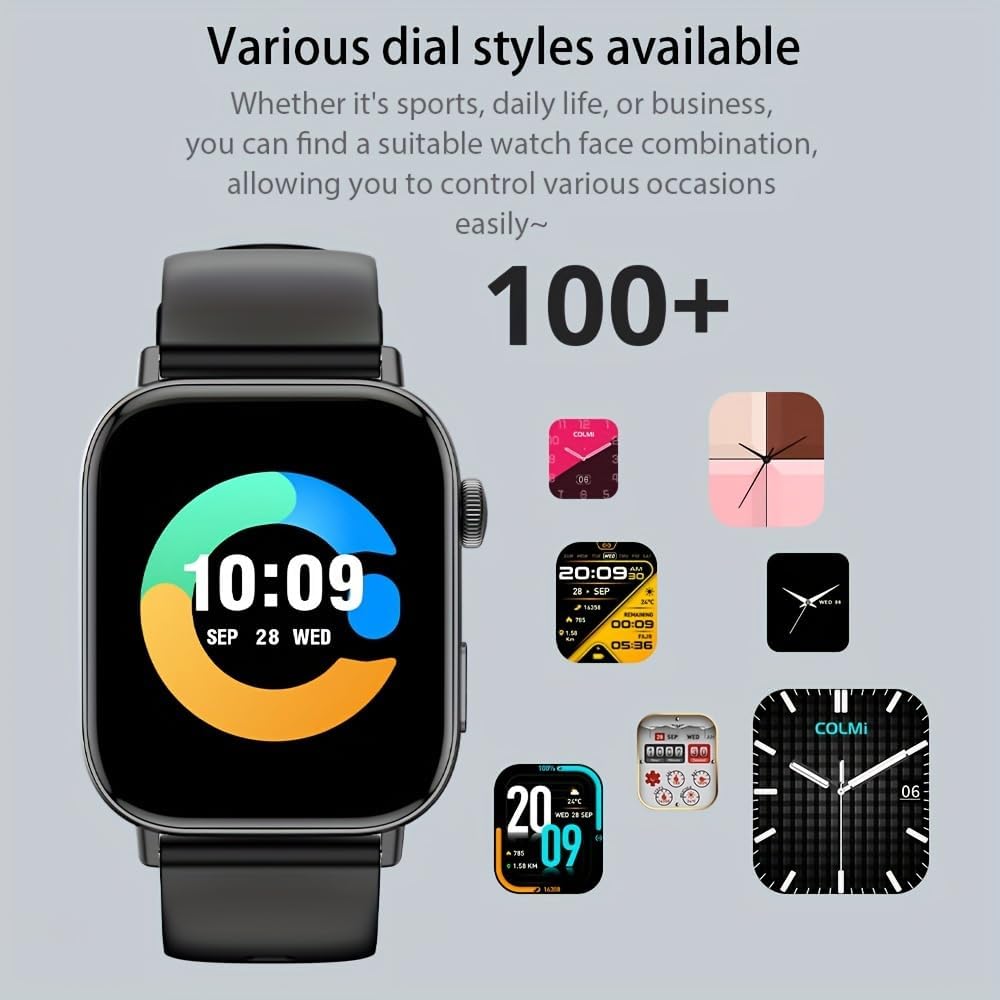
Image: A selection of over 100 diverse watch dial styles, ranging from classic to modern, available for the COLMI C8 Max Smartwatch.
- אויף וואַך: Long-press the current watch face, then swipe left or right to browse and tap to select.
- דורך אַפּ: Open the companion app, go to "Watch Faces" or "Dial Market," and choose from a wider selection to download and sync to your watch.
Sports Tracking and Analysis
The COLMI C8 Max supports multiple sports modes and provides real-time analysis of your activities. It can record sports-related data such as steps, distance, calories burned, and exercise time.

Image: The COLMI C8 Max Smartwatch screen showing detailed sports tracking data, including total steps, calories, heart rate, and distance, with a visual representation of activity zones.
To start a workout:
- Swipe to the "Sports" or "Workout" menu on your watch.
- Select your desired sports mode (e.g., Running, Cycling, Walking).
- Tap to start the activity. The watch will begin recording data.
- To end, swipe right or press the side button and select "End" or "Pause."
Note: For accurate data, ensure the watch is worn snugly on your wrist. Data is for reference only.
קאָמוניקאַציע פֿעיִקייטן
Synchronous Messages
Receive notifications from your smartphone directly on your COLMI C8 Max. This includes calls, SMS messages, and alerts from various social media applications.
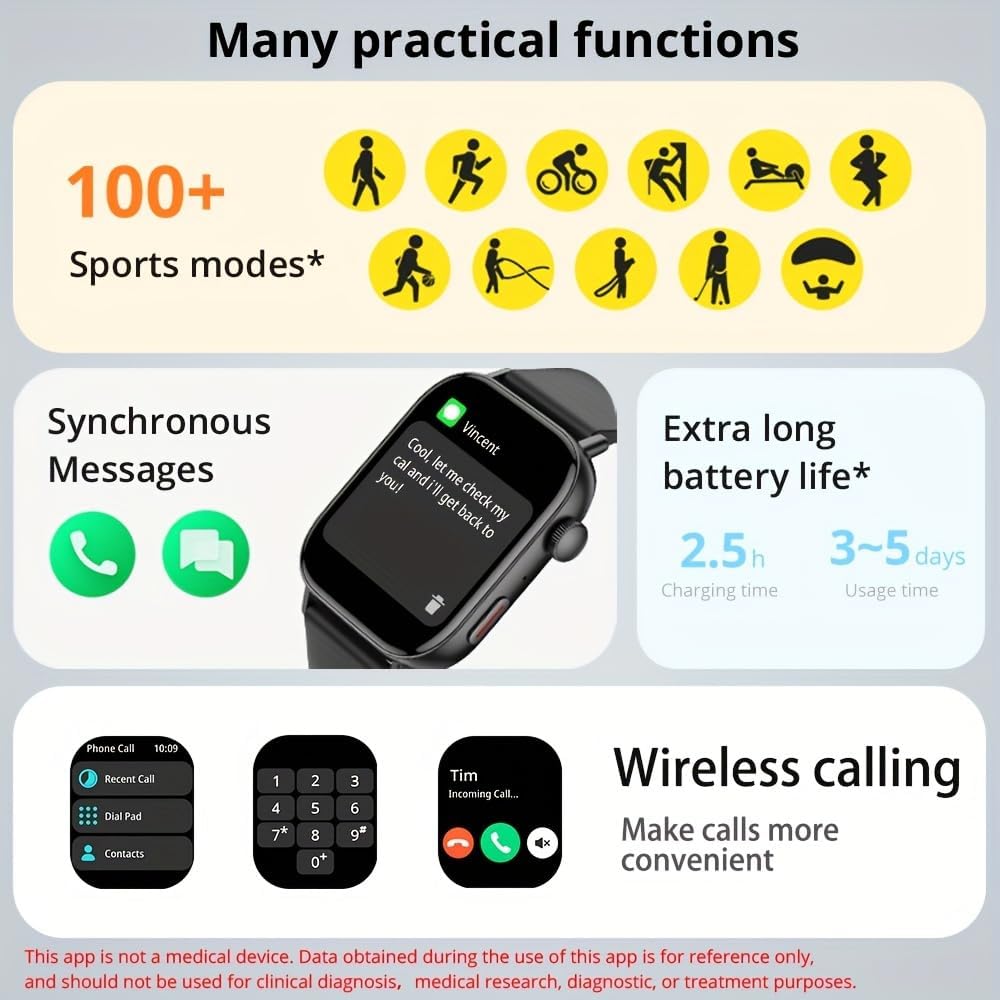
Image: A composite image illustrating several practical functions of the COLMI C8 Max, including synchronous message display, various sports modes, and battery life indicators.
Ensure that app notifications are enabled in your phone's settings and within the COLMI companion app for the desired applications.
ווירעלעסס פאַך
The COLMI C8 Max features a built-in microphone and speaker, allowing you to make, answer, and hang up calls directly from your wrist when connected to your smartphone via Bluetooth.

Image: Three COLMI C8 Max smartwatches in different colors, showcasing the wireless calling interface with options for recent calls, dial pad, and contacts, as well as an incoming call screen.
To use wireless calling:
- זיכער מאַכן אַז אייער זייגער איז פארבונדן צו אייער טעלעפאָן דורך בלועטוט.
- On the watch, navigate to the "Phone Call" or "Dial Pad" function.
- You can dial a number, select from recent calls, or access your contacts (synced via the app).
- ווען אַ רוף קומט אַרײַן, קענט איר עס ענטפֿערן אָדער אָפּוואַרפֿן גלייך פֿון דעם זייגער־עקראַן.
סמאַרט פֿעיִקייטן
קול אַססיסטאַנט
The smartwatch supports a voice assistant function, allowing you to control certain features or get information by voice command. This typically requires your phone's voice assistant (e.g., Siri, Google Assistant) to be active and connected.
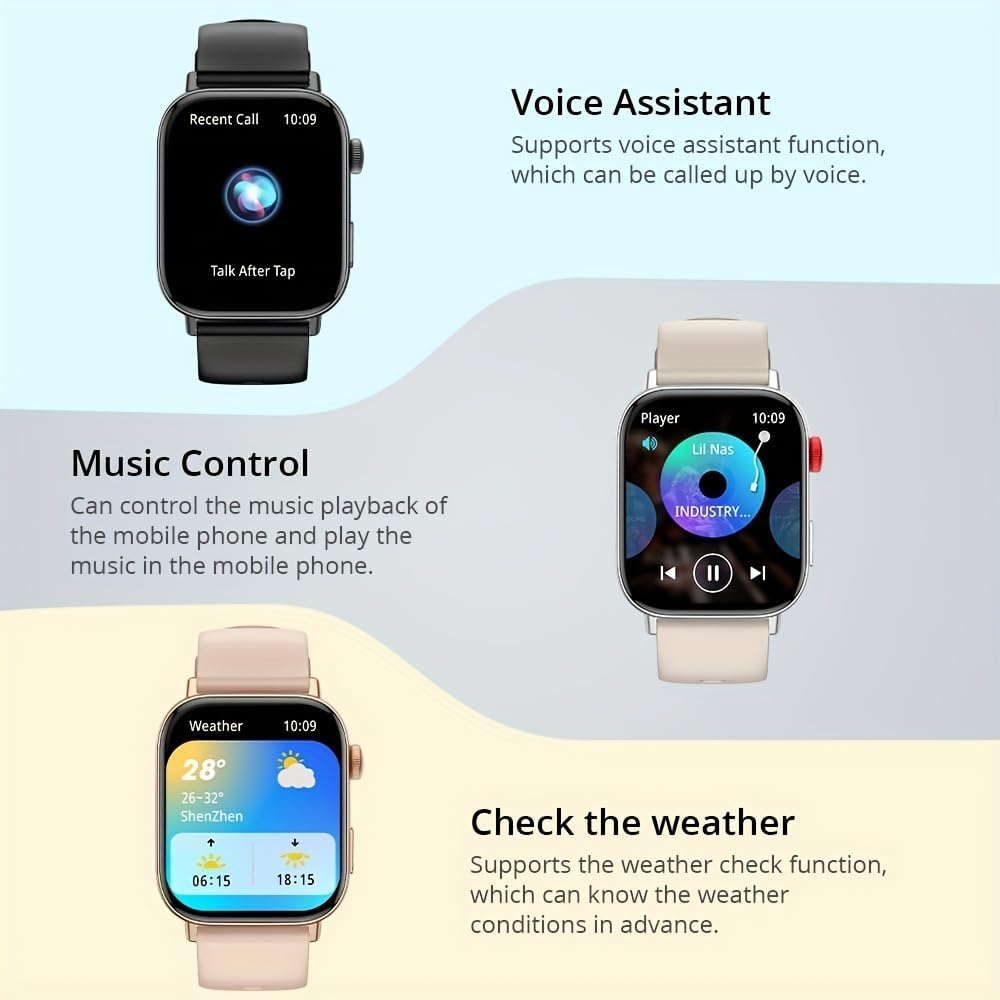
Image: A visual representation of the COLMI C8 Max's smart features, including the Voice Assistant interface, music playback controls, and a detailed weather forecast display.
To activate, swipe to the Voice Assistant screen or use a designated button shortcut (refer to watch settings).
מוזיק קאָנטראָל
Control the music playback on your connected mobile phone directly from your smartwatch. You can play, pause, skip tracks, and adjust volume.
Navigate to the "Music Control" interface on your watch. Ensure your phone's music player is active.
Weather Check
Get real-time weather conditions and forecasts directly on your wrist. This feature requires the watch to be connected to your phone and the companion app to have location permissions enabled.
Swipe to the "Weather" widget on your watch to view current conditions and upcoming forecasts.
באַטערי לעבן מאַנאַגעמענט
The COLMI C8 Max is equipped with a 250 mAh lithium polymer battery, offering an average usage time of 5-10 days, and up to 240 hours of standby time. Actual battery life may vary based on usage, notification frequency, and features enabled (e.g., continuous heart rate monitoring, frequent calls).
- רעדוצירן פאַרשטעלן ברייטנאַס.
- דיאַקטיווירן אומנייטיקע נאָוטאַפאַקיישאַנז.
- Turn off continuous heart rate monitoring if not needed.
- Limit frequent use of power-intensive features like wireless calling.
וישאַלט
רייניקן דיין סמאַרטוואַטש
Regular cleaning helps maintain the appearance and functionality of your device:
- זייגער קערפער: Wipe the screen and body with a soft, lint-free cloth. If necessary, slightly dampen the cloth with water. Avoid using soap or other cleaning agents.
- רימען: For silicone straps, you can wash them with mild soap and water, then rinse thoroughly and dry completely before reattaching to the watch.
- טשאַרדזשינג קאָנטאַקטן: Ensure the metal charging contacts on the back of the watch are clean and free of dust or debris. Use a dry cotton swab if needed.
Always ensure the watch is completely dry before charging.
סטאָרידזש
When not in use for extended periods, store your smartwatch in a cool, dry place, away from direct sunlight and extreme temperatures. It is recommended to charge the battery to about 50% before long-term storage to preserve battery health.
Firmware דערהייַנטיקונגען
Periodically, COLMI may release firmware updates to improve performance, add new features, or fix bugs. These updates are typically managed through the companion app.
To check for updates:
- Open the COLMI companion app on your smartphone.
- Navigate to the "Device" or "Profile" סעקציע.
- Look for "Firmware Update" or "Software Update."
- If an update is available, follow the on-screen instructions. Ensure your watch has sufficient battery (at least 50%) and remains connected to your phone during the update process.
טראָובלעשאָאָטינג
If you encounter issues with your COLMI C8 Max Smartwatch, try the following solutions before contacting customer support:
- זייגער טוט זיך נישט אן:
- זיכער מאַכן אַז די זייגער איז גאָר אויפגעלאָדן. פֿאַרבינדט עס צום טשאַרדזשער פֿאַר לפּחות 30 מינוט.
- דריק און האלט דעם זייט קנעפל פאר 10-15 סעקונדעס צו צווינגען א ריסטארט.
- נישט געקענט צופּאַסן מיטן טעלעפאָן:
- זיכער מאַכן אַז בלועטוט איז ענייבאַלד אויף דיין טעלעפאָן און די זייגער.
- זייט זיכער אז די זייגער איז אינעם בלוטוט ראַנגע (געווענליך 10 מעטער).
- ריסטאַרט ביידע דיין טעלעפאָן און די זייגער.
- ויסמעקן די בלועטוט קעש אויף אייער טעלעפאָן (אויב אָנווענדלעך) און פּרוּווט ווידער צו פאַרבינדן.
- If previously paired, "forget" the device in your phone's Bluetooth settings and re-pair.
- נאָטיפיקאַטיאָנס ניט באקומען:
- Check if the watch is properly connected to the app.
- Ensure notification permissions are granted for the companion app in your phone's settings.
- Verify that app-specific notifications are enabled within the companion app.
- Check if "Do Not Disturb" mode is active on either the watch or phone.
- Inaccurate Activity Data (Steps, Heart Rate):
- זייט זיכער אז די זייגער טראָגט גוט אויף אייער האַנטגעלענק, נישט צו לויז אדער צו ענג.
- רייניקט דעם האַרץ ראַטע סענסאָר אויף דער הינטערשטער זייגער.
- Sync the watch with the app regularly to ensure data transfer.
- עקראַן רעאַגירט נישט:
- Restart the watch by pressing and holding the side button.
- זיכער מאַכן אַז דער עקראַן איז ריין און טרוקן.
- קורץ באַטאַרייע לעבן:
- Refer to the "Battery Life Management" section for tips on optimizing battery usage.
- זיכער מאַכן אַז די זייגער איז גאָר אויפגעלאָדן יעדעס מאָל.
If the issue persists after trying these steps, please refer to the Warranty and Support section.
טעכניש ספּעסאַפאַקיישאַנז
Below are the detailed specifications for the COLMI C8 Max Smartwatch:

Image: Detailed dimensions of the COLMI C8 Max Smartwatch, including watch face width (38mm), height (45.6mm), thickness (10mm), and strap length (155-235mm).
| שטריך | באַשרייַבונג |
|---|---|
| סאָרט | COLMI |
| מאָדעל נאָמען | C8 מאַקס |
| ווייַז | 1.93-inch IPS Touch Screen, 240 x 288 pixels |
| באַטאַרייע קאַפּאַציטעט | 250 מאַה ליטהיום פּאָלימער |
| באַטערי לעבן | 5-10 days (typical usage), 240 hours (average life) |
| טשאַרדזשינג צייט | בעערעך. 2.5 שעה |
| וואַסער קעגנשטעל | IP68 (שטויב און וואַסער קעגנשטעליק) |
| אינערלעכער סטאָרידזש | 128 מב |
| באַראַן | 640 קב |
| קאַנעקטיוויטי | בלועטאָאָטה 5.3 |
| קאַמפּאַטאַבילאַטי | אַנדרויד, יאָס |
| Dimensions (Watch Face) | 45.6 mm (Height) x 38 mm (Width) |
| גרעב | 10 מם |
| רימען לענג | 155 - 235 מ״מ |
| קאָליר | שוואַרץ |
| אָפּערייטינג סיסטעם | Proprietary (compatible with Android/iOS) |
וואָראַנטי און שטיצן
Your COLMI C8 Max Smartwatch comes with a standard manufacturer's warranty. Please refer to the warranty card included in your product packaging for specific terms and conditions, including warranty period and coverage details.
For technical support, troubleshooting assistance beyond this manual, or warranty claims, please contact COLMI customer service through their official website or the contact information provided in your product documentation. When contacting support, please have your product model (C8 Max) and purchase details ready.
באַאַמטער Webפּלאַץ: www.colmi.com (באַמערקונג: דאָס איז אַ פּלאַץ האָלדער URL. Please refer to your product packaging for the exact official support webפּלאַץ.)


