הקדמה
The Akko 5108B Plus is a high-performance mechanical keyboard designed for both gaming and productivity. It features a unique "Lord of Mysteries" theme, tri-mode connectivity (Bluetooth, 2.4GHz wireless, and wired Type-C), hot-swappable switches, customizable RGB backlighting, and durable PBT dye-sub keycaps. This manual provides detailed instructions for setup, operation, maintenance, and troubleshooting to ensure optimal use of your keyboard.

Figure 1: Akko 5108B Plus Mechanical Keyboard overview.
סעטאַפּ
1. פּעקל אינהאַלט
- אַקקאָו 5108 ב פּלוס מעטשאַניקאַל קלאַוויאַטור
- וסב טיפּע- C קאַבלע
- 2.4 גהז ווירעלעסס ופנעמער
- קייקאַפּ פּולער
- באַשטימען פּולער
- באַניצער מאַנואַל (דעם דאָקומענט)
2. פֿאַרבינדן דיין קלאַוויאַטור
The Akko 5108B Plus supports three connection modes: wired (USB Type-C), 2.4GHz wireless, and Bluetooth.

Figure 2: Tri-mode connection options for the keyboard.
2.1. ווייערד מאָדע
- געפֿינען די USB Type-C פּאָרט אויף די קלאַוויאַטור.
- Connect one end of the provided USB Type-C cable to the keyboard and the other end to an available USB port on your computer.
- די קלאַוויאַטור וועט ווערן אויטאָמאַטיש דערקענט דורך דיין אָפּערייטינג סיסטעם.

Figure 3: Detachable USB Type-C port for wired connection.
2.2. 2.4GHz ווירעלעס מאָדע
- Locate the 2.4GHz wireless receiver (dongle) in the keyboard packaging.
- שטעקט אריין דעם 2.4GHz ריסיווער אין א פאראן USB פארט אויף אייער קאמפיוטער.
- Switch the mode selector on the keyboard to 2.4G mode. The keyboard should automatically connect.
2.3. בלועטאָאָטה מאָדע
- שטעלט דעם מאָדע סעלעקטאָר אויף דער קלאַוויאַטור צו בלועטוט מאָדע.
- אויף אייער קאָמפּיוטער אָדער מיטל, אַקטיוויזירט בלועטוט און זוכט פֿאַר נײַע דעוויסעס.
- Select "Akko 5108B Plus" from the list of available devices.
- Follow any on-screen prompts to complete the pairing process. The keyboard can store up to three Bluetooth profiles.
אָפּעראַציע
1. הייס-סוואַפּאַבל סוויטשיז
The Akko 5108B Plus features premium gaming 5-pin hot-swappable sockets, allowing you to easily change mechanical switches without soldering. This enables customization of typing feel and sound.

Figure 4: Illustration of the hot-swappable switch feature.
1.1. פאַרבייַטן סוויטשיז
- Using the provided switch puller, gently grip the switch from the top and bottom.
- Pull the switch straight up to remove it from the socket.
- Align the pins of the new switch with the holes in the socket.
- Press the new switch firmly and straight down until it clicks into place. Ensure pins are not bent.
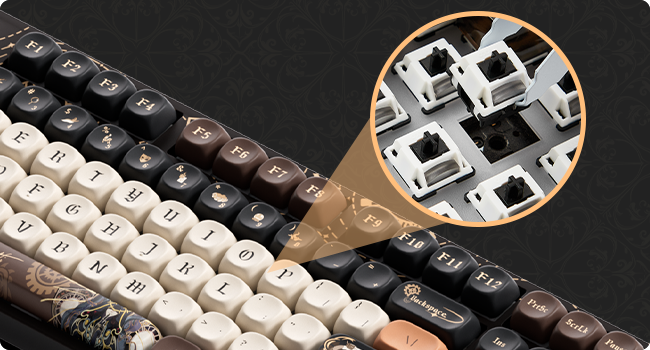
פיגורע 5: דעטאַילעד view of a switch being removed from the keyboard socket.
2. RGB Backlighting
The keyboard features customizable RGB backlighting with over 20 preset modes. You can also create custom lighting effects using the Akko Cloud Driver software.

Figure 6: Keyboard displaying various RGB lighting effects.
2.1. Adjusting Backlight Modes
Refer to the keyboard's function key combinations (Fn + specific keys) for cycling through preset RGB modes, adjusting brightness, and changing animation speed. These combinations are typically printed on the keycaps or detailed in the quick start guide.
3. Programmable Keys (Akko Cloud Driver)
All keys on the 5108B Plus can be programmed using the Akko Cloud Driver software. This allows for macro creation, key remapping, and custom lighting profiles.
- Download the Akko Cloud Driver from the official Akko webפּלאַץ.
- Install and launch the software.
- Connect your keyboard in wired mode for best compatibility with the software.
- Follow the software's interface to customize key functions and lighting.
4. PBT Dye-Sub Keycaps
The keyboard is equipped with PBT dye-sublimated keycaps, known for their durability and resistance to wear and shine. The legends are infused into the plastic, ensuring they will not fade over time.

Figure 7: MOA Profile keycap height diagram, illustrating the ergonomic design.
וישאַלט
- רייניקונג קלאַוויאַטור קאַפּס: ניצן אַ ווייך, דamp cloth to wipe down keycaps. For deeper cleaning, remove keycaps using the provided keycap puller and wash them with mild soap and water. Ensure they are completely dry before reattaching.
- רייניקונג פון די קלאַוויאַטור גוף: Use a dry, soft cloth to wipe the keyboard body. Avoid using harsh chemicals or abrasive materials.
- באַזייַטיקונג פון שטויב: ניצט קאמפרעסט לופט צו באַזײַטיקן שטויב און שמוץ פון צווישן די קלאַוויאַטורן און סוויטשעס.
- סטאָרידזש: When not in use for extended periods, store the keyboard in a dry, cool place away from direct sunlight.
טראָובלעשאָאָטינג
| פּראָבלעם | מעגלעך סיבה | לייזונג |
|---|---|---|
| קלאַוויאַטור רעאַגירט נישט (ווייערד) | לויזער קאַבל פֿאַרבינדונג, דעפֿעקטיווער USB פּאָרט, דרייווער פּראָבלעם. |
|
| קלאַוויאַטור רעאַגירט נישט (ווירעלעס) | Low battery, incorrect mode, receiver not plugged in, interference. |
|
| RGB באַקלייט אַרבעט נישט | Backlight turned off, software conflict. |
|
| שליסלען רעגיסטרירן זיך נישט אדער טייפן זיך צוויי מאל | דעפעקטיווער סוויטש, שמוץ אונטערן קאפ. |
|
ספּעסאַפאַקיישאַנז
| שטריך | דעטאַל |
|---|---|
| מאָדעל | Akko 5108B Plus |
| קאַנעקטיוויטי | Tri-mode (Bluetooth 5.0, 2.4GHz Wireless, USB Type-C Wired) |
| סוויטשיז | Hot-swappable 5-pin sockets (compatible with most mechanical switches) |
| קייקאַפּס | PBT Dye-Sublimated, MOA Profile |
| באַקלייט | RGB (20+ preset modes, customizable via software) |
| פּראָגראַממאַביליטי | Akko Cloud Driver support for key remapping and macros |
| אויסלייג | 108-key Full-size (approx.) |
| דימענשאַנז | 19.25 רענטגענ 8.95 X 2.45 אינטשעס (פּאַקע דימענשאַנז) |
| פּונקט וואָג | 3.93 פונט |
| פאַבריקאַנט | Akko |

Figure 8: Approximate dimensions of the Akko 5108B Plus keyboard.
וואָראַנטי און שטיצן
For warranty information, technical support, or to download the latest Akko Cloud Driver software, please visit the official Akko website or contact Akko customer service. Keep your purchase receipt for warranty claims.
Official Akko Webפּלאַץ: www.akkogear.com


