Majority Darwin Bluetooth Alarm Clock with 10W Wireless Charging
Model: Darwin | Brand: Majority
הקדמה
This manual provides detailed instructions for the operation and maintenance of your Majority Darwin Bluetooth Alarm Clock. This device integrates an FM radio, dual alarm clock, 10W wireless charging, and ambient lighting to enhance your bedside experience.
זיכערקייַט אינפֿאָרמאַציע
- לייענען אַלע ינסטראַקשאַנז קערפאַלי איידער נוצן.
- האַלטן די מיטל אַוועק פון וואַסער און נעץ.
- צי ניט ויסשטעלן צו עקסטרעם טעמפּעראַטורעס.
- פרובירט נישט צו צענעמען אדער פאררעכטן דעם איינהייט אליין. ווענדט זיך צו קוואַליפֿיצירטע סערוויס פּערסאָנעל.
- Ensure proper ventilation when using the wireless charging function.
פּעקל אינהאַלט
באַשטעטיקן אַז אַלע זאכן זענען פאַראַן אין דער קעסטל:
- Majority Darwin Bedside Clock
- מעינס מאַכט אַדאַפּטער
- באַניצער מאַנואַל

Image: Package contents of the Majority Darwin alarm clock, including the clock, power adapter, and user manual.
פּראָדוקט איבערview
Familiarize yourself with the main components and control buttons of your Darwin alarm clock.
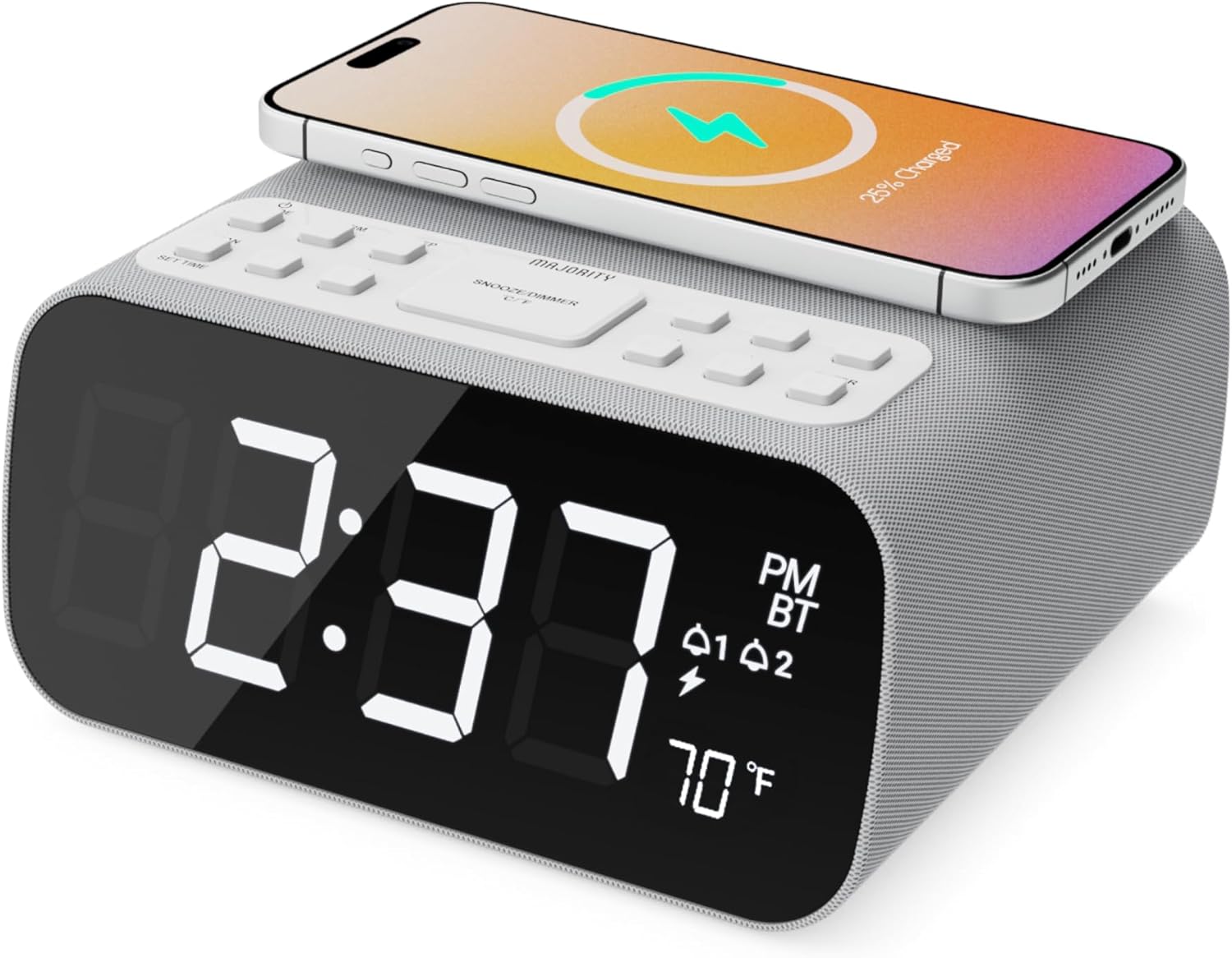
בילד: פראָנט view of the Majority Darwin alarm clock showing the large digital display, wireless charging pad on top, and control buttons.

בילד: זייט view of the Majority Darwin alarm clock highlighting the control panel with buttons for time, alarm, volume, and light settings.
Top פּאַנעל קאָנטראָלס
- ווירעלעסס טשאַרדזשינג פּאַד: Place compatible devices here for 10W wireless charging.
- סנוז / ליכט קנעפּל: Short press to snooze alarm; long press to adjust display brightness or cycle through ambient light colors.
- Time/Date Set Button: Press to enter time/date setting mode.
- אַלאַרם 1/2 קנעפּלעך: Press to activate/deactivate Alarm 1 or Alarm 2. Long press to set alarm time.
- Volume/Tune Buttons: Adjust volume or tune FM radio stations.
- מאָדע קנעפּל: Switch between FM Radio, Bluetooth, and White Noise modes.
Rear Panel Controls & Ports
- DC 12V אַרייַנשרייַב: Connect the mains power adapter here.
- וסב טשאַרדזשינג פּאָרט: For charging additional devices via USB cable.
- באַטערי אָפּטייל: For backup batteries (not for primary power).
- Display Dimmer Slider: Manually adjust the brightness of the main time display.
- Night Light Dimmer: Adjust brightness of the ambient light.
סעטאַפּ
מאַכט קאַנעקשאַן
Connect the provided mains power adapter to the DC 12V input port on the rear of the alarm clock and plug it into a wall outlet. The display will light up.
For battery backup, open the battery compartment on the bottom and insert 2 x AAA batteries (not included). This will retain time settings during a power outage but will not power the display or charging functions.
בילד: הינטערשטע view of the Majority Darwin alarm clock with the power adapter connected to the DC 12V input.
ערשט צייט באַשטעטיקן
- לאנג דריקן די צייט / טאָג שטעלן button on the top panel. The hour digits will start flashing.
- ניצן די Volume/Tune קנעפּלעך צו סטרויערן די שעה.
- דרוק די צייט / טאָג שטעלן קנעפּל נאכאמאל צו באשטעטיגן די שעה און אריבערגיין צו מינוט איינשטעלונג.
- ניצן די Volume/Tune קנעפּלעך צו סטרויערן די מינוט.
- Repeat this process for setting the year, month, and day.
- דרוק די צייט / טאָג שטעלן button one last time to save all settings.
אַפּערייטינג ינסטראַקשאַנז
Time Display & Dimmer
The large LED display shows the current time.
מאַנואַל דימינג: ניצן די Display Dimmer Slider on the rear panel to manually adjust the brightness of the time display.
אַוטאָ דימינג: The device features an auto-dimming function that adjusts display brightness at fixed time intervals (e.g., dimming at night, brightening during the day).

בילד: פראָנט view of the Majority Darwin alarm clock displaying time, AM/PM, and temperature, highlighting the dual alarm icons.
שרעק באַשטעטיקן
The Darwin alarm clock supports two independent alarms (Alarm 1 and Alarm 2).
- Long press either the שרעק 1 or שרעק 2 button. The hour digits for that alarm will flash.
- ניצן די Volume/Tune קנעפּלעך צו שטעלן די געוואונטשענע אַלאַרם שעה.
- דרוק די קאָראַספּאַנדינג שרעק קנעפּל נאכאמאל צו באשטעטיגן די שעה און אריבערגיין צו מינוט איינשטעלונג.
- ניצן די Volume/Tune קנעפלעך צו שטעלן די געוואונטשענע שרעק מינוטן.
- דרוק די שרעק button again to select the alarm source (FM radio or built-in tone). Use Volume/Tune קנעפּלעך צו אויסקלייַבן.
- דרוק די שרעק button again to set the alarm volume.
- דרוק די שרעק button one last time to activate the alarm. An alarm icon will appear on the display.
Deactivating an Alarm: קורץ דריקן די קאָרעספּאָנדירנדיקע שרעק 1 or שרעק 2 button to turn it off. The alarm icon will disappear.
סנאָאָזע פֿונקציע
ווען אַן אַלאַרם קלינגט, דריק קורץ די סנוז / ליכט button on the top panel to temporarily silence the alarm for 9 minutes. The alarm will sound again after the snooze period.
עפעם ראַדיאָ אָפּעראַציע
- דרוק די מאָדע קנעפל ביז "FM" דערשיינט אויפן דיספלעי.
- ניצן די Volume/Tune קנעפּלעך צו מאַנועל צושטעלנ זיך צו אייער געוואונטשענע FM סטאנציע.
- Auto Scan & Store Presets: לאנג דריקן די מאָדע button to automatically scan and save available FM stations as presets.
- קורץ דריקן די מאָדע button to cycle through saved presets.
Bluetooth Pairing & Playback
- דרוק די מאָדע button until "BT" appears on the display and the Bluetooth indicator starts flashing.
- On your smartphone or other Bluetooth device, enable Bluetooth and search for "Majority Darwin".
- Select the device to pair. Once connected, the Bluetooth indicator on the alarm clock will stop flashing.
- You can now play audio from your device through the alarm clock's speaker. Use the Volume/Tune קנעפלעך אויף דעם וועקער זייגער אדער אייער דעווייס צו סטרויערן די קול.

Image: A smartphone displaying music playback, connected via Bluetooth to the Majority Darwin alarm clock.
ווירעלעסס טשאַרדזשינג
The top surface of the alarm clock features a 10W wireless charging pad.
- Place your Qi-compatible smartphone directly onto the wireless charging pad.
- Ensure the phone is centered on the charging symbol for optimal charging.
- A charging indicator (e.g., a lightning bolt icon) may appear on your phone's screen or the alarm clock's display to confirm charging.
וסב טשאַרדזשינג פּאָרט: An additional USB port on the rear allows you to charge other devices using a USB cable.
Image: The Majority Darwin alarm clock with a smartphone placed on top, indicating active wireless charging.
Night Light / Ambient Light
The alarm clock features an ambient light ring around its base.
- לאנג דריקן די סנוז / ליכט button to turn the ambient light on/off.
- קורץ דריקן די סנוז / ליכט button to cycle through different color modes (e.g., red, green, blue, purple, white, color cycle).
- ניצן די נאַכט ליכט דיממער on the rear panel to adjust the brightness of the ambient light.

Image: The Majority Darwin alarm clock illuminated with a vibrant ambient light from its base.
White Noise Function
The device includes various white noise sounds to aid relaxation and sleep.
- דרוק די מאָדע button until the white noise mode is activated (indicated by a specific icon or text on the display).
- ניצן די Volume/Tune buttons to adjust the volume of the white noise.
- קורץ דריקן די מאָדע button again to cycle through different white noise sounds (e.g., nature sounds, fan noise).
וישאַלט
- רייניקט דעם אַפּאַראַט מיט אַ ווייכן, טרוקענעם שטאָף. ניצט נישט קיין שרײַבנדיקע רייניגערס אדער סאָלווענטן.
- האַלטן ווענטאַליישאַן אָופּאַנינגז קלאָר.
- If not in use for an extended period, disconnect from power and remove backup batteries.
טראָובלעשאָאָטינג
קיין מאַכט / אַרויסווייַז אויסגעלאָשן
- זיכער מאַכן אַז דער מאַכט אַדאַפּטער איז זיכער פארבונדן צו ביידע דעם מיטל און אַ אַרבעטנדיקן מאַכט ווענטיל.
- קוק אויב די מאַכט ווענטיל איז פאַנגקשאַנאַל.
ווירעלעסס טשאַרדזשינג איז נישט ארבעטן
- מאַכן זיכער אַז דיין מיטל איז קי-קאַמפּאַטאַבאַל.
- Make sure your phone is centered on the charging pad.
- Remove any thick phone cases or metallic objects between the phone and the charging pad.
בלועטאָאָטה פּערינג ישוז
- Ensure the alarm clock is in Bluetooth pairing mode (BT flashing).
- Make sure your device's Bluetooth is enabled and searching.
- פּרוּווט אָפּצופּאַרן און ווידער צופּאַרן דעם דעווייס.
- Ensure no other devices are currently connected to the alarm clock via Bluetooth.
שרעק ניט געזונט
- Verify that the alarm is activated (alarm icon visible on display).
- קוק די באַשטעטיקן שרעק באַנד.
- Ensure the correct alarm time is set.
ספּעסאַפאַקיישאַנז
| שטריך | דעטאַל |
|---|---|
| סאָרט | מערהייט |
| מאָדעל נאָמען | דאַרווין |
| ווירעלעסס טשאַרדזשינג רעזולטאַט | 10 וו |
| רעדנער רעזולטאַט מאַכט | 12 וואטס |
| קאַנעקטיוויטי טעכנאָלאָגיע | בלועטאָאָטה |
| מאַכט מקור | Mains Power (Battery Backup) |
| פּראָדוקט דימענשאַנז | 13.07 X 8.22 X 6.09 אינטשעס |
| פּונקט וואָג | 1.42 פונט (645 גראַמז) |
| ספּעציעלע פֿעיִקייטן | Adjustable Volume, Dual Alarm, Bluetooth, Wireless Charging, FM Radio, Dimmable Display, Ambient Night Light, White Noise |
וואָראַנטי & שטיצן
The Majority Darwin Bluetooth Alarm Clock comes with a standard manufacturer's warranty. Please refer to the warranty card included in your package for specific terms and conditions.
For technical support, troubleshooting, or warranty claims, please visit the official Majority webפּלאַץ אָדער קאָנטאַקט זייער קונה דינסט.
Online resources and FAQs may also be available on the product support page.