פּראָדוקט איבערview
The IMIKI XPLORER SCOUT D2 is a versatile smartwatch designed for both men and women, featuring a vibrant 1.43-inch AMOLED display. It offers seamless Bluetooth connectivity for calls and smart assistant integration, comprehensive health monitoring capabilities including blood oxygen and heart rate tracking, and support for over 100 sports modes. Its robust design is IP68 waterproof, making it suitable for various activities, and it boasts exceptional battery life with fast charging.
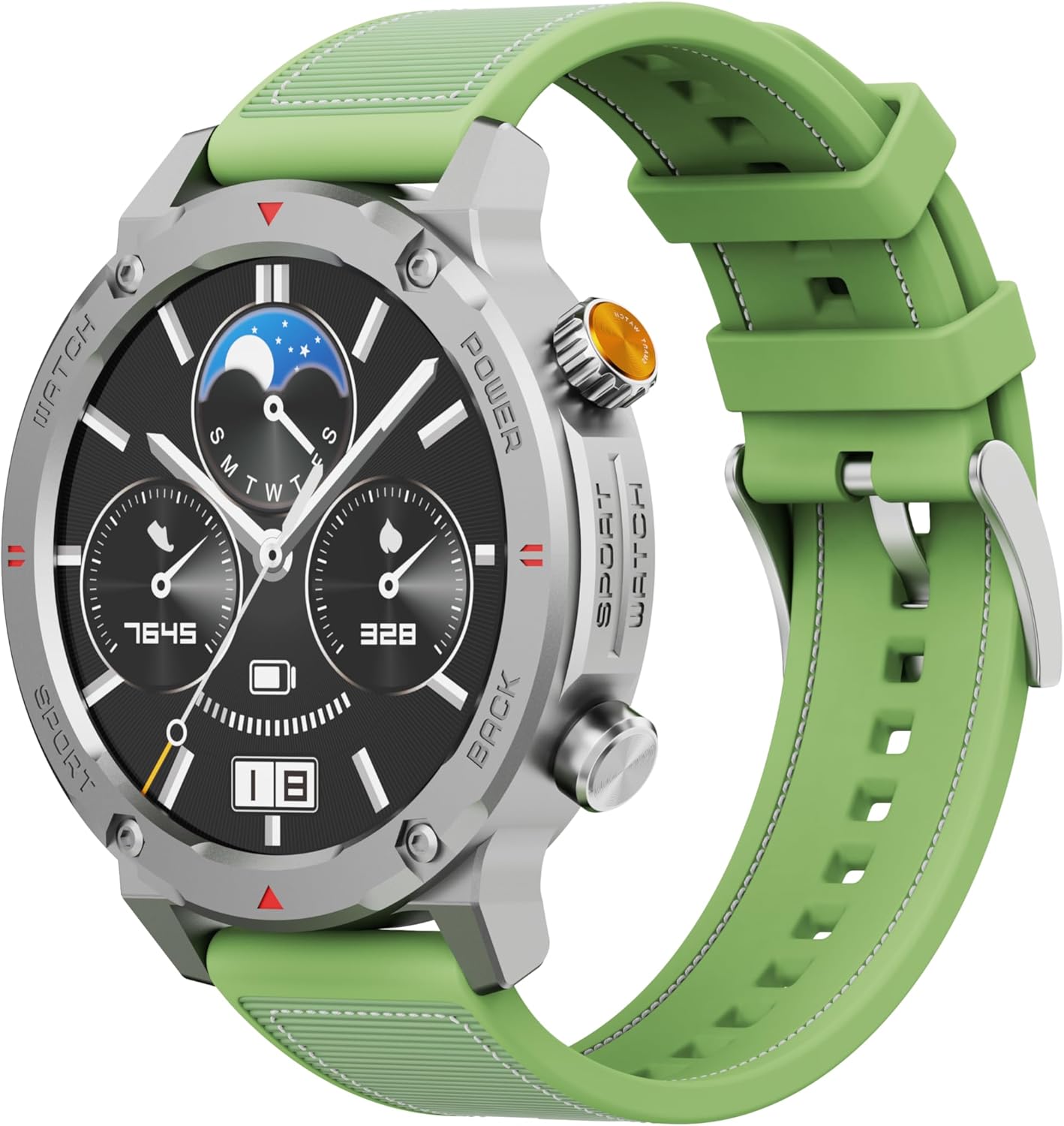
פיגורע 1: פראָנט view of the IMIKI XPLORER SCOUT D2 Smartwatch with its green strap.
סעטאַפּ גייד
1. וואָס איז אין דער קעסטל
Upon unboxing your IMIKI XPLORER SCOUT D2 Smartwatch, ensure all components are present:
- IMIKI XPLORER SCOUT D2 Smartwatch
- טשאַרדזשינג קאַבלע

Figure 2: The IMIKI XPLORER SCOUT D2 Smartwatch module separated from its bezel and strap, illustrating its modular design.
2. אויפלאָדן די סמאַרטוואַטש
Before first use, fully charge your smartwatch. The 400 mAh battery provides up to 30 days of autonomy on a single charge, and it supports fast charging for quick power-ups.
- פֿאַרבינדט דעם טשאַרדזשינג קאַבל צום טשאַרדזשינג פּאָרט אויף דער הינטערשטער זייגער פֿון דער סמאַרטוואַטש.
- Plug the other end of the cable into a USB power adapter (not included) or a computer's USB port.
- The watch display will indicate charging status. Allow sufficient time for a full charge.

פיגורע 3: דערציען view of the IMIKI XPLORER SCOUT D2 Smartwatch, highlighting the charging contacts and health sensors.
3. ערשט סעטאַפּ און פּערינג
To unlock the full potential of your smartwatch, pair it with your smartphone via Bluetooth.
- אראפקאפיע די אַפּ: זוכן פֿאַר the official IMIKI companion app on the Apple App Store (for iOS) or Google Play Store (for Android) and install it on your smartphone.
- געבן בלועטאָאָטה: מאַכן זיכער אַז בלועטאָאָטה איז ענייבאַלד אויף דיין סמאַרטפאָנע.
- מאַכט אויף זייגער: Press and hold the power button on the smartwatch to turn it on.
- עפענען אַפּ: Launch the IMIKI app on your smartphone and follow the on-screen instructions to add a new device.
- פּאָרינג: Select "IMIKI XPLORER SCOUT D2" from the list of available devices in the app. Confirm the pairing request on both your phone and the smartwatch if prompted.
Once paired, you can customize settings, view health data, and receive notifications directly on your smartwatch.
אַפּערייטינג ינסטראַקשאַנז
1. אַרויסווייַזונג און נאַוויגאַציע
The IMIKI XPLORER SCOUT D2 features a 1.43-inch AMOLED display with a high resolution of 466x466 pixels, protected by tempered glass. Navigate the watch interface using touch gestures and the physical buttons.
- שלעפּן אַרויף / אַראָפּ: סקראל דורך מעניוז און נאָוטאַפאַקיישאַנז.
- שלעפּן לינקס / רעכט: צוטריט צו שנעלע ווידזשעטס אדער פארשידענע זייגער פנימער.
- צאַפּן: אויסקלייבן אַן אייטעם אָדער עפֿענען אַן אַפּליקאַציע.
- גשמיות קנעפּלעך: Use the side buttons for power on/off, returning to the home screen, or quick access to sports modes.

Figure 4: Close-up of the smartwatch display, illustrating the clear AMOLED screen and various data points.
2. געזונט מאָניטאָרינג
The smartwatch is equipped with an optical sensor to monitor key health metrics:
- האַרץ קורס (HR): כסדר טראַקס דיין האַרץ טעמפּאָ איבערן טאָג.
- בלוט זויערשטאָף (SpO2): מעסט אייערע בלוט זויערשטאָף זעטיקונג לעוועלס.
- שלאָפן קוואַליטעט: Monitors your sleep patterns and provides insights into sleep quality.
Access detailed health reports and historical data through the companion app.
3. טרענירונג מאָדעס
With over 100 integrated sports modes, the XPLORER SCOUT D2 accurately records your exercise statistics. Select your desired activity from the watch's sports menu to begin tracking.

Figure 5: Visual representation of the smartwatch's diverse functionalities, including health tracking and sports modes.
4. Bluetooth Calling and Voice Assistant
The single-chipset Bluetooth 5.3 ensures stable and high-quality connectivity, allowing you to answer calls directly from your wrist. The integrated voice assistant enables hands-free control of your device with simple voice commands.
5. נאָוטאַפאַקיישאַנז
Receive real-time notifications for calls, SMS messages, and app alerts directly on your smartwatch. Manage notification settings through the companion app.
6. וואַסער קעגנשטעל (IP68)
The IMIKI XPLORER SCOUT D2 is IP68 rated, meaning it is resistant to dust and water. This allows it to withstand splashes, rain, and brief immersion in shallow water. באַמערקונג: While IP68 rated, it is not recommended for swimming, diving, or high-pressure water activities.

Figure 6: Illustration of the smartwatch's IP68 water resistance and exceptional battery autonomy.
וישאַלט
Proper care and maintenance will extend the lifespan of your IMIKI XPLORER SCOUT D2 Smartwatch.
- רייניקונג: Regularly wipe the watch and strap with a soft, dry, lint-free cloth. For stubborn dirt, slightly dampשווענק דעם שטאָף מיט וואַסער. פֿאַרמייַדט ניצן שאַרפע כעמיקאַלן אָדער אַברייסיוו מאַטעריאַלן.
- סענסאָר זאָרגן: Keep the optical sensors on the back of the watch clean for accurate health monitoring.
- סטאָרידזש: האַלט די סמאַרטוואַטש אין אַ קיל, טרוקן אָרט אַוועק פון דירעקט זונשייַן און עקסטרעמע טעמפּעראַטורן.
- באַטאַרייע לאָנדזשעוואַטי: To maximize battery life, avoid fully discharging the battery frequently. Charge it before it completely runs out.
- Interchangeable Components: The watch features a removable central case and interchangeable straps (Oyster, Active, Scout styles). Handle these components with care when changing them.

Figure 7: The IMIKI XPLORER series showcasing interchangeable straps and case styles.
טראָובלעשאָאָטינג
If you encounter issues with your IMIKI XPLORER SCOUT D2 Smartwatch, try the following solutions:
| פּראָבלעם | מעגלעך לייזונג |
|---|---|
| די זייגער טוט זיך נישט אן. | זיכער מאַכן אַז די זייגער איז גאָר אויפגעלאָדן. פֿאַרבינדט עס צום טשאַרדזשער און וואַרט אַ פּאָר מינוט איידער איר פּרוּווט עס ווידער אָנצוצינדן. |
| קען נישט פאַרבינדן מיטן סמאַרטפאָן. |
|
| נישט פּינקטלעכע געזונט־מעדזשינגען. |
|
| מעלדונגען נישט באקומען. |
|
ספּעסאַפאַקיישאַנז
| שטריך | דעטאַל |
|---|---|
| סאָרט | IMIKI |
| מאָדעל נאָמען | IMIKI SMART WATCH XPLORER SCOUT D2 GREEN |
| נומער מאָדעל נומער | D2 GREEN |
| פאַרשטעלן גרייס | 1.43 אינטשעס |
| ווייַז טיפּ | AMOLED |
| קאַנעקטיוויטי טעכנאָלאָגיע | בלועטאָאָטה 5.3 |
| באַטאַרייע קאַפּאַציטעט | 400 מאַה |
| דורכשניטלעך באַטאַרייע לעבן | אַרויף צו 30 טעג |
| וואַסער קעגנשטעל | IP68 |
| געזונט מאָניטאָרינג | Heart Rate, Blood Oxygen (SpO2), Sleep Quality |
| טרענירונג מאָדעס | Over 100+ integrated modes |
| ספּעציעלע פֿעיִקייטן | Bluetooth Calling, Voice Assistant, Fast Charging, Removable Central Case, Tempered Glass Screen |
| קאַמפּאַטאַבאַל דעוויסעס | סמאַרטפאָונז (אַנדרויד און יאָס) |
| פּונקט וואָג | 68 גראַמז |
| פּעקל דימענשאַנז | 10.5 X 10.5 X 6 סענטימעטער |
וואָראַנטי און שטיצן
For warranty information and customer support, please refer to the documentation included with your purchase or visit the official IMIKI webזייטל. האַלט דיין קויפן באַווייַז פֿאַר קיין וואָראַנטי קליימז.
For further assistance, you may also contact the seller or Amazon customer service if purchased through Amazon.


