1. פּראָדוקט איבערview
The Mastech MS850D is a 6000-count True RMS auto-ranging digital multimeter designed for precise electrical measurements. It is suitable for professionals, technicians, and enthusiasts, offering a wide range of functions for various electrical applications.

פיגורע 1: פראָנט view of the Mastech MS850D Digital Multimeter, displaying a measurement of 198.7 mV.
שליסל פֿעיִקייטן:
- 6000 Counts Auto Ranging: Provides precise measurements across various ranges automatically.
- אמת RMS: זיכערט גענויע לייענונגען פֿאַר נישט-סינוסאָידאַלע AC כוואַליעפאָרמען.
- קאָמפּרעהענסיוו מעסטונג קייפּאַבילאַטיז: מיטלען AC/DC Voltagע., AC/DC קראַנט, קעגנשטעל, קאַפּאַסיטאַנס, פרעקווענץ, און טעמפּעראַטור.
- זיכערהייט סערטאַפייד: CAT III 600V rating for safe use in electrical testing environments.
- באַניצער-פרייַנדלעך פאַנגקשאַנז: Includes Buzzer/Continuity, Diode Test, Transistor Test (optional), MAX/MIN, REL, Non-Contact Voltage (NCV) Detection, Live Wire Recognition, Data Hold, Flashlight, and Auto Power Off.
- סאָליד פּלאַן: Ergonomic dimensions (150mm x 75mm x 47mm) and lightweight (284g) for easy handling.
2. פּעקל אינהאַלט
באַשטעטיקט אַז אַלע זאכן וואָס זענען אויסגערעכנט אונטן זענען אַרייַנגערעכנט אין אייער פּעקל:
- 1 x Mastech MS850D-6000 Counts True RMS Auto Ranging Digital Multimeter
- 1 x Temperature probe
- 1 x Pair of Test leads
- 2 x Batteries (AAA type, 1.5V)
- 1 x באַניצער מאַנואַל
3. זיכערקייַט אינפֿאָרמאַציע
ווארענונג: To avoid electric shock or personal injury, read all safety information before using this product. Use the multimeter only as specified in this manual; otherwise, the protection provided by the multimeter may be impaired.
- שטענדיק זיכער מאַכן אַז דער מולטימעטער איז אין גוטן אַרבעטס צושטאַנד איידער נוצן.
- דו זאלסט נישט צולייגן מער ווי די רייטאַד וואָלtage, as marked on the multimeter, between the terminals or between any terminal and earth ground. The MS850D is rated for קאַץ III 600 וו.
- ניצן וואָרענען ווען ארבעטן מיט וואָלtagהעכער 30V AC RMS, 42V שפּיץ, אדער 60V DC. די וואַליומעןtagדאָס איז אַ ריזיקירן פון קלאַפּ.
- Do not use the multimeter if the test leads are damaged or if the meter appears damaged.
- Ensure the rotary switch is in the correct position for the measurement you intend to make.
- קיינמאָל פאַרבינדן די פּרובירן פירט צו אַ וואָלtage source when the rotary switch is set to current, resistance, or continuity mode.
- פאַרבייטן די באַטאַרייע און פיוזיז בלויז מיט די ספּעציפֿיצירטע טיפּ און ראַנג.
- ניצ נישט דעם מולטימעטער אין עקספּלאָזיווע גאַז, פארע, אדער שטויביגע סביבות.
- האַלט די פינגער הינטער די פינגער שיצער אויף די טעסט פּראָובז בעת מעסטונגען.
4. סעטאַפּ
4.1 באַטאַרייע ייַנמאָנטירונג
The MS850D multimeter requires two 1.5V AAA batteries for operation. To install or replace batteries:
- זייט זיכער אז דער מולטימעטער איז אויסגעלאשן און דיסקאנעקט אלע טעסט דראטן.
- געפינט דעם דעקל פון דעם באַטעריע אָפּטייל אויף דער צוריקזייט פון דעם מולטימעטער.
- ניצט אַ שרויפנציהער צו לייזן די שרויף וואָס באַזיכערט די באַטאַרייע דעקל.
- Remove the cover and insert the two AAA batteries, observing the correct polarity (+ and -).
- פאַרבייַטן די באַטאַרייע דעקן און פאַרשטייַפן די שרויף.
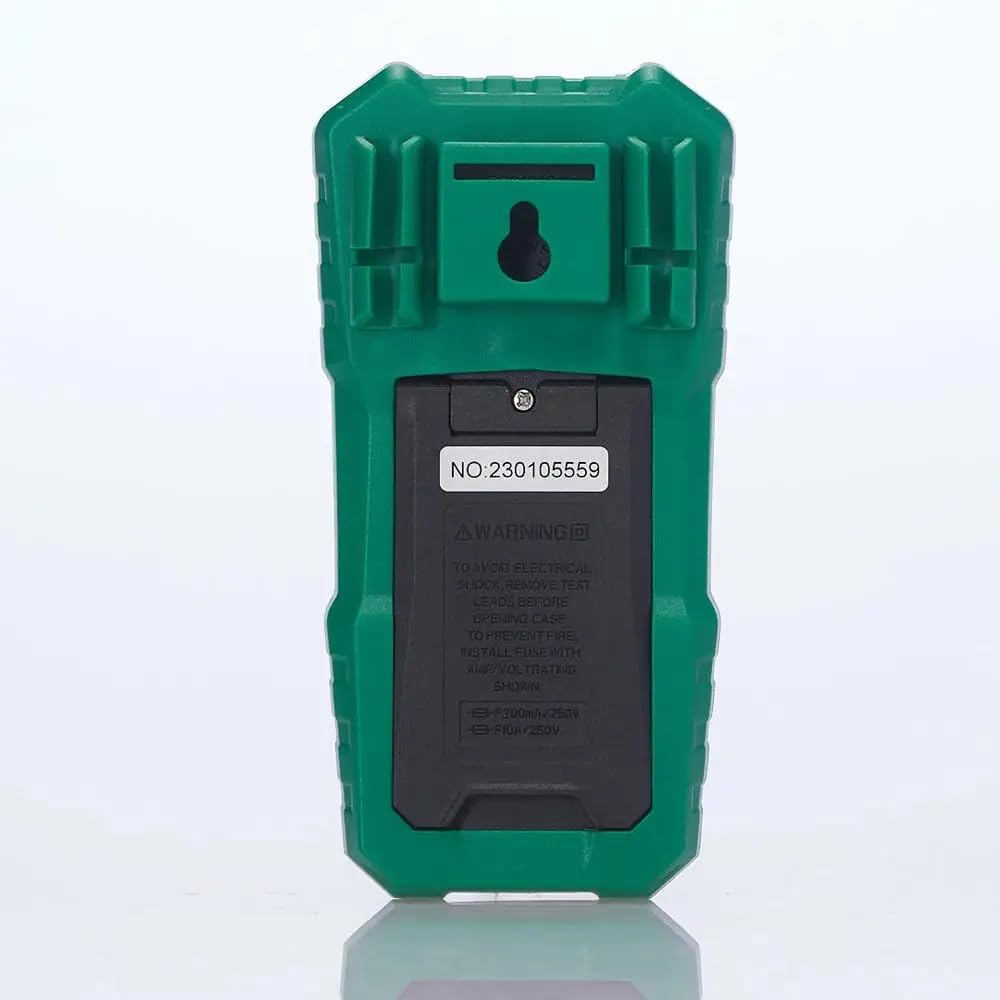
פיגורע 2: דערציען view of the multimeter, illustrating the battery compartment and safety warnings.
4.2 פֿאַרבינדן טעסט דראָטן
ריכטיקע פֿאַרבינדונג פֿון טעסט־לידער איז וויכטיק פֿאַר גענויע און זיכערע מעסטונגען.
- אַרייַנלייגן די שוואַרץ פּרובירן פירן אין די COM (געמיינזאמע) אינפוט דזשעק.
- פֿאַר רובֿ באַנדtage, resistance, continuity, capacitance, frequency, and temperature measurements, insert the red test lead into the VΩmA אַרייַנשרייַב דזשאַק.
- פֿאַר קראַנט מעסטונגען ביז 600mA, שטעקט אַרײַן די רויטע טעסט דראָט אין דעם VΩmA אַרייַנשרייַב דזשאַק.
- For current measurements between 600mA and 10A, insert the red test lead into the 10A מאַקס אַרייַנשרייַב דזשאַק.

פיגור 3: ווינקלדיק view of the multimeter, highlighting the input jacks for test leads.
5. אַפּערייטינג ינסטרוקטיאָנס
This section details how to use the Mastech MS850D for various measurements.
5.1 פּאַוערינג אויף / אַוועק
Rotate the central dial from the "OFF" position to any desired measurement function to power on the multimeter. To power off, rotate the dial back to the "OFF" position.
5.2 ראָטאַרי סוויטש פונקציעס
The rotary switch selects the primary measurement function:
- V~ (AC באַנדtage): מעסט וועקסלשטראָם וואָלומעןtage.
- V- (DC באַנדtage): מעסט גלייכשטראָם באַנדtage.
- Hz/% (Frequency/Duty Cycle): מעסט אָפטקייט און דוטי ציקל.
- Ω (Resistance): מעסט עלעקטרישע קעגנשטעל.
- Continuity/Diode: Checks for circuit continuity and tests diodes.
- NCV/Live: נאַן-קאָנטאַקט חלקtage detection and Live Wire recognition.
- °C/°F (טעמפּעראַטור): Measures temperature using the included probe.
- hFE (טראַנסיסטאָר טעסט): Measures transistor gain (requires optional socket).
- μA~ / μA- (AC/DC Microampעס): מעסט מיקראָampאיצט איצט.
- mA~ / mA- (AC/DC Milliampעס): מעסט מיליampאיצט איצט.
- A~ / A- (AC/DC Ampעס): מיטלען ampere current (up to 10A).
5.3 קנעפּל פאַנגקשאַנז
- סעלעקט (אויסקלייבן): Toggles between different functions within a single rotary switch position (e.g., AC/DC voltage, continuity/diode, °C/°F).
- האלט: איינפֿרירט די איצטיקע לייענונג אויף דער אַרויסווייַזונג. דריק ווידער צו באַפֿרײַען.
- MIN/MAX/REL:
- Press once to enter MIN/MAX mode. The multimeter will record the minimum and maximum values. Press again to cycle between MIN, MAX, and current reading.
- Long press to activate REL (Relative) mode. This subtracts the current reading from all subsequent readings, useful for measuring changes.
- Flashlight Button (often combined with backlight): Activates the built-in flashlight for illuminating the measurement area.
5.4 ספּעציפֿישע מעסטונג פּראָצעדורן
5.4.1 חלקtagמעסטונג (AC/DC)
- שטעלן די דריי באַשטימען צו V~ פֿאַר AC voltagE אָדער V- פֿאַר DC voltage. Use the SEL button to switch between AC and DC if the position combines them.
- פאַרבינדן די שוואַרץ פּרובירן פירן צו די COM דזשעק און די רויטע טעסט פירט צו די VΩmA דזשאַק.
- פֿאַרבינדט די טעסט פּראָבעס פּאַראַלעל אַריבער דעם קרייַז אָדער קאָמפּאָנענט וואָס דאַרף געמעסטן ווערן.
- לייענען דעם חלקtagE ווערט אויף די אַרויסווייַזן.
5.4.2 קראַנט מעסטונג (AC/DC)
וואָרענען: קיינמאָל נישט פאַרבינדן דעם מולטימעטער פּאַראַלעל מיט אַ וואָלומעטערtage source when measuring current. Always connect in series with the load.
- Determine if the current is AC or DC.
- Set the rotary switch to the appropriate current range (μA, mA, or A). Use the SEL button to switch between AC and DC.
- פאַרבינדן די שוואַרץ פּרובירן פירן צו די COM דזשאַק.
- For currents up to 600mA, connect the red test lead to the VΩmA jack. For currents up to 10A, connect the red test lead to the 10A מאַקס דזשאַק.
- עפֿנט דעם קרייַז וואו מען וויל מעסטן דעם קראַנט און פֿאַרבינדט דעם מולטימעטער אין סעריע.
- לייענט דעם איצטיקן ווערט אויפן דיספלעי.
5.4.3 קעגנשטעל מעזשערמאַנט
- שטעלן די דריי - באַשטימען צו די Ω שטעלע.
- פאַרבינדן די שוואַרץ פּרובירן פירן צו די COM דזשעק און די רויטע טעסט פירט צו די VΩmA דזשאַק.
- זיכער מאַכן אַז די קרייַז אָדער קאָמפּאָנענט איז דעענערדזשייזד איידער איר מעסט די קעגנשטעל.
- פֿאַרבינדט די טעסט פּראָובז אַריבער דעם קאָמפּאָנענט.
- לייענען די קעגנשטעל ווערט אויף די אַרויסווייַזן.
5.4.4 קאָנטינויטי טעסט
- שטעלן די דריי - באַשטימען צו די Continuity/Diode position. Use SEL to select continuity mode (usually indicated by a speaker icon).
- פאַרבינדן די שוואַרץ פּרובירן פירן צו די COM דזשעק און די רויטע טעסט פירט צו די VΩmA דזשאַק.
- פֿאַרבינדט די טעסט פּראָובז אַריבער דעם קרייַז אָדער קאָמפּאָנענט.
- אויב דער קעגנשטאנד איז אונטער בערך 50Ω, וועט דער בוזער קלינגען, וואס ווײַזט אויף קאנטינעויטעט.
5.4.5 דייאָוד טעסט
- שטעלן די דריי - באַשטימען צו די Continuity/Diode position. Use SEL to select diode mode (usually indicated by a diode symbol).
- פאַרבינדן די שוואַרץ פּרובירן פירן צו די COM דזשעק און די רויטע טעסט פירט צו די VΩmA דזשאַק.
- פֿאַרבינדט די רויטע פּראָבע צו דער אַנאָדע און די שוואַרצע פּראָבע צו דער קאַטאָדע פֿון דער דיאָד. דער עקראַן וועט ווײַזן דעם פֿאָרווערטס וואָלומען.tagאון קאַפּ.
- דרייט איבער די פּראָבעס. דער עקראַן זאָל ווײַזן "OL" (אָפֿן שלייף) פֿאַר אַ גוטע דיאָד.
5.4.6 מעאַסורעמענט קאַפּאַציטעט
- שטעלן די דריי - באַשטימען צו די קאַפּאַסיטאַנס position (often combined with Hz/% or other functions, use SEL to select).
- פאַרבינדן די שוואַרץ פּרובירן פירן צו די COM דזשעק און די רויטע טעסט פירט צו די VΩmA דזשאַק.
- Ensure the capacitor is fully discharged before measurement to prevent damage to the multimeter.
- פֿאַרבינדט די טעסט פּראָובז אַריבער די קאַפּאַסיטאָר טערמינאַלס.
- לייענען די קאַפּאַסאַטאַנס ווערט אויף די אַרויסווייַזן.
5.4.7 אָפטקייַט מעזשערמאַנט
- שטעלן די דריי - באַשטימען צו די הז /% position. Use SEL to select frequency mode.
- פאַרבינדן די שוואַרץ פּרובירן פירן צו די COM דזשעק און די רויטע טעסט פירט צו די VΩmA דזשאַק.
- פֿאַרבינדט די טעסט פּראָובז אַריבער די סיגנאַל מקור.
- לייענט די פרעקווענץ ווערט אויפן דיספלעי.
5.4.8 טעמפּעראַטור מעזשערמאַנט
- שטעלן די דריי - באַשטימען צו די ° C / ° F position. Use SEL to switch between Celsius and Fahrenheit.
- פֿאַרבינדט די טעמפּעראַטור פּראָבע צו דער COM און VΩmA jacks, observing polarity if specified by the probe.
- שטעלט די שפּיץ פֿון דער טעמפּעראַטור פּראָבע אויף אָדער לעבן דעם אָביעקט וועמענס טעמפּעראַטור זאָל געמאָסטן ווערן.
- לייענט די טעמפּעראַטור ווערט אויף דעם עקראַן.
5.4.9 ניט-קאָנטאַקט VoltagE (NCV) דעטעקשאַן
- שטעלן די דריי - באַשטימען צו די NCV / לעבן שטעלע.
- Move the top front part of the multimeter close to the conductor or outlet.
- The multimeter will emit an audible beep and the NCV indicator light will flash if AC voltage is detected, with the frequency of beeps and flashes increasing with voltagע שטאַרקייט.
6. וישאַלט
געהעריגע אויפהאלטונג גאראנטירט די לאנגעוויטי און גענויקייט פון אייער מולטימעטער.
6.1 רייניקונג
- ווישן די פאַל מיט אַדamp שטאָף און מילד וואַשפּולווער. דו זאלסט נישט נוצן אַברייסיווז אָדער סאָלוואַנץ.
- האַלט די אַרייַנגאַנג טערמינאַלן פריי פון שמוץ און נעץ.
6.2 באַטערי פאַרבייַט
Refer to Section 4.1 for detailed instructions on battery replacement. Replace batteries when the low battery indicator appears on the display.
6.3 קאָריק פאַרבייַט
If the current measurement function fails, the fuse may need replacement. The MS850D uses two fuses:
- פ1: F300mA/250V (for mA/μA range)
- פ2: F10A/250V (for 10A range)
To replace fuses:
- זייט זיכער אז דער מולטימעטער איז אויסגעלאשן און דיסקאנעקט אלע טעסט דראטן.
- עפֿנט דעם דעקל פֿונעם באַטעריע־אָפּטייל (זעט אָפּטייל 4.1).
- Carefully remove the old fuse(s) and replace with new fuses of the exact same type and rating.
- פאַרבייַטן די באַטאַרייע דעקן און פאַרשטייַפן די שרויף.
7. טראָובלעשאָאָטינג
If you encounter issues with your Mastech MS850D, refer to the following common problems and solutions:
| פּראָבלעם | מעגלעך סיבה | לייזונג |
|---|---|---|
| קיין דיספּלעי אָדער טונקעל דיספּלעי | נידעריק אָדער טויט באַטעריז | טוישט די באַטעריעס (זעט סעקציע 4.1). |
| פאַלש רידינגז | Incorrect function selected; Loose test leads; Damaged test leads; Out of range measurement | Verify rotary switch position; Ensure test leads are securely connected; Inspect test leads for damage; Check if the measurement is within the multimeter's specified range. |
| קראַנט מעסטונג אַרבעט נישט | בלאָון קאָריק | טוישט אויס די ריכטיגע פיוז (זעט סעקציע 6.3). |
| "OL" (איבערלאַסט) געוויזן | Measurement exceeds the selected range or multimeter's maximum capacity | Select a higher range if available, or confirm the measurement is within the multimeter's limits. |
8. ספּעסאַפאַקיישאַנז
Detailed technical specifications for the Mastech MS850D Digital Multimeter:

Figure 4: Detailed specifications and packaging information for the Mastech MS850D.
| מעזשערמאַנט | קייט | אַקיעראַסי |
|---|---|---|
| DC Voltage | 600mV, 6V, 60V, 600V | ±(0.8%+5) |
| AC Voltage | 600mV, 6V, 60V, 600V | ±(1.0%+10) |
| DC Current | 600μA, 6000μA, 60mA, 600mA, 6A, 10A | ±(2.0%+5) (μA/mA), ±(3.0%+5) (A) |
| AC קראַנט | 600mA, 6A, 10A | ±(2.5%+5) (mA), ±(3.0%+5) (A) |
| קעגנשטעל | 600Ω, 6KΩ, 60KΩ, 600KΩ, 6MΩ, 60MΩ | ±(1.0%+5) (600Ω-6MΩ), ±(1.2%+5) (60MΩ) |
| קאַפּאַסיטאַנס | 60nF, 600nF, 6μF, 60μF, 600μF, 6mF, 60mF, 100mF | ±(4.0%+25) (60nF-600μF), ±(5.0%+25) (6mF-100mF) |
| אָפטקייַט | 10Hz, 100Hz, 1KHz, 10KHz, 100KHz, 1MHz, 10MHz | ±(0.5%+4) |
| טעמפּעראַטור | -20°C to 0°C, 0°C to 400°C, 400°C to 1000°C | ±(4°C), ±(3.0%+3), ±(2.0%+3) |
| ווייַז | 6000 קאַונץ | |
| זיכערקייַט רייטינג | קאַץ III 600 וו | |
| מאַכט מקור | 2 רענטגענ 1.5 וו אַאַאַ באַטעריז | |
| דימענסיעס (L X W X H) | 150 מם X 75 מם X 47 מם (בעערעך) | |
| וואָג | 284 ג (בעערעך) | |
9. וואָראַנטי און שטיצן
The Mastech MS850D Digital Multimeter is manufactured by Mastech and imported by REES52. For warranty information, technical support, or service inquiries, please refer to the warranty card included with your product or contact the seller/manufacturer directly.
ביטע האַלטן דיין דערווייַז פון קויפן פֿאַר וואָראַנטי קליימז.
- פאַבריקאַנט: מאַסטעטש
- אימפארטירער: REES52
- מאָדעל נומער: MS850D


