הקדמה
This manual provides essential instructions for the safe operation, maintenance, and troubleshooting of your roborock QV 35S Robot Vacuum and Mop. Please read this manual thoroughly before using the product and retain it for future reference.

פיגורע 1: The roborock QV 35S Robot Vacuum and Mop with its multifunction docking station and companion app interface.
וויכטיק סאַפעטי אינפֿאָרמאַציע
שטענדיק פֿאָלגן די גרונטלעכע זיכערהייט מיטלען ווען איר ניצט עלעקטרישע אַפּאַראַטן צו רעדוצירן דעם ריזיקאָ פֿון פֿײַער, עלעקטרישן קלאַפּ און שאָדן.
- לייענען אַלע ינסטראַקשאַנז איידער ניצן די אַפּפּליאַנסע.
- Do not allow children to operate the robot. Supervise children and pets when the robot is operating.
- פאַרזיכערן די מאַכט וואָלtage שוועבעלעך די וולtage אנגעצייכנט אויף דער טשאַרדזשינג דאָק.
- ניצט נישט דעם ראָבאָט אין סביבות מיט אָפֿענע פֿלאַמען אָדער שוואַכע אָביעקטן.
- האַלטן האָר, פרייַ קליידער, פינגער און אַלע טיילן פון דעם גוף אַוועק פון אָופּאַנינגז און מאָווינג טיילן.
- Only use the charging dock provided by the manufacturer.
פּעקל אינהאַלט
באַשטעטיקן אַז אַלע קאָמפּאָנענטן זענען פאַראַן אין דער פּאַקעט:
- roborock QV 35S Robot Vacuum and Mop
- מולטיפונקטיאָן דאַקינג סטאַנציע
- Mop Pads (two rotating)
- מאַכט קאַבלע
- באַניצער מאַנואַל
סעטאַפּ
1. Docking Station Placement
Place the multifunction docking station on a hard, level surface against a wall. Ensure there is at least 0.5 meters (1.6 feet) of clear space on both sides and 1.5 meters (4.9 feet) in front of the dock for optimal robot navigation. Connect the power cable to the dock and plug it into a power outlet.
2. ערשטע אויפלאָדונג
Place the robot onto the charging contacts of the docking station. The robot will automatically power on and begin charging. Allow the robot to fully charge before its first use.
3. אַפּ קאַנעקשאַן
Download the roborock app from your mobile device's app store. Open the app and follow the on-screen instructions to add your roborock QV 35S. A 2.4 GHz Wi-Fi network is required for app connection.

פיגורע 2: The roborock app provides comprehensive control and customization options for your robot.
אַפּערייטינג ינסטראַקשאַנז
1. ערשטע מאַפּינג
For the first cleaning cycle, allow the robot to map your home. The PreciSense LiDAR navigation system will scan 360° to create detailed maps for efficient route planning. The robot supports up to 4 floor maps, automatically switching between them for multi-story homes.

פיגורע 3: The robot utilizes LiDAR technology for precise navigation and mapping, enabling efficient cleaning routes.
2. רייניקונג מאָדעס
The roborock QV 35S offers various cleaning modes accessible via the app:
- נאָר וואַקוום: For dry debris removal.
- נאָר מאָפּ: For wet cleaning of hard floors.
- וואַקוום און מאַפּ: גלייכצייטיג וואַקוום רייניקונג און מאַפּינג.
- מנהג רייניקונג: Define specific rooms or zones for cleaning.
3. Suction and Mopping Features
The robot features 10,000 Pa HyperForce suction for deep cleaning and dual spinning mops that rotate at up to 200 RPM. The mops can lift 10 mm to avoid wetting carpets during cleaning. Water flow can be adjusted in 30 levels via the app.

פיגורע 4: The robot's powerful 10,000 Pa HyperForce suction effectively removes debris from various surfaces.

פיגורע 5: Dual spinning mops provide effective wet cleaning, with an automatic lift feature for carpets.
4. אויסמיידן שטערונגען
The reactive technical obstacle avoidance system uses structured light to detect and navigate around obstacles, even in cluttered environments. The robot can suggest "No-Go Zones" for areas where it might get stuck, such as under chairs or tables.
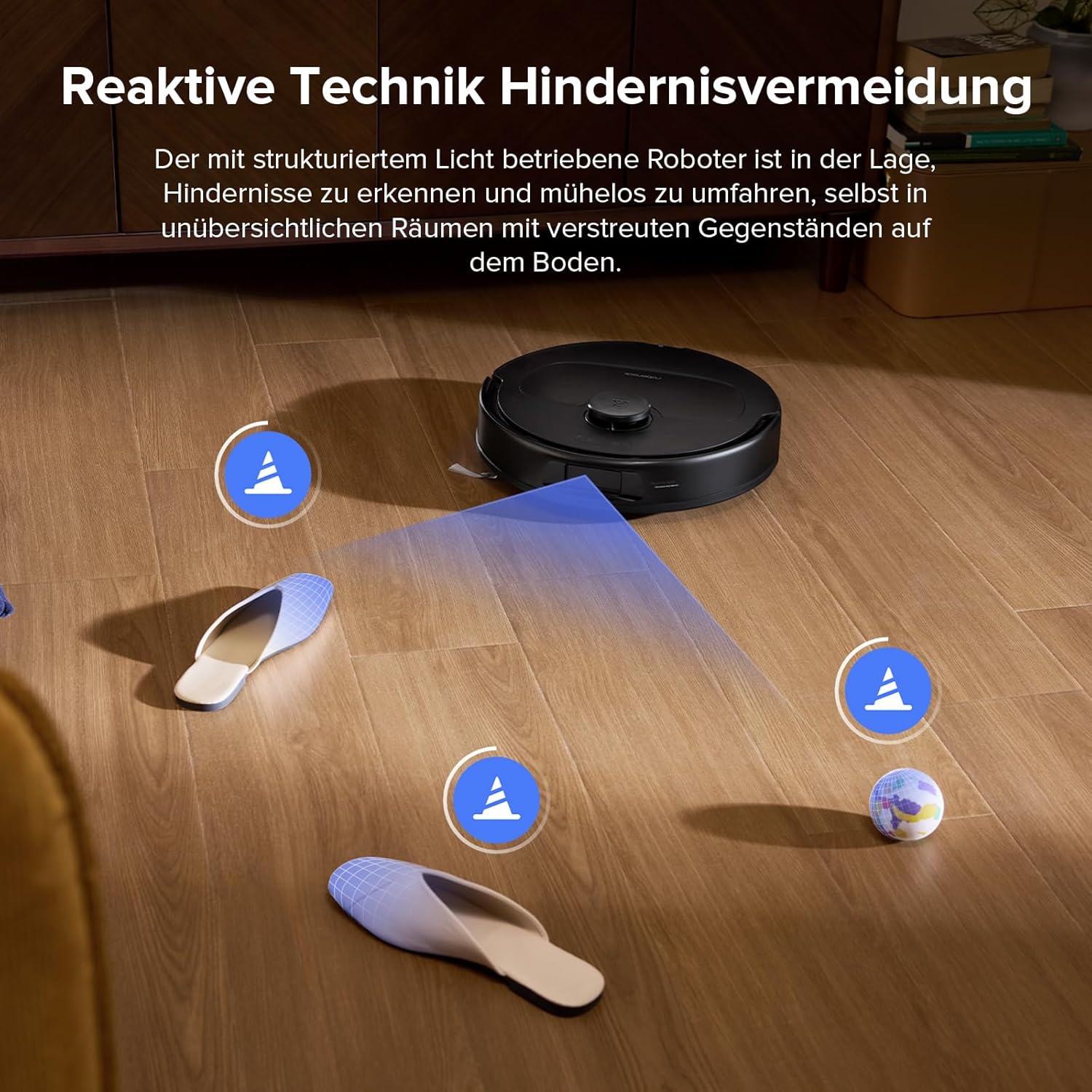
פיגורע 6: The robot's advanced sensors enable it to identify and bypass common household obstacles.
וישאַלט
1. Multifunction Dock Maintenance
The multifunction dock automatically washes and dries the mop pads, refills the water tank, and empties the dustbin. The dustbag in the dock can hold debris for over 7 weeks. Regularly check and empty the dustbag as needed. The entire docking station is detachable for easy and thorough cleaning to prevent sludge and dirt buildup.

פיגורע 7: The multifunction dock simplifies maintenance with automated cleaning and emptying features.
2. Main Brush and Side Brush Cleaning
The robot features a dual anti-tangle system with a rubberized floating main brush and a unique arc-shaped side brush. While designed to prevent tangles, it is recommended to periodically check and clean the brushes, especially if you have pets with long hair. Remove any hair or debris wrapped around the brushes. The improved side brush is SGS-certified for a 0% entanglement rate.
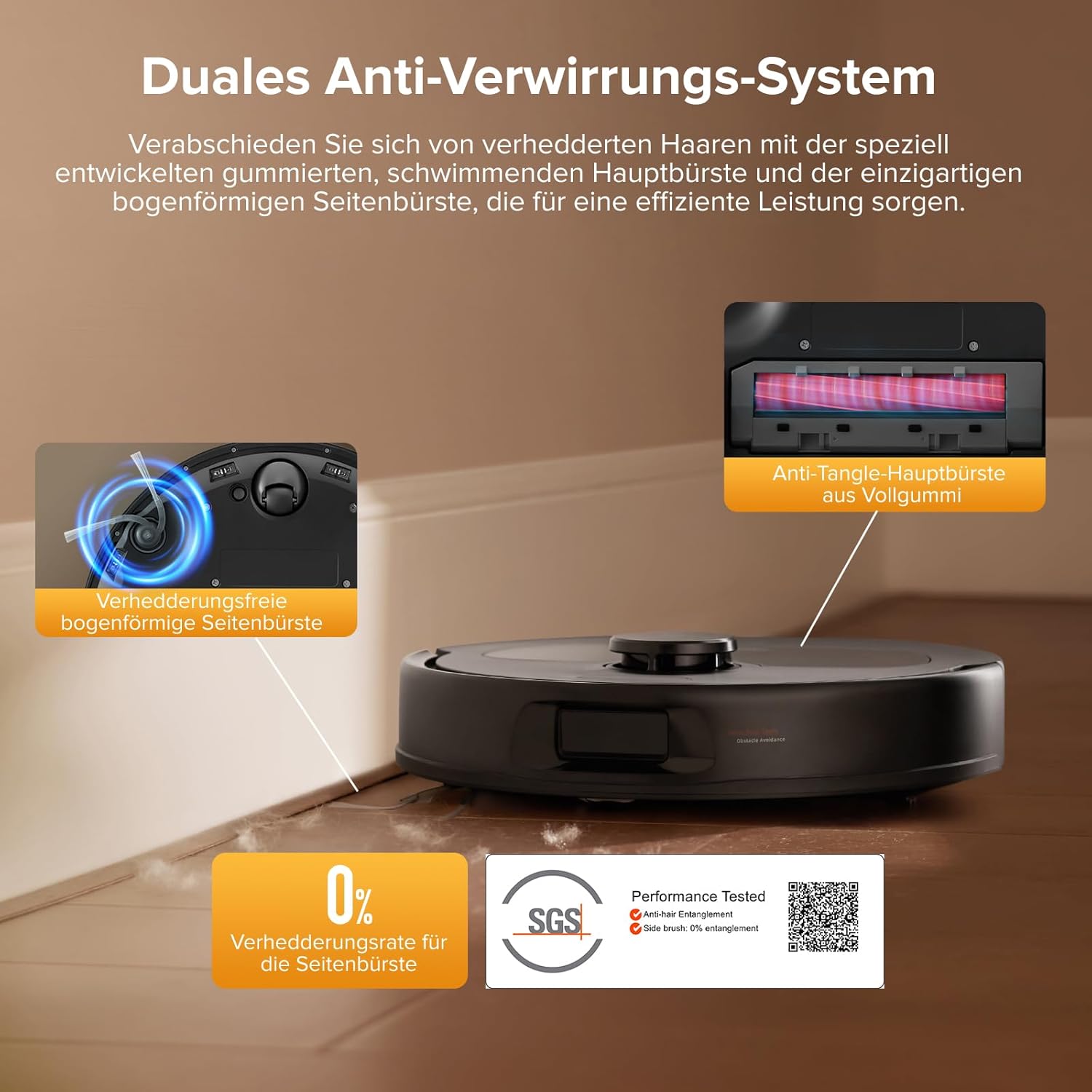
פיגורע 8: The anti-tangle brush system minimizes hair entanglement, but periodic inspection is advised. SGS Certification Details
3. Mop Pad Cleaning
The mop pads are automatically washed and dried by the docking station. For optimal performance, it is recommended to occasionally remove and hand-wash the mop pads with water to remove any accumulated dirt or residue.
4. פילטער רייניקונג
The robot's internal filter should be cleaned regularly. Tap out dust and rinse with water. Ensure the filter is completely dry before reinserting it into the robot.
טראָובלעשאָאָטינג
| פּראָבלעם | מעגלעך סיבה | לייזונג |
|---|---|---|
| Robot not connecting to Wi-Fi. | אומרעכט Wi-Fi פּאַראָל, 5GHz נעץ, אָדער שוואַך סיגנאַל. | Ensure you are using a 2.4 GHz Wi-Fi network. Verify the password. Move the robot closer to the router. |
| ראָבאָט בלייבט אָפט שטעקן. | Small obstacles, loose cables, or tight spaces. | Clear the area of small objects and cables. Use the app to define "No-Go Zones" for problematic areas. |
| שלעכטע זויג-פעהיגקייט. | Full dustbin, clogged filter, or tangled main brush. | Empty the dustbin. Clean or replace the filter. Remove any hair or debris from the main brush. |
| Mop pads not cleaning effectively. | Dirty mop pads, insufficient water flow, or empty water tank. | Ensure mop pads are clean. Adjust water flow settings in the app. Refill the water tank. |
| Robot displays "move to new location and restart" error. | Robot is in an unfamiliar or problematic location, or a sensor issue. | Manually move the robot to a clear, open area and restart it. If the issue persists, clean all sensors and ensure no obstructions. |
ספּעסאַפאַקיישאַנז
- סאָרט: ראָבאָראָק
- מאָדעל: QV 35S
- קאָליר: Roborock Qv 35s Black
- Robot Dimensions (L x W x H): בעערעך 35 X 35 X 9.65 סענטימעטער (13.8 X 13.8 X 3.8 אינטשעס)
- Dock Dimensions (L x W x H): 35 X 48.7 X 52.1 סענטימעטער (13.8 X 19.2 X 20.5 אינטשעס)
- נומער וואָג: 16 Kilograms (including dock)
- סאַקשאַן מאַכט: 10,000 פּאַ היפּערפאָרס
- Mopping System: Dual Spinning Mops (up to 200 RPM), 10mm Auto Mop Lift
- נאַוויגאַציע: PreciSense LiDAR Navigation & Mapping
- ויסמיידן מכשול: Reactive Technical Obstacle Avoidance (structured light)
- אַפּ קאָנטראָל: Yes (roborock app, requires 2.4 GHz Wi-Fi)
- קול קאָנטראָל: Compatible with Amazon Echo, Google Home
- ספּעציעלע פֿעיִקייטן: 360-degree rotation, removable container, pet hair suction, advanced custom cleaning, precise laser mapping, automatic shutdown.
- אַרייַנגערעכנט קאַמפּאָונאַנץ: Docking station, water tank, mop pads, two rotating brushes.
וואָראַנטי און שטיצן
For warranty information, technical support, or service inquiries, please refer to the official roborock webזייטל אדער קאנטאקט זייער קאסטומער סערוויס גלייך.
You can find more information and support on the official roborock store page: roborock Official Store


