1. הקדמה
Thank you for choosing the SUPVAN G15M Label Maker. This manual provides essential information for setting up, operating, and maintaining your device. Please read it thoroughly to ensure proper use and to maximize the lifespan of your label maker. The G15M is a versatile, portable label printer designed for various applications in home, office, and industrial settings, featuring a QWERTY keyboard and thermal transfer printing technology.
2. פּראָדוקט איבערview
The SUPVAN G15M is a rechargeable label maker equipped with a QWERTY keyboard for easy text input and a backlit LCD screen for clear visibility in various lighting conditions. It utilizes thermal transfer printing technology, ensuring durable labels that are resistant to fading, water, oil, and abrasion, with a lifespan of up to 10 years. The device supports a wide range of label types and sizes, from 6mm to 15mm, including heat shrink tubes and cable labels. Its compact design and 1200mAh lithium battery provide extended portability and usage without frequent recharging.
שליסל פֿעיִקייטן אַרייַננעמען:
- לאַנג-בלייַביק קריקאָנלאָדלעך באַטאַרייע: Integrated 1200mAh lithium battery with USB Type-C charging, offering approximately three months of standby time on a full charge.
- Thermal Transfer Printing: Produces durable labels resistant to fading, water, oil, and abrasion, suitable for indoor and outdoor use.
- פּאָרטאַטיוו און ווערסאַטאַל פּלאַן: Features a QWERTY keyboard, a 300-nit backlit LCD screen, 5mm print margins for paper saving, and an anti-slip design.
- Advanced Printing Functions: Supports up to 4 lines of text, 9 font sizes, 6 styles, 5 borders, and 449 symbols. Compatible with QR codes, barcodes, and 17 languages.
- ברייט לאַבעל קאַמפּאַטאַבילאַטי: Works with labels from 6 to 15 mm, heat shrink tubes from 3.5 to 9 mm, and cable labels, ideal for cable identification and organization.
3. וואָס איז אין דער קעסטל
Upon unboxing your SUPVAN G15M Label Maker, please verify that all components are present:

Image: SUPVAN G15M Label Maker box contents.
- 1 x SUPVAN G15M Mini Label Maker
- 1 x וסב טיפּ-C קאַבלע
- 1 x Heat Shrink Tubing (9mm x 2m, Ø4.8mm)
- 1 x White Continuous Label (12mm x 7.5m)
- 1 x באַניצער מאַנואַל
4. סעטאַפּ
4.1 Installing Labels
Follow these steps to install a label cassette into your G15M label maker:
- Open the label compartment cover on the back of the device.
- Insert the label cassette, ensuring it clicks securely into place.
- פאַרמאַכן די דעקל פעסט.
Video: Demonstrates how to install label cassettes into the SUPVAN G15M label maker.
4.2 טשאַרדזשינג די מיטל
The G15M label maker comes with a built-in 1200mAh lithium battery. To charge the device:
- Connect the provided USB Type-C cable to the charging port on the side of the label maker.
- שטעקט אריין דעם אנדערן עק פונעם קאבל אין א קאמפאטיבלן USB פאוער אדאפטער (נישט אריינגערעכנט) אדער א קאמפיוטער'ס USB פארט.
- The battery indicator on the LCD screen will show the charging status. A full charge provides extended usage.

Image: The SUPVAN G15M features a 1200mAh rechargeable battery, offering a more economical and environmentally friendly solution compared to devices requiring AAA batteries.
5. אַפּערייטינג ינסטרוקטיאָנס
5.1 גרונטלעכע לייבל שאַפונג
To create a label:
- Turn on the label maker by pressing the power button.
- Use the QWERTY keyboard to type your desired text. The backlit LCD screen will display your input.
- Utilize the 'Set' button to access font, size, style, and border options. The arrow keys allow navigation through menus and text.
- Press the 'Add' button to insert symbols, QR codes, or barcodes.

Image: The G15M features a backlit LCD screen for clear viewing, comfortable keys for easy typing, an anti-slip design for secure handling, and a USB Type-C port for convenient charging.
5.2 Printing and Cutting
Once your label text is finalized:
- Press the print button (usually indicated by a printer icon).
- The label will be printed and dispensed from the device.
- Use the integrated cutter to cleanly separate the printed label from the roll. The G15M is designed for smooth-cut edges, making labels easy to peel and apply.
Video: Demonstrates how to print and cut labels using the SUPVAN G15M label maker, highlighting the smooth-cut edges.

Image: The SUPVAN G15M features a minimal 5mm margin, reducing label waste compared to other label makers with larger margins.
6. Label Types and Applications
The SUPVAN G15M is compatible with a variety of label types, making it suitable for diverse labeling needs:

Image: The G15M label maker supports 6 different label types for various applications.
- Continuous Labels: Ideal for general-purpose labeling, such as warning signs or long text.
- Fixed Size Labels (Die-Cut): Pre-cut labels perfect for organizing small items like screws, nuts, or components in storage bins.
- Heat Shrink Tubes: Used for insulating and identifying cables, wires, and connectors. Requires heat application for shrinking.
- Cable Labels: Designed to wrap around cables for easy identification, such as network cables or power cords.
- Wrap Around Labels: Similar to cable labels, these wrap around cylindrical objects for clear identification.
- מאַרקינג Tags: Labels with a hole for attaching to items using cable ties or strings, suitable for larger cables or equipment.
Video: Demonstrates the application of various label types, including continuous, die-cut, cable, heat shrink, wrap-around, and marking tags.

Image: Multi-layer lamination technology ensures labels are resistant to water, oil, abrasion, and temperature, with strong adhesion and no residue.
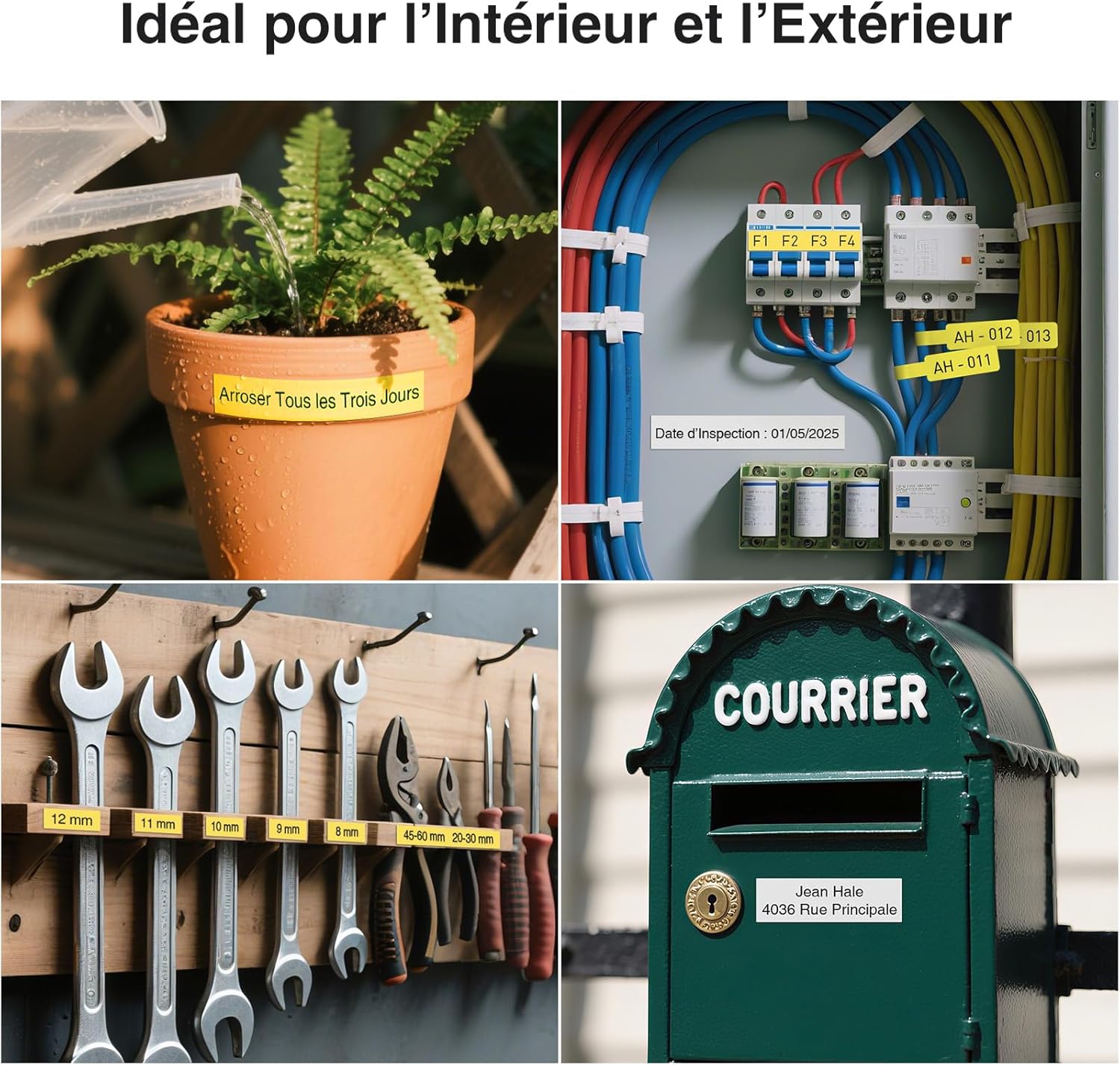
Image: The G15M labels are suitable for both indoor and outdoor applications, demonstrating versatility in various environments.

Image: The G15M supports printing of barcodes, QR codes, various frames, and over 400 icons for comprehensive labeling.
7. וישאַלט
To ensure optimal performance and longevity of your SUPVAN G15M Label Maker:
- רייניקונג: Regularly wipe the exterior of the device with a soft, dry cloth. If necessary, use a slightly damp cloth, but ensure no moisture enters the label compartment or charging port.
- פּרינט קאָפּ רייניקונג: If print quality degrades, gently clean the print head using a cotton swab lightly dampבאדעקט מיט איזאָפּראָפּיל אַלקאָהאָל. לאָזט עס גאָר טרוקן איידער נוצן.
- סטאָרידזש: Store the label maker in a cool, dry place away from direct sunlight and extreme temperatures. Remove the label cassette if storing for extended periods.
- באַטערי זאָרגן: For long-term storage, ensure the battery is partially charged (around 50%). Recharge periodically to prevent deep discharge.
8. טראָובלעשאָאָטינג
If you encounter issues with your SUPVAN G15M, refer to the following common problems and solutions:
| פּראָבלעם | מעגלעך סיבה | לייזונג |
|---|---|---|
| קיין מאַכט/אַפּאַראַט וועט נישט צינדן זיך אָן | נידעריגע באַטעריע אָדער די דעוויס איז אויסגעלאָשן. | Charge the device using the USB Type-C cable. Press and hold the power button to turn it on. |
| Poor print quality (faint, streaky) | Print head is dirty or label cassette is incorrectly installed. | Clean the print head. Reinstall the label cassette, ensuring it is properly seated. |
| Label jam | Label is misaligned or obstructed. | Open the label compartment, carefully remove any jammed label material, and reinstall the cassette. |
| Labels not feeding | Label cassette empty or incorrectly installed. | Replace the label cassette or ensure it is correctly installed. |
| אַפּאַראַט רעאַגירט נישט | צייטווייליגע ווייכווארג פראבלעם. | Perform a soft reset by turning the device off and then on again. If the issue persists, contact customer support. |
9. ספּעסאַפאַקיישאַנז
Detailed technical specifications for the SUPVAN G15M Label Maker:
| שטריך | באַשרייַבונג |
|---|---|
| סאָרט | SUPVAN |
| מאָדעל נאָמען | G15M מיני |
| דרוק טעכנאָלאָגיע | טערמאַל |
| קאַנעקטיוויטי טעכנאָלאָגיע | וסב |
| דרוקער רעזולטאַט | מאָנאָטשראָמע |
| מאַקסימום דרוק גיכקייט (מאָנאָכראָם) | 20 בלעטער פּער מינוט |
| מאַקסימום דרוק רעזאָלוציע (שוואַרץ און ווייס) | 203 דפּי |
| מאַקס מידיאַ גרייס | 15 מם רענטגענ 6 עם |
| קאַמפּאַטאַבאַל דעוויסעס | פּיסי, סמאַרטפאָנע |
| ספּעציעלע שטריך | For heat shrink tubes, rechargeable, 5mm minimum edge spacing |
| מאַכט | 10.00 וו |
| פּראָדוקט דימענשאַנז (L x W x H) | 17 X 8.5 X 4.3 סענטימעטער |
| פּונקט וואָג | 472 ג |
| באַטערי | 1 A - included |
| פאַבריקאַנט | Beijing Supvan Information Technology Co., Ltd. |
| לאַנד פון אָריגין | כינע |
10. וואָראַנטי און שטיצן
SUPVAN products are designed for reliability and performance. For warranty information, technical support, or to purchase additional supplies, please visit the official SUPVAN webזייטל אדער קאנטאקט זייער קאסטומער סערוויס. האלט אייער קויף קוויטל אלס באווייז פון קויפן פאר גאראנטיע פארלאנגען.
Official SUPVAN Store: Visit SUPVAN Store


