הקדמה
Thank you for choosing Gsangoo USB C Wired Headphones. These earphones are designed to provide a high-fidelity audio experience with convenient wired control and broad compatibility with USB Type-C devices. This manual provides essential information for setup, operation, and maintenance to ensure optimal performance and longevity of your product.

Image: Gsangoo USB C Wired Headphones, showcasing the earbuds and USB-C connector.
פּראָדוקט פֿעיִקייטן
- USB C Connectivity: Designed for devices without a 3.5mm audio jack, offering direct digital audio transmission.
- באַקוועם און ערגאָנאָמיש פּלאַן: Shaped to fit the ear's natural curve for extended wear comfort.
- מאַגנעטישע אויערקנעפּלעך: Integrated magnets help prevent cable tangling when not in use.
- הויך-קוואַליטעט געזונט: Features a 14.2mm sound driver for immersive audio reproduction.
- In-line Control & HD Microphone: Allows for volume adjustment, music playback control, and clear hands-free calls.
- דוראַבאַל קאַנסטראַקשאַן: Made with a lightweight ABS shell and TPE wire for enhanced durability and service life.
- Advanced DAC Chip: Ensures wide compatibility and stable, high-quality sound transmission.
סעטאַפּ
To begin using your Gsangoo USB C Wired Headphones, simply plug the USB Type-C connector into the compatible port on your device. No additional drivers or software are typically required. The headphones are designed for immediate plug-and-play functionality.

Image: Illustration of connecting the USB Type-C headphones to a device, highlighting the port and built-in DAC chip.
אַפּערייטינג ינסטראַקשאַנז
The in-line control unit allows for easy management of audio and calls:
- באַנד אַרויף: Tap the '+' button once.
- באַנד אַראָפּ: Tap the '-' button once.
- שפּיל / פּויזע מוזיק: צאַפּן די צענטער קנעפּל אַמאָל.
- ווייַטער ליד: Tap the center button twice.
- פֿריִער ליד: Tap the center button three times.
- ענטפער רופן: Tap the center button once during an incoming call.
- סוף רופן: Tap the center button once during an active call.
- אָפּוואַרפן רופן: Tap the center button three times during an incoming call.
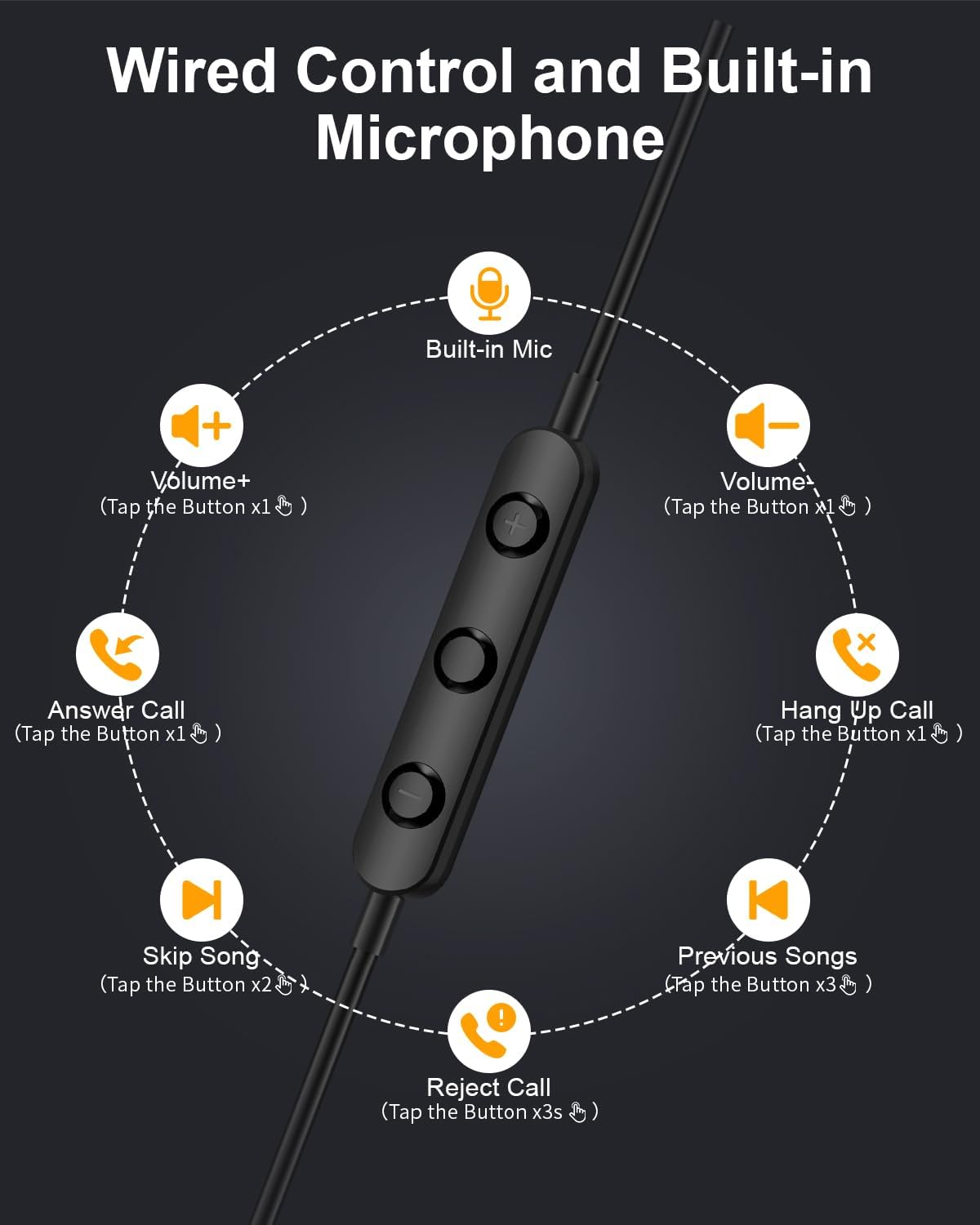
Image: Diagram illustrating the functions of the in-line control buttons for volume, music, and call management.
קאַמפּאַטאַבילאַטי
These USB C wired earphones are compatible with a wide range of devices that feature a USB Type-C audio output and do not have a 3.5mm headphone jack. Please note: These headphones are not compatible with devices that have both a USB-C jack and a 3.5mm jack, as the device may prioritize the 3.5mm port.
קאָמפּאַטיבלע דעוויסעס אַרייַננעמען:
- פֿאַר עפּל: iPhone 17/17 Air/17 Pro/16/16 Pro/16 Pro Max/15/15 Plus/15 Pro/15 Pro Max, iPad 10th Gen/iPad Air 4th/5th/11/13 inch/iPad Pro 11/12.9/iPad Mini 6th.
- פאר Samsung: Galaxy S25 Ultra/S25/S24 Ultra/S24/S23 FE/S23/S23 Ultra/S22/S22 Ultra/S21 FE/S21/S21 Ultra/S20 FE/S20 Ultra/Z Flip6/Z Fold5/A55/A54/A16 5G/A56 5G/A34 5G/A53 5G/A33 5G.
- פֿאַר Google: Pixel 9 Pro/8 Pro/8/7/7 Pro/7a/6a/6/6 Pro.
- For OnePlus: 12R/12/11R/11/10T/10 Pro/9/Nord/8T.
- And other Phone USB C devices without a 3.5mm jack.

Image: Visual guide to USB C headphone compatibility, showing various devices and emphasizing the requirement for a USB-C only audio port.
וישאַלט
געהעריגע זאָרג וועט פֿאַרלענגערן דאָס לעבן פֿון אייערע כעדפֿאָונז:
- רייניקונג: Gently wipe the earbuds and cable with a soft, dry cloth. Avoid using harsh chemicals or abrasive materials.
- סטאָרידזש: When not in use, store the headphones in the provided storage bag to prevent tangling and damage. The magnetic design helps keep the earbuds together.
- ויסמיידן נעץ: These headphones are not water-resistant. Keep them away from liquids and high humidity.
- שעפּן מיט זאָרג: Avoid pulling the cable forcefully or bending the connector at sharp angles.

Image: Close-up of the magnetic earbuds, demonstrating how they connect to prevent tangling.
טראָובלעשאָאָטינג
אויב איר טרעפט פּראָבלעמען מיט אייערע כעדפאָונז, ביטע באַציעט זיך צו די פאלגענדע געוויינטלעכע לייזונגען:
- קיין קול:
- זייט זיכער אַז דער USB-C קאַנעקטאָר איז גאָר אַרײַנגעשטעקט אין אײַער דעווײַס.
- קאָנטראָלירט די וואָלומען סעטטינגס פון אייער דעווייס.
- Verify that your device supports audio output via its USB-C port and does not have a 3.5mm jack that might be prioritized.
- Test the headphones with another compatible device to rule out a device-specific issue.
- מיקראָפאָן איז נישט ארבעטן:
- מאַכן זיכער אַז די כעדפאָונז זענען סיקיורלי פארבונדן.
- קאָנטראָלירט די מיקראָפאָן אַרייַנגאַנג סעטטינגס פון אייער מיטל.
- באַשטעטיקן אַז דער מיקראָפאָן איז נישט אַבסטראַקטיד.
- Sound Quality Issues (e.g., static, distortion):
- זיכער מאַכן אַז דער קאַנעקטער איז ריין און פריי פון דעבריס.
- Try playing different audio sources to determine if the issue is with the content.
- קאָנטראָלס ניט ריספּאַנדינג:
- זיכער מאַכן אַז די כעדפאָונז זענען ריכטיק פֿאַרבונדן.
- Some older devices or specific apps may have limited support for in-line controls.
If these steps do not resolve the issue, please contact Gsangoo customer support for further assistance.
ספּעסאַפאַקיישאַנז
| מאָדעל נאָמען | 945-Black-USBC |
| כעדפאָונז דזשאַק | USB C |
| קאַנעקטיוויטי טעכנאָלאָגיע | ווייערד |
| מאַטעריאַל | Acrylonitrile Butadiene Styrene (ABS) Shell, Thermoplastic Elastomer (TPE) Wire |
| קאָנטראָל טיפּ | Button Control (Push Button) |
| קאַבלע שטריך | טאַנגלע פֿרייַ |
| פּונקט וואָג | 0.634 אונס (0.02 קילאָגראַמס) |
| וואַסער קעגנשטעל מדרגה | ניט וואַסער קעגנשטעליק |
| אַודיאָ דרייווער טיפּ | דינאַמיש דרייווער |
| עאַרפּיעסע פאָרעם | Bud (In Ear) |
| ראַש קאָנטראָל פֿעיִקייטן | Passive Noise Cancellation, Sound Isolation |
| שטיצט בלועטאָאָטה טעכנאָלאָגיע | ניין |
| ספּעציעלע שטריך | לייטווייט |
| פּראָדוקט דימענשאַנז | 1 X 1 X 0.3 אינטשעס |
וואָראַנטי און שטיצן
Gsangoo is committed to providing high-quality products and customer satisfaction. We offer after-sales service to address any questions or concerns you may have regarding your USB C Wired Headphones.
For product support, troubleshooting assistance, or warranty inquiries, please contact Gsangoo customer service through the platform where you purchased the product or visit the official Gsangoo store page.
We aim to respond to all inquiries within 24 hours to provide satisfactory assistance.


