הקדמה
The TONOR Gaming Mic TCX3+ is designed to enhance your gaming and streaming experience, particularly for Xbox users. This microphone offers superior sound quality, customizable RGB lighting, and convenient controls for an immersive audio environment. Please read this manual carefully to ensure proper setup and operation.
וואָס איז אין די קעסטל
- מיקראָפאָן x1
- Boom arm stand x1
- USB-A to Type-C charging cable x1
- 3.5mm to 3.5mm audio cable x1
סעטאַפּ
Follow these steps to set up your TONOR Gaming Mic TCX3+:
- באַפעסטיקט דעם בום אָרעם: Securely attach the included boom arm stand to your desk. The microphone adapter comes with both 3/8-inch and 5/8-inch threaded adapters for compatibility.
- אָנקלאַפּן די מיקראָפאָן: Attach the TCX3+ microphone to the boom arm.
- Connect to Xbox Controller: Use the provided 3.5mm audio connection cable to seamlessly connect the microphone to your Xbox controller. No additional splitters or power supply are needed.
- מאַכט אויף: Long press the knob on the microphone to power it on.
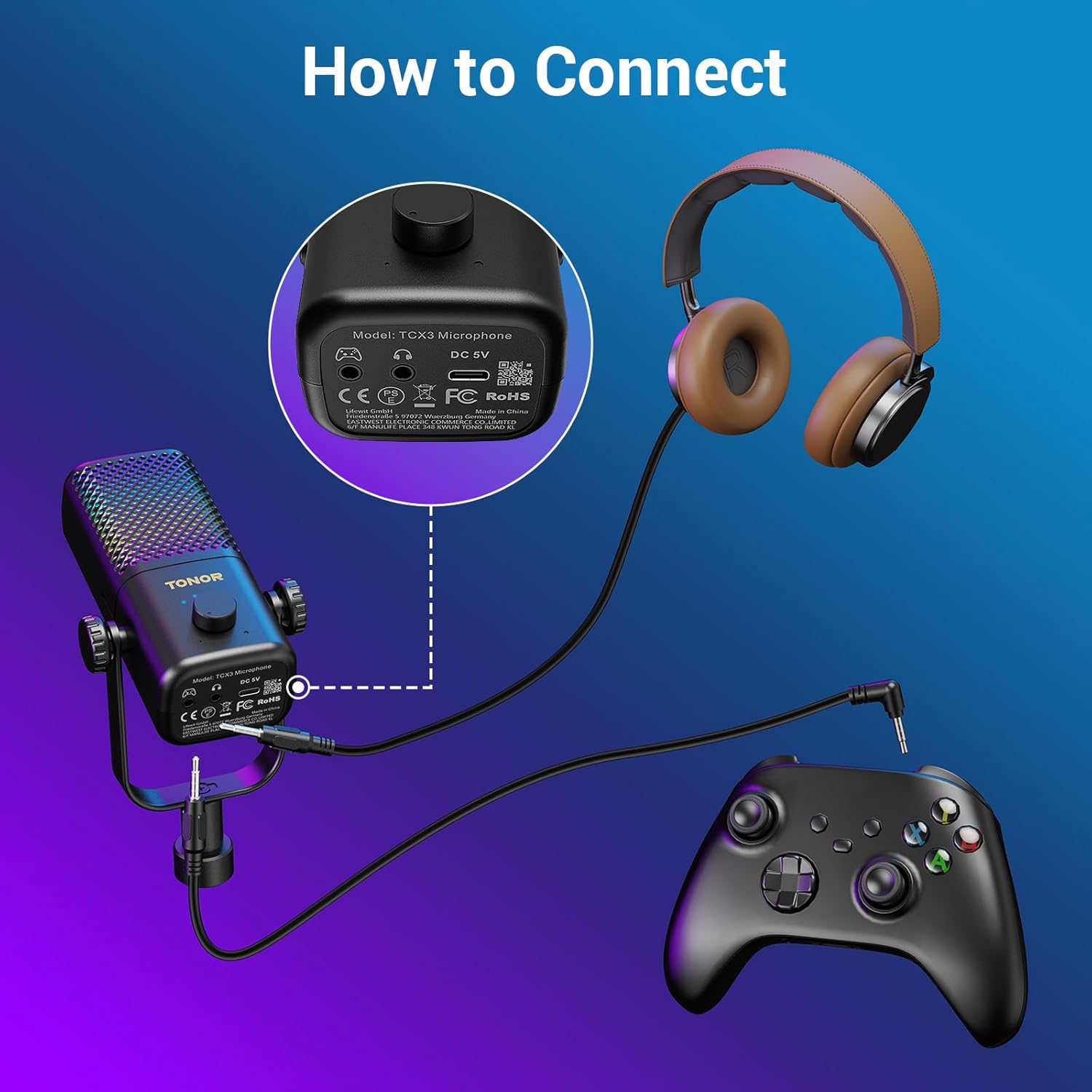
Figure 1: Connecting the TCX3+ microphone to an Xbox controller.
באַמערקונג: This microphone is not compatible with PC, phone, PS4/5, or Nintendo Switch.

פיגור 2: קאָמפּאַטאַביליטי איבערview for the TCX3+ microphone.
אַפּערייטינג ינסטראַקשאַנז
מאַכט אויף / אַוועק
- To power on the microphone, long press the main knob.
- To power off the microphone, long press the main knob again.
Volume/Gain Control
- Rotate the main knob to adjust the communication volume to your desired level.
שטום פֿונקציע
- Tap the top button of the microphone to instantly mute or unmute.

Figure 3: Volume and Mute controls on the TCX3+ microphone.
RGB ליגהטינג יפעקץ
Customize your gaming space with three dynamic RGB modes:
- To activate RGB modes, long press the mute button.
- To switch between modes, lightly press the mute button again.
- You can also turn off the lights for a pure auditory environment.

Figure 4: RGB Light Control options.
מאָניטאָרינג פֿונקציע
- To disable the monitoring function, long press the knob.

Figure 5: Multi-functional control for gain and monitoring.
באַטאַרייע לעבן & טשאַרדזשינג
The TCX3+ microphone is equipped with a long-lasting lithium battery:
- Up to 30 hours of use in non-light mode.
- Up to 10 hours of use in color light mode.
- Quick-charge for just 5 minutes provides an additional hour of gameplay.
וויכטיק באַמערקונג: The microphone cannot be used while charging.
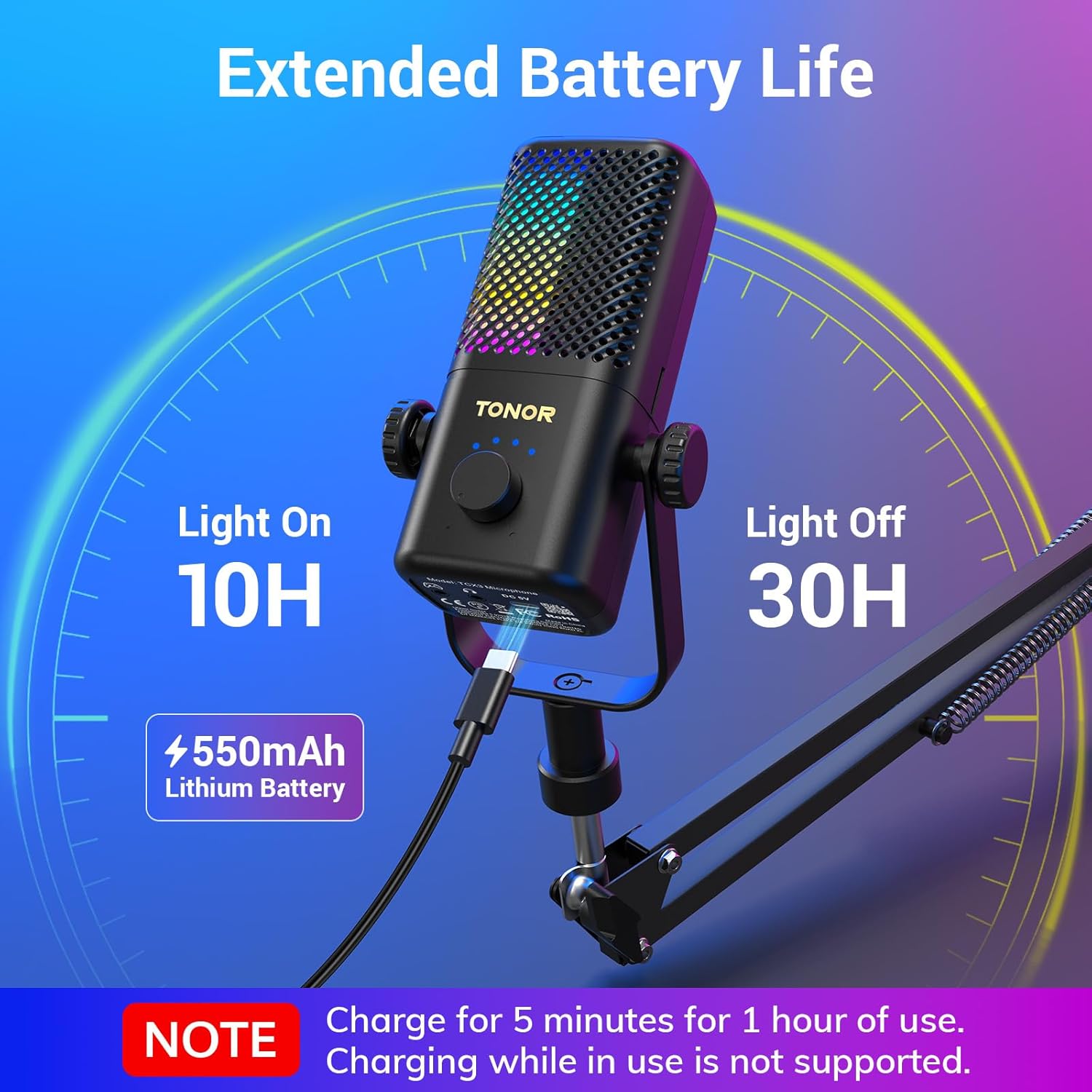
Figure 6: Battery life and quick charging features.
ספּעסאַפאַקיישאַנז
| שטריך | דעטאַל |
|---|---|
| מיקראָפאָן פאָרם פאַקטאָר | גאַנדזעק |
| נומער דימענשאַנז (L X W X H) | 16.14 X 5.67 X 5.04 אינטשעס |
| מאַכט מקור | DC |
| נומער פון באַטעריז | 1 ליטהיום יאָן באַטעריז פארלאנגט (אַרייַנגערעכנט) |
| מאַטעריאַל | Acrylonitrile Butadiene Styrene, Alloy Steel |
| סיגנאַל-צו-נויז ראַטיאָ | 40 דב |
| נומער פון טשאַנאַלז | 1 |
| פּונקט וואָג | 2.76 פונט |
| מאָדעל נאָמען | TCX3+ |
| קאַנעקטיוויטי טעכנאָלאָגיע | אַגזיליערי |
| קאַנעקטער טיפּ | 3.5 מם דזשאַק |
| ספּעציעלע שטריך | Stand, Volume control, Mute, RGB |
| קאַמפּאַטאַבאַל דעוויסעס | Gamepad (Xbox Controller) |
וישאַלט
To ensure the longevity and optimal performance of your TONOR Gaming Mic TCX3+, follow these maintenance guidelines:
- רייניקונג: Use a soft, dry cloth to clean the microphone and boom arm. Avoid using harsh chemicals or abrasive materials.
- סטאָרידזש: ווען ניט אין נוצן, קראָם די מיקראָפאָן אין אַ קיל, טרוקן אָרט אַוועק פון דירעקט זונשייַן און עקסטרעם טעמפּעראַטורעס.
- קאַבלע זאָרגן: Handle cables gently to prevent damage. Avoid sharp bends or kinks.
טראָובלעשאָאָטינג
If you encounter any issues with your TONOR Gaming Mic TCX3+, refer to the following common problems and solutions:
- קיין קול: Ensure the 3.5mm audio cable is securely connected to both the microphone and the Xbox controller. Check the volume settings on your Xbox and the microphone's gain knob.
- פאַרקרימט אַודיאָ: Reduce the microphone's gain level. Ensure you are not too close to the microphone. Check for any interference from other electronic devices.
- RGB לייץ נישט ארבעטן: Ensure the microphone is powered on. Long press the mute button to activate RGB modes, then lightly press to cycle through them.
- מיקראָפאָן לאָדט זיך נישט אויף: Ensure the USB-A to Type-C cable is properly connected to the microphone and a power source. Remember, the mic cannot be used while charging.
- קאַמפּאַטאַבילאַטי ישוז: Confirm that you are using the microphone with a compatible Xbox controller. The microphone is not compatible with PC, phone, PS4/5, or Nintendo Switch.
וואָראַנטי און שטיצן
TONOR products come with a standard warranty. For specific warranty details, repair requests, or after-sales service, please refer to the warranty card included in your product packaging or visit the official TONOR webזייטל. האַלט אייער קויף קוויטל ווי אַ באַווייַז פון קויפן.
אפיציעלע פּראָדוקט ווידעאָ
Video 1: TONOR Gaming Mic Compatible. This video demonstrates the features and compatibility of the TONOR Gaming Mic TCX3+.


