1. הקדמה
This manual provides essential information for the safe and efficient operation of your Bietrun 2000W Pure Sine Wave Inverter. Please read it thoroughly before installation and use, and retain it for future reference.
פּעקל אינהאַלט
באַשטעטיקן אַז אַלע זאכן זענען פאַראַן אין פּעקל:
- 1 x Bietrun 2000W Pure Sine Wave Inverter
- 2 x 10AWG 3-foot Battery Cables (Red and Black)
- 1 x Ground Cable
- 1 x רימאָוט קאָנטראָל
- 4 רענטגענ פוסעס
- 1 x Small Wrench
- מאַונטינג סקרוז

Image 1.1: The Bietrun 2000W Pure Sine Wave Inverter with its remote control, battery cables, ground cable, fuses, and wrench.
2. זיכערקייַט אינסטרוקציעס
Observe the following safety precautions to prevent injury and damage to the inverter or connected devices:
- עפֿנט נישט דעם אינווערטער גasinז. עס זענען נישטאָ קיין באַניצער-סערוויסאַבאַל טיילן אינעווייניק.
- Ensure proper ventilation around the inverter. Do not block cooling vents.
- האַלט דעם ינווערטער אַוועק פון וואַסער, נעץ, ברענענדיקע מאַטעריאַלן און דירעקט זונשייַן.
- פֿאַרבינדט דעם ינווערטער בלויז צו אַ 12V גלייכשטראָם מאַכט מקור. פֿאַרבינדן צו אַנדערע וואָלומעןtagעס קען פאַרשאַפן שעדיקן.
- Ensure correct polarity when connecting battery cables (Red to Positive, Black to Negative). Reverse polarity will cause damage.
- Always connect the ground cable to a proper earth ground.
- Do not exceed the inverter's rated continuous power output (2000W) or peak surge power (4000W).
- דיסקאָנעקט דעם ינווערטער פון דער באַטאַרייע איידער איר דורכפירן קיין וישאַלט אָדער רייניקונג.
אינטעגרירטע שוץ פֿעיִקייטן
The inverter includes multiple protection mechanisms:
- אָווערלאָאַד פּראַטעקשאַן
- נידעריק וואָלtagE פּראַטעקשאַן
- GFCI פּראַטעקשאַן
- אָווערוואָלtagE פּראַטעקשאַן
- אָוווערטעמפּעראַטור פּראַטעקשאַן
- קורץ קרייַז פּראַטעקשאַן
- פאַרקערט קאַנעקשאַן פּראַטעקשאַן
- איבער קראַנט שוץ

Image 2.1: Visual representation of the inverter's comprehensive safety protection system.
3. פּראָדוקט פֿעיִקייטן
The Bietrun 2000W Pure Sine Wave Inverter is designed for reliable power conversion with advanced features:
- פּורע סינע וואַווע רעזולטאַט: Provides high-quality AC power (THD < 3%) suitable for sensitive electronics, ensuring stable operation and minimizing damage risk.
- הויך עפעקטיווקייַט: Conversion efficiency exceeding 90% reduces energy loss.
- קעסיידערדיק מאַכט: Delivers 2000W continuous power with a 4000W peak surge capacity.
- ווערסאַטאַל רעזולטאַט: Features 4 AC outlets, 1 AC wiring terminal, 2 USB ports (5V/2.1A), and 1 Type-C port (5V/2.1A).
- HD LED אַרויסווייַז: Provides real-time status updates including input/output voltage, charging status, battery status, current power, and fault codes.
- ווייַט קאָנטראָל: Allows for convenient power management from a distance.
- שטיל אָפּעראַציע: High-efficiency cooling system with a low-noise fan maintains optimal operating temperature.
- סאָליד און דוראַבאַל פּלאַן: Encased in rugged Aluminum Alloy, with dimensions of 19 x 10 x 7 inches and a weight of 12.5 lbs.

Image 3.1: Key features of the Bietrun 2000W Pure Sine Wave Inverter.
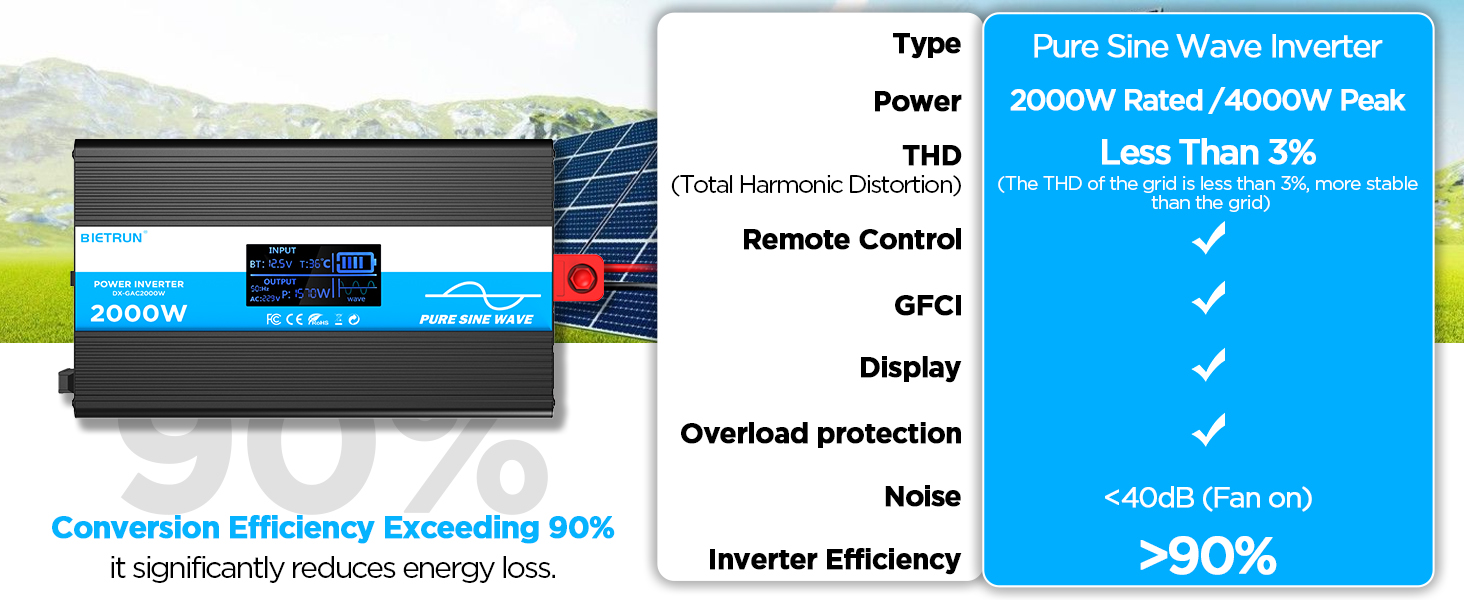
Image 3.2: Illustrates the stable, grid-like output of a pure sine wave inverter compared to unstable power from other types.
4. סעטאַפּ און ייַנמאָנטירונג
אָרט און מאַונטינג
Choose a dry, well-ventilated location away from direct sunlight, heat sources, and flammable materials. The inverter can be wall-mounted using the provided screws.
באַטערי קאַמפּאַטאַבילאַטי
The inverter is compatible with various 12V battery types, including LiFePO4, LI, SLD, GEL, FLD, and AGM batteries.

Image 4.1: The inverter supports multiple 12V battery chemistries.
קשר סטעפּס
- צוגרייטן קאַבלעס: Use the provided 10AWG 3-foot cables. Ensure all connections are secure.
- Connect Ground Cable: Attach the green/yellow ground cable to the inverter's ground terminal and to a reliable earth ground point.
- פֿאַרבינדן באַטעריע קאַבלען:
- פאַרבינדן די רויט battery cable to the inverter's positive (+) וואָקזאַל.
- פאַרבינדן די שוואַרץ battery cable to the inverter's נעגאַטיוו (-) וואָקזאַל.
- פאַרבינדן די אנדערע סוף פון די רויט cable to the battery's positive (+) וואָקזאַל.
- פאַרבינדן די אנדערע סוף פון די שוואַרץ cable to the battery's נעגאַטיוו (-) וואָקזאַל.
וויכטיק: Ensure correct polarity. A spark may occur during the final connection, which is normal due to capacitor charging.
- זיכער קאַנעקשאַנז: Double-check all connections for tightness to prevent loose contacts and overheating.
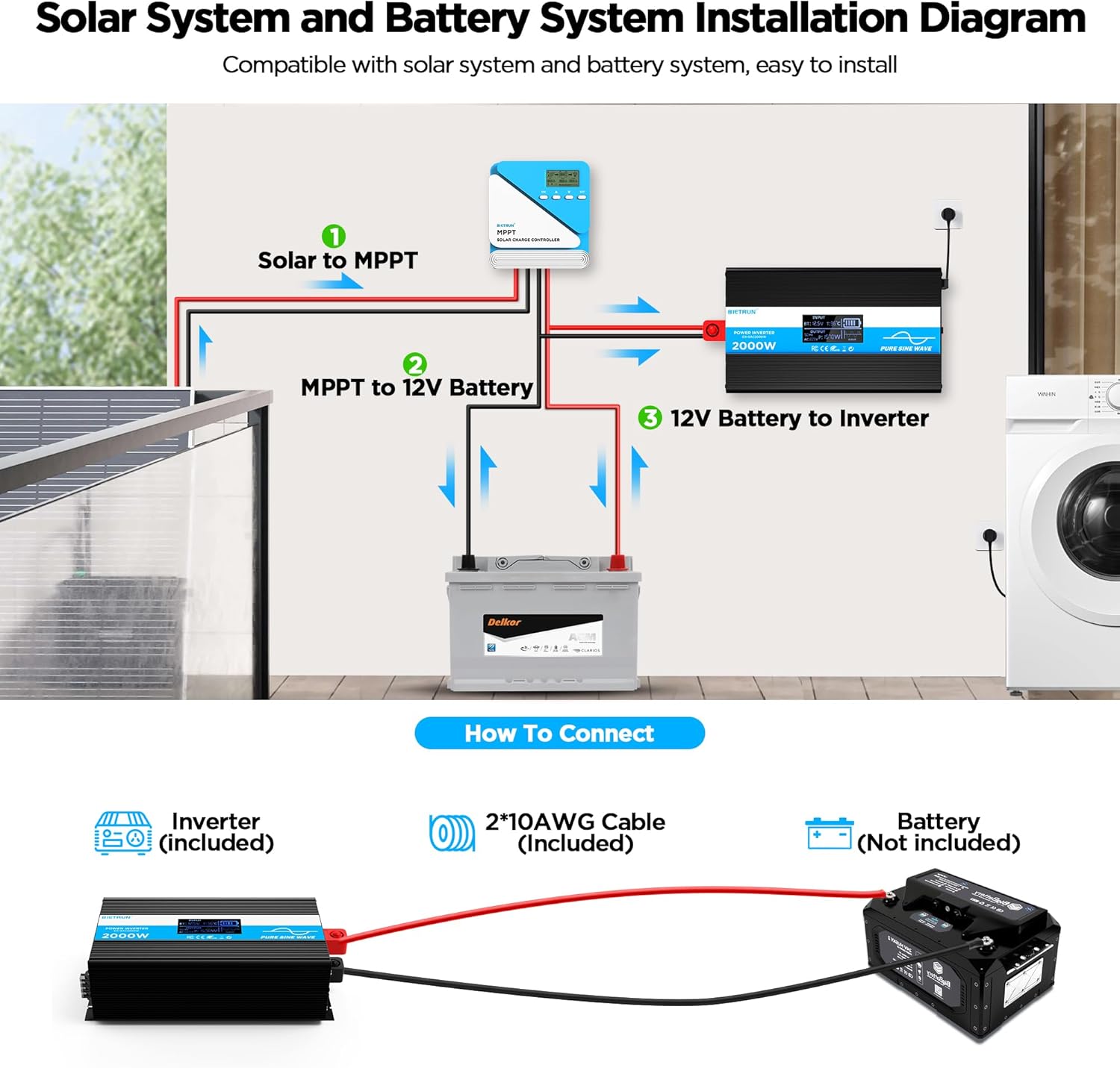
Image 4.2: Basic wiring diagram for connecting the inverter to a 12V battery.
Inverter Interface Overview

Image 4.3: Front panel layout with output interfaces and controls.

Image 4.4: Rear panel layout with battery input terminals and cooling fans.
5. אָפּעראַציע
מאַכט אויף / אַוועק
- מאַנואַל אָפּעראַציע: Flip the ON/OFF switch on the inverter to the 'ON' position to power on. Flip to 'OFF' to power off.
- רימאָוט קאָנטראָל אָפּעראַציע: Ensure the inverter's 'REMOTE' switch is in the 'ON' position. Use the ON/OFF buttons on the remote control to operate the inverter.
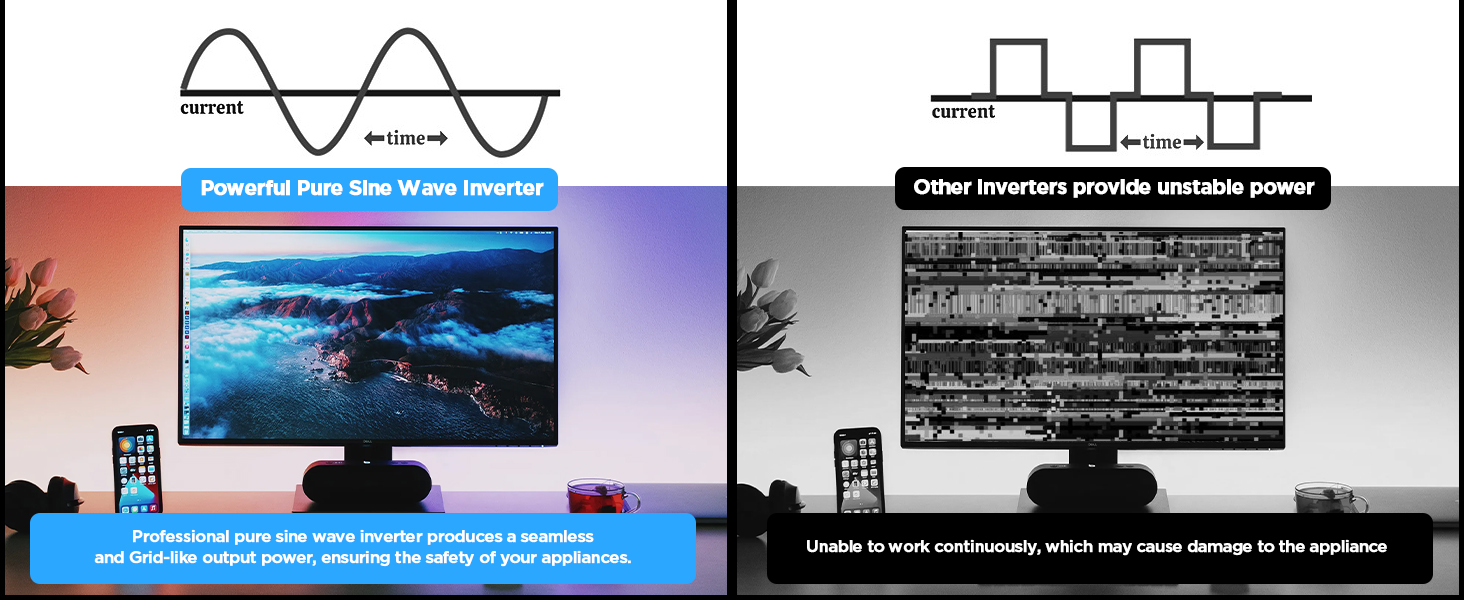
Image 5.1: The remote control allows for convenient operation.
קאַנעקטינג דעוויסעס
Once the inverter is powered on, plug your AC devices into the AC outlets or connect to the AC wiring terminal. USB devices can be connected to the USB or Type-C ports.
Ensure the total power consumption of all connected devices does not exceed 2000W continuously.
6. HD Display Information
The integrated HD display provides real-time operational data and fault indications:
- אַרייַנשרייַב: דיספּלייז באַטאַרייע וואָלtage (BT) and internal temperature (T).
- רעזולטאַט: Shows output frequency (Hz), AC voltage (AC), and current power consumption (P).
- באַטערי סטאַטוס: Visual indicator of battery charge level.
- וואַוועפאָרם: ווײַזט אויף ריין סינוס כוואַליע רעזולטאַט.
- שולד קאָודז: Numeric codes appear for specific issues, aiding in troubleshooting.

Image 6.1: The HD display provides comprehensive status updates and fault codes.
שולד קאָוד דיסקריפּשאַנז
- 2: נידעריק וואָלtage ווארענונג
- 3: אָווערוואָלtagE פּראַטעקשאַן
- 4: נידעריק וואָלtagE פּראַטעקשאַן
- 5: אָווערלאָאַד ווארענונג
- 6: אָווערלאָאַד פּראַטעקשאַן
- 7: אָוווערטעמפּעראַטור פּראַטעקשאַן
- 8: רעזולטאַט קורץ קרייַז פּראַטעקשאַן
7. טראָובלעשאָאָטינג
If the inverter is not functioning correctly, refer to the display for fault codes and consult the table below:
| פּראָבלעם | מעגלעך סיבה | לייזונג |
|---|---|---|
| דער אינווערטער טוט זיך נישט אן | לויזע באַטעריע פֿאַרבינדונגען, נידעריק באַטעריע וואָלומעןtagע, דעפעקטיווע פיוז. | Check battery cable connections. Recharge or replace battery. Check and replace fuses if blown. |
| No AC output (Fault Code 8) | רעזולטאַט קורץ קרייַז. | Disconnect all AC loads. Check for short circuits in connected devices or wiring. Reconnect one by one. |
| Overload warning/protection (Fault Code 5/6) | די פארבונדענע לאסט איז גרעסער ווי די קאַפּאַציטעט פון דעם אינווערטער. | Reduce the total power of connected devices. Disconnect high-power appliances. |
| נידעריק וואָלtage warning/protection (Fault Code 2/4) | באַטערי וואָלtage איז צו נידעריק. | Recharge the battery. Check battery health. |
| אָווערוואָלtage protection (Fault Code 3) | אַרייַנשרייַב וואָלtage איז צו הויך. | באַשטעטיקן באַטאַרייע וואָלtage is within the 12V range. Disconnect from charging source if overcharging. |
| Overtemperature protection (Fault Code 7) | Inverter is overheating. | Ensure adequate ventilation. Reduce load. Allow inverter to cool down. Clean fan vents if obstructed. |
If the fault persists after attempting the solutions, contact customer support.
8. ספּעסאַפאַקיישאַנז
| שטריך | באַשרייַבונג |
|---|---|
| מאָדעל נומער | DX-GAC2000W |
| קעסיידערדיק מאַכט | 2000 וו |
| שפּיץ סערדזש מאַכט | 4000 וו |
| אַרייַנשרייַב וואָלtage | DC 12V |
| רעזולטאַט חלקtage | אַק 110וו-120וו |
| רעזולטאַט וואַוועפאָרם | ריין סיין וואַווע |
| גאַנץ האַרמאָניק דיסטאָרשאַן (THD) | < 3% |
| קאַנווערזשאַן עפיקאַסי | > 90% |
| AC אַוטלעץ | 4 |
| וסב פּאָרץ | 2 (5V/2.1A) |
| טיפּ-C פּאָרט | 1 (5V/2.1A) |
| דימענסיעס (L X W X H) | 19 X 10 X 7 אינטשעס |
| פּונקט וואָג | 11.13 פונט |
| קאָאָלינג סיסטעם | צווייענדיקע קילער פאַנס |
9. וישאַלט
רעגולערע אויפהאלטונג גאראנטירט אפטימאלע פאָרשטעלונג און לאַנגלעבעדיקייט פון אייער ינווערטער:
- רייניקונג: Periodically clean the exterior of the inverter with a dry, soft cloth. Ensure cooling vents are free from dust and debris. Do not use liquid cleaners.
- קשר טשעק: Regularly inspect battery cable connections for tightness and corrosion. Clean any corrosion with a wire brush and baking soda solution.
- ווענטילאַטיאָן: Ensure the inverter always has adequate airflow. Do not operate in enclosed spaces without ventilation.
- Fuse Replacement: If a fuse blows, replace it only with a fuse of the same type and rating as specified in the package contents.
10. וואָראַנטי און שטיצן
For warranty information or technical support, please refer to the contact details provided with your purchase or visit the official Bietrun webזייטל. האַלט אייער קויף קוויטל ווי אַ באַווייַז פון קויפן.


