1. הקדמה
The ATTACK SHARK X68 HE is a high-performance 60% mechanical gaming keyboard designed for speed, precision, and customization. Featuring magnetic switches with Hall Effect triggering technology, it offers an 8000Hz polling rate for ultra-low latency and adjustable actuation points from 0.1mm to 3.4mm. Its robust design includes PBT keycaps and full RGB backlighting, making it suitable for both intense gaming and efficient typing across Windows and Mac systems.

Figure 1: Key features of the ATTACK SHARK X68 HE keyboard.
2. פּעקל אינהאַלט
ביטע באַשטעטיקן אַז אַלע זאכן זענען פאַראַן אין דיין פּעקל:
- ATTACK SHARK X68 HE Gaming Keyboard
- USB-C Coiled Cable
- באַניצער מאַנואַל
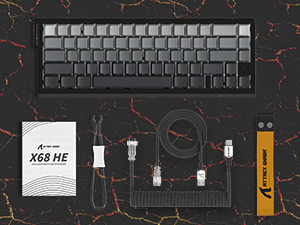
פיגור 2: איינגעשלאסענע זאכן אין דעם פּראָדוקט פּעקל.
3. סעטאַפּ
To set up your ATTACK SHARK X68 HE keyboard, follow these simple steps:
- פֿאַרבינדט דעם USB-C קאַבל: Locate the USB-C port on the back of the keyboard. Insert the smaller end of the provided coiled USB-C cable into this port.
- פאַרבינדן צו קאָמפּיוטער: Insert the standard USB-A end of the cable into an available USB port on your computer (PC or Mac).
- דרייווער ינסטאַלירונג: The keyboard is plug-and-play for basic functionality. For advanced customization, including DKS, macros, and RGB settings, download the dedicated web driver software from the official ATTACK SHARK webפּלאַץ.
- אָרט: Place the keyboard on a stable, flat surface. Consider using a wrist rest for ergonomic comfort during extended use.
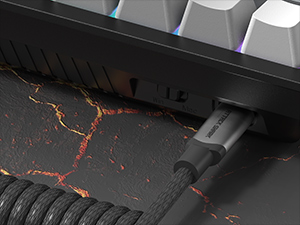
Figure 3: Connecting the USB-C cable to the keyboard.
4. אַפּערייטינג ינסטרוקטיאָנס
The ATTACK SHARK X68 HE is a 60% layout keyboard, meaning some functions are accessed via a function (Fn) layer. Familiarize yourself with the key legends and the Fn key combinations for full functionality.
יקערדיק שליסל פאַנגקשאַנז
- נאָרמאַל טייפּינג: All alphanumeric keys, symbols, and modifiers (Shift, Ctrl, Alt, Win/Cmd) function as standard.
- פונקציע (Fn) קנעפל: Press and hold the Fn key to access secondary functions printed on the front or side of certain keycaps. For example, arrow keys, F-keys, and multimedia controls are typically accessed this way.
Polling Rate and Latency
The keyboard operates at an 8000Hz polling rate, providing a rapid 0.125ms response time. This ensures minimal input lag for competitive gaming and fast-paced tasks.

Figure 4: 8000Hz Polling Rate for ultra-fast response.
5. קוסטאָמיזאַטיאָן
The ATTACK SHARK X68 HE offers extensive customization options through its web driver software and on-board controls.
Adjustable Actuation Points & Rapid Trigger
Utilizing magnetic switches, the keyboard allows you to customize the actuation point of each key from 0.1mm to 3.4mm with 0.01mm precision. This feature, combined with Rapid Trigger technology, enables faster resets and re-presses, providing a significant advantage in gaming by allowing dynamic keystrokes (DKS), Snap Tap, and Mod-Tap functions.

Figure 5: Adjustable Actuation Point mechanism.
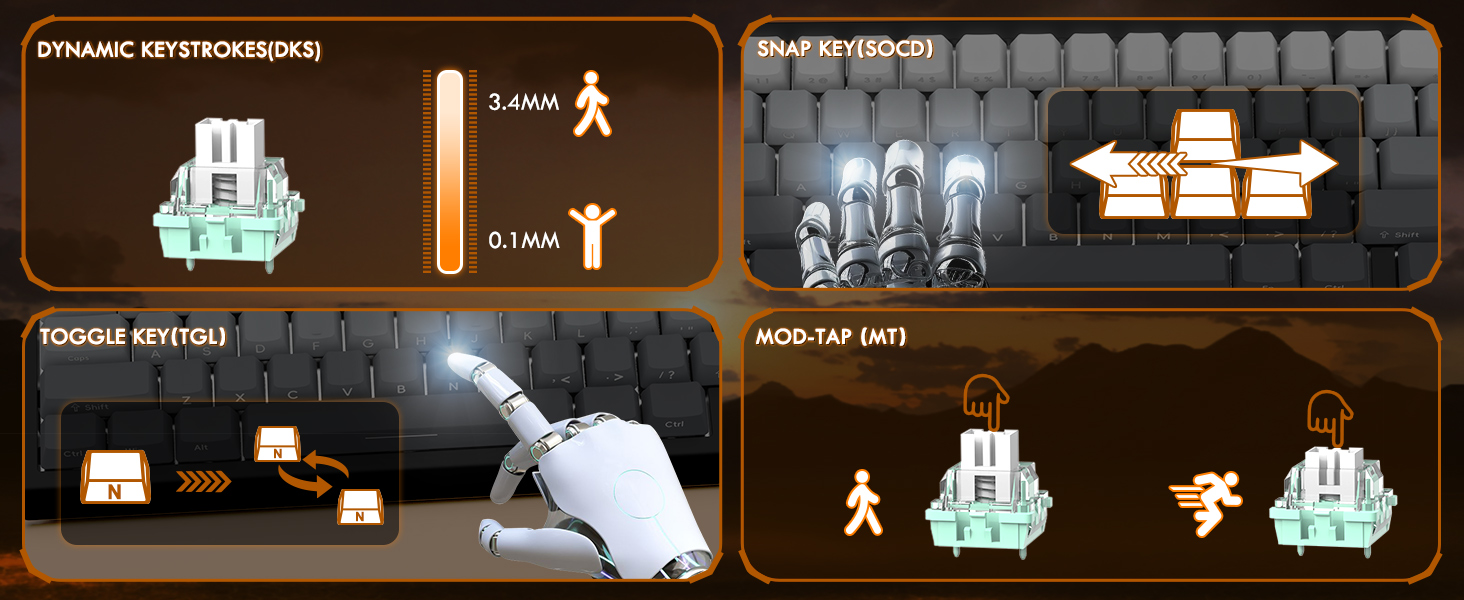
Figure 6: Explanation of DKS, Snap Tap, Toggle Key, and Mod-Tap features.
רגב באַקקליגהטינג
The keyboard features 16 million-color RGB lighting with over 20 preset light effects and multiple dynamic modes. You can adjust backlight brightness, speed, and switch between different lighting modes and colors using Fn key combinations or the web שאָפער ווייכווארג.
- Fn + Up/Down Arrow: Adjust Backlit Brightness.
- Fn + Left/Right Arrow: Adjust Backlit Speed.
- פֿן + \|: Switch Light Mode.
- Fn + Enter: Switch Light Color.
- Fn + באַקספּייס: ליכט אויף / אַוועק.

Figure 7: Full RGB light effects.
Web דרייווער ווייכווארג
The professional customized web software allows for comprehensive customization on both Windows and Mac. You can easily configure DKS, key combinations, macros, key remapping, and detailed RGB lighting settings. This enables a truly personalized experience for various user needs and gaming styles.

פיגורע 8: Web driver software interface for customization.
6. וישאַלט
געהעריגע אויפהאלטונג גאראנטירט די לאנגעוויטי און אפטימאלע פאָרשטעלונג פון אייער קלאַוויאַטור.
רייניקונג
- אַלגעמיינע רייניקונג: Use a soft, dry cloth to wipe down the keyboard surface regularly.
- באַזייַטיקונג פון שטויב: ניצט קאמפרעסט לופט צו באַזײַטיקן שטויב און שמוץ פון צווישן די קלאַוויאַטורן.
- טיף רייניקונג: For deeper cleaning, you may carefully remove the PBT keycaps using a keycap puller (not included unless specified in package contents). Clean the keycaps with mild soap and water, ensuring they are completely dry before reattaching.
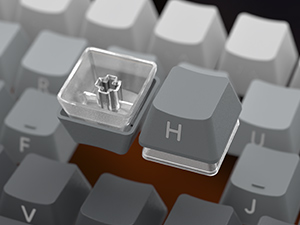
Figure 9: Keycap removal for cleaning.
סטאָרידזש
ווען נישט אין באַנוץ פֿאַר לענגערע פּעריאָדן, האַלט די קלאַוויאַטור אין אַ קיל, טרוקן אָרט אַוועק פון דירעקט זונשייַן און עקסטרעמע טעמפּעראַטורן.
7. טראָובלעשאָאָטינג
If you encounter issues with your ATTACK SHARK X68 HE keyboard, please refer to the following common solutions:
- קלאַוויאַטור ניט ריספּאַנדינג:
- זיכער מאַכן אַז דער USB-C קאַבל איז זיכער פארבונדן צו ביידע די קלאַוויאַטור און דעם קאָמפּיוטער.
- פרובירט צו קאנעקטן די קלאַוויאַטור צו אַן אַנדער USB פּאָרט אויף אייער קאָמפּיוטער.
- פּרובירט די קלאַוויאַטור אויף אַן אַנדער קאָמפּיוטער צו אויסשליסן סיסטעם-ספּעציפֿישע פּראָבלעמען.
- RGB לייץ נישט ארבעטן:
- Check if the RGB lighting is turned off using the Fn + Backspace shortcut.
- פאַרזיכערן די web driver software is installed and updated, and check lighting settings within the software.
- Verify that the keyboard is receiving sufficient power from the USB port.
- שליסלען רעגיסטרירן זיך נישט אדער טייפן זיך צוויי מאל:
- Clean under the affected keycaps to remove any debris.
- Adjust the actuation point settings in the web driver software. Sometimes, a very low actuation point can lead to unintended presses or misfires.
- זיכער מאַכן אַז די קלאַוויאַטור פירמווער איז אַרויף צו דאַטע דורך די web שאָפער ווייכווארג.
- Software Issues / Customization Not Applying:
- Ensure you are using the correct and latest version of the ATTACK SHARK web driver software for the X68 HE model.
- Run the software as an administrator (on Windows).
- Temporarily disable any antivirus or firewall software that might be interfering with the web שאָפער.
If the problem persists after trying these steps, please contact ATTACK SHARK customer support for further assistance.
8. ספּעסאַפאַקיישאַנז
| שטריך | באַשרייַבונג |
|---|---|
| מאָדעל | X68 HE |
| סאָרט | באַפאַלן שאַרק |
| קאַנעקטיוויטי טעכנאָלאָגיע | יו-עס-בי-סי (ווייערד) |
| קלאַוויאַטור באַשרייַבונג | מעטשאַניקאַל גיימינג קיבאָרד |
| באַשטימען טיפּ | Magnetic Switches (Hall Effect) |
| פּאָללינג קורס | 8000 הז |
| ענטפער צייט | 0.125ms |
| Actuation Point Range | 0.1mm to 3.4mm (0.01mm accuracy) |
| קייקאַפּס | PBT Keycaps (Contour Line 3.0 version) |
| באַקלייט | Full RGB (16 million colors, 20+ preset effects) |
| אַנטי-גהאָסטינג | פול שליסל אַנטי-גאָוסטינג |
| קאַמפּאַטאַבאַל דעוויסעס | Laptop, PC, Tablet (Windows/Mac) |
| פּראָדוקט דימענשאַנז | 14.25 X 6.18 X 0.79 אינטשעס |
| פּונקט וואָג | 2.01 פונט |
| נומער פון קיז | 66 |
9. וואָראַנטי און שטיצן
ATTACK SHARK products are designed for durability and performance. For specific warranty information, please refer to the warranty card included with your product or visit the official ATTACK SHARK website. If you require technical support, have questions about product functionality, or need assistance with troubleshooting, please contact ATTACK SHARK customer service through their official channels.
אָנליין שטיצן: Visit the ATTACK SHARK official webזייטל פֿאַר אָפֿט געשטעלטע פֿראַגעס, דרייווער דאַונלאָודז, און שטיצע קאָנטאַקט אינפֿאָרמאַציע.
E- בריוו שטיצן: זעט אייער פּראָדוקט פּאַקאַדזשינג אָדער די באַאַמטער webזייטל פֿאַר די קונה שטיצע בליצפּאָסט אַדרעס.


