הקדמה
This manual provides detailed instructions for the installation, operation, and maintenance of your GIGABYTE B860M GAMING X WIFI6E Motherboard. Please read this manual thoroughly before installing or using the product to ensure correct operation and to prevent damage.
The GIGABYTE B860M GAMING X WIFI6E Motherboard is designed to support Intel Core Ultra Series CPUs, featuring a robust power delivery system, DDR5 memory support, and advanced connectivity options including PCIe 5.0, M.2, 2.5GbE LAN, WIFI 6E, and USB 4.
סעטאַפּ גייד
1. אַנפּאַקינג און דורכקוק
Carefully remove the motherboard from its packaging. Inspect for any signs of damage during transit. Ensure all accessories listed in the package contents are present.
- GIGABYTE B860M GAMING X WIFI6E Motherboard
- סאַטאַ קאַבלע
- Wi-Fi אַנטענע
- באַניצער מאַנואַל (דעם דאָקומענט)
- דרייווער סי-די/יו-עס-בי (אויב אריינגערעכנט)
2. מוטערבאָרד אויסלייג איבערview
מאַכט זיך באַקאַנט מיט די שליסל קאָמפּאָנענטן און קאַנעקטאָרס אויף דער מוטערבאָרד.
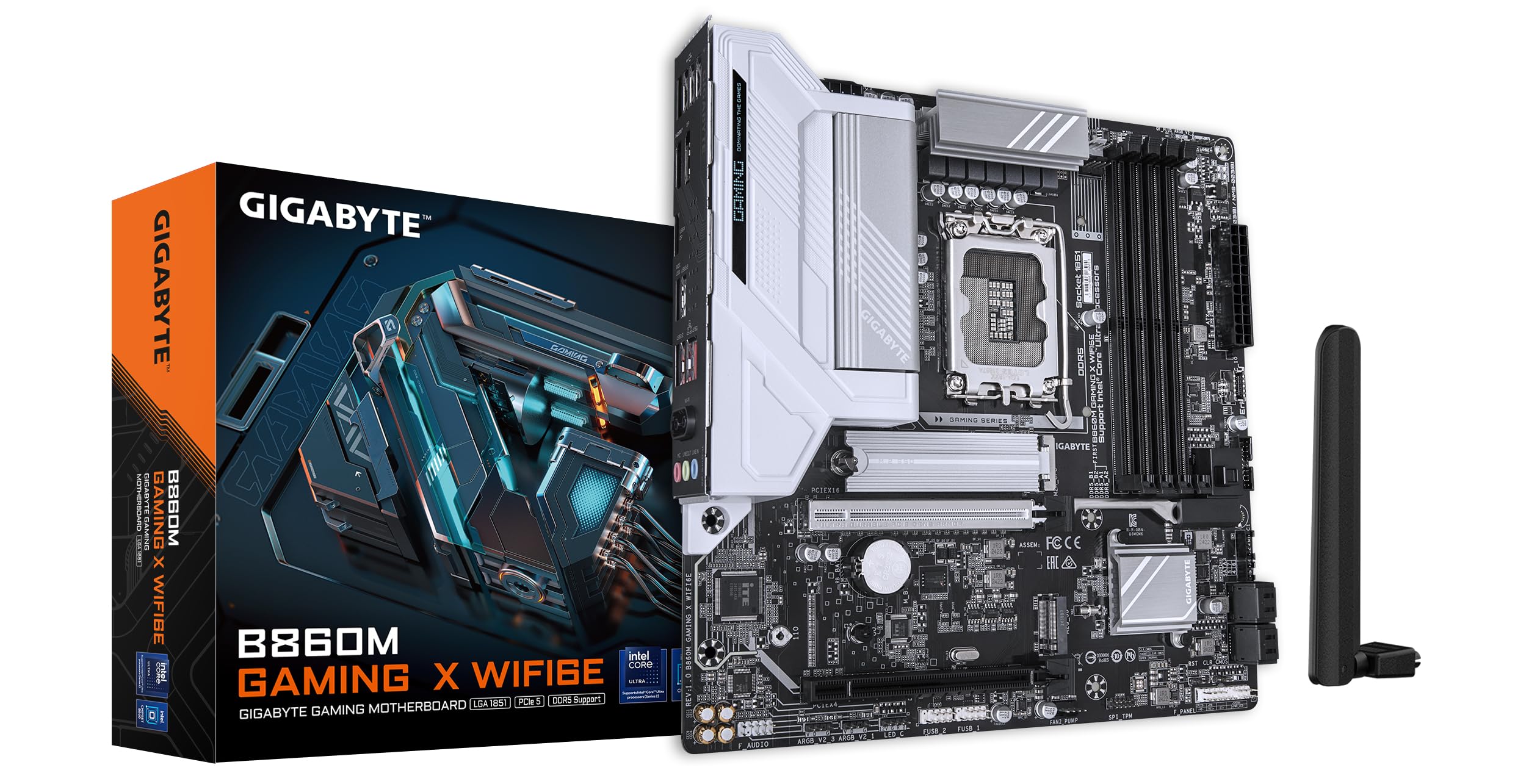
בילד: פון אויבן אַראָפּ view of the GIGABYTE B860M GAMING X WIFI6E Motherboard, highlighting the CPU socket, DDR5 DIMM slots, PCIe slots, and M.2 slots.

בילד: ווינקלדיק view of the GIGABYTE B860M GAMING X WIFI6E Motherboard, showing the heatsinks and overall board design.
3. קפּו אינסטאַלאַציע (LGA 1851)
- עפֿנט דעם CPU סאָקעט לעווער.
- גלייכט אויס די סי-פי-יו מיטן סאקעט, און מאכט זיכער אז די דרייעקיקע מארק אויפן סי-פי-יו פאסט צו דער מארק אויפן סאקעט.
- לייגט פֿאָרזיכטיק אַרײַן די סי־פּי־יו אין דער סאָקעט אָן עס צווינגען.
- פֿאַרמאַכט דעם סאָקעט הייבער צו פֿעסטשטעלן די סי-פּי-יו.
4. זכּרון (DDR5) אינסטאַלאַציע
- עפֿנט די קליפּס ביי ביידע עקן פֿון דעם DIMM סלאָט.
- גלייכט אויס דעם זכּרון מאָדול מיטן שפּאַלט, און מאַכט זיכער אַז דער קערב אויפן מאָדול פּאַסט צום שליסל אין שפּאַלט.
- דריק פעסט אַראָפּ אויף ביידע עקן פון די זכּרון מאָדול ביז די קליפס קליקן אין פּלאַץ.
- For dual-channel operation, install modules in the recommended slots (refer to motherboard diagram for specific slots).
5. סטאָרידזש מיטל ינסטאַלירונג (M.2 SSDs)
- געפינט די M.2 סלאָץ אויף די מאַדערבאָרד.
- Remove the M.2 heatsink and stand-off screw.
- שטעל אַרײַן דעם M.2 SSD אין דעם סלאָט אין אַ ווינקל.
- Push down the SSD and secure it with the stand-off screw.
- Reattach the M.2 heatsink for thermal protection.
6. גראַפיקס קאַרטל (PCIe 5.0) ינסטאַלירונג
- עפֿנט דעם לאַטש אויף דעם PCIe 5.0 x16 סלאָט.
- Align your graphics card with the slot and press down firmly until it is fully seated and the latch closes.
- באַפֿעסטיקן די גראַפיקס קאַרטל צו דיין פּיסי קעסטל מיט שרויפֿן.
7. פֿאַרבינדן פּעריפֿעראַלע דעוויסעס און מאַכט
Connect the 24-pin ATX power connector and the 8-pin CPU power connector from your power supply to the motherboard. Connect front panel headers (power button, reset, USB, audio) according to the motherboard manual diagram. Install the Wi-Fi antenna to the rear I/O panel.

Image: Rear I/O panel of the GIGABYTE B860M GAMING X WIFI6E Motherboard, showing USB ports, HDMI, DisplayPort, 2.5GbE LAN, Wi-Fi antenna connectors, and audio jacks.
אַפּערייטינג ינסטראַקשאַנז
1. ערשטער בוט און בייאָוס סעטאַפּ
After assembling your system, power it on. Press the DEL קנעפל בעת סטאַרטאַפּ צו אַרייַן די בייאָס/UEFI סעטאַפּ יוטילאַטי. דאָ קענט איר קאָנפיגורירן בוט סדר, סיסטעם צייט, און אַנדערע אַוואַנסירטע סעטטינגס.
2. דרייווער ינסטאַלירונג
Once the operating system is installed, install the necessary drivers for the motherboard components (chipset, LAN, Wi-Fi, audio, etc.). These can be found on the included driver disk/USB or downloaded from the official GIGABYTE webפּלאַץ.
3. Wi-Fi 6E Connectivity
Ensure the Wi-Fi antenna is securely connected. In your operating system's network settings, select the appropriate Wi-Fi 6E network and enter the password to connect.
4. קיו-פלאַש פּלוס
The Q-Flash Plus feature allows you to update the BIOS without installing a CPU, memory, or graphics card. Download the latest BIOS file פֿון גיגאַבייט website, rename it as instructed, and save it to a USB flash drive. Insert the USB drive into the designated Q-Flash Plus USB port on the rear I/O panel and press the Q-Flash Plus button.
וישאַלט
1. בייאָוס דערהייַנטיקונגען
טשעק רעגולער די גיגאבייט website for the latest BIOS updates. BIOS updates can improve system stability, performance, and add support for new hardware. Follow the instructions provided by GIGABYTE carefully when performing a BIOS update.
2. דרייווער דערהייַנטיקונגען
Keep your motherboard drivers updated to ensure optimal performance and compatibility. Download drivers only from the official GIGABYTE support page.
3. רייניקונג
רייניקן פּעריִאָדיש שטויב פֿון דער מאַדערבאָרד און קאָמפּאָנענטן מיט קאָמפּרעסירטער לופֿט. זיכער מאַכן אַז די סיסטעם איז אויסגעלאָשן און נישט אַרויסגעשטעקט פֿון דער פּלאַטע איידער איר רייניקט. פֿאַרמייַדן ניצן פֿליסיקייטן אָדער אַברייסיוו מאַטעריאַלן.
טראָובלעשאָאָטינג
1. סיסטעם גייט נישט אן
- קאָנטראָלירט אַז אַלע מאַכט קאַנעקשאַנז (24-פּין ATX, 8-פּין CPU) זענען זיכער איינגעזעצט.
- באַשטעטיקן אַז די מאַכט צושטעל אַרבעט ריכטיק.
- Ensure the front panel power button header is correctly connected.
2. קיין אַרויסווייַז רעזולטאַט
- Confirm the graphics card is properly seated in the PCIe slot and connected to the power supply (if required).
- Check that the monitor cable is securely connected to both the graphics card and the monitor.
- If using integrated graphics, ensure the monitor is connected to the motherboard's video output (HDMI/DisplayPort).
3. סיסטעם אינסטאביליטעט אדער קראַשיז
- Verify that all components (CPU, RAM, GPU) are correctly installed.
- Check for overheating issues; ensure CPU cooler and case fans are working.
- דערהייַנטיקט די בייאָס און אַלע דרייווערס צו די לעצטע ווערסיעס.
- טעסט זכּרון מאָדולן אינדיווידועל אויב איר כאָשעד ראַם פּראָבלעמען.
4. Wi-Fi קאָנעקטיוויטי פּראָבלעמען
- Ensure the Wi-Fi antenna is securely attached to the rear I/O panel.
- Check if Wi-Fi drivers are installed correctly.
- Verify that the Wi-Fi module is enabled in the BIOS.
ספּעסאַפאַקיישאַנז
| שטריך | דעטאַל |
|---|---|
| מאָדעל נאָמען | B860M GAMING X WIFI6E |
| קפּו סאָקקעט | LGA 1851 |
| קאָמפּאַטיבלע פּראַסעסאָרן | Intel Core Ultra Series CPUs |
| טשיפּסעט | Intel B860M |
| ראַם זכּרון טעכנאָלאָגיע | DDR5, Dual Channel (4 x DIMMs) |
| Max Memory Clock Speed | ביז 6400MHz (OC) |
| PCIe Slots | 1x PCIe 5.0 x16, 1x PCIe 4.0 |
| מ.2 סלאָץ | Multiple M.2 slots with Thermal Protection |
| לאַן | 2.5GbE לאַן |
| ווירעלעסס קאַנעקטיוויטי | Realtek 2x2 Wi-Fi 6E |
| וסב פּאָרץ | USB 4.0 Type-C, USB 3.2 Gen 2 Type-C, various USB 3.2/2.0 |
| VRM | Hybrid Digital 8+1+2+2 Phase 60A DrMOS |
| דימענשאַנז | 9.61 X 9.61 X 1.38 אינטשעס |
| פּונקט וואָג | 2.65 פונט |
וואָראַנטי און שטיצן
GIGABYTE motherboards come with a limited warranty. Please refer to the official GIGABYTE webזייטל אדער אייער פּראָדוקט פּאַקאַדזשינג פֿאַר ספּעציפֿישע וואָראַנטי טערמינען און באַדינגונגען וואָס זענען אָנווענדלעך צו אייער געגנט.
פֿאַר טעכנישע שטיצע, דרייווער דאַונלאָודז, בייאָס דערהייַנטיקונגען, און ווייטערדיקע פּראָדוקט אינפֿאָרמאַציע, ביטע באַזוכט די אָפֿיציעלע גיגאַבייט שטיצע webפּלאַץ:
https://www.gigabyte.com/support
When contacting support, please have your motherboard model name (B860M GAMING X WIFI6E) and serial number ready.


