1. הקדמה
This manual provides detailed instructions for the installation, operation, and maintenance of the Aiphone VM-RMVU Residential Fire Alarm Compatible Monitor Security Master Unit. Please read this manual thoroughly before using the product to ensure correct and safe operation. Keep this manual in a safe place for future reference.
2. סעטאַפּ און ייַנמאָנטירונג
The Aiphone VM-RMVU unit is designed for wall-mounted installation. Ensure proper power supply and network connections as described below.
2.1 פונדרויסנדיק View and Mounting
Refer to the diagram below for the external dimensions and mounting details. The unit requires a compatible wall box for installation.

בילד 1: פונדרויסנדיק view of the Aiphone VM-RMVU unit with detailed mounting dimensions. This diagram illustrates the physical layout, including the location of the power switch, sensors, microphone, speaker, and various indicator lights. It also shows the dimensions for wall-mounted installation.
2.2 וויירינג קאַנעקשאַנז
Follow the wiring diagram carefully to connect the master unit to power, entrance units, sub-units, and other security devices. The system supports both wired and wireless LAN connections.
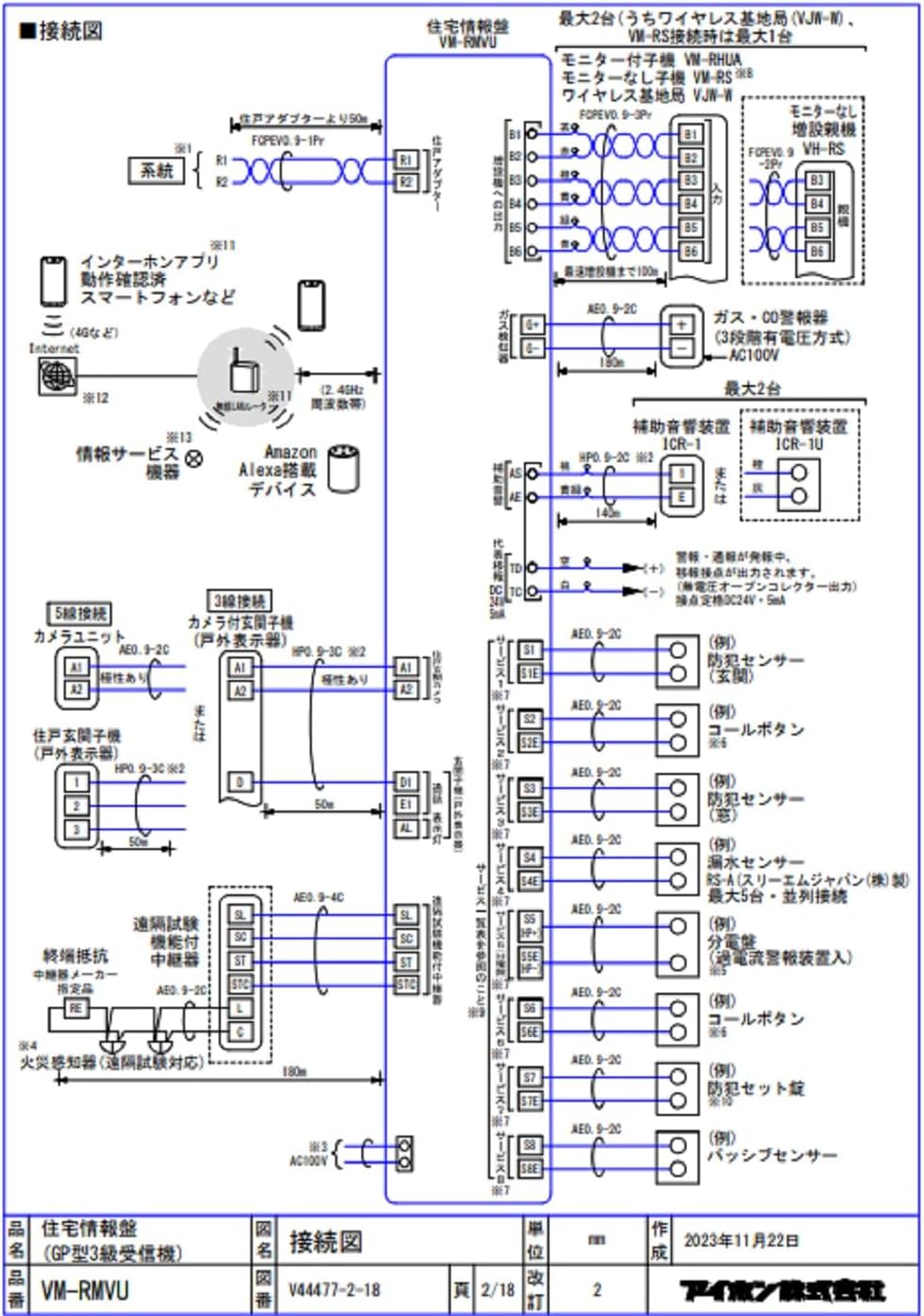
בילד 2: Comprehensive wiring diagram for the Aiphone VM-RMVU system. This diagram details connections for power, entrance units, monitor sub-units, wireless base stations, extension master units, gas/CO alarms, auxiliary alarm devices, call buttons, security set panels, and passive sensors. It also illustrates connections for internet apps, smartphones, and Amazon Alexa devices via wireless LAN.
מאַכט צושטעלן:
- Connect the unit to an AC100V, 50/60Hz power source.
- Ensure the power switch (located on the rear panel) is in the OFF position before connecting.
נעץ קאַנעקשאַן:
- The VM-RMVU supports wireless LAN (IEEE 802.11b/g/n) for connection to internet apps, smartphones, and Amazon Alexa devices.
- Refer to the separate wireless LAN setup guide for detailed configuration instructions.
3. אַפּערייטינג ינסטרוקטיאָנס
The Aiphone VM-RMVU features a 7-inch TFT LCD touch panel and intuitive buttons for various functions.

בילד 3: Front panel of the Aiphone VM-RMVU showing the 7-inch LCD display and control buttons. Key buttons include EMERGENCY, POWER indicator, TALK, OFF, OPEN, and ALARM STOP. The model name 'AIPHONE VM-RMVU' is also visible below the screen.
3.1 יקערדיק פאַנגקשאַנז
- מאַכט אויף / אַוועק: Press the power switch on the rear panel to turn the unit on or off. The green POWER indicator will illuminate when on.
- ענטפֿערן קאַללס: When an entrance unit calls, the display will show the caller. Press the רעדן button to initiate a simultaneous call. The green TALK indicator will light up.
- ענדיקן קאַללס: דרוק די OFF button to end a call. The red OFF indicator will light up briefly.
- עפן טירן: דריקן די בעשאַס אַ רוף עפענען button to unlock the connected door. The green OPEN indicator will light up.
3.2 זיכערהייט און אַלאַרם פונקציעס
- נויטפאַל קנעפּל: דרוק די נויטפאַל button in case of an emergency to trigger an alarm.
- Alarm Stop: If an alarm sounds (e.g., fire, gas, security alert), press the שרעק האַלטן button to silence it. The red ALARM STOP indicator will light up when an alarm is active.
- Security Display: The security display unit provides visual indicators for Fire, Gas, and Security Alert statuses.
3.3 טאָוטש פּאַנעל אָפּעראַציע
The 7-inch TFT LCD is a touch panel. Navigate through menus and settings by tapping on the screen icons and options. Refer to the on-screen guide for specific menu functions.
4. וישאַלט
Regular maintenance ensures the longevity and optimal performance of your Aiphone VM-RMVU unit.
- רייניקונג: Use a soft, dry cloth to clean the unit's surface and display. Do not use abrasive cleaners or solvents.
- דורכקוק: Periodically check all connections for security and ensure no cables are damaged.
- ווייכווארג דערהייַנטיקונגען: קוק די פאַבריקאַנט ס website for any available firmware updates to ensure your unit has the latest features and security enhancements.
5. טראָובלעשאָאָטינג
If you encounter issues with your Aiphone VM-RMVU unit, refer to the following common troubleshooting steps:
- קיין מאַכט: Ensure the power cable is securely connected and the power switch on the rear panel is ON. Check your circuit breaker.
- קיין ווידעא/אודיאָ: Verify all wiring connections to entrance units and sub-units. Ensure network connectivity for wireless functions.
- אַלאַרם פּראָבלעם: Check the status indicators on the security display unit. If the issue persists, contact customer support.
- טאָוטש פּאַנעל רעאַגירט נישט: Try restarting the unit by turning the power off and on. If the problem continues, contact support.
For more complex issues, please consult a qualified technician or Aiphone customer support.
6. ספּעסאַפאַקיישאַנז
| שטריך | באַשרייַבונג |
|---|---|
| סאָרט | אייפון |
| מאָדעל נומער | VM-RMVU |
| מאַכט וואָלtage | AC100V: 50/60Hz |
| מאַכט קאַנסאַמשאַן | Standby 6W: Max 17W |
| רופן מעטאָד | Simultaneous Call Method |
| ווייַז | 7-inch TFT LCD Display (Touch Panel) |
| נומער פון פּיקסעלס | בעערעך. 1.15 מיליאָן בילדצעלן |
| ווירעלעסס לאַן | IEEE 802.11b/g/n (2.4GHz) |
| פּראָדוקט דימענשאַנז (LxWxH) | 18 X 22 X 4.5 סענטימעטער |
| וואָג | בעערעך. 880 ג |
| אַפּערייטינג אַמביאַנט טעמפּעראַטור | 0 צו 40 °C |
| אַרייַנגערעכנט קאַמפּאָונאַנץ | הויפּט אַפּאַראַט |
7. וואָראַנטי און שטיצן
For warranty information, technical support, or service inquiries, please refer to the official Aiphone website or contact your local Aiphone distributor. Keep your purchase receipt as proof of purchase.
אייפאָון אפיציעל Webפּלאַץ: www.aiphone.com


