1. פּראָדוקט איבערview
The Aigo Darkflash DV240S-240mm AIO ARGB Liquid CPU Cooler is designed to provide efficient cooling for your CPU while offering customizable aesthetic options. It features a magnetic LCD display, addressable RGB (ARGB) lighting, and high-performance PWM fans.

Figure 1: Darkflash DV240S AIO Liquid CPU Cooler. This image shows the complete cooler unit, including the radiator with two ARGB fans, the pump with an integrated square LCD display, and the connecting tubes.
שליסל פֿעיִקייטן:
- Magnetic Customizable LCD Display: 320x320px, 450 nits brightness, 24-bit true color, supports personalized images and animations (JPG, PNG, GIF, MP4).
- High-Performance ARGB PWM Fans: Two 120mm fans with infinity mirror design, up to 1800 RPM, 51 CFM airflow, rifle bearings, and low noise operation (max 32 dBA).
- Broad Platform Compatibility: Supports Intel LGA 1700, 1200, 115X, 2066 and AMD AM5, AM4 sockets.
- Efficient Thermal Design: Copper-based water block for superior thermal conductivity.
- 5V ARGB Sync: Compatible with motherboard ARGB software for synchronized lighting effects.
2. ינסטאַללאַטיאָן גייד
Before beginning installation, ensure your system is powered off and disconnected from the power source. Refer to your motherboard manual for specific CPU cooler mounting instructions.
2.1. Prepare Your Motherboard
- Install the appropriate backplate and mounting brackets for your CPU socket (Intel or AMD).
- Apply thermal paste to the CPU if not pre-applied on the cold plate.
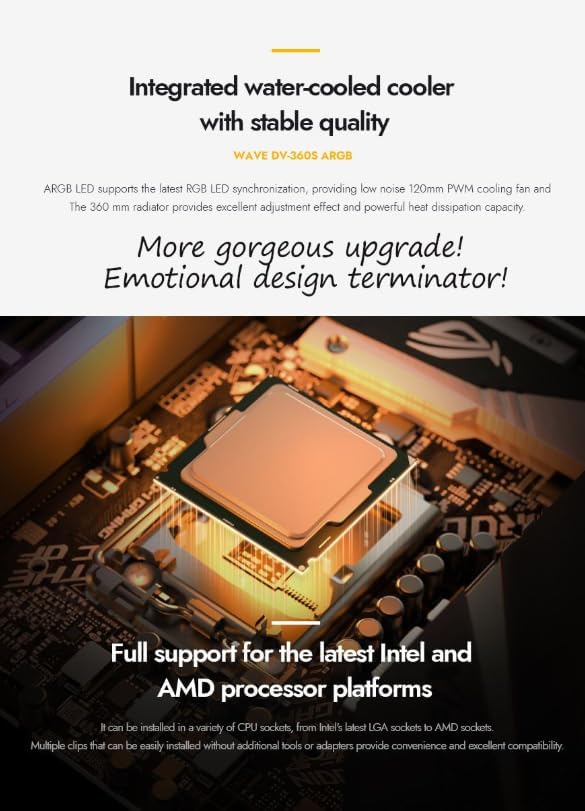
Figure 2: CPU Socket Preparation. This image illustrates a CPU socket on a motherboard with the necessary mounting hardware for the cooler already in place, ready for the water block installation.
2.2. מאָנטירן דעם ראַדיאַטאָר און פאַנס
- Attach the 120mm ARGB PWM fans to the radiator using the provided screws. Ensure the fan airflow direction is appropriate for your case's cooling configuration.
- Mount the radiator assembly to an available fan mount location in your PC case (e.g., top, front, or rear).

Figure 3: ARGB Fans. This image provides a close-up view of the cooler's 120mm ARGB fans, highlighting their infinity mirror design and displaying key specifications like speed, noise level, air volume, and bearing type.
2.3. Install the Water Block/Pump
- Carefully place the water block onto the CPU, aligning it with the mounting holes.
- Secure the water block using the provided screws, tightening them in a cross pattern until snug.

Figure 4: Water Block Installation. This image shows the water block, featuring its magnetic modular design and integrated LCD display, mounted onto a CPU on a motherboard.
2.4. קאָננעקט קאַבלעס
- Connect the pump power cable to the CPU_FAN or AIO_PUMP header on your motherboard.
- Connect the fan power cables to available fan headers on your motherboard.
- Connect the 5V ARGB cable from the cooler to a 5V ADD_HEADER אויף דיין מוטערבאָרד.
- וויכטיק אָנזאָג: Do not connect the ARGB cable to a 12V RGB header. Connecting to a 12V header may damage the product and void the warranty. The ARGB LED operates at 5V.

Figure 5: ARGB Sync Connection. This image highlights the correct 5V ARGB header (ADD_HEADER) on a motherboard for connecting the cooler's lighting, and explicitly warns against using the 12V RGB header.
- Connect the USB cable from the pump to an available internal USB 2.0 header on your motherboard for LCD display control.
3. אַפּערייטינג ינסטרוקטיאָנס
3.1. LCD Display Customization
The DV240S features a magnetic LCD display that can be customized using dedicated software. This software allows you to:
- Upload personalized images (JPG, PNG) and animations (GIF, MP4).
- Adjust screen brightness (450 nits peak brightness).
- Rotate the display content (supports 270° installation).
- Monitor system parameters.
Download the latest software from the official Aigo/Darkflash website. Install and launch the software to access customization options.
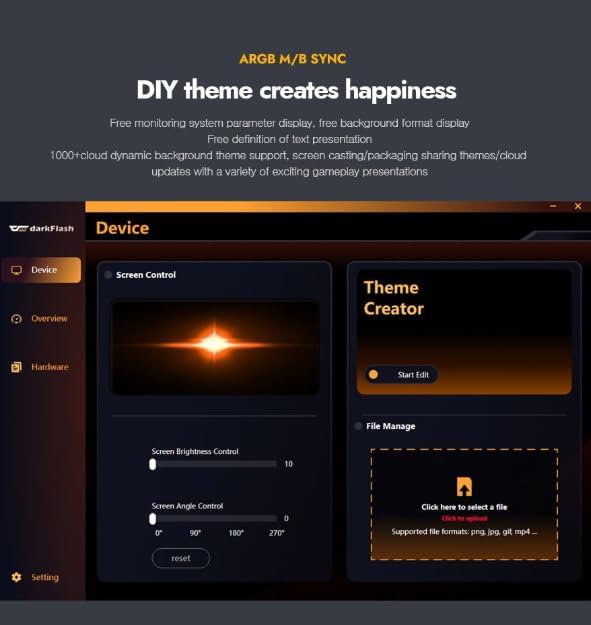
Figure 6: LCD Customization Software. This image displays the user interface of the Darkflash software, showing options for screen control, brightness adjustment, screen angle rotation, and file management for uploading custom images or animations to the LCD display.

Figure 7: Customizable LCD Display. This image provides a detailed view of the cooler's pump head, highlighting the square IPS display screen with a personalized image, and mentioning its magnetic attachment and 270° installation support.
3.2. ARGB לייטינג קאנטראל
The 5V ARGB lighting can be controlled via your motherboard's ARGB synchronization software (e.g., ASUS Aura Sync, MSI Mystic Light Sync, GIGABYTE RGB Fusion, ASRock Polychrome Sync). Refer to your motherboard's manual for instructions on using its ARGB software.
3.3. PWM Fan Control
The fans support PWM (Pulse Width Modulation) control, allowing your motherboard to automatically adjust fan speeds based on CPU temperature. This ensures optimal cooling performance and reduced noise levels when the system is under light load. Configure fan curves in your motherboard's BIOS/UEFI settings or through compatible software.
4. וישאַלט
Regular maintenance helps ensure optimal performance and longevity of your AIO cooler.
- שטויב רייניקונג: Periodically clean the radiator fins and fan blades with compressed air to remove dust buildup. Dust can impede airflow and reduce cooling efficiency.
- טשעק קאַנעקשאַנז: Ensure all cables (power, ARGB, USB) are securely connected to the motherboard and cooler components.
- דורכקוקן די רערן: Occasionally check the tubing for any signs of kinks, leaks, or damage.
5. טראָובלעשאָאָטינג
If you encounter issues with your Darkflash DV240S cooler, refer to the following common troubleshooting steps:
- No Power/Fans Not Spinning:
- Verify that the pump and fan power cables are correctly connected to the motherboard headers.
- Check BIOS/UEFI settings to ensure fan headers are enabled and configured correctly.
- No ARGB Lighting:
- Ensure the 5V ARGB cable is securely connected to a 5V ADD_HEADER אויף דיין מוטערבאָרד.
- Reiterate: Do not connect to a 12V RGB header.
- Check your motherboard's ARGB software for lighting control and ensure it recognizes the device.
- LCD Display Not Working/Blank:
- Verify the internal USB 2.0 cable is securely connected to both the pump and the motherboard.
- Ensure the Darkflash customization software is installed and running.
- Check device manager to see if the USB device is recognized.
- שלעכטע קילונג פאָרשטעלונג:
- Confirm the water block is securely mounted to the CPU and thermal paste is properly applied.
- Check for dust buildup on the radiator and clean if necessary.
- Ensure fans are spinning at appropriate speeds (check BIOS/UEFI or monitoring software).
- Verify correct fan orientation for optimal airflow within your case.
6. ספּעסאַפאַקיישאַנז
| שטריך | באַשרייַבונג |
|---|---|
| מאָדעל | דווקסנומקסס |
| קולער טיפּ | All-in-One (AIO) Liquid CPU Cooler |
| ראַדיאַטאָר גרייס | 240 מם |
| פאָכער גרייס | 2 x 120mm ARGB PWM Fans |
| פאַן ספּיד | אַרויף צו 1800 רפּם |
| לופטפלאָוו | Up to 51 CFM (per fan) |
| ראַש מדרגה | מאַקסימום 32 דבאַ |
| שייַכעס טיפּ | ביקס שייַכעס |
| Water Block Material | קופּער |
| לקד ווייַז | 320x320px, 450 nits brightness, 24-bit true color, magnetic attachment, 270° rotation support |
| ARGB סינק | 5V אַדרעסאַבאַל RGB |
| קפּו סאָקקעט קאַמפּאַטאַבילאַטי | Intel: LGA 1700, 1200, 115X, 2066 אַמד: AM5, AM4 |
| Overall Material | Acrylonitrile Butadiene Styrene, Aluminum, Copper |
7. וואָראַנטי און שטיצן
For warranty information and technical support, please contact your retailer or the manufacturer, Aigo/Darkflash, directly. Specific warranty terms may vary by region and retailer.
Extended warranty options may be available from third-party providers. Please consult your purchase documentation for details.
Manufacturer: Aigo


