1. הקדמה
א דאנק פארן קויפןasing the Artec Kids Mini Piano. This electronic keyboard is designed to provide an engaging and educational musical experience for children aged 6 and above. Featuring a 37-key keyboard, various instrument tones, rhythm patterns, and interactive play modes, it encourages creativity and musical exploration. Please read this manual thoroughly before use to ensure proper operation and to maximize your enjoyment of the product.
2. זיכערקייַט אינפֿאָרמאַציע
ווארענונג: נישט פּאַסיק פֿאַר קינדער אונטער 3 יאָר צוליב קליינע טיילן. דערשטיקונגס-געפאַר.
- מאַכט מקור: This device operates on 4 AAA batteries or via a USB Type-A to DC cable.
- Voltage: דק 5 וו.
- מאַכט קאַנסאַמשאַן: 2.5W.
- איצטיקע קאַנסאַמשאַן: קסנומקסאַ.
- שטענדיק קאָנטראָלירן קינדער בעשאַס שפּיל.
- צי ניט מישן אַלט און נייַ באַטעריז. דו זאלסט נישט מישן אַלקאַליין, נאָרמאַל (טשאַד-צינק), אָדער קריקאָנלאָדלעך (ניקעל-קאַדמיום) באַטעריז.
- Remove batteries if the product is not used for a long period.
- האַלטן די פּראָדוקט אַוועק פון וואַסער און נעץ.
- דו זאלסט נישט פּרווון צו דיסאַסעמבאַל אָדער מאָדיפיצירן די פּראָדוקט.
3. פּראָדוקט פֿעיִקייטן
- 37-Key Keyboard: Allows for two-handed play.
- באַנד אַדזשאַסטמאַנט: 16 levels of volume control.
- Automatic Performance (8 Songs): Includes popular tunes like "Twinkle Twinkle Little Star" and "Canon."
- One-Key-One-Song Mode: Play along with accompaniment by pressing any key.
- Percussion & Animal Sounds (4 Types Each): Switch between various percussion and animal sounds.
- Instrument Tones (8 Types): Piano, Xylophone, Organ, Guitar, Violin, Harp, Trumpet, Clarinet.
- Rhythm Patterns (16 Types): Rock, Reggae, Samba, and more.
- רעקאָרדינג און פּלייבּעק: Record up to 150 notes and play them back.
- מאַכט אָפּציעס: Operates on 4 AAA batteries or via USB power.
- Key Stickers: Includes stickers to label white keys for easy learning.

Figure 1: Artec Kids Mini Piano in Mint Green, highlighting its 37-key design and various functions for children aged 6 and up.
4. סעטאַפּ
4.1 מאַכט צושטעלן
The Kids Mini Piano can be powered by either 4 AAA batteries (not included) or a USB Type-A to DC cable (included).
4.1.1 באַטאַרייע ייַנמאָנטירונג
- Locate the battery compartment on the underside of the piano.
- ניצן אַ שרויפנ - ציער צו עפענען די באַטאַרייע אָפּטייל דעקן.
- אַרײַנשטעלן 4 נײַע AAA באַטעריעס, און זיכער מאַכן אַז די פּאָלאַריטעט איז ריכטיק (+/-).
- נאָענט די דעקן פון די באַטאַרייע אָפּטייל און באַוואָרענען עס מיט די שרויף.
4.1.2 USB Power Connection
Connect the included USB Type-A to DC cable to the DC 5V input port on the piano. Plug the USB Type-A end into a compatible USB power adapter (not included) or a computer USB port.

Figure 2: The Kids Mini Piano can be powered by 4 AAA batteries or a USB cable, offering flexibility for play at home or on the go.
4.2 Attaching Key Stickers
The piano comes with stickers to help beginners identify notes on the white keys. Carefully peel and apply these stickers to the corresponding white keys as shown in the diagram.
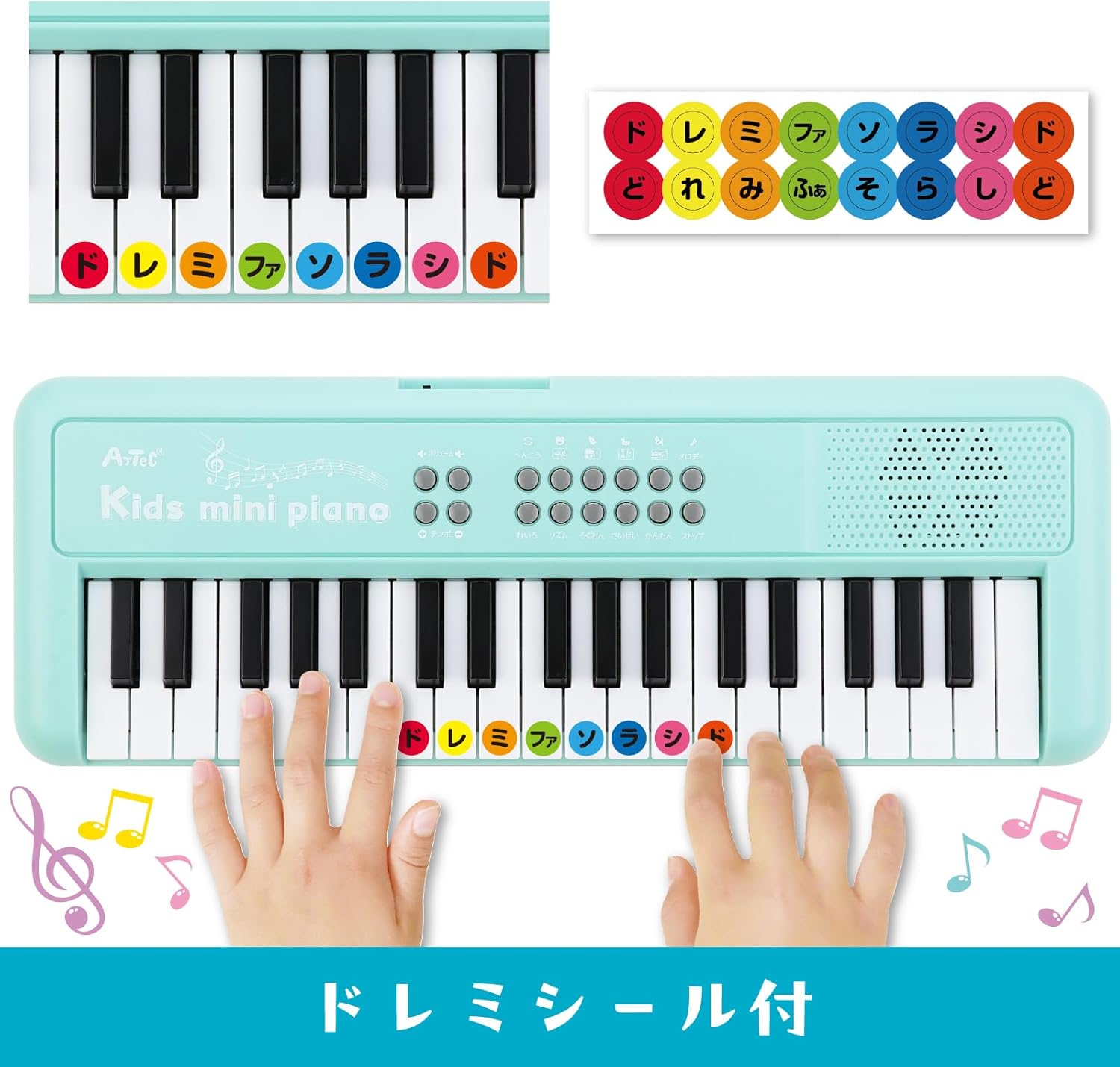
Figure 3: Apply the included 'Do Re Mi' stickers to the white keys for easy note identification and learning.
4.3 Music Stand Assembly
The detachable music stand can be inserted into the designated slot above the keyboard to hold sheet music or the included key stickers guide.
Video 1: This video demonstrates the assembly of the music stand and the application of key stickers on a similar electronic piano. Note that the piano color in the video may vary from the Mint Green product.
5. אַפּערייטינג ינסטרוקטיאָנס

פיגורע 4: דעטאַילעד view of the control panel, showing buttons for various functions including volume, tempo, melody, tone, rhythm, recording, and playback.
5.1 מאַכט אויף / אַוועק
Locate the power button (usually on the top left or right of the control panel) and press it to turn the piano ON or OFF.
5.2 באַנד אַדזשאַסטמאַנט
Use the volume control buttons (often labeled with '+' and '-') to adjust the sound level. There are 16 levels of volume adjustment available.
5.3 פּלייַינג מאָדעס
5.3.1 פריי שפּיל מאָדע
In this mode, you can play the keys freely to create your own melodies. This is the default mode when the piano is turned on.
5.3.2 One-Key-One-Song Mode
Select a demo song, then press the 'One-Key-One-Song' button. The accompaniment will play, and you can press any key to play the melody notes in time with the music, making it easy to perform songs.
5.4 Instrument Tones (8 Types)
Press the 'Tone' button repeatedly to cycle through the 8 available instrument tones: Piano, Xylophone, Organ, Guitar, Violin, Harp, Trumpet, and Clarinet. Each press will change the sound of the keyboard.
5.5 Rhythm Patterns (16 Types)
Press the 'Rhythm' button repeatedly to select from 16 different rhythm patterns, including Rock, Reggae, and Samba. The selected rhythm will play as background music.
5.6 Percussion & Animal Sounds (4 Types Each)
Dedicated buttons allow you to switch between 4 types of percussion sounds and 4 types of animal sounds. These can be played along with your melodies or rhythms.
5.7 רעקאָרדינג און ווידערשפּיל
- Press the 'Record' button to start recording your performance. The indicator light will illuminate.
- Play your desired melody (up to 150 notes).
- Press the 'Record' button again to stop recording.
- Press the 'Playback' button to listen to your recorded melody.
5.8 Demo Songs (8 Songs)
Press the 'Demo' button to play through the 8 pre-programmed demo songs. These include popular tunes like "Twinkle Twinkle Little Star," "Frère Jacques," "Mary Had a Little Lamb," "Happy Farmer," "Chouchou," "Für Elise," "Turkish March," and "Canon."
Video 2: This video demonstrates various functions of a multi-functional 37-key children's piano, including different instrument sounds, rhythms, and demo songs. The piano color in the video is pink.
Video 3: This video showcases the features of a 37-key electronic piano, including playing different notes and demonstrating various sounds. The piano color in the video is white.
6. וישאַלט
- Clean the piano with a soft, dry cloth. Do not use abrasive cleaners or solvents.
- Avoid exposing the piano to direct sunlight, high temperatures, or humidity.
- Store the piano in a cool, dry place when not in use.
- If the piano is not functioning correctly, first check the batteries or USB connection.
7. טראָובלעשאָאָטינג
| פּראָבלעם | מעגלעך סיבה | לייזונג |
|---|---|---|
| קיין קלאַנג אָדער נידעריקע וואָלומען. | Low batteries, incorrect power connection, volume too low. | Replace batteries, ensure USB cable is securely connected, increase volume. |
| שליסלען רעאגירן נישט. | שטראָם פּראָבלעם, אינערלעכע דורכפאַל. | קאָנטראָלירט די מאַכט צושטעל. אויב די פּראָבלעם בלייבט, קאָנטאַקטירט קונה שטיצע. |
| פאַרקרימט געזונט. | Low batteries, volume too high. | Replace batteries, reduce volume. |
8. ספּעסאַפאַקיישאַנז
- מאָדעל נומער: 75535
- פּראָדוקט דימענשאַנז: 15.5 X 42.5 X 4.5 סענטימעטער
- פּראָדוקט וואָג: 600 ג
- הויפּט מאַטעריאַל: היפּס
- רעקאַמענדיד עלטער: 6 יאר און העכער
- מאַכט צושטעלן: 4 x AAA batteries (sold separately) or USB Type-A to DC cable (included)
- Voltage: DC 5V
- מאַכט קאַנסאַמשאַן: 2.5 וו
- איצטיקע קאַנסאַמשאַן: 0.5 א

Figure 5: Product dimensions and included items: Kids Mini Piano, Do Re Mi stickers, and a 1m USB Type-A to DC cable.
9. וואָראַנטי און שטיצן
For warranty information, returns, or technical support, please refer to your purchase receipt or contact the retailer directly. Keep your proof of purchase for any warranty claims.


