הקדמה
Thank you for choosing the Porodo Lifestyle 4K Digital Camera. This camera is designed to capture your world in stunning detail, offering 4K video recording and high-resolution 50MP images. With features like 16x digital zoom, a flip flash, and a 180° rotating screen, it is ideal for vlogging, photography, and various content creation needs. This manual provides essential information on setting up, operating, and maintaining your camera to ensure optimal performance and longevity.
זיכערקייַט אינפֿאָרמאַציע
- Do not expose the camera to extreme temperatures, direct sunlight, or high humidity.
- פֿאַרמײַדט צו לאָזן פאַלן אָדער אויסשטעלן די קאַמעראַ צו שטאַרקע קלאַפּן.
- Keep the camera away from water and liquids unless specifically designed for underwater use (this model is not).
- פרובירט נישט צו צענעמען אדער מאדיפיצירן די קאמערא. דאס וועט בטל מאכן די גאראנטיע.
- ניצט נאָר די ספּעציפֿיצירטע באַטעריע טיפּ און טשאַרדזשינג מעטאָד.
- האַלטן אויס פון דערגרייכן פון קינדער.
פּעקל אינהאַלט
ביטע אָפּהאַקן דאָס קעסטל פֿאַר די פֿאָלגנדיקע זאַכן:
- Porodo Lifestyle 4K Digital Camera
- קריקאָנלאָדלעך באַטאַרייע (650 מאַה)
- טיפּ-C טשאַרדזשינג קאַבלע
- באַניצער מאַנואַל (דעם דאָקומענט)
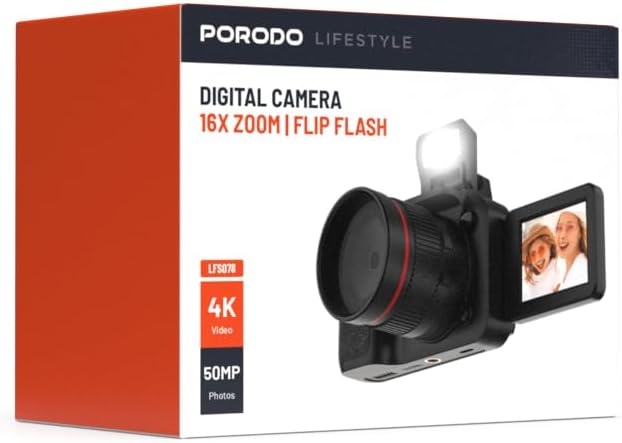
בילד: פראָנט view of the Porodo Lifestyle 4K Digital Camera retail box, showing the camera and key features.

בילד: צוריק view of the Porodo Lifestyle 4K Digital Camera retail box, displaying product specifications and features.
פּראָדוקט איבערview
Familiarize yourself with the various parts of your Porodo Lifestyle 4K Digital Camera.

Image: The Porodo Lifestyle 4K Digital Camera shown with its 180° rotating screen flipped open and the integrated flash extended upwards.
- לענס: Main optical component for capturing images and videos.
- Flip Flash: Provides additional illumination in low-light conditions.
- 180° Rotating Screen (2.2'' Display): ערמעגליכט פלעקסיבל viewing angles, ideal for vlogging and selfies.
- מאַכט קנעפּל: טוט אָן/אויסלעשן די קאַמעראַ.
- לאָדן קנעפּל: כאַפּט בילדער אָדער הייבט אָן/שטעלט אָפּ ווידעאָ רעקאָרדינג.
- פארגרעסער קאָנטראָלס: Adjusts the 16x digital zoom.
- נאַוויגאַציע קנעפּלעך: For menu navigation and settings adjustment.
- טיפּ-C פּאָרט: פֿאַר טשאַרדזשינג און דאַטן אַריבערפירן.
- זכּרון קאָרט שפּעלטל: For inserting an SD card (not included).
סעטאַפּ
1. באַטאַרייע ייַנמאָנטירונג און טשאַרדזשינג
- געפינט דעם דעקל פונעם באַטעריע־אָפּטייל אויף דער אונטערשטער טייל פון דער קאַמעראַ.
- שלעפּט דעם לאַטש צו עפֿענען דעם דעקל.
- Insert the provided 650mAh battery, ensuring the contacts align correctly.
- פֿאַרמאַכט דעם דעקל פֿון דער באַטעריע־אָפּטיילונג ביז עס קליקט זיכער.
- Connect the camera to a power source using the Type-C charging cable. The charging indicator will illuminate.
- A full charge takes approximately 2.5 hours. The indicator will change or turn off when charging is complete.
2. זכּרון קאַרטל ינסטאַלירונג
A memory card (SD card, not included) is required to store photos and videos.
- Locate the memory card slot, usually on the side or bottom of the camera.
- Insert the SD card with the metal contacts facing the correct direction (refer to the diagram near the slot if available) until it clicks into place.
- צו אַרויסנעמען, שטופּ די קאַרטל לײַכט אַרײַן ביז זי שפּרינגט אַרויס.
3. ערשטע איינשאַלטונג
- דריק און האלט דעם פּאַוער קנעפּל פֿאַר אַ פּאָר סעקונדעס ביז דער עקראַן באַלויכטנט זיך.
- Upon first use, you may be prompted to set the date and time. Use the navigation buttons to adjust and confirm.
אַפּערייטינג ינסטראַקשאַנז
Basic Photo Mode (50MP)
- Turn on the camera. It will typically default to photo mode.
- Frame your shot using the 2.2'' display.
- Press the Shutter button halfway down to focus (if applicable).
- Press the Shutter button fully to capture a 50MP image.

Image: A person holding the Porodo Lifestyle 4K Digital Camera, demonstrating a typical usage scenario for capturing photos.

בילד: נאך איינס view of a person holding the Porodo Lifestyle 4K Digital Camera, illustrating the camera's ergonomic design during use.
Basic Video Mode (4K)
- Switch the camera to video mode (usually via a dedicated button or menu option).
- Press the Shutter button once to start 4K video recording. A recording indicator (e.g., red dot, timer) will appear on the screen.
- דרוק דעם לאָדן קנעפּל ווידער צו האַלטן די רעקאָרדינג.

Image: The Porodo Lifestyle 4K Digital Camera highlighting its 4K video resolution capability.
Using the 16X Digital Zoom
- While in photo or video mode, use the zoom controls (often marked with 'W' for Wide and 'T' for Telephoto) to adjust the 16x digital zoom.
- Press 'T' to zoom in and 'W' to zoom out.
Using the Flip Flash
- To activate the flash, manually flip it up from its resting position.
- The camera will automatically use the flash when needed in low-light conditions, depending on your flash settings (e.g., Auto, Fill-in, Red-eye reduction).
- To turn off the flash, gently push it back down until it locks into place.
Using the 180° Rotating Screen
- The 2.2'' display can be rotated 180 degrees.
- Flip the screen out from the side of the camera and rotate it to face forward for selfies or vlogging, or to various angles for creative shots.
- Ensure the screen is securely positioned before shooting.

Image: The Porodo Lifestyle 4K Digital Camera illustrating its 2.2-inch display and 180-degree flip screen functionality.
ווידערשפּילן און אויסמעקן Files
- Enter Playback mode (usually via a dedicated button or menu option).
- Use the navigation buttons to scroll through your photos and videos.
- צו ויסמעקן אַ file, סעלעקטירט עס און דריקט דעם אויסמעקן קנעפל (אפט באצייכנט מיט א מיסט קאסטן אייקאן). באשטעטיגט אויסמעקן ווען איר ווערט געבעטן.
קאַנעקטינג צו אַ קאָמפּיוטער
- קער אַוועק די אַפּאַראַט.
- Connect the camera to your computer using the provided Type-C cable.
- Turn on the camera. It should appear as a removable disk drive on your computer.
- איר קענט איצט איבערפירן בילדער און ווידיאס צו אייער קאמפיוטער.
וישאַלט
רייניקונג די אַפּאַראַט
- ניצט אַ ווייכן, לינט-פֿרייע שטאָף צו רייניקן דעם קאַמעראַ קערפּער.
- For the lens and screen, use a specialized lens cleaning cloth and solution. Do not use abrasive materials.
- Avoid spraying cleaning solutions directly onto the camera. Apply to the cloth first.
באַטערי קער
- לאָדט די באַטאַרייע גאָר אויף איידער דער ערשטער באַנוץ.
- פֿאַרמײַדט צו גאָר אויסליידיקן די באַטאַרייע אָפֿט כּדי צו פֿאַרלענגערן איר לעבן.
- If storing the camera for an extended period, charge the battery to about 50% and remove it from the camera.
סטאָרידזש
- האַלט די קאַמעראַ אין אַ קיל, טרוקן אָרט, אַוועק פון דירעקט זונשייַן און עקסטרעמע טעמפּעראַטורן.
- Use a camera bag or case to protect it from dust and scratches.
טראָובלעשאָאָטינג
| פּראָבלעם | מעגלעך סיבה | לייזונג |
|---|---|---|
| די קאַמעראַ צינדט זיך נישט אָן. | די באַטעריע איז טויט אָדער נישט ריכטיק אינסטאַלירט. | לאָדט די באַטעריע אויף. מאַכט זיכער אַז די באַטעריע איז אַרײַנגעשטעלט מיט דער ריכטיקער פּאָלאַריטעט. |
| קען נישט נעמען בילדער/ווידעאס. | די זכּרון קאַרטל איז פול, נישט אַרײַנגעשטעלט, אָדער קאָרומפּירט. | אַרײַנשטעלן אַ זכּרון קאַרטל. אויסמעקן נישט-נייטיקע files. Format the card (this will erase all data). |
| Images/Videos are blurry. | Lens is dirty. Insufficient light. Camera shake. | Clean the lens. Use the flash or shoot in brighter conditions. Hold the camera steady. |
| פלאַש אַרבעט נישט. | Flash is not flipped up. Flash setting is off. | Ensure the flash is manually flipped up. Check flash settings in the menu. |
| די קאַמעראַ פֿאַרפֿרירט זיך. | ווייכווארג פראבלעם. | אַרויסנעמען און צוריקשטעלן די באַטאַרייע צו ריסעט די קאַמעראַ. |
ספּעסאַפאַקיישאַנז
Detailed technical specifications for the Porodo Lifestyle 4K Digital Camera:

Image: Visual representation of the camera's core capabilities: 4K video, 50MP photos, and 16x digital zoom.

Image: A detailed table outlining the technical specifications of the Porodo Lifestyle 4K Digital Camera.
- מאָדעל נאָמען: Porodo Lifestyle 4K Digital Camera – 50MP, 16x Zoom, Flip Flash, 180° Rotating Screen
- נומער מאָדעל נומער: 6849108448116
- סאָרט: פּאָראָדאָ
- מאַקסימום Webקאַם בילד האַכלאָטע: 50 מפּ
- ווידעא האַכלאָטע: 4K (3840x2160)
- דיגיטאַל פארגרעסער: 16X
- אָפּטיש פארגרעסער: 1.0
- ווייַז: 2.2'' (180° Rotating Screen)
- באַטאַרייע קאַפּאַציטעט: 650mAh (1 P76 battery included)
- אַרבעט צייט: אַרויף צו 3 שעה
- ריטשאַרדזש צייט: בעערעך 2.5 שעה
- טשאַרדזשינג פּאָרט: טיפּ-C
- פאָטאָ סענסאָר טעכנאָלאָגיע: קמאָס
- געשטיצט File פֿאָרמאַטירונגען: JPG (images), AVI (videos)
- בילד סטאַביליזאַטיאָן: דיגיטאַל
- אַספּעקט פאַרהעלטעניש: 16:9, 4:3
- מיטערינג באַשרייַבונג: אָרט
- פּראָדוקט דימענשאַנז: 6 רענטגענ 13 רענטגענ 9 סענטימעטער; 310 ג
- לאַנד פון אָריגין: כינע
וואָראַנטי און שטיצן
Porodo products are designed with quality and reliability in mind. For warranty information and technical support, please refer to the official Porodo webזייטל אדער קאָנטאַקט אייער לאקאלן דיסטריביאַטאָר.
אָנליין שטיצן: באַזוכן די Porodo Store on Amazon פֿאַר פּראָדוקט אינפֿאָרמאַציע און דערהייַנטיקונגען.
פארלענגערטע וואָראַנטי אָפּציעס: Additional warranty plans may be available through authorized retailers. Please check with your point of purchase for details.


