
1. פּראָדוקט איבערview
The OWON HDS241 is a versatile 3-in-1 handheld device integrating a single-channel oscilloscope, a 24000-count digital multimeter, and a 100kHz signal generator. Designed for both outdoor and indoor use, it offers a compact form factor with powerful measurement capabilities for various electrical and electronic applications.

Image 1.1: The OWON HDS241 device, highlighting its oscilloscope, multimeter, and signal generator functions.
2. זיכערקייַט אינפֿאָרמאַציע
Before using the OWON HDS241, please read and understand all safety instructions to prevent electric shock, injury, or damage to the device. Keep this manual for future reference.
- אַלגעמיינע זיכערקייַט: ניצט שטענדיק דעם אפאראט אינעם באשטימטן פארנעםtage and current limits. Do not operate the device in wet or damp באדינגונגען.
- פּראָבע זיכערקייַט: Ensure probes are correctly connected and rated for the measurement being performed. Avoid touching exposed wiring or components when the device is powered on.
- באַטערי זיכערקייַט: Use only the specified battery type. Do not disassemble, crush, or expose the battery to extreme temperatures.
- וישאַלט: איבערגעבן אלע סערוויסינג צו קוואַליפֿיצירטע פּערסאָנעל. פּרוּווט נישט צו פאַרריכטן דעם אַפּאַראַט אַליין.
3. שליסל פֿעיִקייטן
- דיגיטאַלער מולטימעטער: 4 1/2 digit True RMS digital multimeter for measuring AC/DC voltage/current, resistance, diode, capacitance, and continuity. Maximum input voltage is AC 750V, DC 1000V.
- Signal Waveform Generator: 1-channel 100 kHz generator supporting sine, square, ramp, and pulse wave outputs. Maximum output amplitude is 2.5 Vpp.
- אָסילאָסקאָפּע: Waveform refresh rate up to 10,000 wfms/s, 40MHz bandwidth, and real-time sampling rate up to 250MSa/s. Features auto-setup, multiple measurement functions, 8K record length, cursor measurement, and slow scan mode for long-term signal monitoring.
- סאָליד פּלאַן: Portable form factor with a 3.5-inch high-definition color LCD screen, suitable for various environments.
- לאנג באַטאַרייע לעבן: Low-power design with a 2000 mAh high-capacity lithium battery and standard Type-C port for charging and power bank compatibility.
4. פּעקל אינהאַלט
The standard package for the OWON HDS241 includes:
- OWON HDS241 Handheld Oscilloscope Unit
- Test Leads for Multimeter
- אָססילאָסקאָפּע פּראָבע
- וסב טיפּע- C קאַבלע
- באַניצער מאַנואַל (דעם דאָקומענט)
Note: Additional accessories such as a BNC-to-alligator clip cable or carrying case may need to be purchased separately.
5. מיטל אויסלייג און קאָנטראָלס
Familiarize yourself with the physical components and controls of the HDS241.

בילד 5.1: פראָנט און זייט view of the OWON HDS241 with key controls and ports labeled. Labels include: signal input connector, display area, multifunction keys, channel key, mode switching key, system settings, save settings, power button, relative value/activation menu key, multimeter input port, horizontal time base setting/signal adjustment, return key, range switch/measurement menu key, arrow keys, auto range/auto setting key, hold value/Stop/Run key, probe compensation output (2.5V/1kHz square wave or signal generator output), USB charging/communication interface, approximate weight (0.6 kg host, excluding battery), gross weight (1.2 kg).
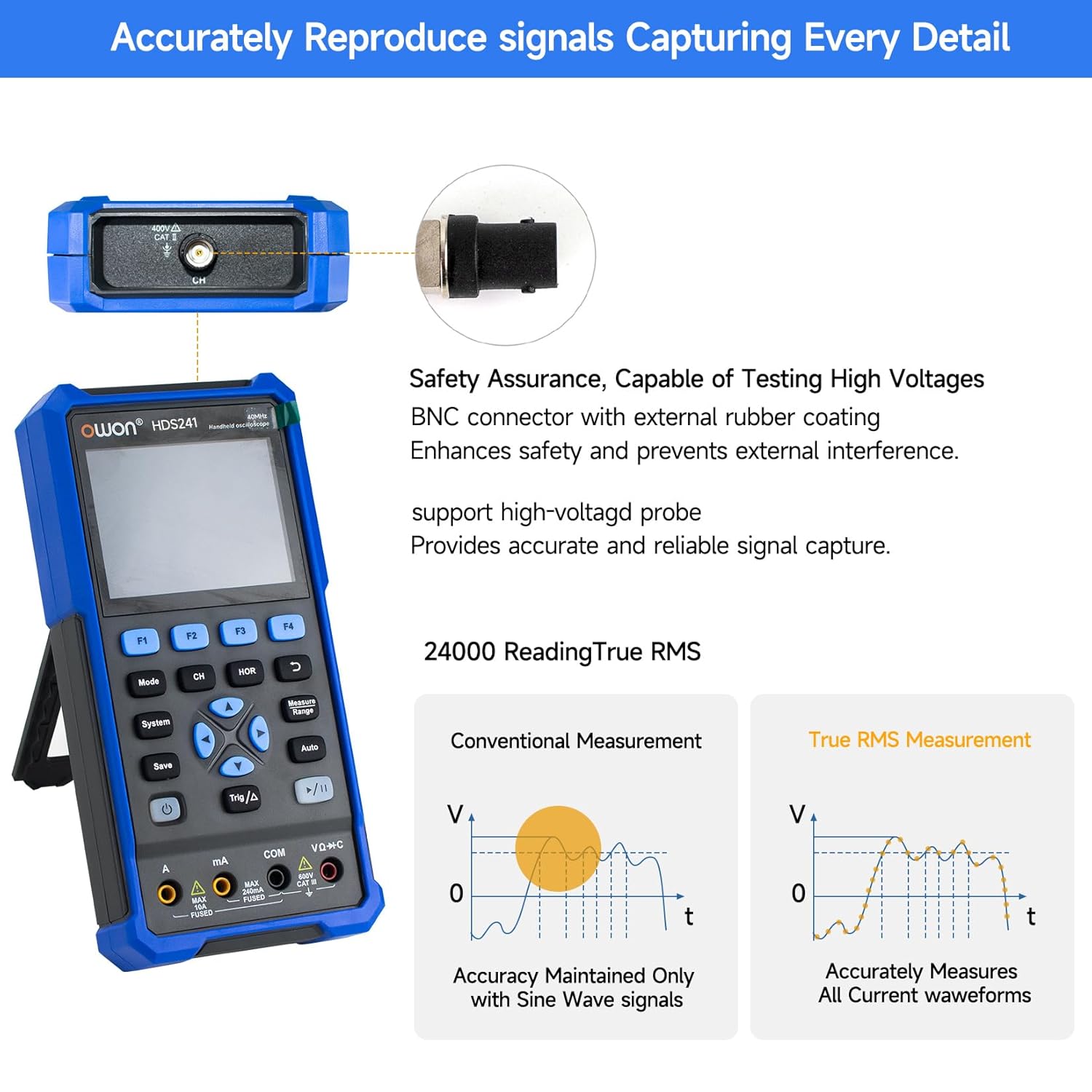
Image 5.2: Detail of the BNC connector, designed for safety and signal integrity, with external rubber coating.
6. ערשט סעטאַפּ
6.1 טשאַרדזשינג די מיטל
The HDS241 is equipped with a built-in 2000 mAh lithium battery. Before first use, fully charge the device using the provided USB Type-C cable and a compatible power adapter (not included) or a computer USB port.
- Connect the USB Type-C cable to the device's Type-C port.
- פאַרבינדן די אנדערע סוף פון די קאַבלע צו אַ וסב מאַכט מקור.
- די טשאַרדזשינג ינדיקאַטאָר וועט ווייַזן די טשאַרדזשינג סטאַטוס.

Image 6.1: The USB Type-C charging port and internal battery compartment, emphasizing long-lasting performance.
6.2 פּאַוערינג אויף / אַוועק
דריקן און האַלטן די מאַכט קנעפּל צו קער די מיטל אויף אָדער אַוועק.
7. אַפּערייטינג מאָדעס
The HDS241 features three primary operating modes: Oscilloscope, Multimeter, and Signal Generator. Press the מאָדע button to switch between these functions.
7.1 אָסילאָסקאָפּ מאָדע
In Oscilloscope mode, the device displays real-time waveforms, allowing for detailed analysis of electrical signals. Connect the oscilloscope probe to the BNC connector on the top of the device.
- Auto-Setup: דרוק די אַוטאָ button for automatic scaling and positioning of the waveform.
- מאס: ניצן די מאָס menu (accessed via F1) to select automatic measurements like Frequency, Period, Amplitude, Max, Min, Peak-to-Peak, and RMS.
- לויפֿער מעזשערמאַנץ: Activate cursor measurements (accessed via F2) to manually measure voltage (ΔV) and time (ΔT) differences between points on the waveform.
- טריגער סעטטינגס: Adjust trigger type, level, and mode using the Trig/Δ קנעפּל.
- Horizontal/Vertical Controls: Use the navigation arrows to adjust time base (horizontal) and voltage scale (vertical).

בילד 7.1.1: עקס.amples of oscilloscope display features including dual sampling mode, high refresh rate, 8 types of auto-measurements, and cursor measurements.

בילד 7.1.2: עקס.amples of actual measured waveforms, demonstrating the oscilloscope's signal capture capabilities for different signal types.
7.2 מולטימעטער מאָדע
In Multimeter mode, the HDS241 functions as a digital multimeter. Connect the test leads to the appropriate input ports (VΩ+C, COM, A, mA) at the bottom of the device.
- פונקציע סעלעקציע: ניצן די מאָדע button to cycle through measurement types (Voltage, Current, Resistance, Capacitance, Diode, Continuity).
- אַוטאָ-ראַנג: The device supports auto-ranging for convenient measurement.
- דאַטן האַלטן: ניצן די היט button or a dedicated hold function (if available) to freeze the current reading.
7.3 סיגנאַל גענעראַטאָר מאָדע
The Signal Generator mode allows the device to output various waveforms. Connect the output to the circuit under test using the appropriate cable (e.g., BNC to alligator clips, not included).
- כוואַליעפאָרם סעלעקציע: Use the F-keys to select sine, square, ramp, or pulse waveforms.
- פּאַראַמעטער אַדזשאַסטמאַנט: Adjust frequency and amplitude using the navigation arrows. The maximum output amplitude is 2.5 Vpp.
8. דאַטאַ מאַנאַגעמענט
The HDS241 supports data transfer to a computer via its USB Type-C port for further analysis and record-keeping.
- קאַנעקטינג צו פּיסי: ניצט דעם צוגעשטעלטן USB טיפּ-C קאַבל צו פאַרבינדן דעם מיטל צו אייער קאָמפּיוטער.
- ווייכווארג: Refer to the OWON website for any necessary drivers or software to facilitate data transfer and analysis.
- שפּאָרן דאַטן: ניצן די היט button to store waveform images, settings, or measurement data directly on the device.
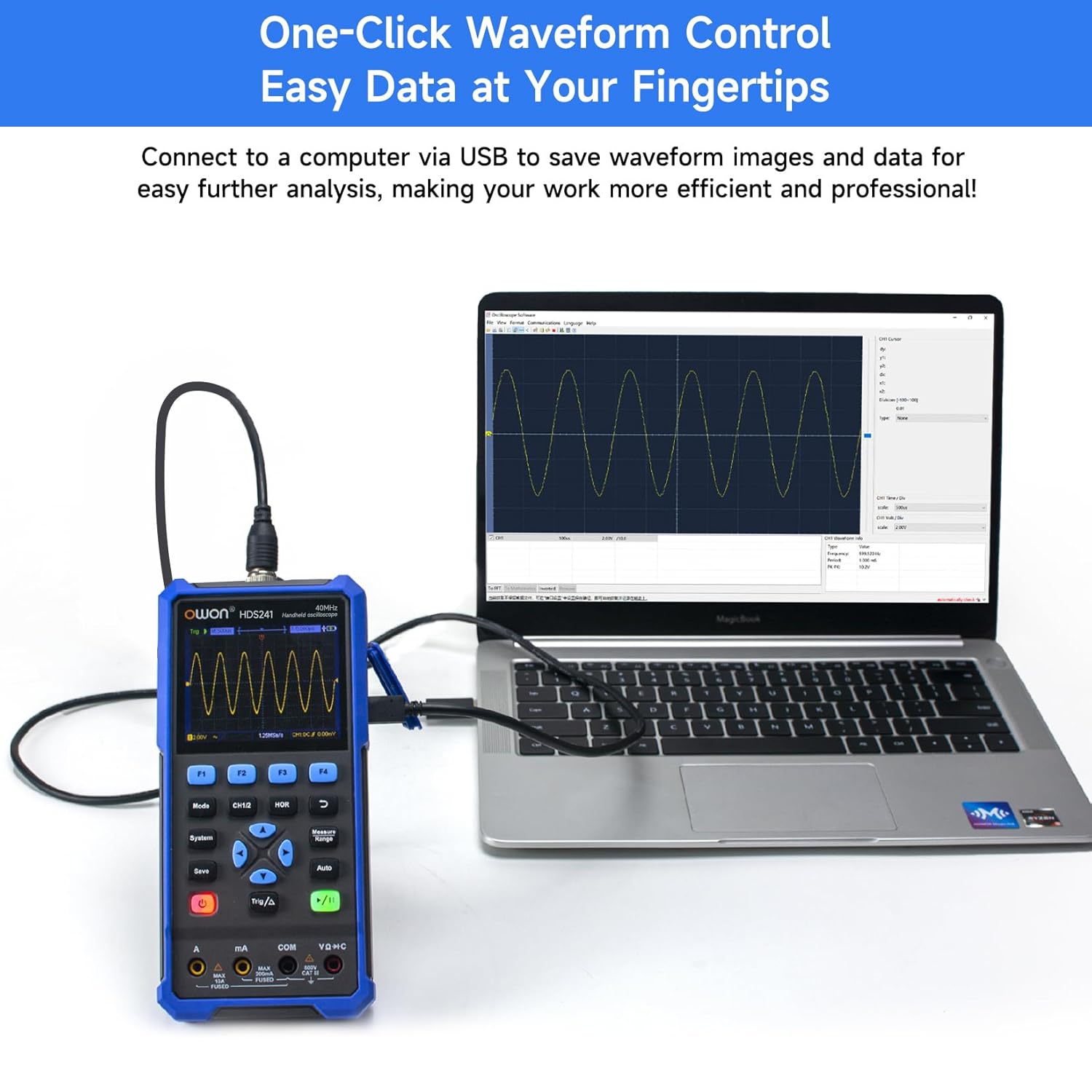
Image 8.1: The OWON HDS241 connected to a computer for data transfer and analysis, enabling easy waveform control.
9. וישאַלט
- רייניקונג: רייניקט דעם אַפּאַראַט מיט אַ ווייכן, טרוקענעם שטאָף. ניצט נישט קיין שרײַבנדיקע רייניגערס אדער סאָלווענטן.
- סטאָרידזש: האַלט דעם אַפּאַראַט אין אַ קיל, טרוקן אָרט אַוועק פון דירעקט זונשייַן און עקסטרעמע טעמפּעראַטורן.
- באַטערי זאָרגן: פֿאַר לאַנג-טערמין סטאָרידזש, זאָרגט אַז די באַטאַרייע איז טיילווייז אויפגעלאָדן (אַרום 50%) און לאָדט עס אויף יעדע עטלעכע חדשים צו האַלטן די באַטאַרייע געזונט.
- פּראָבע קאַלאַבריישאַן: Periodically calibrate the oscilloscope probe using the dedicated probe compensation output to ensure accurate measurements.
10. טראָובלעשאָאָטינג
| פּראָבלעם | מעגלעך סיבה | לייזונג |
|---|---|---|
| די מיטל טוט נישט מאַכט אויף. | נידעריגע אדער אויסגעשעפטע באַטעריע. | Connect the device to a power source using the USB Type-C cable and allow it to charge. |
| קיין כוואַליעפאָרם ווערט נישט געוויזן אין אָסילאָסקאָפּ מאָדע. | Probe not connected correctly; signal too small or too large; incorrect time base or voltagE scale. | Ensure probe is securely connected. Press אַוטאָ for automatic setup. Adjust vertical and horizontal scales manually. Check trigger settings. |
| מולטימעטער לייענונגען זענען נישט ריכטיק. | Test leads not properly connected; incorrect measurement function selected; external interference. | Verify test lead connections. Ensure the correct measurement mode (voltage, current, resistance) is selected. Minimize external electrical noise. |
| Signal generator output is not as expected. | Incorrect waveform type, frequency, or amplitude set. | Check the selected waveform, frequency, and amplitude settings in the signal generator menu. |
11. טעכניש ספּעסאַפאַקיישאַנז
אָסילאָסקאָפּ ספּעסיפיקאַציעס:
| פּאַראַמעטער | ווערט |
|---|---|
| באַנדווידט | 40 מהז |
| קאַנאַל | 1 |
| Sampלינג קורס | 250 מסאַ / s |
| אַקוואַזישאַן מאָדע | Sample, Peak Detect |
| רעקאָרד לענג | Max. 8K |
| ווייַז | 3.5 אינטש לקד |
| Waveform Refresh Rate | 10,000 וופמס / s |
| אַרייַנשרייַב קאַפּלינג | גלייכשטראָם, וועקסלשטראָם, ערד |
| אַרייַנשרייַב ימפּידאַנס | 1 MΩ±2%, in parallel with 16 pF±10 pF |
| זאָנד אַטטענואַטיאָן | 1X, 10X, 100X, 1000X |
| Max Input Voltage | 400V (DC + AC, PK-PK) |
| Sensitivity Resolution | 10mV/div-10V/div |
| ווערטיקאַל רעסאָלוטיאָן | 8 ביסל |
| האָריזאָנטאַל סקאַלע | 5ns/div-1000s/div, step 1-2-5 |
| טריגער טיפּ | עדזש |
| צינגל מאָדע | אויטאָ, נאָרמאַל, איינציק |
| אַוטאָ מעאַסורעמענט | Period, Frequency, Mean, PK-PK, Max, Min, Amplitude, RMS |
| לויפֿער מעאַסורעמענט | ΔV, ΔT |

Image 11.1: Detailed oscilloscope specifications.
Digital Multimeter Specifications:
| פּאַראַמעטער | ווערט |
|---|---|
| ווייַז גראף | 4½ digits (max 24000 counts) |
| טעסט מאָדעס | Voltage, Current, Resistance, Capacitance, Diode, Continuity |
| Max Input Voltage | אַק 750 וו, דק 1000 וו |
| מאַקסימום ינפּוט קראַנט | אַק 10 אַ, דק 10 אַ |
| אַוטאָ ראַנגע | יא |
| אמת RMS | יא |

Image 11.2: Detailed digital multimeter specifications.
Signal Waveform Generator Specifications:
| פּאַראַמעטער | ווערט |
|---|---|
| וואַוועפאָרמס | סינע, סקווער, רamp, דויפעק |
| רעזולטאַט אָפטקייַט | 10Hz-100KHz |
| Ampליטוד | 2Vpp-2.5Vpp |

Image 11.3: Detailed signal waveform generator specifications.
אַלגעמיינע ספּעסאַפאַקיישאַנז:
- דימענסיעס: 9.6 X 3.8 X 19.8 סענטימעטער
- נומער וואָג: 1.2 קילאָגראַמס
- מאַכט מקור: Battery Powered (2000 mAh Lithium Battery)
- קאָליר: בלוי
- סערטיפיקאַטיאָנס: CE, True RMS
12. וואָראַנטי און שטיצן
OWON products are designed for reliability and performance. For warranty information, technical support, or service inquiries, please refer to the official OWON webזייטל אדער קאָנטאַקט אייער לאקאלן דיסטריביאַטאָר.
- וואָראַנטי פּעריאָד: Standard manufacturer's warranty applies. Please check your purchase documentation for specific terms and duration.
- טעכניש שטיצן: Visit the OWON official website for FAQs, software downloads, and contact information for technical assistance.
- קערט: Refer to the retailer's return policy for details on product returns and exchanges.


