1. הקדמה
This manual provides comprehensive instructions for the safe and effective use of your SUUNTO Aqua Open-Ear Bone Conduction Headphones. Please read this manual thoroughly before using the device and retain it for future reference.
2. וואָס איז אין דער קעסטל
The SUUNTO Aqua package includes the following components:
- SUUNTO Aqua headphones
- טשאַרדזשינג קאַבלע
- פּאָווערבאַנק
- SUUNTO storage bag
- עאַרפּלוגס
- Printed user quick guide
- International warranty leaflet
- זיכערקייַט בלאַט

3. פּראָדוקט איבערview
The SUUNTO Aqua headphones are designed for sports enthusiasts, offering open-ear bone conduction technology, 32GB of internal MP3 storage, and IP68 waterproofing. They feature head movement control and dual microphones for clear communication.

4. סעטאַפּ
4.1. טשאַרדזשינג די כעדפאָונז
The SUUNTO Aqua headphones come with a portable power bank that extends their battery life. To charge:
- Place the headphones into the power bank.
- Connect the power bank to a USB power source using the provided charging cable.
- The headphones charge in approximately 1 hour for a full charge, providing 10 hours of playtime. The power bank provides an additional 20 hours, totaling 30 hours of playtime. A 10-minute fast charge provides 3 hours of endurance.

4.2. פּאָווערינג אויף / אויסגעלאשן
- צו אנצינדן, דריק און האלט דעם מאַכט קנעפּל ביז די אינדיקאַטאָר ליכט צינדט זיך אָן.
- צו אויסלעשן, דריק און האלט דעם מאַכט קנעפּל ביז די אינדיקאַטאָר ליכט גייט אויס.
4.3. Music Transfer (32GB MP3 Mode)
The headphones feature 32GB of internal storage for offline music playback, supporting MP3, FLAC, WAV, AAC, M4A, APE, and WMA file formats. This allows for music playback without a connected phone, ideal for swimming.
- Place the headphones into the power bank.
- Connect the power bank to your computer or USB-C compatible mobile phone using the charging cable.
- Open the headphones' music folder on your device.
- Copy your desired audio files into this folder. The headphones can store approximately 8,000 songs (based on 4MB per song).
4.4. Bluetooth Pairing (to Phone)
To connect your SUUNTO Aqua headphones to your smartphone via Bluetooth:
- קער אויף די כעדפאָונז.
- Keep the power button pressed for 5 seconds to enter pairing mode. The indicator light will flash.
- אויף דיין טעלעפאָן, גיין צו סעטטינגס > בלועטאָאָטה.
- Select "SUUNTO Aqua" from the list of available devices.
- Once connected, the headphones will play a prompt tone.
4.5. Pairing to SUUNTO Watch
To connect your SUUNTO Aqua headphones with a compatible SUUNTO watch (e.g., 9 Peak Pro, Race, Race S, Vertical, Ocean), you must first install the "SUUNTO Aqua Swimming" app from the SuuntoPlus™ Store on your watch.
- Switch the SUUNTO Aqua headphones on.
- Open the SUUNTO app on your phone and navigate to your watch's profile.
- Go to the SuuntoPlus™ Store and search for "Aqua". Install the "SUUNTO Aqua Swim" app on your watch.
- Sync your watch with the SUUNTO app.
- From the exercise start screen on your watch, scroll down and select SuuntoPlus™.
- אויסקלייַבן SUUNTO Aqua Swim פֿון דער רשימה פון דעוויסעס.
- Ensure the watch is close to your headphones. The watch will automatically connect.
- Follow the on-screen instructions for visual calibration.
- Go back and press אָנהייב to begin swimming with data tracking.
5. אַפּערייטינג ינסטרוקטיאָנס
5.1. Switching Music Modes
You can switch between offline music mode (MP3) and Bluetooth music mode:
- Press and hold the Play/Pause button for 3 seconds on the headphones.
- Alternatively, use the SUUNTO app to switch between "Bluetooth music" and "Offline music" modes under the "Music mode" setting.
5.2. Head Movement Control
The SUUNTO Aqua headphones feature intuitive head movement controls for hands-free operation:
- ענטפֿערן / סוף רופן: Nod your head twice.
- אָפּוואַרפן רופן: Shake your head twice.
- ווייַטער ליד: Shake your head twice (during music playback).

5.3. סאָונד מאָדעס
The headphones offer different sound modes optimized for various activities:
- Normal Sound Mode: פֿאַר אַלגעמיין נוצן.
- Outdoor Sound Mode: Enhances awareness of surroundings.
- Underwater Sound Mode: Optimized for clear audio during swimming.
These modes can be selected via the SUUNTO app under "Sound mode".
5.4. רופן מאַנאַגעמענט
The built-in dual microphone with ENC (Environmental Noise Cancellation) technology ensures clear voice calls. Use head movement controls or physical buttons to manage calls when connected via Bluetooth.
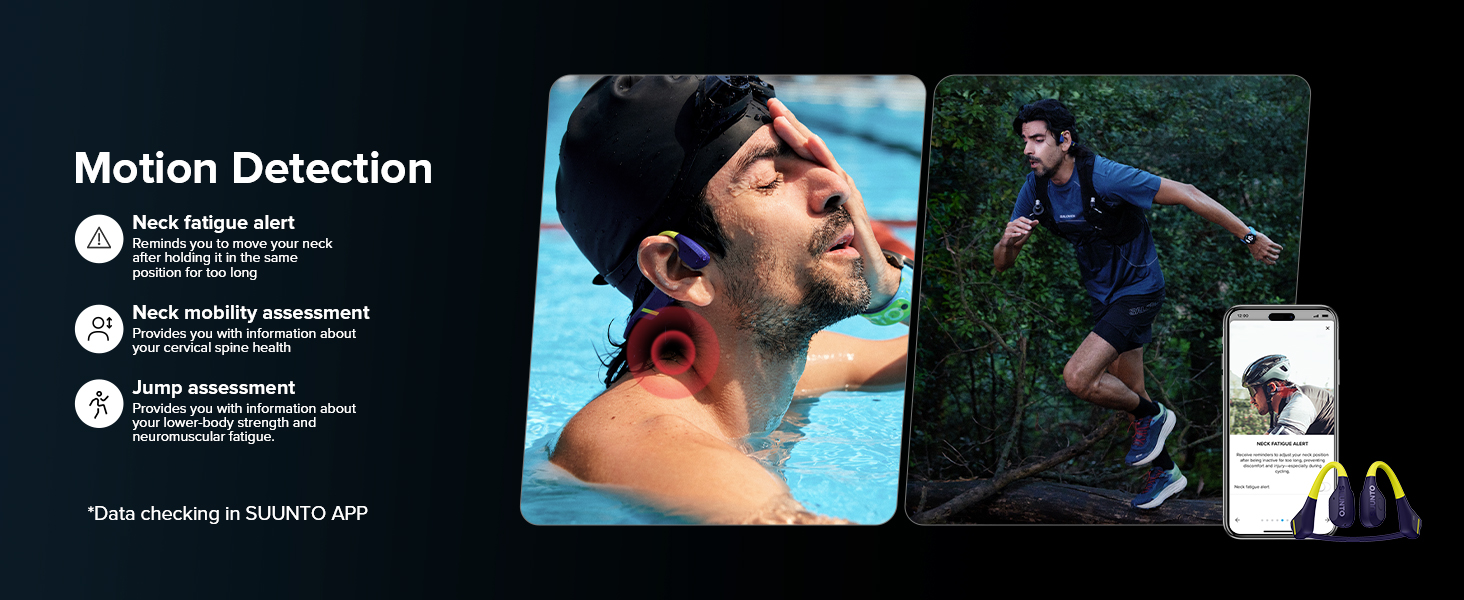
6. Motion Detection & Analysis
The SUUNTO Aqua headphones integrate with the SUUNTO app to provide advanced motion detection and analysis for various sports activities:
- Swim Posture Identification: Recognizes breaststroke and freestyle.
- Swim Metrics: Records glide time, head pitch angle, breath frequency, and angle.
- Neck Fatigue Measurement: Provides alerts to adjust neck position during prolonged activity.
- Neck Mobility Measurement: Assesses cervical spine health.
- Jump Test Assessment: Evaluates lower-body strength and neuromuscular fatigue.

7. וישאַלט
7.1. רייניקונג
Regularly clean your headphones with a soft, damp cloth. Avoid using harsh chemicals or abrasive materials. Ensure the charging contacts are dry and clean before charging.
7.2. וואַסער קעגנשטעל
The SUUNTO Aqua headphones are IP68 waterproof, allowing submersion up to 5 meters for up to 2 hours. They are resistant to water, sweat, and dust. Always ensure the charging port is dry before connecting the power bank.

7.3. סטאָרידזש
Store the headphones in the provided SUUNTO storage bag when not in use to protect them from dust and scratches. Avoid storing in extreme temperatures.
8. טראָובלעשאָאָטינג
| פּראָבלעם | מעגלעך סיבה | לייזונג |
|---|---|---|
| קאָפּהערער גייען נישט אָן. | נידעריק באַטאַרייע. | Charge the headphones using the power bank. |
| נישט מעגלעך צו פאַרבינדן דורך בלוטוט. | קאָפּהערער נישט אין פּערינג מאָדע; בלועטוט אויסגעלאָשן אויף דעם מיטל; מיטל צו ווייט. | Ensure headphones are in pairing mode (flashing light). Turn on Bluetooth on your device. Keep devices within 30 meters. |
| No sound in MP3 mode. | קיין מוזיק files transferred; incorrect mode selected. | אַריבערפירן מוזיק files to the 32GB storage. Ensure offline music mode is selected. |
| Sound quality issues underwater. | אומרעכטער קלאַנג מאָדע. | Switch to "Underwater Sound Mode" via the SUUNTO app. |
| Watch not connecting to headphones. | SUUNTO Aqua Swimming app not installed on watch; watch not synced. | Install "SUUNTO Aqua Swimming" app on your watch and sync. Ensure watch is close to headphones. |
9. ספּעסאַפאַקיישאַנז
| שטריך | דעטאַל |
|---|---|
| מאָדעל נאָמען | Suunto Aqua |
| מאָדעל נומער | SS051108000 |
| קאַנעקטיוויטי טעכנאָלאָגיע | ווירעלעס (בלוטוט 5.3) |
| אַודיאָ דרייווער טיפּ | ביין קאַנדאַקשאַן דרייווער |
| אינערלעכער סטאָרידזש | 32GB (up to 8,000 songs) |
| וואַסער קעגנשטעל מדרגה | IP68 (5 meters for up to 2 hours) |
| באַטערי לעבן | 10 hours (headphones), 20 hours (additional with power bank) - Total 30 hours |
| טשאַרדזשינג צייט | 1 hour (full charge), 10 minutes (for 3 hours endurance) |
| מאַטעריאַל | Silicone, Titanium |
| פּונקט וואָג | 0.06 קילאָגראַמס (2.11 אונסעס) |
| פּראָדוקט דימענשאַנז | 5.04 X 3.78 X 1.85 אינטשעס |
| קאָנטראָל מעטאָד | Button, Head Movement, App Control |
| ראַש קאָנטראָל | Active Noise Cancellation (ENC for mic) |
10. וואָראַנטי און שטיצן
For warranty information and customer support, please refer to the International Warranty Leaflet included in your package or visit the official SUUNTO website. You can also find additional support and resources on the SUUNTO Brand Store on Amazon.


