1. הקדמה
This manual provides essential information for the safe and efficient use of your MESWAO 15.6 Inch Pro Android 14 Tablet. Please read this manual thoroughly before operating the device and retain it for future reference.
2. זיכערקייַט אינפֿאָרמאַציע
- שטעלט נישט אויס די טאַבלעט צו עקסטרעמע טעמפּעראַטורן, דירעקטע זונשייַן, אדער הויכע הומידיטי.
- פֿאַרמײַדט צו לאָזן פאַלן אָדער אויסשטעלן די טאַבלעט צו שווערע קלאַפּן.
- Use only the provided power adapter and Type-C cable for charging.
- האַלט די טאַבלעט אַוועק פון וואַסער און אַנדערע פליסיקייטן.
- Do not attempt to disassemble or repair the tablet yourself. Contact customer support for assistance.
- Ensure proper ventilation when using the tablet for extended periods.
3. פּעקל אינהאַלט
באַשטעטיקן אַז אַלע זאכן זענען פאַראַן אין פּעקל:
- 1 x MESWAO 15.6 inch Android Tablet
- 1 x מאַכט אַדאַפּטער
- 1 X טיפּ C קאַבלע
- 1 x באַניצער מאַנואַל
- 1 X טיפּ-C צו וסב אַדאַפּטער
- 1 x Stuck pin
4. דיווייס איבערview
Familiarize yourself with the physical components of your MESWAO tablet.
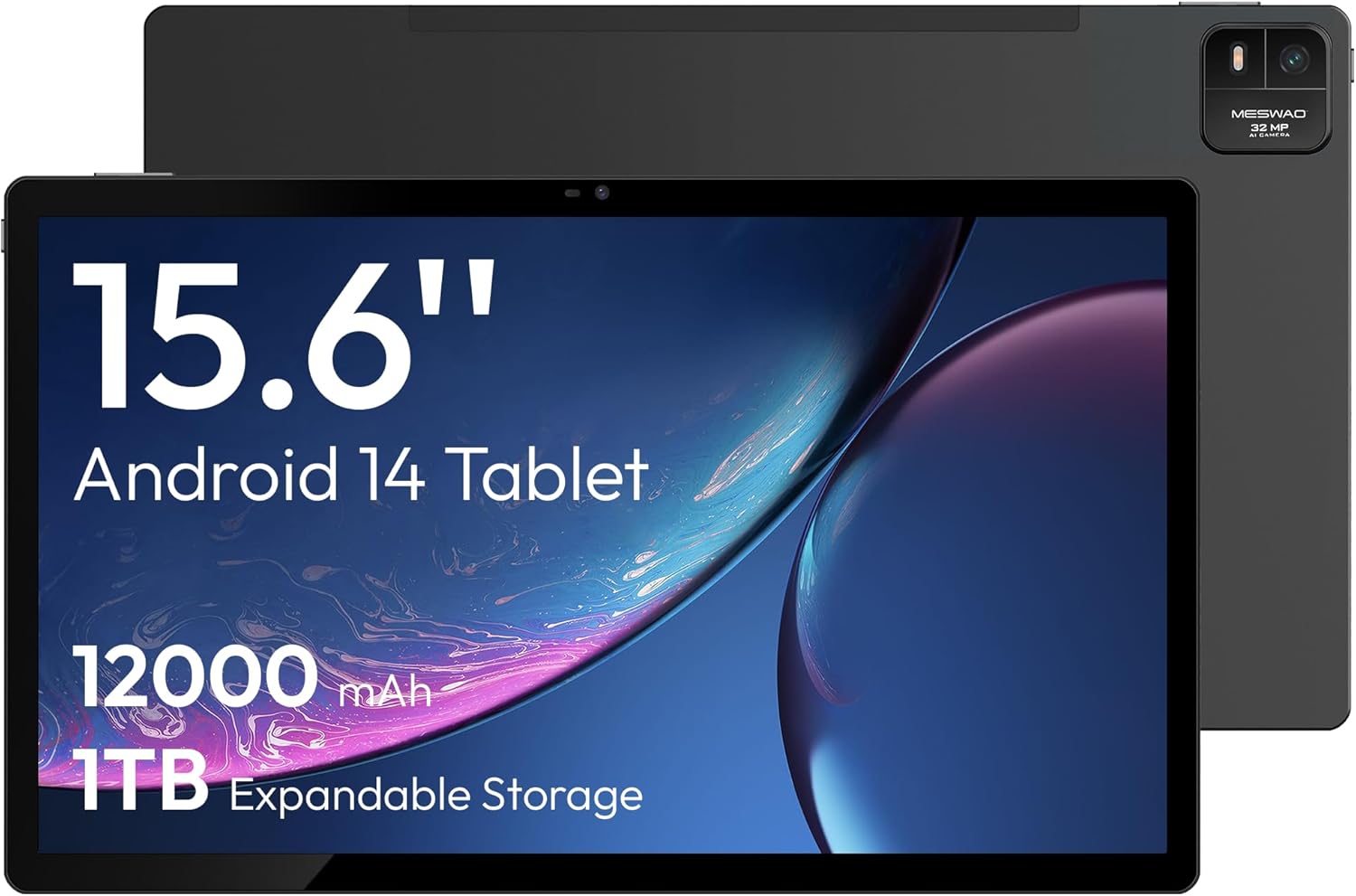
פיגורע 4.1: פראָנט view of the MESWAO 15.6-inch Android 14 Tablet, highlighting the large display and key specifications such as 12000mAh battery and 1TB expandable storage.
פיגורע 4.2: זייַט און דערציען view of the tablet, indicating the location of the quad speakers, Type-C port, TF card slot, power button, volume controls, and front/rear cameras.
שליסל קאַמפּאָונאַנץ:
- 15.6-inch FHD IPS Display: Large screen for immersive viewing.
- פראָנט אַפּאַראַט: פֿאַר ווידעאָ קאָלס און סעלפֿיז.
- הינטערשטע קאַמעראַ (32MP): פֿאַר כאַפּן בילדער און ווידעאָס.
- מאַכט קנעפּל: To turn the tablet on/off or put it to sleep.
- באַנד קנעפּלעך: צו סטרויערן די אַודיאָ לעוועלס.
- טיפּ-C פּאָרט: פֿאַר טשאַרדזשינג און דאַטן אַריבערפירן.
- טף קאַרד שפּעלטל: For expandable storage (MicroSD card).
- קוואד רעדנערס: פֿאַר אַודיאָ רעזולטאַט.
5. סעטאַפּ
5.1 ערשט טשאַרדזשינג
Before first use, fully charge the tablet. Connect the provided Type-C cable to the tablet's Type-C port and the power adapter to a wall outlet. The tablet supports 30W fast charging.

פיגורע 5.1: The tablet connected to its charger, showing the charging indicator on the screen.
5.2 מאַכט אויף / אַוועק
- צו מאַכט אויף: דריקן און האַלטן די מאַכט קנעפּל ביז די פאַרשטעלן לייץ.
- צו מאַכט אַוועק: דריק און האלט דעם פּאַוער קנעפּל, און סעלעקטיר 'פּאַוער אויס' פון די אָפּציעס אויפן עקראַן.
- צו שלאפן/אויפוואכן: דריקן בעקיצער די מאַכט קנעפּל.
5.3 ערשט קאַנפיגיעריישאַן
Upon first power-on, follow the on-screen prompts to set up your Android 14 operating system. This includes selecting your language, connecting to Wi-Fi, and signing in with your Google account.
5.4 ווי-פי קאַנעקשאַן
- גיין צו סעטטינגס > נעץ און אינטערנעט > ווי-פי.
- טוישן Wi-Fi On.
- אויסקלייבן אייער געוואונטשענע נעץ פון דער ליסטע.
- אַרייַן די פּאַראָל אויב געבעטן און צאַפּן פאַרבינדן. The tablet supports dual-band Wi-Fi (2.4GHz and 5GHz).
5.5 אריינשטעלן א מיקראָSD קאַרטל
To expand storage up to 1TB, insert a MicroSD card:
- געפינט די TF קאַרטל שפּעלטל אויף דער זייט פון די טאַבלעט.
- Use the provided stuck pin to gently press into the small hole next to the slot to eject the tray.
- Place the MicroSD card into the tray with the gold contacts facing down.
- פֿאָרזיכטיק צוריקשטעלט דעם טאַץ אין דער טאַבלעט.

פיגורע 5.2: Illustration of the tablet's internal storage and the option for expandable storage via MicroSD card.
6. אפערירן די טאַבלעט
6.1 יקערדיק נאַוויגאַציע
The Android 14 operating system uses touch gestures for navigation:
- צאַפּן: אויסקלייבן אַן אייטעם אָדער עפֿענען אַן אַפּ.
- לאַקכענען: סקראָלן דורך סקרינז אדער רשימות.
- קניפּ: פארגרעסערן אדער פארקלענערן בילדער און web בלעטער.
- לאנג פּרעס: צוטריט קאנטעקסטועלע מעניוס אדער באוועג איקאנעס.
6.2 ווייַז פֿעיִקייטן
The 15.6-inch FHD IPS display offers a resolution of 1920 x 1080 pixels, providing clear and vibrant visuals for various applications.

פיגורע 6.1: Comparison of the MESWAO 15.6-inch display size to an A4 sheet of paper and a smaller tablet, emphasizing its expansive viewינג געגנט.
6.3 פאָרשטעלונג
Powered by the Helio G99 octa-core processor and 8GB RAM, the tablet delivers efficient performance for multitasking, gaming, and media consumption.

פיגורע 6.2: An illustration of the Helio G99 Octa-Core chipset, detailing its technical specifications and performance benefits.
6.4 קאַמעראַ באַניץ
The tablet features a 32MP rear camera and a 5MP front camera. Open the Camera app to capture photos and videos.
6.5 אַודיאָ
The quad speakers provide clear audio. You can connect Bluetooth headphones or use the Type-C port for audio output with a suitable adapter.
6.6 אַנדרויד 14 פֿעיִטשערס
The tablet runs on Android 14, offering features such as:
- Smooth Multitasking: Efficiently switch between applications.
- פּאַרענטאַל קאָנטראָל: Manage content and usage for children.
- Enhanced Privacy & UI: Improved security and user interface experience.

פיגורע 6.3: The Android 14 operating system interface, showcasing various applications and system features.
7. וישאַלט
7.1 רייניקונג די מיטל
ניצט אַ ווייכע, לינט-פֿרייע שטאָף צו רייניקן דעם עקראַן און קערפּער פֿון דער טאַבלעט. פֿאַרמייַדט ניצן שטרענגע כעמיקאַלן אָדער אַברייסיוו מאַטעריאַלן.
7.2 ווייכווארג דערהייַנטיקונגען
קאָנטראָלירט רעגולער פֿאַר סיסטעם דערהייַנטיקונגען צו ענשור אָפּטימאַל פאָרשטעלונג און זיכערהייט. גייט צו סעטטינגס > סיסטעם > סיסטעם דערהייַנטיקן.
7.3 באַטערי קער
צו פאַרלענגערן די באַטאַרייע לעבן:
- פֿאַרמײַדט אָפֿט פֿולשטענדיק אויסצולאָדן די באַטעריע.
- Do not expose the tablet to high temperatures.
- אַרויסנעמען דעם טשאַרדזשער אַמאָל די באַטאַרייע איז פול.
8. טראָובלעשאָאָטינג
8.1 טאַבלעט טוט זיך נישט אָן
- זיכער מאַכן אַז די באַטאַרייע איז אויפגעלאָדן. פֿאַרבינדט דעם טשאַרדזשער און וואַרט אַ פּאָר מינוט איידער איר פּרוּווט עס אָנצוצינדן.
- דריק און האלט דעם פּאַוער קנעפּל פֿאַר לפּחות 10-15 סעקונדעס צו צווינגען אַ ריסטאַרט.
8.2 Wi-Fi פֿאַרבינדונג פּראָבלעמען
- ריסטאַרט דיין Wi-Fi ראַוטער.
- פארגעסט די נעץ אין די טאַבלעט סעטטינגס און פארבינדט זיך ווידער.
- זיכער מאַכן אַז די טאַבלעט איז אין דער ראַנגע פֿון די Wi-Fi סיגנאַל.
8.3 לאַנגזאַמע פאָרשטעלונג
- נאָענט ומנייטיק הינטערגרונט אַפּלאַקיישאַנז.
- ויסמעקן קאַש דאַטן פֿאַר אַפּפּס.
- זיכער מאַכן אַז עס איז דאָ גענוג פֿרײַער סטאָרידזש פּלאַץ.
8.4 עקראַן רעאַגירט נישט
- ריסטאַרט די טאַבלעט.
- זיכער מאַכן אַז דער עקראַן איז ריין און פריי פון שמוץ.
9. ספּעסאַפאַקיישאַנז
| שטריך | באַשרייַבונג |
|---|---|
| מאָדעל נאָמען | MES-B3 |
| אָפּערייטינג סיסטעם | אַנדרויד 14 |
| ווייַז גרייס | 15.6 אינטשעס |
| פאַרשטעלן האַכלאָטע | 1920 x 1080 פּיקסעלס (FHD) |
| פּראַסעסער | מעדיאַטעק העליאָ G99 אָקטאַ-קאָר |
| גראַפיקס קאָופּראַסעסער | Mali-G75 |
| באַראַן | 8 גיגאבייט |
| אינערלעכער סטאָרידזש (ראַם) | 256 גיגאבייט |
| יקספּאַנדאַבאַל סטאָרידזש | ביז 1TB דורך MicroSD קאַרטל |
| דערציען אַפּאַראַט | 32MP |
| פראָנט אַפּאַראַט | 5MP |
| באַטאַרייע קאַפּאַציטעט | 12000 מאַה |
| טשאַרדזשינג | 30 וו שנעל טשאַרדזשינג |
| ווירעלעסס קאַנעקטיוויטי | Dual-Band Wi-Fi (802.11a/b/ac/ad/ax), Bluetooth |
| פּונקט וואָג | 4.55 פונט |
| פּראָדוקט דימענשאַנז | 14.49 X 8.66 X 0.39 אינטשעס |
10. וואָראַנטי און שטיצן
10.1 וואָראַנטי אינפֿאָרמאַציע
Your MESWAO tablet comes with a 12-חודש וואָראַנטי דעקן פאַבריקאַציע חסרונות. ביטע האַלטן דיין קויפן באַווייַז פֿאַר וואָראַנטי קליימז.
10.2 קונה שטיצן
For technical assistance, troubleshooting, or warranty inquiries, please contact MESWAO customer support. Our support team is available to assist you.
- 24-שעה קונה שטיצן: הילף איז פֿאַראַן אַרום די זייגער.
- Local After-sales Centers: Service centers are available in regions including the US, Germany, Japan, and more.
- Quick Response Flow: Issues reported receive a team response within 24 hours, aiming for prompt problem resolution or replacement.


