הקדמה
א דאנק פארן קויפןasing the REACHER Digital Alarm Clock Radio (Model CR7WCA). This device is designed to enhance your sleep and wake-up experience by combining an alarm clock, FM radio, sleep sound machine, and a multi-color night light. Please read this manual carefully to ensure proper use and optimal performance.
זיכערקייַט אינפֿאָרמאַציע
- שטעלט נישט אויס דעם אפאראט צו וואסער אדער איבעריגע פייכטקייט.
- ויסמיידן פּלייסינג די מיטל לעבן היץ קוואלן אָדער אין דירעקט זונשייַן.
- ניצן בלויז די צוגעשטעלט מאַכט אַדאַפּטער.
- דו זאלסט נישט פּרווון צו דיסאַסעמבאַל אָדער פאַרריכטן די מיטל זיך. קאָנטאַקט קונה שטיצן פֿאַר הילף.
- האַלטן אויס פון דערגרייכן פון קינדער.
פּעקל אינהאַלט
- REACHER Digital Alarm Clock Radio (CR7WCA)
- מאַכט אַדאַפּטער
- באַניצער מאַנואַל
פּראָדוקט איבערview
The REACHER CR7WCA combines multiple functions in a compact design, ideal for your bedside table.

בילד: פראָנט view of the REACHER Digital Alarm Clock Radio, displaying the time 12:05 PM with a warm glowing night light at the base.

בילד: The alarm clock radio placed on a wooden table, illustrating its versatile functions as an alarm clock, FM radio, nightlight, and sound machine. Note: Not solid wood, wood-look finish.
Control Buttons and Ports

בילד: A diagram illustrating the control buttons on the top panel (e.g., Time Set, Alarm Set, Snooze) and the ports on the back (DC 5V power input, radio antenna, display dimmer, nightlight brightness control).
- אויבערשטע פּאַנעל קנעפּלעך: Sleep Sound On/Off, Music Selection, Volume Up/Down, Time Set, Alarm Set/On/Off, Snooze/Nightlight Switch, FM Radio On/Off/Auto Scan.
- Back Panel Ports/Controls: DC 5V Power Input, Radio Antenna, Display Dimmer, Nightlight Brightness Control.
סעטאַפּ
- מאַכט קשר: Connect the provided power adapter to the DC 5V input port on the back of the clock and plug it into a wall outlet. The display will light up.
- באַטאַרייע באַקאַפּ: The device includes a CR2023 battery (pre-installed) to maintain time and alarm settings during a power outage. This battery does not power the display or functions.
- ערשטע צייט איינשטעלונג:
- Press and hold the 'Time Set' button. The hour digits will flash.
- Use the 'Volume Up/Down' buttons to adjust the hour.
- Press 'Time Set' again to confirm the hour and move to minutes. Adjust minutes using 'Volume Up/Down'.
- Press 'Time Set' once more to save the time.
אַפּערייטינג ינסטראַקשאַנז
באַשטעטיקן די שרעק
- שטעלן אַלאַרם צייט:
- Press and hold the 'Alarm Set' button. The alarm hour digits will flash.
- Use the 'Volume Up/Down' buttons to adjust the alarm hour.
- Press 'Alarm Set' again to confirm the hour and move to minutes. Adjust minutes using 'Volume Up/Down'.
- Press 'Alarm Set' once more to save the alarm time.
- אויסקלייבן אַלאַרם קלאַנג: After setting the time, the alarm sound icon will flash. Use the 'Music Selection' button to cycle through the 9 available alarm sounds (8 natural sounds + beep) or select FM radio.
- אַדזשאַסטירן אַלאַרם באַנד: Use the 'Volume Up/Down' buttons to set the desired alarm volume (20-105dB).
- אַקטאַווייט/דיאַקטיווייט שרעק: Briefly press the 'Alarm Set' button to toggle the alarm on or off. An alarm icon will appear on the display when active.
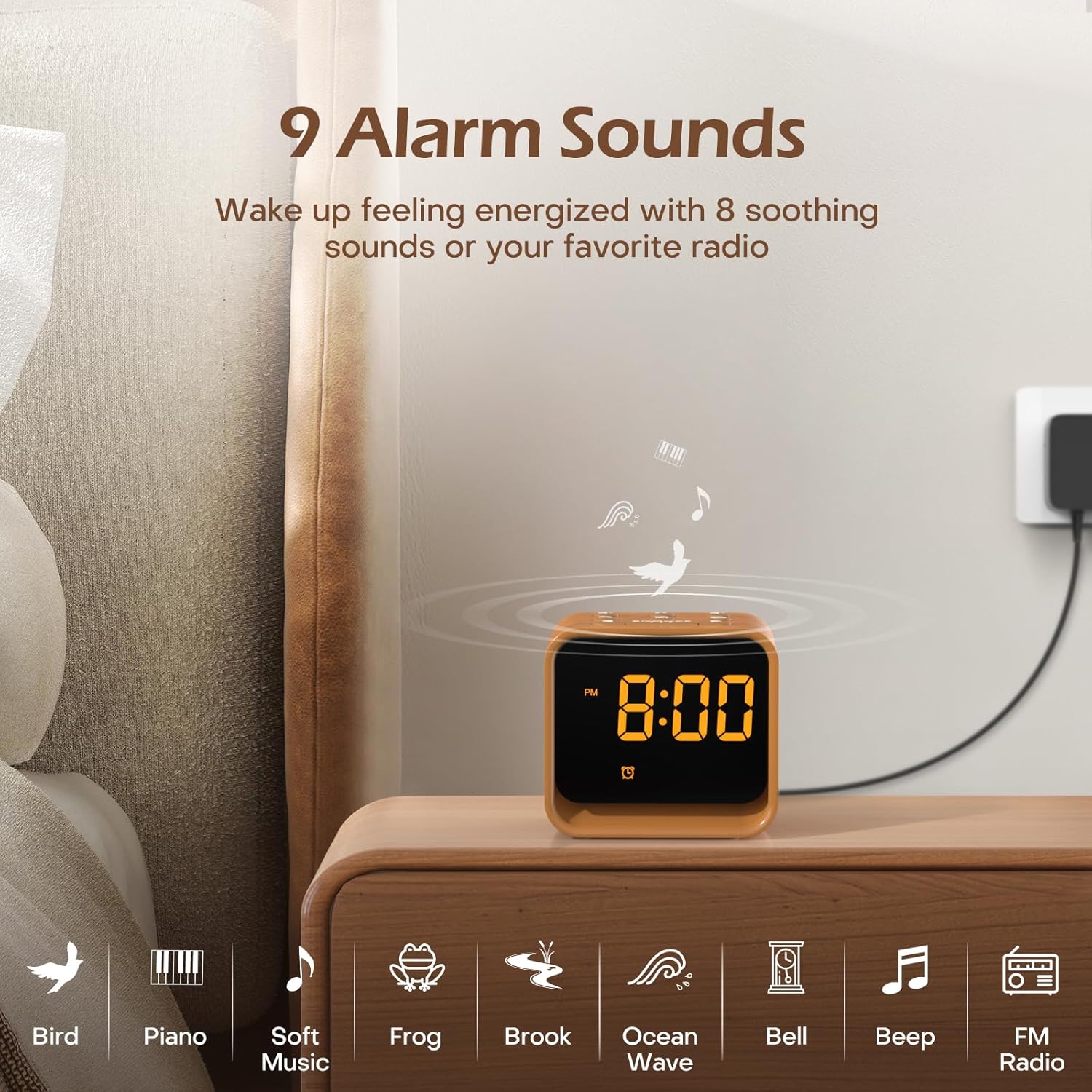
בילד: An illustration of the nine available alarm sounds, including various natural sounds and classic alarm tones, designed for a gentle wake-up.
עפעם ראַדיאָ אָפּעראַציע
- קער אויף / אַוועק: Press the 'FM Radio On/Off/Auto Scan' button to turn the FM radio on or off.
- Auto Scan and Save: When the radio is on, press and hold the 'FM Radio On/Off/Auto Scan' button to automatically scan for available stations and save them as presets.
- טוישן סטאַנציעס: Use the 'Volume Up/Down' buttons to cycle through saved FM stations.
- סטרויערן באַנד: Use the 'Volume Up/Down' buttons to adjust the radio volume (0-30 levels).

בילד: Details of the FM Radio function, including frequency range (76-108 MHz), adjustable volume (0-30 levels), and an auto-off timer (0-180 minutes).
שלאָפן סאָונד מאַשין
- קער אויף / אַוועק: Press the 'Sleep Sound On/Off' button to activate or deactivate the sleep sounds.
- אויסקלייַבן געזונט: Use the 'Music Selection' button to cycle through the 24 available soothing sounds (white noise, fan sounds, baby favorites, nature sounds).
- סטרויערן באַנד: Use the 'Volume Up/Down' buttons to set the desired volume for the sleep sounds.
- שלאָפן טימער: The sleep timer allows the sound to play for a set duration before automatically turning off. Available settings typically include 30, 60, 90, 120, 150, or 180 minutes. Refer to the specific timer button or sequence on your device.

בילד: אַן אינערלעכער view of the clock radio, emphasizing its speaker and the variety of 24 soothing sounds available, categorized into white noise, fan sounds, baby favorites, and nature sounds.
נאַכט ליכט
- קער אויף / אַוועק: Briefly press the 'Snooze/Nightlight Switch' button to turn the night light on or off.
- טוישן קאָליר: Press the 'Snooze/Nightlight Switch' button repeatedly to cycle through the 7 available colors.
- סטרויערן ברייטנאַס: Use the 'Nightlight Brightness Control' on the back of the device to adjust the intensity of the night light.

בילד: The clock radio featuring its 7-color dimmable bottom night light, which can be turned on or off to create a desired ambiance.
ווייַז ברייטנאַס
The LED display brightness can be adjusted from 0% to 100% to suit your preference and avoid disturbing sleep.
- סטרויערן ברייטנאַס: Use the 'Display Dimmer' control on the back of the device to slide and set the desired display brightness.
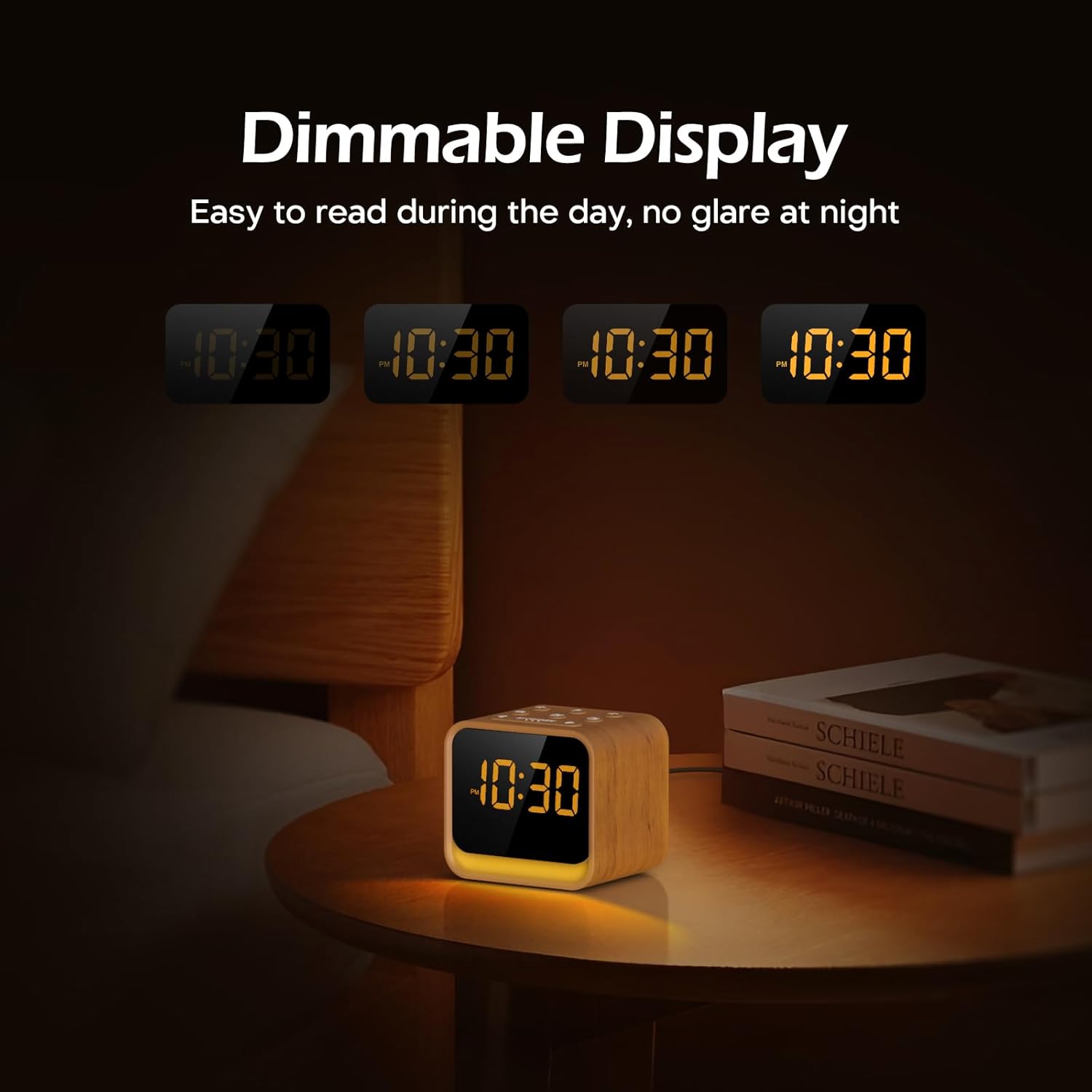
בילד: The clock's display at different brightness settings, from 0% to 100%, illustrating the dimmable LED feature for comfortable viewing day and night.
סנאָאָזע פֿונקציע
When the alarm sounds, briefly press the 'Snooze/Nightlight Switch' button to activate the 9-minute snooze function. The alarm will sound again after 9 minutes.
וישאַלט
- רייניקונג: ווישט אָפּ דאָס אַפּאַראַט מיט אַ ווייכן, טרוקענעם שטאָף. ניצט נישט קיין שרײַבנדיקע רייניגערס אָדער סאָלווענטן.
- סטאָרידזש: If storing for an extended period, disconnect from power and keep in a cool, dry place.
- באַטערי פאַרבייַט: The CR2023 backup battery should last for several years. If settings are lost during a power outage, replace the battery by opening the battery compartment on the bottom of the unit.
טראָובלעשאָאָטינג
| פּראָבלעם | מעגלעך סיבה | לייזונג |
|---|---|---|
| די מיטל טוט נישט מאַכט אויף. | מאַכט אַדאַפּטער נישט פארבונדן אָדער דעפעקטיוו. | Ensure power adapter is securely connected to the device and a working power outlet. |
| דער אַלאַרם קלינגט נישט. | דער אַלאַרם איז נישט אַקטיוויזירט אָדער דער באַנד איז צו נידעריק. | קוק אויב די אַלאַרם בילדל ווערט געוויזן. פֿאַרגרעסער דעם אַלאַרם באַנד. |
| די FM ראַדיאָ אָפּנאַם איז שוואַך. | אַנטענע נישט אויסגעשטרעקט אָדער שטערונג. | Fully extend the radio antenna. Try repositioning the device to reduce interference. |
| Time/settings are lost after power outage. | CR2023 backup battery is depleted. | פאַרבייַטן די CR2023 באַקאַפּ באַטאַרייע. |
ספּעסאַפאַקיישאַנז
- סאָרט: ריטשער
- מאָדעל: CR7WCA
- מאַטעריאַל: פּלאַסטיק
- קאָליר: Oak Wood finish
- ווייַז טיפּ: געפירט
- ווייַז ברייטנאַס: 0-100% דימאַבאַל
- נאַכט ליכט: 7 Colors, Dimmable
- שרעק סאָונדס: 9 options (8 natural sounds + beep/FM radio)
- שלאָף סאָונדס: 24 options (White Noise, Fan, Baby Favorites, Nature Sounds)
- FM ראַדיאָ אָפטקייַט: 76-108 מהז
- מאַכט מקור: Corded (DC 5V adapter)
- באַקקופּ באַטאַרייע: CR2023 (for settings memory)
- Approximate Dimensions (Package): 13.9 X 9.4 X 8 סענטימעטער
- Approximate Weight (Package): 0.49 קג
וואָראַנטי און שטיצן
REACHER products come with a standard manufacturer's warranty. For specific warranty details, technical support, or any questions regarding your device, please refer to the contact information provided with your purchase or visit the official REACHER webפּלאַץ.
For customer service inquiries, please retain your purchase receipt and product model number (CR7WCA).


