1. הקדמה
This manual provides essential information for the proper setup, operation, maintenance, and troubleshooting of your Meizu mblu 21 4G LTE smartphone. Please read this manual thoroughly before using your device to ensure optimal performance and longevity.
The Meizu mblu 21 features a 6.79-inch HD display, a 13MP dual camera system, and runs on Android 14. It is designed for efficient performance and reliable connectivity.
2. סעטאַפּ
2.1 פּעקל אינהאַלט
באַשטעטיקן אַז דיין פּעקל כּולל די פאלגענדע זאכן:
- Meizu mblu 21 Smartphone
- מאַכט אַדאַפּטער
- שנעלע אָנהייב גייד (אויב אַרייַנגערעכנט)
2.2 סים קאַרטל און מיקראָסד קאַרטל ינסטאַלירונג
The Meizu mblu 21 supports Dual Nano SIM cards and a MicroSD card for expandable storage.
- געפינט די סים טאַץ אויף דער זייט פון אייער דעווייס.
- Insert the SIM ejector tool (not included, use a thin pin if necessary) into the small hole on the SIM tray to eject it.
- Place your Nano SIM card(s) and/or MicroSD card into the designated slots on the tray, ensuring proper orientation.
- פֿאָרזיכטיק צוריקשטעלט די סים טאַץ אין דעם טעלעפאָן ביז עס קליקט אין פּלאַץ.
2.3 ערשטע איינשטראָם און נעץ קאָנפיגוראַציע
- Press and hold the power button until the Meizu logo appears.
- פֿאָלגט די אינסטרוקציעס אויף דעם עקראַן צו פֿאַרענדיקן די ערשטע סעטאַפּ, אַרייַנגערעכנט שפּראַך אויסוואַל, Wi-Fi פֿאַרבינדונג און Google חשבון סעטאַפּ.
- For cellular connectivity, ensure your SIM card is active. This device is an international version and in the USA market, it operates exclusively on T-Mobile's 4G LTE network. Outside the USA, it is compatible with various carriers worldwide.
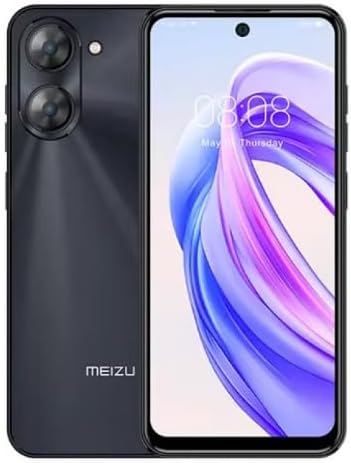
בילד 2.3.1: פראָנט און דערציען view of the Meizu mblu 21 smartphone. The front displays the screen with a punch-hole camera, while the rear shows the dual camera module and the Meizu branding.
3. אַפּערייטינג ינסטרוקטיאָנס
3.1 גרונטלעכע נאַוויגאַציע (אַנדרויד 14)
Your Meizu mblu 21 runs on Android 14, offering an intuitive user experience. Use gestures or on-screen navigation buttons to move between apps, access settings, and manage notifications.
3.2 קאַמעראַ באַניץ
The device features a 13MP Smart Camera on the rear and an 8MP front camera. Open the Camera app to capture photos and videos. Utilize various modes and settings for optimal results.
3.3 זיכערהייט פֿעיִקייטן
Unlock your device using the side-mounted fingerprint sensor for instant access or the 8MP front camera for Smart Face Unlock.
3.4 קאַנעקטיוויטי
- ווי-פי: Supports Dual-Band Wi-Fi (2.4GHz and 5GHz) for stable internet access.
- בלועטאָאָטה: Bluetooth 5.0 for connecting to wireless accessories.
- VoLTE: Enjoy clearer voice calls with VoLTE HD Calls.

בילד 3.4.1: Visual representation of key connectivity and operating system features, including Android 14, Dual-Band Wi-Fi, Bluetooth 5.0, and VoLTE HD Calls.
4. וישאַלט
4.1 אַלגעמיינע קער
- האַלטן דיין מיטל טרוקן און אַוועק פון עקסטרעם טעמפּעראַטורעס.
- רייניקט דעם עקראַן און קערפּער מיט אַ ווייכן, לינט-פֿרייע שטאָף. פֿאַרמייַדט שטרענגע כעמיקאַלן.
- באַשיצט דעם עקראַן מיט אַ עקראַן פּראָטעקטאָר און דעם קערפּער מיט אַ פּראַטעקטיוו קעסטל צו פאַרמייַדן קראַצן און שעדיקן.
4.2 באַטערי מאַנאַגעמענט
The 4900mAh battery is designed for all-day performance. To prolong battery life:
- פֿאַרמײַדט אָפֿט פֿולשטענדיק אויסצולאָדן די באַטעריע.
- Use the provided power adapter for charging.
- Optimize background app usage and screen brightness in settings.

בילד 4.2.1: אַן אינערלעכער view of the Meizu mblu 21 smartphone highlighting the 4900mAh battery, emphasizing its capacity for extended use.
5. טראָובלעשאָאָטינג
5.1 פּראָסט ישוז און סאַלושאַנז
- מיטל נישט קער אויף: זיכער מאַכן אַז די באַטאַרייע איז אויפגעלאָדן. פֿאַרבינדט זיך צום מאַכט אַדאַפּטער און פּרוּווט ווידער.
- נעטוואָרק קאַנעקטיוויטי ישוז: Check if your SIM card is properly inserted and active. Verify network settings and ensure you are within T-Mobile's coverage area in the USA.
- לאַנגזאַמע פאָרשטעלונג: Close unnecessary background applications. Clear cache and temporary fileס. ריסטאַרט דעם מיטל.
- די באַטאַרייע פליסן געשווינד: Reduce screen brightness, disable unused features like Bluetooth or GPS, and check for power-intensive apps.
If problems persist, consider performing a factory reset (back up your data first) or contacting customer support.
6. ספּעסאַפאַקיישאַנז
| מאָדעל נומער | M416L |
| אָפּערייטינג סיסטעם | אַנדרויד 14 |
| ווייַז | 6.79 Inches HD, 2340 x 1080 Resolution, 90Hz Adaptive Refresh Rate |
| פּראַסעסער | Octa Core 1.6GHz ARM Mali-G57 |
| זכּרון | 64 GB Internal Storage, 4 GB RAM |
| באַטערי | 4900mAh (4.9E+3 Milliamp Hours) Lithium Polymer |
| דערציען אַפּאַראַט | 13MP Smart Camera, 5P Precision Lens |
| פראָנט אַפּאַראַט | 8MP |
| סעליאַלער טעכנאָלאָגיע | 4G LTE FDD: 2,3,4,5,7,8,12,17,26,28,66; 3G WCDMA: 2/4/5/8; 2G Quad Band |
| SIM טיפּ | Dual Nano SIM + MicroSD |
| ווי-פי | צוויי-באַנד (2.4GHz און 5GHz) |
| בלועטאָאָטה | 5.0 |
| אַודיאָ דזשאַק | וסב טיפּ C |
| פּונקט וואָג | 14 אונסעס |
| FCC ID | 2ANQ6-M416L |

בילד 6.1: The Meizu mblu 21 smartphone presented in its Titan Black color variant, showcasinג זײַן דיזײַן.
7. וואָראַנטי און שטיצן
For warranty information, please refer to the warranty card included with your product or consult the retailer where the device was purchased. Meizu provides support for its products. For further assistance, please visit the official Meizu webפּלאַץ אָדער קאָנטאַקט זייער קונה דינסט.


