1. הקדמה
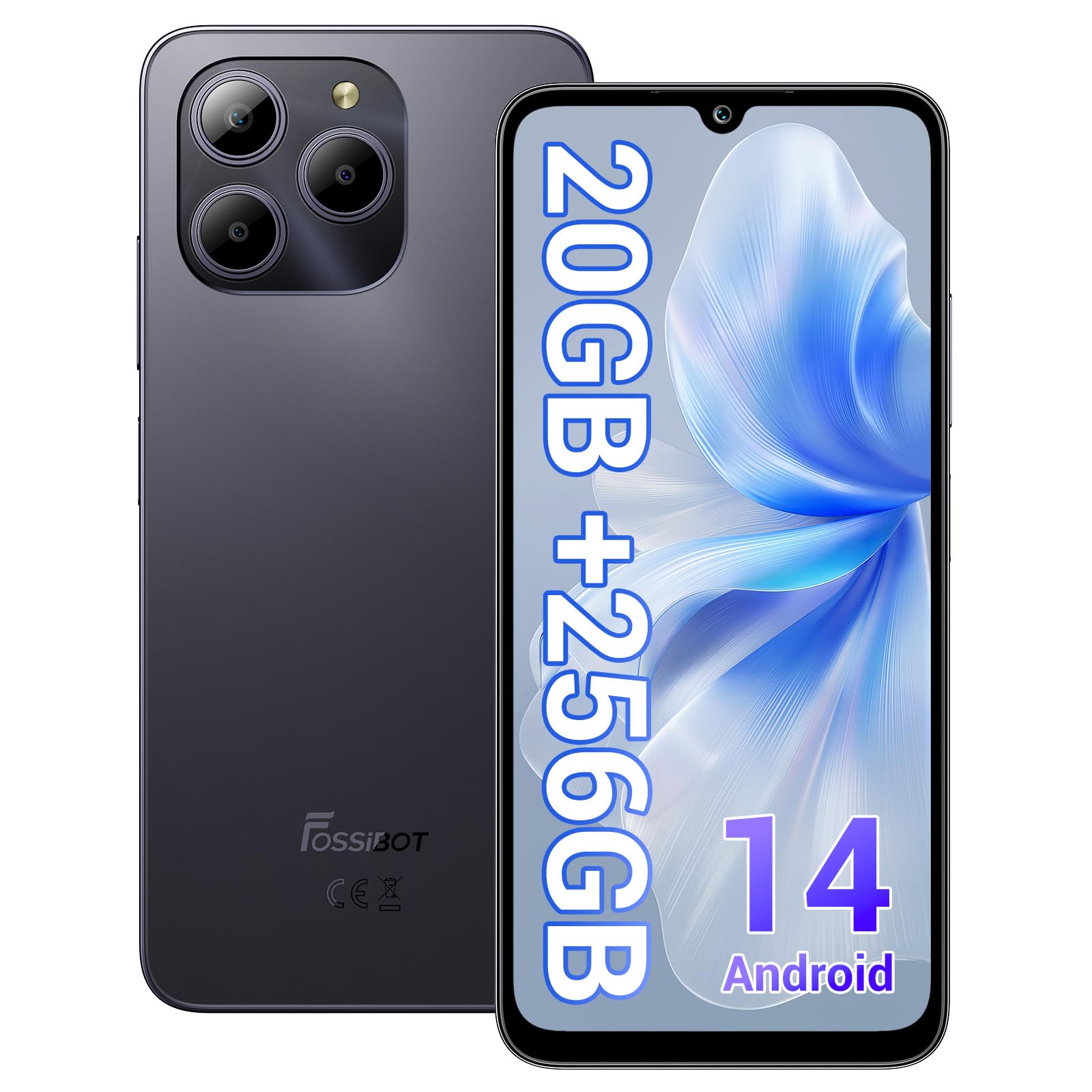
Welcome to the FOSSIBOT S2 Smartphone user manual. This guide provides essential information for setting up, operating, maintaining, and troubleshooting your new device. The FOSSIBOT S2 is an unlocked smartphone featuring Android 14, a 6.72-inch FHD+ display, a 50MP main camera, a 5000mAh battery, and advanced security features like Face ID and a fingerprint sensor.
2. זיכערקייַט אינפֿאָרמאַציע
- באַטערי זיכערקייַט: Do not attempt to replace the battery yourself. Use only FOSSIBOT-approved chargers and cables. Avoid exposing the device to extreme temperatures or direct sunlight.
- וואַסער קעגנשטעל: די דעווייס איז נישט וואַסערפּרוף. פֿאַרמייַדט אויסשטעלונג צו פֿליסיקייטן.
- געהער שוץ: פֿאַרמײַדט פֿאַרלענגערט הערן אויף הויכע וואָלומען כּדי צו פֿאַרמײַדן שאָדן צו דער הערן.
- דרייווינג זיכערקייַט: ניצט נישט אייער טעלעפאָן בשעת'ן דרייוון. שטעלט שטענדיק זיכערהייט אויף דער וועג אין פריאריטעט.
- באַזייַטיקונג: Dispose of the device and its accessories responsibly according to local regulations. Do not dispose of with household waste.
3. פּעקל אינהאַלט
באַשטעטיקט אַז אַלע זאכן זענען פאַראַן אין אייער פּראָדוקט פּאַקעט:
- פאָסיבאָט ס2 סמאַרטפאָון
- סים קאָרט שפּילקע
- טיפּ- C וסב קאַבלע
- 18 וו טשאַרדזשער
- באַניצער מאַנואַל / וואָראַנטי קאָרט
- TPU קאַסע

4. דיווייס איבערview
Familiarize yourself with the physical components of your FOSSIBOT S2 smartphone.

- פראָנט: 6.72-inch FHD+ display, 16MP front camera, earpiece.
- הינטן: 50MP main camera, LED flash, fingerprint sensor (side-mounted).
- זייטן: Power button, volume buttons, SIM/SD card tray, USB Type-C port, 3.5mm audio jack.
5. סעטאַפּ
5.1 אריינשטעלן SIM און SD קארטלעך
- געפינט די סים קארטל טאַץ אויף דער זייט פון אייער דעווייס.
- שטעקט אריין דעם צוגעשטעלטן סים קארטל ארויסווארפער געצייג אין דעם קליינעם לאך לעבן דעם טאַץ און דריקט לײַכט ביז דער טאַץ קומט ארויס.
- Place your Nano-SIM cards (up to two) and/or a microSD card (for storage expansion up to 1TB) into the designated slots on the tray. Ensure the gold contacts face downwards.
- פֿאָרזיכטיק צוריקשטעלט דעם טאַץ אין דעם טעלעפֿאָן ביז עס קליקט אַרײַן אין פּלאַץ.

5.2 אײַנצושאַלטן און ערשטע סעטאַפּ
- Press and hold the Power button until the FOSSIBOT logo appears.
- פֿאָלגט די אינסטרוקציעס אויף דעם עקראַן צו אויסקלײַבן אײַער שפּראַך, פֿאַרבינדן זיך צו אַ Wi-Fi נעץ, און אויפֿשטעלן אײַער Google חשבון.
- You will be guided through setting up security features such as a PIN, pattern, fingerprint, and Face ID.
6. אַפּערייטינג דיין מיטל
6.1 ווייַז
The FOSSIBOT S2 features a 6.72-inch FHD+ In-cell display with a resolution of 1080 x 2400 pixels, providing clear and vibrant visuals.

6.2 פאָרשטעלונג
Powered by the MediaTek G85 Octa-Core processor and 20GB RAM (8GB physical + 12GB virtual), the FOSSIBOT S2 delivers smooth performance for multitasking, gaming, and streaming. It includes 256GB of internal storage, expandable up to 1TB with a TF card.

6.3 אַפּאַראַט
Capture high-quality photos and videos with the 50MP AI main camera and take clear selfies with the 16MP front camera. The camera system supports various modes for different shooting scenarios.

6.4 באַטאַרייע און טשאַרדזשינג
The FOSSIBOT S2 is equipped with a 5000mAh battery, providing extended usage time. It supports 18W fast charging via the Type-C port.
6.5 זיכערהייט פֿעיִקייטן
Unlock your device securely using the side-mounted fingerprint sensor or Face ID recognition.

6.6 קאַנעקטיוויטי
The FOSSIBOT S2 supports dual 4G SIM cards for reliable network coverage. It also includes NFC for contactless payments and GPS/GLONASS/Galileo/Beidou for accurate navigation.

6.7 אַנדרויד 14 אָפּערייטינג סיסטעם
Experience the latest features and security enhancements with Android 14, offering improved privacy controls, smarter battery management, and a customizable user interface.

7. וישאַלט
- ווייכווארג דערהייַנטיקונגען: קאָנטראָלירט און אינסטאַלירט רעגולער סיסטעם דערהייַנטיקונגען צו ענשור אָפּטימאַלע פאָרשטעלונג און זיכערהייט.
- רייניקונג: ניצט אַ ווייכע, לינט-פֿרייע שטאָף צו רייניקן דעם עקראַן און קערפּער פֿון טעלעפֿאָן. פֿאַרמייַדט שטרענגע כעמיקאַלן.
- באַטערי זאָרגן: To prolong battery life, avoid fully discharging the battery frequently. Charge the device before it drops below 20%.
- סטאָרידזש פאַרוואַלטונג: פּעריִאָדיש אויסמעקן נישט-נייטיקע fileס און אַפּפּס צו האַלטן די גיכקייט פון די מיטל און באַפֿרײַען סטאָרידזש.
8. טראָובלעשאָאָטינג
אויב איר טרעפט פּראָבלעמען מיט אייער FOSSIBOT S2, זעט די פאלגענדע געוויינטלעכע לייזונגען:
- מיטל נישט קער אויף: Ensure the battery is charged. Connect the phone to the charger for at least 15 minutes, then try powering on again.
- אַפּפּס קראַשן/פֿרירן: Close background apps. Clear the cache of the problematic app or reinstall it. If the issue persists, perform a factory reset (back up data first).
- שלעכט נעץ סיגנאַל: Check if your SIM card is properly inserted. Ensure you are within network coverage. Restart the device.
- די באַטאַרייע איז געשווינד ויסגעשעפּט: Reduce screen brightness, disable unused features like Wi-Fi, Bluetooth, and GPS when not needed. Check battery usage in settings to identify power-hungry apps.
- Fingerprint/Face ID Not Working: Ensure your fingers are clean and dry for fingerprint recognition. For Face ID, ensure your face is well-lit and unobstructed. Re-register your fingerprint or face if necessary.
For more complex issues, please contact FOSSIBOT customer support.
9. ספּעסאַפאַקיישאַנז
| שטריך | באַשרייַבונג |
|---|---|
| מאָדעל נאָמען | S2 |
| אָפּערייטינג סיסטעם | אַנדרויד 14 |
| פּראַסעסער | מעדיאַטעק העליאָ G85 אָקטאַ-קאָר (2 GHz) |
| באַראַן | 20 גיגאבייט (8 גיגאבייט פיזיש + 12 גיגאבייט ווירטועל) |
| אינערלעכער סטאָרידזש | 256 גיגאבייט |
| יקספּאַנדאַבאַל סטאָרידזש | ביז 1TB דורך TF קאַרטל |
| ווייַז גרייס | 6.72 אינטשעס FHD+ אין-צעל |
| ווייַז האַכלאָטע | 1080 X 2400 בילדצעלן |
| דערציען אַפּאַראַט | 50MP |
| פראָנט אַפּאַראַט | 16MP |
| באַטאַרייע קאַפּאַציטעט | 5000 מאַה |
| טשאַרדזשינג | 18W שנעלע טשאַרדזשינג (טיפּ-C) |
| קאַנעקטיוויטי | Dual 4G SIM, Wi-Fi, Bluetooth, NFC |
| נאַוויגאַציע | דזשי־פי־עס, גלאָנאַס, גאַלילעאָ, ביידו |
| זיכערהייַט | Fingerprint Sensor, Face ID |
| אַודיאָ דזשאַק | 3.5 מם |
| דימענשאַנז | 6.57 X 3.03 X 0.34 אינטשעס |
| וואָג | 1.04 פונט |
10. וואָראַנטי און שטיצן
Your FOSSIBOT S2 smartphone comes with a standard manufacturer's warranty. Please refer to the included Warranty Card in your package for specific terms and conditions, including warranty duration and coverage details.
For technical support, service inquiries, or to access additional resources, please visit the official FOSSIBOT website or contact their customer service department. Contact information can typically be found on the Warranty Card or the FOSSIBOT brand store page.
אָנליין שטיצן: Visit the FOSSIBOT Store on Amazon


