1. הקדמה
Thank you for choosing the Lubluelu SL60 Pro Robot Vacuum Cleaner and Mop. This manual provides essential information for the safe operation, maintenance, and troubleshooting of your device. Please read it thoroughly before use and retain it for future reference.
2. וויכטיק סאַפעטי אינסטרוקציעס
כדי צו רעדוצירן דעם ריזיקע פון שאָדן אדער שאָדן, לייענט די זיכערהייט אינסטרוקציעס קערפֿול און האַלט זיי צוטריטלעך בעת פּראָדוקט באַניץ.
- דער מיטל קענען ווערן גענוצט דורך קינדער אַלט 8 יאר און העכער און מענטשן מיט רידוסט פיזיש, סענסערי אָדער גייַסטיק קייפּאַבילאַטיז אָדער פעלן פון דערפאַרונג און וויסן אויב זיי האָבן באקומען השגחה אָדער לימעד וועגן נוצן פון די אַפּפּליאַנסע אויף אַ זיכער וועג און פֿאַרשטיין די כאַזערדז ינוואַלווד. .
- קינדער זאָל זיין סופּערווייזד צו ענשור אַז זיי טאָן ניט שפּילן מיט די אַפּפּליאַנסע.
- רייניקונג און באַניצער וישאַלט זאָל ניט זיין געמאכט דורך קינדער אָן השגחה.
- ניצט נאָר דעם מאַכט אַדאַפּטער וואָס ווערט צוגעשטעלט דורך דעם פאַבריקאַנט.
- Do not use the appliance in areas with open flames or fragile objects.
- זיכער מאַכן אַז דער ראָבאָט איז אויסגעלאָשן און אַרויסגעטראָגן פֿון דער פּלאַטע איידער איר רייניקט אָדער דורכפֿירט וישאַלט.
- Do not immerse the robot or charging base in water.
- האַלטן האָר, פרייַ קליידער, פינגער און אַלע טיילן פון דעם גוף אַוועק פון אָופּאַנינגז און מאָווינג טיילן.
3. פּעקל אינהאַלט
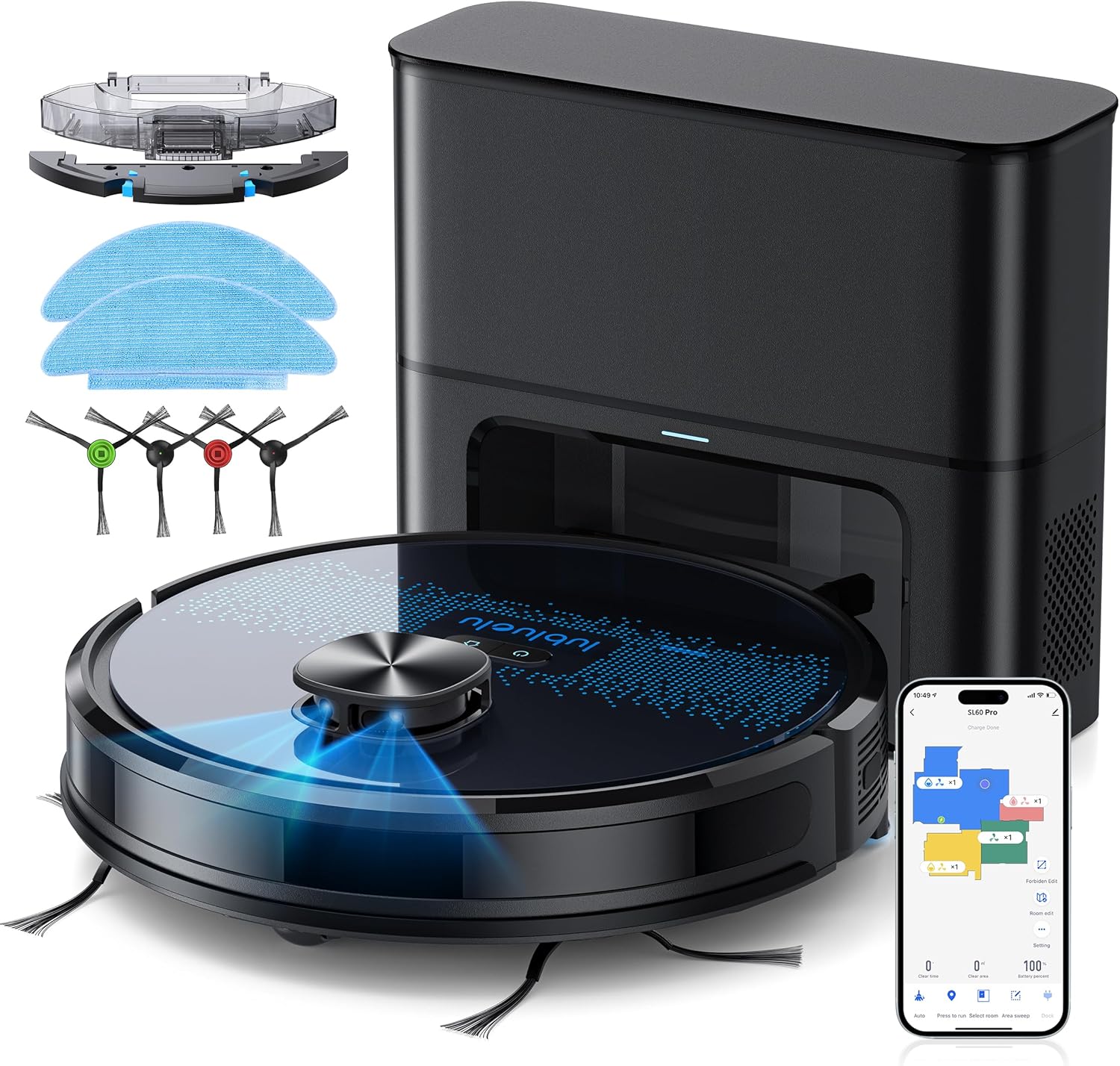
באַשטעטיקט אַז אַלע קאָמפּאָנענטן זענען פאַראַן און אין גוטן צושטאַנד ביים אויספּאַקן. אויב עס פעלט אָדער זענען געשעדיגט, ביטע קאָנטאַקטירט קונה שטיצע.
- Lubluelu SL60D Robot Vacuum Cleaner
- D3 Self-Emptying Station
- Extra Dust Bag (2.5L capacity)
- Mop Pad (2 pieces)
- רייניקונג טול
- זייט ברושעס (2 פּאָר)
- עקסטרע HEPA פילטער
- באַניצער מאַנואַל
4. פּראָדוקט איבערview
The Lubluelu SL60 Pro is an advanced robot vacuum and mop designed for efficient home cleaning. It features LIDAR navigation, 4000Pa suction power, a 2.5L self-emptying dust station, and smart app control.
4.1 שליסל פֿעיִקייטן
- לידאַר נאַוויגאַציע: Equipped with 8-meter laser range and SLAM algorithm for accurate mapping and efficient route planning.
- זעלבסט-ליידיקנדיקע סטאנציע: Automatically empties the robot's dustbin into a 2.5L disposable bag, requiring manual emptying only every 60 days.
- 4000Pa זויג-מאַכט: Powerful brushless motor with three adjustable suction levels for effective cleaning on various surfaces, including carpets.
- 3-אין-1 רייניקונג: Sweeps, vacuums, and mops simultaneously with electronic water control and Y-shaped mopping patterns.
- מולטי-שטאָק מאַפּינג: Stores up to 5 maps for multi-level homes, allowing for customized cleaning plans.
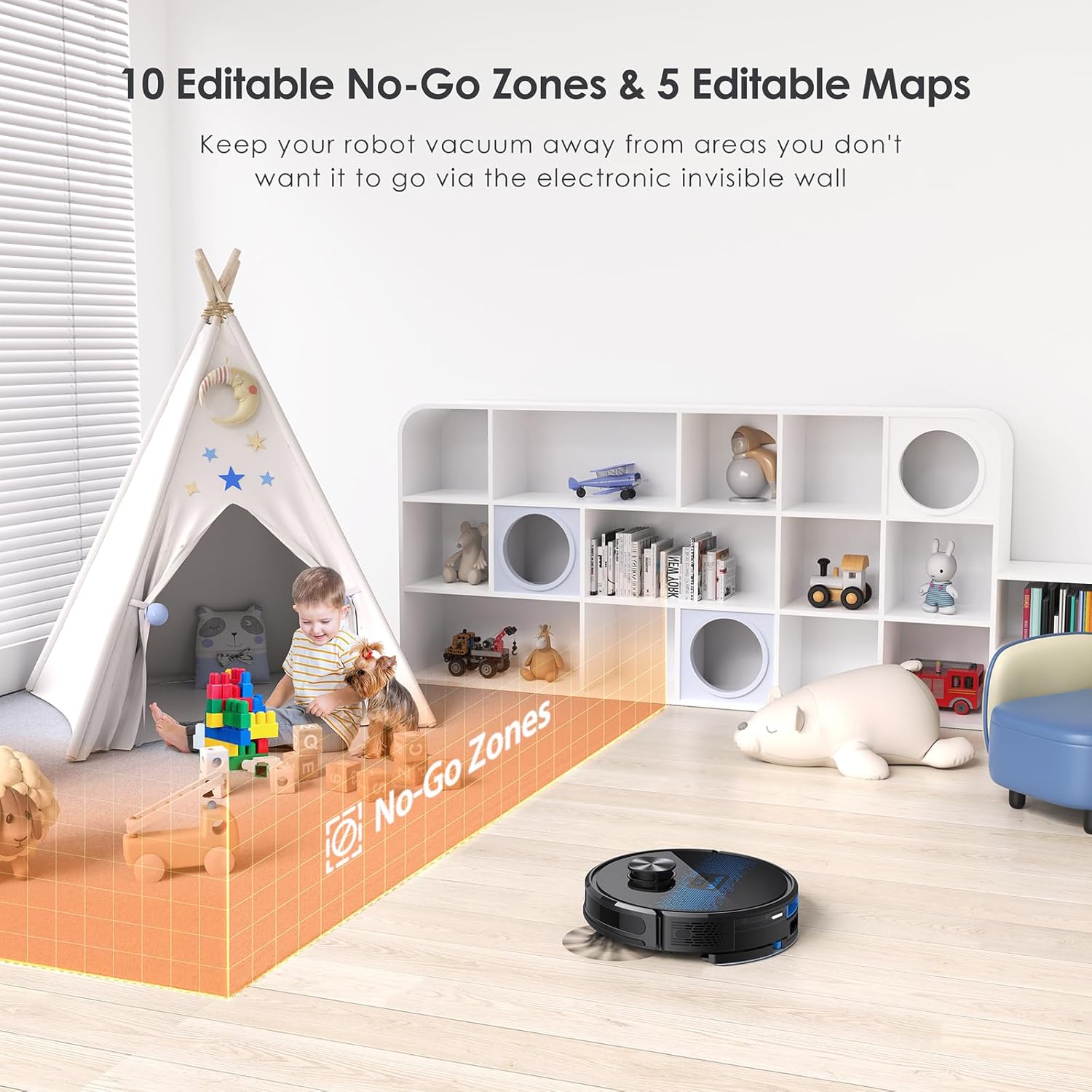
- קאַסטאַמייזאַבאַל רייניקונג: Set no-go zones, virtual walls, spot cleaning, edge cleaning, and scheduled cleaning via the app.
- אָטאַמאַטיק ריטשאַרדזשינג: Returns to the charging base when battery is low (below 15%) and resumes cleaning from where it left off once charged to 80%.
- נידעריק ראַש אָפּעראַציע: ארבעט ביי בערך 55dB.

5. סעטאַפּ
5.1 טשאַרדזשינג די ראָבאָט
Before first use, fully charge the robot. Place the self-emptying station against a wall with at least 0.5 meters of clear space on either side and 1.5 meters in front. Ensure the power cable is securely connected.

5.2 אינסטאַלירן זייט ברושעס
Attach the side brushes by pressing them onto the square posts at the bottom of the robot until they click into place.
5.3 Installing the Dust Bin/Water Tank
The robot comes with a combined dust bin and water tank. Fill the water tank with clean water (do not use cleaning solutions that may clog the system). Attach the mop pad to the bottom of the tank. Insert the assembly into the robot until it locks.
5.4 פֿאַרבינדן זיך צו Wi-Fi און אַפּ
To unlock all smart features, connect your robot to the Lubluelu app (Smartlife app). Ensure your Wi-Fi network is 2.4GHz.
- Download the 'Smartlife' app from your mobile app store.
- רעגיסטרירן אָדער קלאָץ אין צו דיין חשבון.
- Press and hold the power button on the robot for 3-5 seconds until the Wi-Fi indicator light blinks rapidly.
- In the app, tap 'Add Device' and select 'Robot Vacuum (Wi-Fi)' under 'Small Home Appliances'.
- Follow the in-app instructions to connect the robot to your 2.4GHz Wi-Fi network.
6. אָפּעראַציע
6.1 אָנהייבן/פּויזירן רייניקונג
- אָנהייב: Press the power button on the robot or tap 'Start' in the app.
- פּויזע: Press the power button again or tap 'Pause' in the app.
- צוריקקער צו באַזע: Press the home button on the robot or tap 'Recharge' in the app.
6.2 רייניקונג מאָדעס
The robot offers various cleaning modes accessible via the Smartlife app:
- אַוטאָ רייניקונג: The robot intelligently maps and cleans your home using its LIDAR navigation.
- אָרט רייניקונג: דירעקטירט דעם ראָבאָט צו רייניקן אַ ספּעציפֿישן קליין געגנט אינטענסיוו.
- זאָנע רייניקונג: דעפינירן ספעציפישע געביטן אויף דער מאַפּע פֿאַר דעם ראָבאָט צו רייניקן.
- ברעג רייניקונג: דער ראָבאָט רייניקט לעבן ווענט און מעבל עדזשאַז.
- סקעדזשולד רייניקונג: שטעלט איין ספעציפישע צייטן פארן ראָבאָט צו רייניקן אויטאָמאַטיש.

6.3 Using the Mopping Function
Ensure the water tank is filled and the mop pad is attached. The app allows you to adjust water flow levels for different floor types.
6.4 Managing Maps and No-Go Zones
The SL60 Pro can store up to 5 different maps, useful for multi-level homes. You can also define up to 10 no-go zones or virtual walls to restrict the robot from certain areas.
6.5 קול קאָנטראָל
The robot is compatible with Amazon Alexa and Google Assistant. Follow the instructions in the Smartlife app to link your device for voice commands.
7. וישאַלט
רעגולערע אויפהאלטונג גאראנטירט אפטימאלע פאָרשטעלונג און פארלענגערט די לעבנס-צייט פון אייער ראָבאָט וואַקוום.
7.1 ליידיקן דעם שטויב־קאסטן
The self-emptying station automatically handles dust collection. The 2.5L dust bag in the station should be replaced approximately every 60 days, depending on usage.

7.2 רייניקן די הויפּט באַרשט
Periodically remove the main brush and clean it using the provided cleaning tool to remove tangled hair and debris.
7.3 רייניקונג פון זייט-באַרשטן
Check side brushes for wear and tear. Remove any tangled hair or debris. Replace if damaged.
7.4 רייניקונג די פילטער
Tap the filter to remove loose dirt. Rinse the filter with water if necessary, ensuring it is completely dry before reinstallation.
7.5 רייניקן דעם וואַסער טאַנק און מאַפּ פּאַד
After each mopping session, empty any remaining water from the tank and clean the mop pad. The mop pad can be hand-washed or machine-washed.
7.6 רייניקונג פון סענסאָרן און טשאַרדזשינג קאָנטאַקטן
Wipe all sensors and charging contacts on both the robot and the charging station with a clean, dry cloth to ensure proper function.
8. טראָובלעשאָאָטינג
If you encounter issues with your Lubluelu SL60 Pro, refer to the following common problems and solutions:
| פּראָבלעם | מעגלעך סיבה | לייזונג |
|---|---|---|
| ראָבאָט טוט נישט קער אויף. | Low battery or power switch off. | Ensure the power switch is on and charge the robot. |
| ראָבאָט קען נישט פאַרבינדן צו Wi-Fi. | Incorrect Wi-Fi band (not 2.4GHz), wrong password, or router too far. | Ensure 2.4GHz Wi-Fi, verify password, move robot closer to router, or reset Wi-Fi on robot. |
| ראָבאָט בלייבט אָפט שטעקן. | Obstacles, tangled cables, or uneven surfaces. | Clear the cleaning area of obstacles, cables, and small items. Use no-go zones for problematic areas. |
| שלעכטע רייניקונג פאָרשטעלונג. | Full dustbin, dirty brushes/filter, or low suction setting. | Empty dustbin, clean brushes and filter, increase suction power via the app. |
| די וואַש-פונקציע אַרבעט נישט. | Empty water tank, dry mop pad, or clogged water nozzle. | Fill water tank, moisten mop pad, clean water nozzle. |
For further assistance, please contact Lubluelu customer support.
9. ספּעסאַפאַקיישאַנז
| שטריך | דעטאַל |
|---|---|
| סאָרט | לובלועלו |
| מאָדעל נאָמען | SL60 Pro |
| קאָליר | בלוי שווארצע |
| פּראָדוקט דימענסיעס (ראָבאָט) | 32 X 32 X 10 סענטימעטער |
| פּונקט וואָג | 4.4 קילאָגראַמס |
| סאַקשאַן מאַכט | אַרויף צו 4000 פּאַ |
| שטויב זעקל קאַפּאַציטעט (סטאַנציע) | 2.5 ליטער |
| וואַסער טאַנק קאַפּאַציטעט | 250 מיליליטער |
| Voltage | 14.4 וואלטס |
| ראַש מדרגה | 55 דעציבעלן |
| רונטימע | אַרויף צו 2 שעה 30 מינוט |
| נאַוויגאַציע טיפּ | LIDAR |
| קאַמפּאַטאַבאַל דעוויסעס | Smartphone (Wi-Fi 2.4GHz), Amazon Alexa, Google Assistant |
| ספּעציעלע פֿעיִקייטן | LIDAR Navigation, Smart Mapping, Obstacle Avoidance, Edge Cleaning, Wet/Dry Mopping, App Control, No-Go Zones, Continuous Breakpoint Cleaning, Multi-Stage Mapping |
10. וואָראַנטי און שטיצן
Lubluelu is committed to customer satisfaction. For any issues with your robot vacuum, please contact our customer service team. We provide lifetime technical support.
- וואָראַנטי: ביטע זעט אייער קויף דאקומענטאציע פאר ספעציפישע וואראנטי דעטאלן.
- קאָנטאַקט שטיצן: For technical assistance or service inquiries, please email us or visit our official webפּלאַץ.