1. הקדמה
This manual provides detailed instructions for the setup, operation, and maintenance of your ECHTPower Wireless Switch Controller. Please read this manual thoroughly before using the product to ensure proper functionality and to maximize your gaming experience. This controller is designed for use with Nintendo Switch, PC, iOS, and Android devices.

Image 1.1: ECHTPower Wireless Switch Controller in purple. This image displays the front view of the controller, highlighting its ergonomic design and button layout.
2. פּראָדוקט איבערview
2.1 פּעקל אינהאַלט
- ECHTPower Wireless Switch Controller
- וסב-C טשאַרדזשינג קאַבלע
- באַניצער מאַנואַל (דעם דאָקומענט)
2.2 קאָנטראָללער אויסלייג
Familiarize yourself with the buttons and features of your controller:

בילד 2.1: פראָנט view of the ECHTPower Wireless Switch Controller. This image shows the left and right analog sticks, D-pad, A/B/X/Y buttons, Home button, Capture button, Plus/Minus buttons, and shoulder buttons.
- לינקער אנאלאג שטעקן: For movement and camera control. Features Hall Effect technology for precision.
- רעכטער אנאלאג שטעקן: For camera control and aiming. Features Hall Effect technology for precision.
- ד-פּאַד: ריכטונגס-איינגאב.
- A/B/X/Y קנעפּלעך: אַקציע קנעפּלעך.
- לינקס/רעכטס קנעפּלעך: אַקסל קנעפּלעך.
- ZL/ZR Triggers: Analog triggers.
- HOME קנעפּל: קערט צוריק צום סיסטעם היים עקראַן.
- CAPTURE Button: Takes screenshots or records video clips.
- +/- קנעפּלעך: Start/Select functions.
- M קנעפּל: Macro/Customization button (refer to advanced settings for programming).
- LED ינדיקאַטאָרס: Player number and charging status.

בילד 2.2: נאָענט־אַרויף view of the Hall Effect joystick. This image highlights the advanced sensor technology used in the analog sticks for enhanced durability and drift-free performance.
The controller features Hall Effect joysticks, which utilize electromagnetic induction for precise, drift-free control and extended lifespan compared to traditional potentiometers.
3. סעטאַפּ און קאַנעקשאַן
3.1 טשאַרדזשינג די קאָנטראָללער
Before first use, fully charge the controller. Connect the supplied USB-C cable to the controller's charging port and the other end to a USB power source (e.g., console, PC, USB wall adapter). The LED indicators will show charging status and turn off when fully charged.
3.2 פֿאַרבינדן זיך צו נינטענדאָ סוויטש
- פֿון די היים מעניו, אויסקלײַבן "קאָנטראָלערס" > "ענדערן גריפּ/אָרדער".
- On the next screen, press and hold the SYNC button on the top of the ECHTPower controller for a few seconds until the player LEDs begin to flash.
- אַמאָל פּערד, די שפּילער LED (s) קאָראַספּאַנדינג צו די קאָנטראָללער נומער וועט זיין ליט.
Note: The SYNC button is usually a small, recessed button on the top edge of the controller.
3.3 פֿאַרבינדן זיך צו אַ קאָמפּיוטער (ווינדאָוס)
The controller supports both wired and wireless connections to PC.
3.3.1 ווייערד קאַנעקשאַן
- פֿאַרבינדט דעם קאָנטראָללער צו אייער פּיסי מיטן USB-C קאַבל.
- דער קאָמפּיוטער זאָל אויטאָמאַטיש דעטעקטירן און אינסטאַלירן די נייטיקע דרייווערס.
- The controller will be recognized as an XInput device.
3.3.2 Wireless Connection (Bluetooth)
- זייט זיכער אז אייער קאמפיוטער האט בלועטוט ענייבאַלד.
- Go to "Settings" > "Devices" > "Bluetooth & other devices" and select "Add Bluetooth or other device".
- Choose "Bluetooth".
- Press and hold the SYNC button on the controller until the LEDs flash rapidly.
- Select the "Pro Controller" or similar device name from the list on your PC.
- Once paired, the controller LEDs will stop flashing and remain lit.
3.4 פֿאַרבינדן זיך צו iOS/Android דעווייסעס

Image 3.1: The ECHTPower Wireless Switch Controller shown alongside various devices, including a tablet, smartphone, and laptop, illustrating its multi-device compatibility.
- געבן בלועטאָאָטה אויף דיין יאָס אָדער אַנדרויד מיטל.
- גיי צו בלועטוט סעטטינגס און זוכט פֿאַר נייע דעוויסעס.
- Press and hold the SYNC button on the controller until the LEDs flash rapidly.
- Select the "Pro Controller" or similar device name from the list on your mobile device.
- Once paired, the controller LEDs will stop flashing and remain lit.
Compatibility may vary with specific games and applications on mobile platforms.
4. אַפּערייטינג ינסטרוקטיאָנס
4.1 יקערדיק קאָנטראָלס
The controller functions similarly to standard gaming controllers. Refer to the in-game instructions for specific button mappings.
- אנאַלאָג שטעקן: Used for movement, camera control, and menu navigation.
- ד-פּאַד: Used for directional input, often for menu navigation or specific game actions.
- A/B/X/Y קנעפּלעך: Primary action buttons, typically for jumping, attacking, interacting, etc.
- L/R/ZL/ZR Buttons: Used for various in-game actions such as aiming, shooting, or special abilities.
- HOME קנעפּל: Returns to the console's home screen or main menu.
- CAPTURE Button: Captures screenshots or video clips (Nintendo Switch specific).
- +/- קנעפּלעך: Often used for pausing games, opening menus, or selecting options.
4.2 Advanced Features (Hall Effect Joysticks)
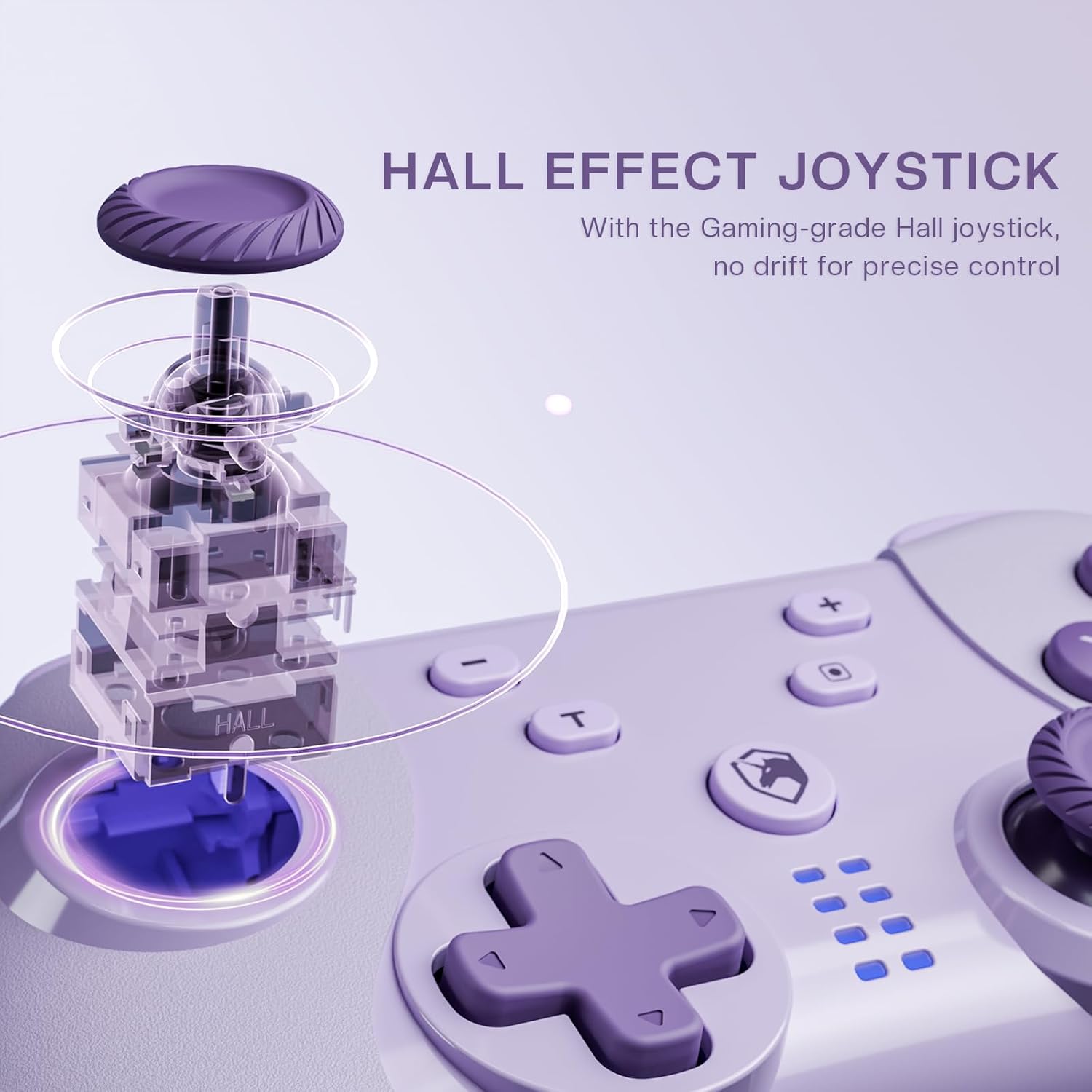
Image 4.1: Diagram illustrating the internal mechanism of a Hall Effect joystick. This image demonstrates how magnetic fields are used for position detection, contributing to drift-free and precise control.
The Hall Effect joysticks provide enhanced precision and durability. This technology uses magnetic fields instead of physical contact, virtually eliminating stick drift and extending the lifespan of the joysticks. No special operation is required; simply enjoy the improved responsiveness and accuracy.
4.3 Macro Function (M Button)
The 'M' button can be programmed for macro functions. Refer to the ECHTPower official website or advanced user guides for detailed instructions on how to program and utilize macro functions for specific gaming scenarios.
5. וישאַלט
- רייניקונג: ניצט אַ ווייכע, טרוקענע שטאָף צו רייניקן דעם קאָנטראָללער. ניצט נישט קיין שאַרפע כעמיקאַלן אָדער אַברייסיוו מאַטעריאַלן.
- סטאָרידזש: האַלט דעם קאָנטראָללער אין אַ קיל, טרוקן אָרט אַוועק פון דירעקט זונשייַן און עקסטרעמע טעמפּעראַטורן.
- באַטערי זאָרגן: כדי צו פארלענגערן די לעבן פון די באַטעריע, זאָלט איר נישט אָפט אויסלאָדן דעם קאָנטראָללער. לאָדט עס אָפט אויף, אפילו אויב עס ווערט נישט גענוצט פאר לענגערע צייטן.
- ויסמיידן טראפנס: באַשיצן דעם קאָנטראָללער פֿון פֿאַלן און קלאַפּן, וואָס קענען שעדיקן אינעווייניקסטע קאָמפּאָנענטן.
6. טראָובלעשאָאָטינג
| פּראָבלעם | מעגלעך סיבה | לייזונג |
|---|---|---|
| דער קאָנטראָללער צינדט זיך נישט אָן. | נידעריק באַטאַרייע. | Charge the controller using the USB-C cable. |
| Cannot connect to device. | Not in pairing mode; Bluetooth interference; device's Bluetooth off. | Ensure controller is in pairing mode (flashing LEDs). Check device's Bluetooth settings. Try restarting both controller and device. |
| Input lag or disconnection. | Distance from device; low battery; wireless interference. | Move closer to the device. Charge the controller. Reduce other wireless devices nearby. |
| Joystick drift. | Rare with Hall Effect, but possible calibration issue or extreme wear. | Try recalibrating the joysticks through your device's settings (e.g., Nintendo Switch system settings). If issue persists, contact support. |
7. ספּעסאַפאַקיישאַנז
- מאָדעל: ווירעלעסס סוויטש קאָנטראָללער
- קאַנעקטיוויטי: בלועטוט ווייערלעס, יו-עס-בי-סי ווייערד
- קאַמפּאַטאַבילאַטי: Nintendo Switch, PC (Windows), iOS, Android
- Joystick Technology: האַלל אַפעקט
- מאַכט מקור: געבויט-אין קריקאָנלאָדלעך באַטערי
- טשאַרדזשינג פּאָרט: וסב-C
- ASIN: B0DNN1BP4F
8. וואָראַנטי און שטיצן
ECHTPower products come with a standard manufacturer's warranty. For specific warranty terms and conditions, please refer to the warranty card included with your product or visit the official ECHTPower webפּלאַץ.
If you encounter any issues or have questions not covered in this manual, please contact ECHTPower customer support:
- Webפּלאַץ: ECHTPower Official Store on Amazon
- בליצפּאָסט: זעט די פּראָדוקט פּאַקאַדזשינג אָדער באַאַמטער webוועבזייטל פֿאַר קאָנטאַקט אימעיל.


