1. הקדמה
This manual provides detailed instructions for the proper use, setup, and maintenance of your Pard NV009-850nm Digital Night Vision Monocular. Please read this manual thoroughly before operating the device to ensure optimal performance and longevity. This device is designed for wildlife observation, hunting, and general outdoor viewארבעטן אין פארשידענע ליכט באדינגונגען.

Image 1.1: The Pard NV009-850nm Digital Night Vision Monocular. This image displays the compact and ergonomic design of the monocular, highlighting its main body, objective lens, and eyepiece.
2. פּראָדוקט איבערview
2.1 פּעקל אינהאַלט
Upon unboxing, verify that all items listed below are present:
- Pard NV009-850nm Digital Night Vision Monocular
- פּראַטעקטיוו קעריינג קאַסע
- וסב טשאַרדזשינג קאַבלע
- Wrist Strap / Neck Strap
- באַניצער מאַנואַל (דעם דאָקומענט)

Image 2.1: Contents of the Pard NV009-850nm package. This image shows the monocular, its carrying case, charging cable, straps, and the user manual, all neatly arranged.
2.2 שליסל פֿעיִקייטן
- Daytime and Nighttime Operation: Seamless transition between full-color daytime viewing and monochrome night vision mode.
- הויך-האַכלאָטע ימאַגינג: Features a 1920x1080 FHD CMOS image sensor and a 1024x768 OLED display for clear, detailed visuals.
- Adjustable IR Illuminator: Integrated 850nm IR illuminator with three intensity levels, providing effective illumination up to 200 meters.
- פאָטאָ און ווידעא רעקאָרדינג: Capture 2608x1944 resolution photos and 1920x1080 Full HD videos directly to a Micro SD card.
- אָפּטיש און דיגיטאַל פארגרעסער: Offers 4.7x optical magnification and 1.5x-3.0x digital zoom for precise target observation.
- Wi-Fi קאַנעקטיוויטי: Connects to smart mobile devices via the "PardVision" app for remote viewינג און דאַטן אַריבערפירן.
- בילד-אין-בילד (PIP) מאָדע: גיט אַ פֿאַרגרעסערטע אינסערט view of the central area for enhanced detail without losing the wider field of view.
- דוראַבאַל פּלאַן: IP67 waterproof rating ensures reliability in various outdoor conditions.

Image 2.2: Comparison of day and night vision modes. This image illustrates the monocular's capability to provide full-color images during the day and clear monochrome images at night, featuring a fox in both scenarios.

Image 2.3: Nighttime viewing range illustration. This graphic demonstrates the monocular's effective viewing distance of up to 200 meters (656 feet) in low-light conditions, showing a wild boar as an example target.

Image 2.4: Enhanced image quality demonstration. This image compares a blurred, lower-quality image with a sharp, enhanced image, illustrating the effectiveness of the PARD Visual Light Enhancement Algorithm (VLEA) and OLED display.
3. סעטאַפּ
3.1 באַטאַרייע ייַנמאָנטירונג
- Locate the battery compartment cover, typically on the underside or side of the monocular.
- Open the cover by twisting or sliding it according to the indicator.
- Insert a fully charged 18650 type battery (not included) with the correct polarity (+/-) as indicated inside the compartment.
- נאָענט די דעקן פון די באַטאַרייע אָפּטייל סיקיורלי.
3.2 Micro SD Card Insertion
The device supports Micro SD cards for storing photos and videos.
- Locate the Micro SD card slot, usually protected by a rubber cover.
- שטעקט אריין די מיקראָ SD קאַרטל מיט אײַן אין דעם שפּאַלט ביז עס קליקט אַרײַן. מאַכט זיכער אַז די קאַרטל איז ריכטיק אָריענטירט.
- Close the rubber cover to protect the slot from dust and moisture.
3.3 ערשטע איינשטראָם און פאָקוס אַדזשאַסטמענט
- דריקן און האַלטן די מאַכט קנעפּל צו קער אויף די מיטל.
- Adjust the diopter ring on the eyepiece until the on-screen display (OSD) text appears sharp and clear to your eye.
- Rotate the objective lens focus ring to bring the observed image into sharp focus.
4. אַפּערייטינג ינסטרוקטיאָנס
4.1 מאַכט אויף / אַוועק
- מאַכט אויף: דריק און האלט דעם פּאַוער קנעפּל פֿאַר אַרום 3 סעקונדעס.
- מאַכט אַוועק: Press and hold the Power button for approximately 3 seconds until the device shuts down.
4.2 Mode Selection (Day/Night)
The NV009-850nm automatically adjusts to ambient light, but you can manually switch modes:
- אין דער הויפּט viewing interface, short press the Mode button to toggle between Day (color) and Night (monochrome) vision modes.
4.3 IR Illuminator Adjustment
The integrated IR illuminator enhances visibility in complete darkness.
- Activate the IR illuminator by pressing its dedicated button (if available) or through the menu.
- Short press the IR button to cycle through the three intensity levels (Low, Medium, High) or to turn it off.

Image 4.1: IR Illuminator functionality. This graphic illustrates the 200m adjustable beam IR illuminator with its three intensity levels, showing how it illuminates a target in darkness.
4.4 פארגרעסערן אפעראציע
- Use the designated zoom buttons (often '+' and '-') to adjust the digital magnification. The optical magnification is fixed at 4.7x.
4.5 פאָטאָ און ווידעא כאַפּן
- פאָטאָ: In viewing mode, short press the Photo button to capture an image.
- ווידעא: Short press the Video button to start recording. Press again to stop recording.

Image 4.2: Video recording and playback function. This image shows the monocular's ability to capture and play back high-definition video, with a simulated screen displaying a recorded scene of a fox.
4.6 פּלייבאַק
- Enter the Playback menu via the main menu.
- Navigate through your recorded photos and videos using the directional buttons.
- Select an item to view it on the OLED display.
4.7 Wi-Fi Connectivity (PardVision App)
- Download the "PardVision" app from your device's app store (Apple App Store or Google Play Store).
- On the monocular, enable Wi-Fi through the system settings. The device will broadcast a Wi-Fi network.
- Connect your smartphone or tablet to the monocular's Wi-Fi network.
- Open the PardVision app to view a live feed, control settings, and transfer files.
4.8 Picture-in-Picture (PIP) Mode
- Activate PIP mode through the quick menu or system settings.
- A magnified window will appear on the main display, showing a zoomed-in view of the central area.
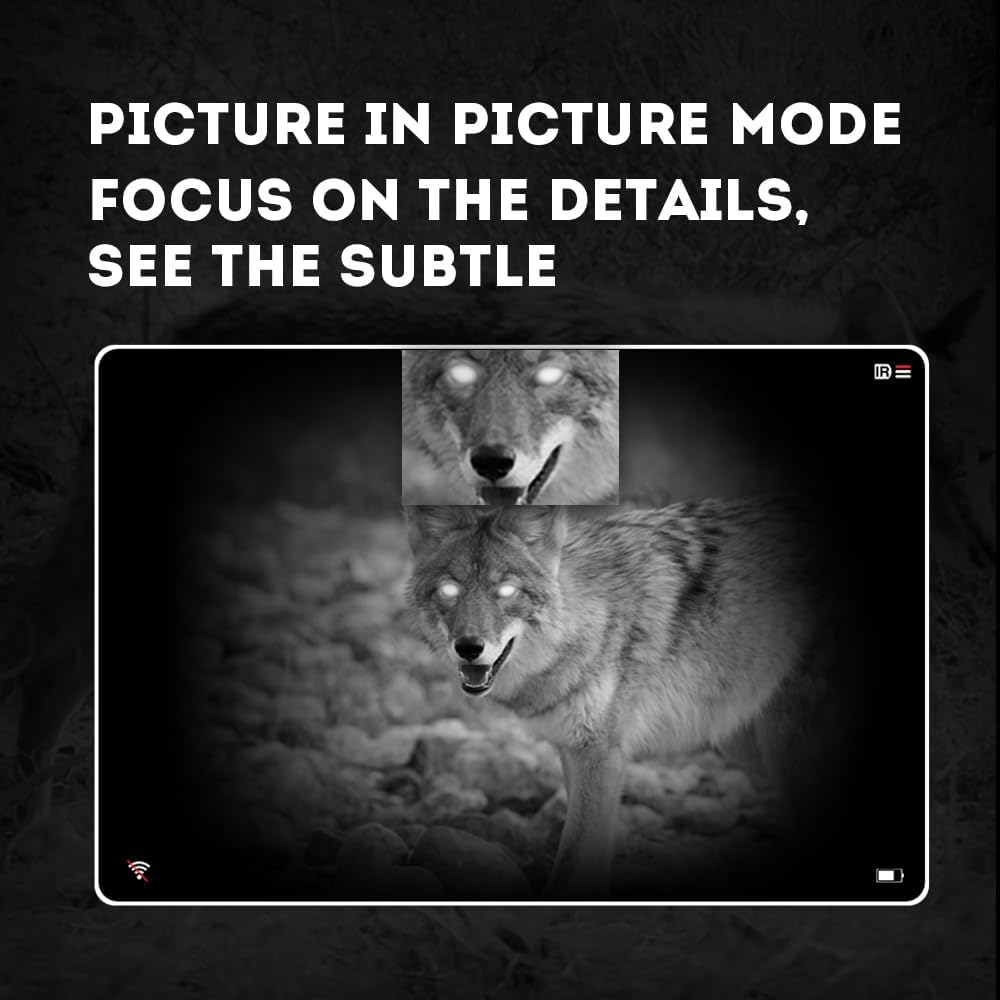
Image 4.3: Picture-in-Picture (PIP) mode. This image demonstrates how PIP mode allows users to focus on specific details within the main view, showing a magnified inset of a coyote's face.
5. וישאַלט
5.1 רייניקונג די מיטל
- לענסעס: Use a soft, lint-free cloth specifically designed for optical lenses. For stubborn smudges, use a small amount of lens cleaning solution. Avoid abrasive materials.
- גוף: Wipe the monocular's body with a soft, damp שטאָף. דו זאלסט נישט נוצן האַרב קעמיקאַלז אָדער סאָלוואַנץ.
5.2 באַטערי קער
- Always use high-quality, rechargeable 18650 batteries.
- אַראָפּנעמען די באַטאַרייע אויב די מיטל וועט נישט זיין געוויינט פֿאַר אַ לאַנג צייַט.
- סטאָר באַטעריז אין אַ קיל, טרוקן אָרט.
5.3 סטאָרידזש
- Store the monocular in its protective carrying case when not in use.
- האַלט דעם אַפּאַראַט אין אַ טרוקענער סביבה, אַוועק פון דירעקטער זון און עקסטרעמע טעמפּעראַטורן.
6. טראָובלעשאָאָטינג
If you encounter issues with your Pard NV009-850nm, refer to the following common problems and solutions:
| פּראָבלעם | מעגלעך סיבה | לייזונג |
|---|---|---|
| די מיטל טוט נישט מאַכט אויף | Low or depleted battery; Incorrect battery installation | Charge or replace the battery; Reinstall battery with correct polarity. |
| די בילד איז בלערי | Improper focus adjustment; Dirty lens | Adjust the diopter and objective lens focus rings; Clean the lenses. |
| No image in night mode | IR illuminator is off or set too low | Turn on the IR illuminator and adjust its intensity. |
| ווי-פי קשר ישוז | Wi-Fi not enabled on device; Incorrect app settings | Ensure Wi-Fi is enabled on the monocular; Check app permissions and settings. |
| Cannot record photos/videos | No Micro SD card; SD card full or corrupted | Insert a Micro SD card; Delete old files or format the card (backup important data first). |
If the problem persists after attempting these solutions, please contact Pard customer support.
7. ספּעסאַפאַקיישאַנז
| שטריך | דעטאַל |
|---|---|
| סאָרט | פּאַרד |
| מאָדעל נאָמען | PARD Night Vision Monocular |
| מאָדעל נומער | NV009-850nm |
| קאָליר | שוואַרץ |
| פּראָדוקט דימענשאַנז (LxWxH) | 7.16" x 2.24" x 2.79" (18.19 ס״מ x 5.69 ס״מ x 7.09 ס״מ) |
| פּונקט וואָג | 340 גראַמז |
| מאַטעריאַל | אַלומינום |
| אָביעקטיוו לענס דיאַמעטער | 25 מילאַמיטערז |
| אויג רעליעף | 25 מילאַמיטערז |
| נאַכט זעאונג קאַפּאַביליטי | יא |
| IR Illuminator Wavelength | 850nm (with 940nm option available in other variants) |
| CMOS Sensor Resolution | 1920x1080 פּיקסעלס |
| ווייַז סקרין | 1024x768 OLED |
| אָפּטיש מאַגנאַפאַקיישאַן | 4.7x |
| דיגיטאַל פארגרעסער | 1.5x-3.0x |
| פאָטאָ האַכלאָטע | 2608x1944 פּיקסעלס |
| ווידעא האַכלאָטע | 1920x1080 פּיקסעלס |
| וואָטערפּרוף רייטינג | IP67 |
| קאַמפּאַטאַבאַל דעוויסעס | Camera (for recording) |
| מאַונטינג טיפּ | Rail Mount (if applicable for accessories) |
8. וואָראַנטי און שטיצן
8.1 וואָראַנטי אינפֿאָרמאַציע
The Pard NV009-850nm Digital Night Vision Monocular comes with a 1 יאָר וואָראַנטי פֿון דעם קויפֿדאַטום. די וואָראַנטי דעקט פֿאַבריקאַציע חסרונות און מאַלפאַנגקשאַנז אונטער נאָרמאַל נוצן. עס דעקט נישט שעדיקן געפֿירט דורך מיסברויך, אַקסאַדאַנץ, נישט-אָטעריזירטע מאָדיפֿיקאַציעס, אָדער נישט ריכטיק וישאַלט.
ביטע האַלטן דיין דערווייַז פון קויפן פֿאַר וואָראַנטי קליימז.
8.2 קונה שטיצן
For technical assistance, warranty claims, or any questions regarding your device, please contact Pard customer support through the official Pard website or your retailer. When contacting support, please have your model number (NV009-850nm) and purchase date available.


