1. הקדמה
Thank you for choosing the GENBOLT 2K Wireless Outdoor Solar Security Camera. This advanced security solution features a dual-lens system, 360° pan-tilt-zoom (PTZ) functionality, and is powered by an integrated 8W solar panel and a 15600mAh rechargeable battery. Designed for outdoor use, it offers comprehensive surveillance with PIR motion detection, automatic tracking, color night vision, and two-way audio communication. This manual provides essential information for proper installation, operation, and maintenance to ensure optimal performance and longevity of your device.
2. פּראָדוקט איבערview
2.1 שליסל פֿעיִקייטן
- 2K (4MP) Resolution: ברענגט קלאָרע און דעטאַלירטע ווידעאָ פֿוטערtage.
- צווייענדיק לענס סיסטעם: Combines a fixed lens and a PTZ lens for broader coverage.
- 360° PTZ פונקציאָנאַליטעט: Offers 355° horizontal pan and 90° vertical tilt for comprehensive area monitoring.
- זונ - פּאַוערד: Equipped with an 8W solar panel for continuous charging, reducing the need for manual recharging.
- הויך-קאַפּאַציטעט באַטערי: Built-in 15600mAh rechargeable battery ensures extended operation.
- PIR Motion Detection & Auto Tracking: Detects human movement and automatically tracks the subject.
- קאָליר נאַכט זעאונג: גיט פול-קאָליר ווידעא אפילו אין שוואַך-ליכט באדינגונגען.
- צוויי-וועג אַודיאָ: איינגעבויטער מיקראָפאָן און רעדנער פֿאַר רעאַל-צייט קאָמוניקאַציע.
- Enhanced WiFi Connectivity: Features 5dBi dual antennas for stable 2.4GHz WiFi signal.
- Cloud & SD Card Storage: Supports cloud storage (7-day free trial available) and local storage via TF card.
- Multi-Platform Access: View and control via iOS/Android app, macOS, and Windows software.
2.2 פּראָדוקט קאַמפּאָונאַנץ

בילד: דעטאַילעד view פון די קאַמעראַ קאָמפּאָנענטן.
- צווייפֿאַכיקע אַנטענע: For improved WiFi signal reception.
- PIR סענסאָר: פּאַסיווער אינפֿראַרעד סענסאָר פֿאַר באַוועגונג דעטעקשאַן.
- HD לענס: High-definition optical lens for clear imaging.
- 8 IR/White LEDs: Infrared LEDs for black and white night vision, white LEDs for color night vision and spotlight.
- רעדנער: For two-way audio communication and alarm sounds.
- טף קאַרד שפּעלטל: פֿאַר לאָקאַלע ווידעאָ סטאָרידזש (שטיצט ביז 128 גיגאבייט, קאַרטל נישט אַרייַנגערעכנט).
- באַשטעטיק קנעפּל: צו צוריקשטעלן די פאַבריק סעטטינגס.
- Type-C Slot & Power ON/OFF: For charging and power control.
- Infrared LED (4pcs): Additional infrared illumination.
- גראדן לamp: ווײַזט דעם סטאַטוס פֿון דעם אַפּאַראַט.
2.3 פּעקל אינהאַלט
- GENBOLT 2K Wireless Outdoor Solar Security Camera
- 8W Solar Panel (integrated)
- יו-עס-בי טיפ-סי קאבל (0.7 מעטער)
- Network Cable (1m)
- מאָנטירונג שרויפן און וואַנט פּלאַגז
- באַניצער מאַנואַל
3. סעטאַפּ
3.1 טשאַרדזשינג די באַטאַרייע
Before initial use, fully charge the camera's built-in 15600mAh battery using the provided USB Type-C cable and a 5V/2A power adapter (not included). The solar panel will maintain the charge once installed, but a full initial charge is recommended.
3.2 Installing a TF Card (Optional)
If you plan to use local storage, insert a TF (microSD) card (up to 128GB, Class 10 or higher recommended) into the TF card slot. Ensure the camera is powered off before inserting or removing the card.
3.3 מאָונטינג די אַפּאַראַט
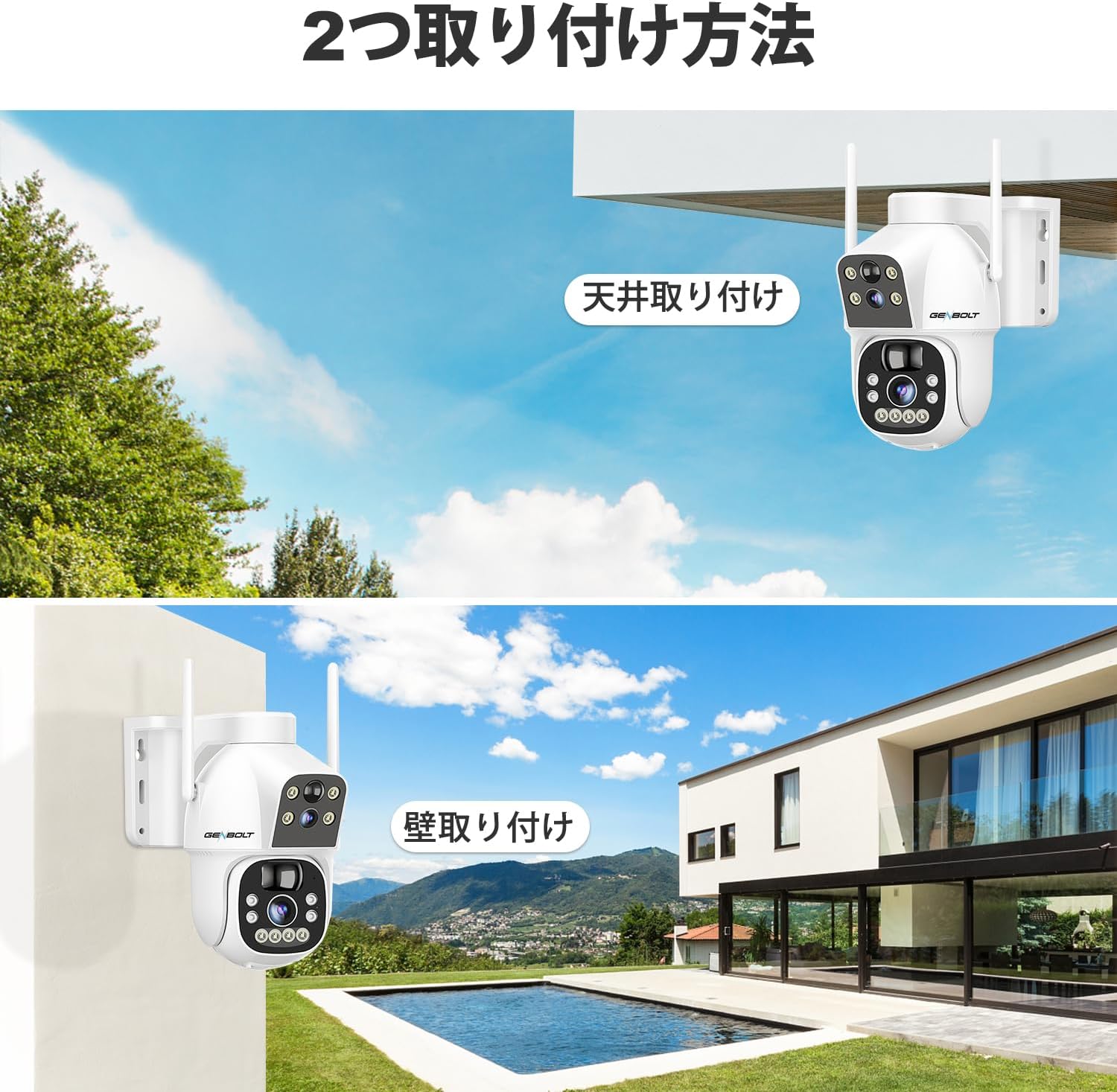
בילד: Two common installation methods: wall mounting and ceiling mounting.
The camera supports both wall and ceiling mounting. Choose a location with optimal sunlight exposure for the solar panel and a strong 2.4GHz WiFi signal. Use the provided screws and wall plugs to securely attach the camera bracket. Adjust the camera angle for the desired viewינג געגנט.
3.4 אַפּ אינסטאַלאַציע און WiFi פֿאַרבינדונג

בילד: Step-by-step guide for connecting the camera to WiFi via the mobile app.
- Download the official GENBOLT app from the iOS App Store or Google Play Store.
- רעגיסטרירן אַ חשבון און קלאָץ אין.
- Tap 'Add Device' or the '+' icon and select your camera model.
- Follow the on-screen instructions to connect the camera to your 2.4GHz WiFi network. This typically involves scanning a QR code displayed on your phone with the camera lens.
- Ensure your phone's location services are enabled during setup for proper network detection.
באַמערקונג: The camera does not support 5GHz WiFi networks. If you encounter issues, ensure your router is broadcasting a 2.4GHz signal and that your phone is connected to it during the setup process. Some users have reported difficulties with initial wired LAN connection instructions in the manual; this camera primarily uses wireless setup.
4. אַפּערייטינג ינסטרוקטיאָנס
4.1 לעבן View און PTZ קאָנטראָל

בילד: The camera's pan and tilt range for flexible monitoring.
אַמאָל פארבונדן, עפֿנט די אַפּ צו view the live feed. Use the on-screen controls to pan (355° horizontally) and tilt (90° vertically) the camera. The dual-lens system allows you to switch between a fixed wide-angle view און אַ באַוועגלעכע PTZ view.
4.2 Motion Detection and Auto Tracking

בילד: PIR motion detection in action, highlighting the detection area.
Enable PIR motion detection in the app settings. When motion is detected, the camera will automatically begin recording and can track the moving object. You will receive instant alerts on your mobile device. Adjust sensitivity settings to minimize false alarms.
4.3 רעקאָרדינג און פּלייבאַק

בילד: The app interface for accessing recorded footage from cloud storage.
Recordings are triggered by motion detection or can be scheduled. Access recorded footage through the app's playback feature. Videos are stored either on the inserted TF card or in the cloud (subscription may apply after the initial free trial). The app allows you to review past events by date and time.
4.4 נאַכט זעאונג מאָדעס

בילד: Visual comparison between color night vision and standard infrared night vision.
The camera supports multiple night vision modes: infrared (black and white), full-color (using white LEDs), and smart mode (switches between IR and color based on detected motion). Configure your preferred mode in the app settings.
4.5 צוויי-וועג אַודיאָ
Use the microphone and speaker functions in the app to communicate with visitors or deter intruders in real-time.
4.6 מולטי-באַניצער ייַנטיילונג

בילד: App interface demonstrating the multi-user sharing feature.
You can share access to your camera's live feed and recordings with family members or trusted individuals through the app. Each user can have different permission levels.
5. וישאַלט
- זונ פּאַנעל רייניקונג: ווישט רעגולער אויס די זונ - פּאַנעל מיט אַ ווייכן, דamp א שטאָף צו באַזייַטיקן שטויב, שמוץ אָדער דעבריס וואָס קען רעדוצירן די טשאַרדזשינג עפעקטיווקייט.
- לענס רייניקונג: Gently clean the camera lenses with a microfiber cloth to ensure clear image quality. Avoid abrasive materials.
- Firmware דערהייַנטיקונגען: Check the app periodically for firmware updates to ensure your camera has the latest features and security enhancements.
- באַטערי געזונט: While the solar panel helps maintain charge, prolonged periods of low sunlight may require occasional manual charging via the Type-C port to preserve battery health.
6. טראָובלעשאָאָטינג
| אַרויסגעבן | מעגלעך סיבה / לייזונג |
|---|---|
| Camera fails to connect to WiFi |
|
| Poor image quality or blurry video |
|
| Motion detection alerts are delayed or missed |
|
| באַטאַרייע דריינז געשווינד |
|
| Cloud storage issues or plan changes |
|
| SD card recording not working |
|
| No response from camera |
|
7. ספּעסאַפאַקיישאַנז
| שטריך | דעטאַל |
|---|---|
| סאָרט | GENBOLT |
| מאָדעל | B0DNFMMMQN |
| האַכלאָטע | 2K (4MP) |
| פעלד פון View | Dual Lens (Fixed & PTZ) |
| פּאַן / טילט קייט | האָריזאָנטאַל 355 °, ווערטיקאַל 90 ° |
| מאַכט מקור | 8W Solar Panel, 15600mAh Rechargeable Battery |
| קאַנעקטיוויטי | 2.4GHz WiFi (IEEE 802.11b/g/n) |
| נאַכט זעאונג | Infrared, Full-Color, Smart Mode |
| באַוועגונג דעטעקשאַן | PIR Human Motion Detection, Auto Tracking |
| אַודיאָ | צוויי-וועג אודיאָ (איינגעבויטער מיקראָפאָן און רעדנער) |
| סטאָרידזש | TF קאַרטל (ביז 128 גיגאבייט), וואָלקן סטאָרידזש |
| אַפּערייטינג סיסטעם שטיצן | יאָס, אַנדרויד, מאַקאָס, ווינדאָוז |
| זיכערהייַט פֿעיִקייטן | RSA Encryption, SSL Data Transmission |
| דימענשאַנז | 26.4 X 21.7 X 18.1 סענטימעטער |
| וואָג | 1.96 קג |
8. וואָראַנטי און שטיצן
8.1 וואָראַנטי אינפֿאָרמאַציע
- 1 יאָר וואָראַנטי: Your GENBOLT camera is covered by a 1-year warranty from the date of purchase, protecting against manufacturing defects.
- 30-Day Return/Exchange: You are eligible for a return or exchange within 30 days of purchase, subject to the retailer's policy.
ביטע האַלטן דיין דערווייַז פון קויפן פֿאַר וואָראַנטי קליימז.
8.2 קונה שטיצן
For technical assistance, troubleshooting, or warranty inquiries, please contact GENBOLT customer support. We offer 24/7 technical support to ensure your satisfaction.
- אָנליין שטיצן: Visit the official GENBOLT webזייטל פֿאַר אָפֿט געשטעלטע פֿראַגעס, שטיצע אַרטיקלען, און קאָנטאַקט פֿאָרמען.
- E- בריוו שטיצן: Reach out via email for detailed assistance.
We are committed to providing reliable home security solutions and excellent customer service.