1. הקדמה
Ensure the security of your home or business with the HiLook DVR-216G-M1 Recorder. This device allows you to store all images captured by your security cameras, providing greater control and continuous monitoring of your spaces. With advanced features, it is perfect for ensuring maximum protection and peace of mind.
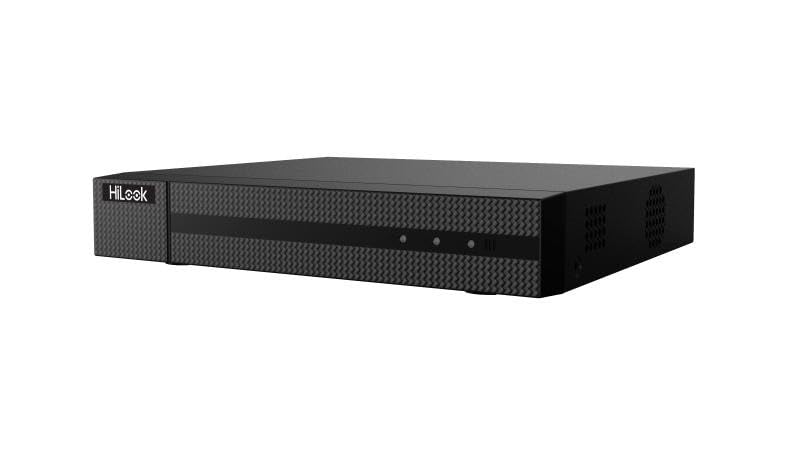
פיגורע 1: פראָנט view of the HiLook Hikvision DVR-216G-M1 Digital Video Recorder, a black rectangular device with a textured front panel and the 'HiLook' logo on the left side.
2. שליסל פֿעיִקייטן
- Intelligent Classification: Based on deep learning, Motion Detection 2.0 classifies human and vehicle targets, reducing false alarms.
- אַוואַנסירטע ווידעא קאַמפּרעשאַן: Supports H.265 Pro+/H.265 Pro/H.265, saving bandwidth and storage.
- Versatile Video Inputs: Compatible with HDTVI, AHD, CVI, CVBS, and IP camera signals.
- Audio via Coaxial Cable: Clear and efficient audio transmission over coaxial cables.
- IP קאַמעראַ שטיצע: Up to 18 IP camera input channels, with resolution up to 5 MP.
- Encoding Capability: Supports up to 1080p Lite at 15 frames per second (fps).
- סיגנאַל קייט: Maximum of 1200 meters for 720p HDTVI signal.
3. פּעקל אינהאַלט
ביטע טשעקט דעם פּעקל קערפֿול פֿאַר די פֿאָלגנדיקע זאַכן:
- 1 x HiLook Hikvision DVR-216G-M1 DVR Unit
- 1 x באַניצער מאַנואַל (דאָס דאָקומענט)
- 1 x מאַכט אַדאַפּטער
- 1 x Installation Kit (including screws and necessary tools)
- 1 רענטגענ עטהערנעט קאַבלע
4. סעטאַפּ גייד
4.1 ערשט סעטאַפּ
- Unpack the DVR: Carefully remove the DVR and all accessories from the packaging.
- פאַרבינדן מאַכט: Connect the provided power adapter to the DVR's power input and then plug it into a suitable power outlet.
- פֿאַרבינדן זיך צום מאָניטאָר: Use an HDMI or VGA cable (not included) to connect the DVR to a monitor for initial setup and viewing.
- פאַרבינדן צו די נעץ: Connect the provided Ethernet cable from the DVR's LAN port to your router or network switch.
- מאַכט אויף: The DVR will typically power on automatically once connected to power. Follow the on-screen prompts for initial configuration, including setting up an administrator password and network settings.
4.2 פֿאַרבינדן קאַמעראַס
The DVR-216G-M1 supports various camera types. Connect your analog (HDTVI, AHD, CVI, CVBS) cameras to the BNC video input ports on the rear panel. For IP cameras, ensure they are on the same network as the DVR and add them through the DVR's network camera management interface.
5. אָפּעראַציע
5.1 יקערדיק אָפּעראַציע
Once the DVR is set up and cameras are connected, you can view live feeds, record footage, and play back recorded events. Navigate the DVR's menu using a connected mouse (not included) to access various functions such as live view, recording schedules, playback, and system settings.
5.2 Motion Detection Configuration
The DVR features advanced motion detection. To configure, access the 'Event' or 'Alarm' settings in the DVR menu. You can define motion detection areas, sensitivity levels, and set up actions such as recording, notification, or alarm output when motion is detected. The deep learning-based Motion Detection 2.0 helps in accurately classifying human and vehicle targets, reducing false alarms.
6. וישאַלט
- רעגולער רייניקונג: האַלט דעם DVR פריי פון שטויב. ניצט אַ ווייכן, טרוקן שטאָף פֿאַר רייניקונג. ניצט נישט קיין פליסיקע רייניגער.
- Firmware דערהייַנטיקונגען: Periodically check the HiLook official webזייטל פֿאַר פירמווער דערהייַנטיקונגען צו ענשור אָפּטימאַל פאָרשטעלונג און אַקסעס צו נייַע פֿעיִקייטן.
- דאַטאַ באַקקופּ: רעגלמעסיג באַקאַפּן וויכטיקע רעקאָרדירטע פֿוטערtage to an external storage device or cloud service to prevent data loss.
- ווענטילאַטיאָן: זיכער מאַכן אַז דער DVR איז געשטעלט אין אַ גוט-ווענטילירטן אָרט צו פאַרמייַדן איבערהיצונג. בלאָקירט נישט די ווענטילאַציע עפענונגען.
7. פראבלעם-פראגעס און אָפֿט געשטעלטע פֿראַגעס
אָפט געשטעלטע פֿראגן
- Q1: How many cameras does the DVR-216G-M1 support?
- A1: The DVR-216G-M1 supports up to 16 analog cameras and 2 IP cameras (expandable up to 18 IP cameras).
- Q2: What is the maximum recording resolution?
- A2: The DVR-216G-M1 supports resolution up to 5 MP, providing high-quality images.
- Q3: Does the DVR-216G-M1 have motion detection?
- A3: Yes, it features deep learning-based Motion Detection 2.0 technology, which classifies humans and vehicles, reducing false alarms.
- Q4: Is installation easy?
- A4: Yes, the DVR-216G-M1 is easy to install and comes with a detailed installation kit, including necessary screws and tools.
- Q5: How does video storage work?
- A5: The DVR-216G-M1 supports local and cloud storage, ensuring you have continuous access to recordings.
- Q6: Which network protocols are compatible with the network interface?
- A6: The network interface supports TCP/IP, PPPoE, DHCP, HiLookVision, DNS, DDNS, NTP, SADP, SMTP, UPnP, and HTTPS.
8. טעכניש ספּעסאַפאַקיישאַנז
| שטריך | באַשרייַבונג |
|---|---|
| מאָדעל | DVR-216G-M1 |
| סאָרט | הילוק |
| פאַבריקאַנט | Hikvision |
| נומער פון טשאַנאַלז | 16 (Analog) + 2 (IP, expandable to 18 IP) |
| ווידעא ינפּוץ | HDTVI, AHD, CVI, CVBS, IP |
| ווידעא קאַמפּרעשאַן | H.265 Pro+/H.265 Pro/H.265 |
| אַודיאָ אַרייַנשרייַב | Via coaxial cable |
| Encoding Capability | Up to 1080p Lite @ 15 fps |
| ווידעא קאַפּטורע רעסאָלוטיאָן | 2592x1944 (5 MP max for IP cameras) |
| Signal Range (HDTVI) | Max 1200 m for 720p HDTVI signal |
| ספּעציעלע פֿעיִקייטן | Motion Detection 2.0 (Deep Learning-based) |
| קאַנעקטיוויטי טעכנאָלאָגיע | ווייערד |
| קאָליר | שוואַרץ |
| מאַכט מקור טיפּ | AC/DC |
| פּעקל דימענשאַנז | 40.5 X 28.1 X 8 סענטימעטער |
| וואָג | 1.46 קילאָגראַמס |
| ASIN | B0DM6FJCH9 |
9. וואָראַנטי און שטיצן
Specific warranty terms and conditions are not provided in the product details. For detailed warranty information, technical support, or service inquiries, please refer to the official HiLook or Hikvision webזייטל אדער קאנטאקט זייער קאסטומער שטיצע גלייך. האלט אייער קויף קוויטל אלס באווייז פון קויפן פאר יעדע גאראנטיע טענות.


