1. הקדמה
This manual provides essential information for setting up, operating, and maintaining your Acer CB242Y G monitor. Please read this manual thoroughly before using the product to ensure proper functionality and safety.
The Acer CB242Y G is a 23.8-inch Full HD (1920 x 1080) IPS monitor designed for a clear and vibrant viewing experience. It features a frameless design, a high refresh rate of up to 120Hz via HDMI/DisplayPort, and 75Hz via VGA, with a rapid 1ms Visual Response Boost (VRB) or 4ms Gray-to-Gray (GTG) response time. The monitor also includes Adaptive Sync technology for smooth visuals and an adjustable stand for ergonomic comfort.
2. זיכערקייַט אינפֿאָרמאַציע
Observe the following safety precautions to prevent damage to the monitor and ensure personal safety:
- שטעלן די מאָניטאָר אויף אַ סטאַביל, גלייַך ייבערפלאַך.
- דו זאלסט נישט פאַרשפּאַרן ווענטאַליישאַן אָופּאַנינגז.
- Use only the power adapter and cables provided by Acer.
- האַלט דעם מאָניטאָר אַוועק פון וואַסער, נעץ און עקסטרעמע טעמפּעראַטורן.
- פרובירט נישט צו סערוויסן דעם מאָניטאָר אַליין. לאָזט איבער אַלע סערוויסינג צו קוואַליפֿיצירטע פּערסאָנעל.
- Disconnect the power cable from the outlet before cleaning.
3. פּעקל אינהאַלט
באַשטעטיקן אַז אַלע זאכן זענען פאַראַן אין דיין פּעקל:
- Acer CB242Y G Monitor
- מאָניטאָר שטאַנד (באַזע און האַלדז)
- מאַכט קאַבלע
- HDMI קאַבלע
- באַניצער מאַנואַל (דעם דאָקומענט)
4. סעטאַפּ
4.1 צוזאַמענשטעלן דעם מאָניטאָר שטאַנד
- נעמט פֿאָרזיכטיק אַרויס דעם מאָניטאָר און שטאַנד קאָמפּאָנענטן פֿון דער פּאַקאַדזשינג.
- Attach the stand neck to the monitor panel. Ensure it clicks securely into place or is fastened with screws if applicable (refer to specific model instructions for screw details).
- Attach the stand base to the stand neck. Tighten the thumb screw or screws at the bottom of the base to secure it.
- שטעלט דעם צוזאַמענגעשטעלטן מאָניטאָר אויף אַ סטאַבילער, גלאַטער ייבערפלאַך.
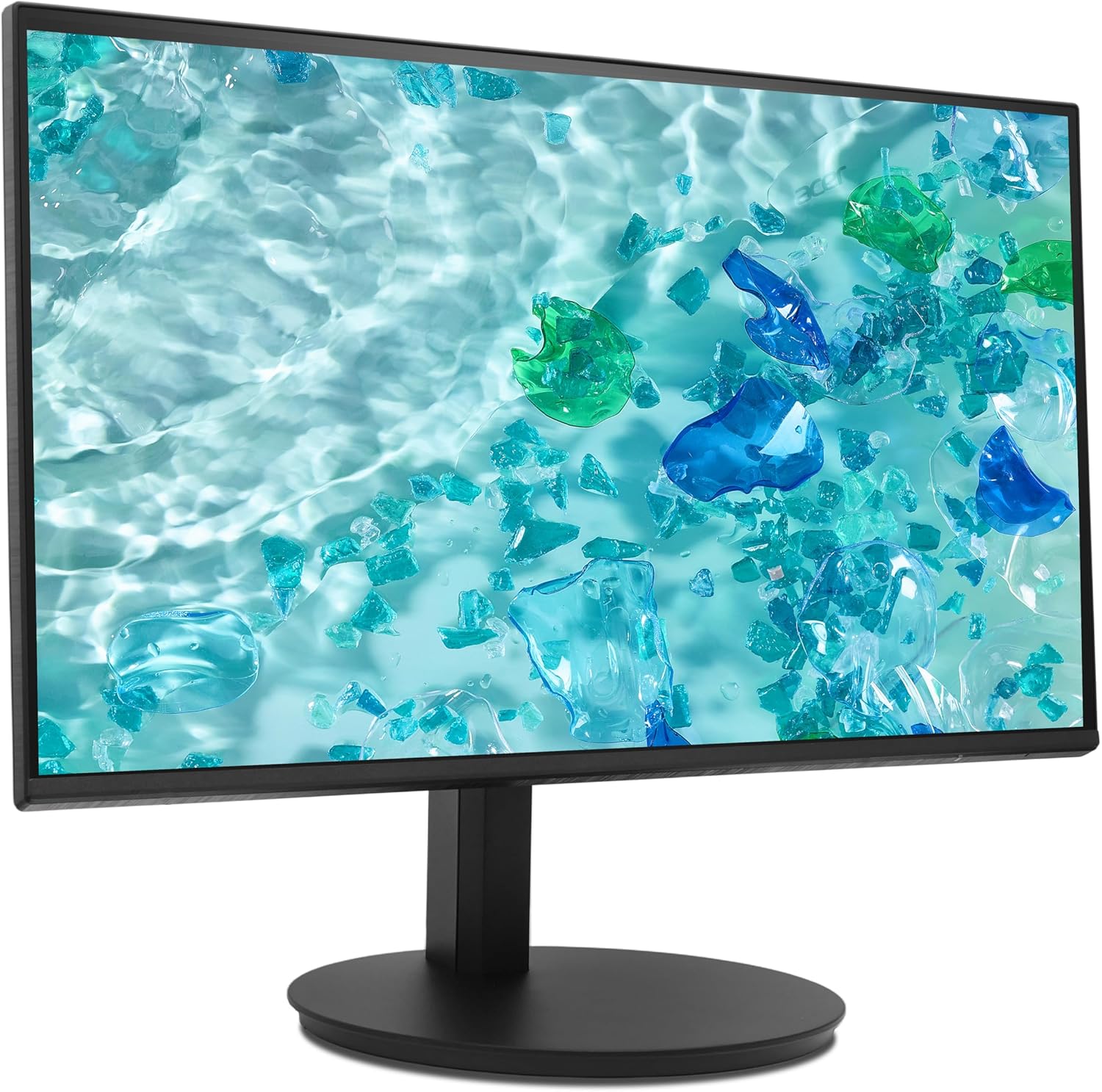
Figure 1: Assembled Acer CB242Y G Monitor. This image shows the monitor from an angled front perspective, highlighting its frameless design and the sturdy stand.
4.2 קאַנעקטינג קאַבלעס
פֿאַרבינדט די נויטיקע קאַבלען צום מאָניטאָר און אײַער קאָמפּיוטער:
- מאַכט קאַבלע: פֿאַרבינדט איין עק פֿון דעם מאַכט קאַבל צום מאָניטאָר'ס מאַכט אַרייַנגאַנג און דעם אַנדערן עק צו אַ מאַכט ווענטיל.
- ווידעא קאַבלע:
- הדמי: Connect the provided HDMI cable from your computer's HDMI output to the monitor's HDMI input.
- ווגאַ: If using VGA, connect a VGA cable from your computer's VGA output to the monitor's VGA input.
- DisplayPort (DP): If using DisplayPort, connect a DisplayPort cable from your computer's DP output to the monitor's DP input. (Note: DP cable not included, but supported by monitor).

פיגורע 2: דערציען view of the monitor. This image displays the back of the monitor, clearly showing the various input ports including HDMI and VGA, and the power input.
4.3 וועסאַ וואַנט מאָונטינג
The monitor supports VESA 100 x 100 mm mounting. To mount the monitor on a wall or an alternative stand:
- Remove the stand neck from the monitor panel.
- Attach the VESA-compatible wall mount or arm to the four screw holes on the back of the monitor.
- Ensure the mounting screws are of appropriate length and type to avoid damaging internal components.
5. אַפּערייטינג ינסטרוקטיאָנס
5.1 פּאַוערינג אויף / אַוועק
דריק דעם מאַכט קנעפּל וואָס געפינט זיך אויפן מאָניטאָר צו עס אנצינדן אָדער אויסלעשן. די מאַכט אינדיקאַטאָר ליכט וועט זיך אָנצינדן ווען דער מאָניטאָר איז אנגעצינדן.
5.2 אויף-סקרין ווייַז (אָסד) מעניו
דאָס OSD מעניו דערמעגלעכט אײַך צו סטרויערן פֿאַרשידענע מאָניטאָר סעטטינגס. ניצט די קאָנטראָל קנעפּלעך (געוויינטלעך געפֿונען אויף דער הינטערשטער אָדער אונטערשטער רעכטער זײַט פֿון מאָניטאָר) צו נאַוויגירן דורך דעם מעניו.
- דריק א קאנטראל קנעפל צו אקטיוויזירן דעם OSD מעניו.
- ניצט די נאַוויגאַציע קנעפּלעך (אַרויף/אַראָפּ/לינקס/רעכטס) צו באַוועגן זיך דורך מעניו אָפּציעס.
- Press the select button to enter a sub-menu or confirm a selection.
- דריק דעם ארויסגאַנג קנעפּל צו גיין צוריק אָדער פֿאַרמאַכן דעם OSD מעניו.
5.3 אַדזשאַסטירן די דיספּליי סעטטינגס
Key settings you can adjust via the OSD menu include:
- ברייטנאַס / קאַנטראַסט: אַדזשאַסטירן די אַלגעמיינע לומינאַנס און דעם חילוק צווישן ליכטיקע און טונקעלע געביטן.
- קאָליר סעטטינגס: מאָדיפֿיצירן קאָליר טעמפּעראַטור, גאַמאַ, און יחידישע RGB לעוועלס.
- אַרייַנשרייַב מקור: Manually select between HDMI, VGA, or DisplayPort inputs.
- דערפרישן קורס: The monitor automatically detects the optimal refresh rate. Ensure your graphics card settings are configured correctly to utilize the maximum 120Hz (HDMI/DP) or 75Hz (VGA).
- אַדאַפּטיוו סינק: Enable or disable Adaptive Sync to synchronize the monitor's refresh rate with your graphics card's frame rate, reducing screen tearing and stuttering. This feature is a VESA open standard.
- בלוי ליכט פילטער: Activate this feature to reduce blue light emissions, which can help reduce eye strain during prolonged use.
5.4 ערגאָנאָמישע אַדזשאַסטמאַנץ
דער מאָניטאָר שטאַנד ערמעגליכט פֿאַרשידענע ערגאָנאָמישע אַדזשאַסטמאַנץ:
- הייך אַדזשאַסטמאַנט: Raise or lower the monitor to achieve an optimal viewינג הייך.
- טילט: Adjust the screen's vertical angle (forward/backward) for comfortable viewing.
- סוויוול: דריי דעם מאָניטאָר האָריזאָנטאַל אויף זײַן באַזע.
- דרייט: Rotate the screen 90 degrees to switch between landscape and portrait orientation.

פיגורע 3: זייַט view of the monitor. This image illustrates the monitor's profile, demonstrating its slim design and the range of motion for height and tilt adjustments.
6. וישאַלט
כדי צו זיכער מאַכן די לאַנגלעבעניש און אָפּטימאַלע פאָרשטעלונג פון דיין מאָניטאָר, נאָכפאָלגן די וישאַלט גיידליינז:
- רייניקונג די פאַרשטעלן: ווישט אָפּ דעם עקראַן מיט אַ ווייכן, לינט-פֿרײַעם שטאָף. פֿאַר שווערע פֿלעקן, דampווישט דעם שטאָף לײַכט מיט וואַסער אָדער אַ נישט-אַבראַוויזיוון עקראַן רייניגער. שפּריצט נישט רייניגער גלייך אויף דעם עקראַן.
- רייניקונג פון די Casing: ניצט אַ ווייכע, טרוקענע שטאָף צו ווישן דעם מאָניטאָרasinז. פֿאַרמײַדן ניצן שטאַרקע דיטערדזשענטן אָדער אַברייסיוו רייניגער.
- ווענטילאַטיאָן: Ensure the ventilation openings on the monitor are not obstructed to prevent overheating.
- מאַכט אַוועק: שטענדיק אויסלעשן דעם מאָניטאָר און אַרויסציען עס פֿון דער עלעקטרישער אַוטלעט איידער איר רייניגט עס אָדער אויב עס וועט נישט ווערן גענוצט פֿאַר אַ לענגערע צייט.
7. טראָובלעשאָאָטינג
אויב איר טרעפט פּראָבלעמען מיט אייער מאָניטאָר, זעט די פאלגענדע געוויינטלעכע פּראָבלעמען און לייזונגען:
| פּראָבלעם | מעגלעך לייזונג |
|---|---|
| קיין בילד אויף פאַרשטעלן |
|
| בילד איז פארשוואומען אדער פארדרייט |
|
| עקראַן רייסינג אָדער שטאַמלען |
|
| מאָניטאָר נישט דעטעקטירט דורך קאָמפּיוטער |
|
8. ספּעסאַפאַקיישאַנז
| מאָדעל נאָמען | CB242Y G |
| פאַרשטעלן גרייס | 23.8 אינטשעס (60 סענטימעטער) |
| טאַפליע טיפּ | IPS with LED backlight |
| האַכלאָטע | 1920 רענטגענ 1080 (פול הד) |
| אַספּעקט פאַרהעלטעניש | 16:9 |
| דערפרישן קורס | 120 Hz (HDMI/DP), 75 Hz (VGA) |
| ענטפער צייט | 1 ms (VRB), 4 ms (GTG) |
| קאַנטראַסט פאַרהעלטעניש | 2000:1 |
| ייבערפלאַך באַהאַנדלונג | מאַט |
| קאַנעקטיוויטי | HDMI 1.4, VGA, DisplayPort |
| ספּעציעלע פֿעיִקייטן | Adaptive Sync, Blue Light Filter, Height Adjustment, Pivot, Swivel, Tilt |
| VESA בארג קאַמפּאַטאַבילאַטי | 100 רענטגענ 100 מם |
| מאַכט קאַנסאַמשאַן (SDR) | 9.0 וו |
| ענערגיע עפעקטיווקייַט קלאַס (SDR) | B |

Figure 4: Energy label for the Acer CB242Y G monitor, showing its energy efficiency class B and power consumption of 9 kWh/1000h.
פֿאַר דעטאַלירטע פּראָדוקט אינפֿאָרמאַציע, זעט די EPREL product database.
9. וואָראַנטי און שטיצן
Acer provides comprehensive support for its products. For the Acer CB242Y G monitor, the following support terms apply:
- מינימום געראַנטיד פּראָדוקט שטיצן: 7 יאָר
- Minimum Availability of Spare Parts: 7 יאָר
- ווייכווארג און פירמוואַרע דערהייַנטיקונגען: מינימום 8 יאָר
פֿאַר טעכנישע הילף, וואָראַנטי קליימז, אָדער ווייטערדיקע פֿראַגעס, ביטע באַזוכט די אָפֿיציעלע Acer שטיצע website or contact your local Acer service center. Contact information can typically be found on the Acer webזייטל אדער אין אייער פּראָדוקט'ס פּאַקאַדזשינג.


