הקדמה
Thank you for choosing the Vortex Blast Portable Bluetooth Speaker. This manual provides essential information for setting up, operating, and maintaining your speaker. Designed for home, outdoors, and parties, the Vortex Blast delivers powerful 30W sound with deep bass, features an IPX6 waterproof rating, Bluetooth 5.2 connectivity, TWS functionality for stereo sound, and dynamic LED light effects.
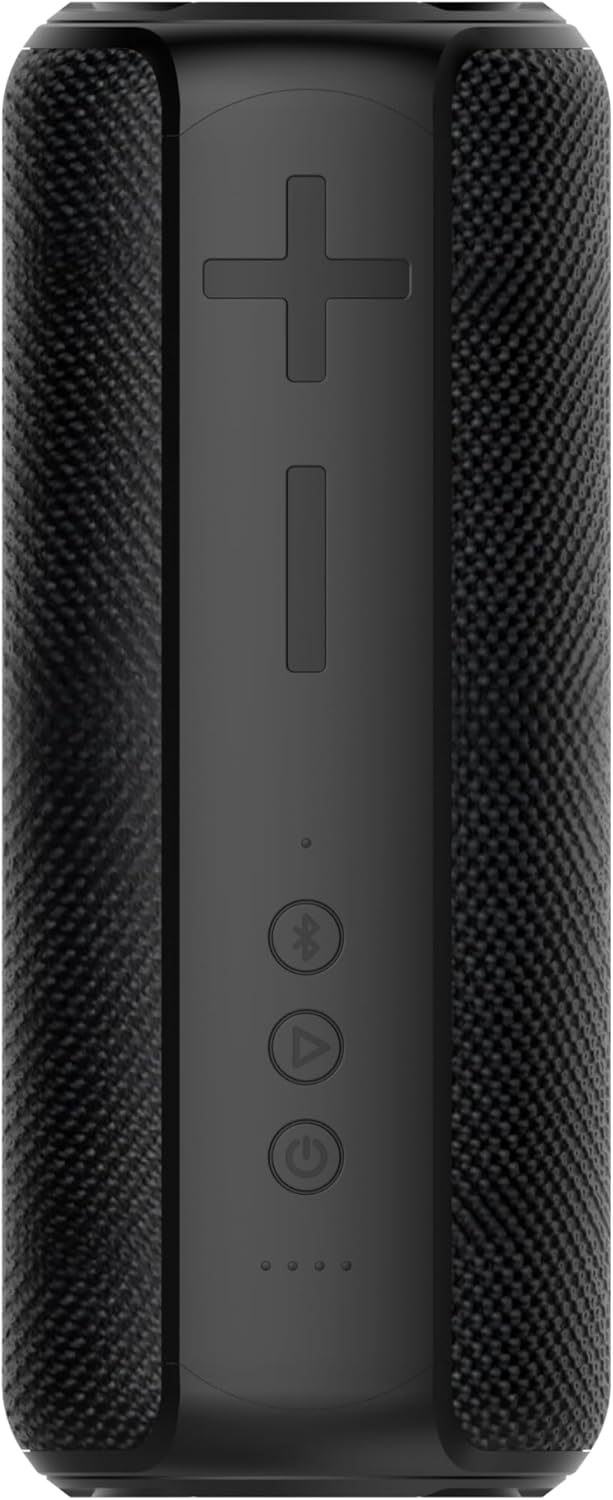
Image: The Vortex Blast Portable Bluetooth Speaker, showcasing its sleek black design and cylindrical shape.
פּעקל אינהאַלט
ביטע אָפּהאַקן דאָס קעסטל פֿאַר די פֿאָלגנדיקע זאַכן:
- 1 x Vortex Blast Portable Bluetooth Speaker
- 1 רענטגענ וסב- C טשאַרדזשינג קאַבלע
- 1 x AUX אַודיאָ קאַבלע
- 1 x מאַכט אַדאַפּטער
- 1 x באַניצער מאַנואַל (דאָס דאָקומענט)
פּראָדוקט איבערview
Familiarize yourself with the controls and ports of your Vortex Blast speaker:

בילד: פון אויבן אַראָפּ view of the Vortex Blast speaker, highlighting the control panel with power, play/pause, Bluetooth, and volume buttons.
קאָנטראָל פּאַנעל:
- מאַכט קנעפּל (⑂): דריקן און האַלטן צו אנצינדן/אויסלעשן. קורץ דריקן צו שפּילן/פּויזירן מוזיק.
- באַנד אַרויף (+): קורץ דריקן צו פארגרעסערן די קול. לאנג דריקן פארן נעקסטן ליד.
- באַנד אַראָפּ (-): קורץ דריקן צו פארמינערן די קול. לאנג דריקן צו פארן פריערדיגן ליד.
- בלוטוט קנעפּל (⑃): Short press to enter pairing mode. Double tap to toggle LED lights on/off.
- LED ינדיקאַטאָרס: Four small lights indicating battery level and charging status.

בילד: נאָענט-אַרויף view of the back of the Vortex Blast speaker, showing the charging port and auxiliary input port, protected by a rubber flap.
Ports (located under a protective flap):
- USB-C טשאַרדזשינג פּאָרט: פֿאַר טשאַרדזשינג די רעדנער.
- AUX אַרייַנשרייַב: פֿאַר פֿאַרבינדן דעוויסעס דורך אַ 3.5 מם אַודיאָ קאַבל.
סעטאַפּ
1. טשאַרדזשינג די ספּיקער
Before first use, fully charge your Vortex Blast speaker. Connect the provided USB-C charging cable to the speaker's charging port and the power adapter to a wall outlet. The LED indicators will show charging progress and turn off when fully charged. A full charge provides approximately 10 hours of playtime.
2. מאַכט אויף / אויסגעלאשן
- To power on: Press and hold the Power button (⑂) for 2-3 seconds until you hear an audible prompt and the LED lights illuminate.
- To power off: Press and hold the Power button (⑂) for 2-3 seconds until you hear an audible prompt and the LED lights turn off.
3. בלועטאָאָטה פּערינג
- Ensure the speaker is powered on and the Bluetooth indicator light is blinking, indicating it's in pairing mode.
- אויף אייער דעווייס (סמאַרטפאָן, טאַבלעט, לאַפּטאָפּ), אַקטיווירט בלועטוט און זוכט פֿאַר פֿאַראַן דעווייסעס.
- Select "Vortex Blast" from the list.
- Once connected, you will hear a confirmation sound, and the Bluetooth indicator light will become solid.
באַמערקונג: דער רעדנער וועט אויטאָמאַטיש פּרובירן זיך ווידער צו פֿאַרבינדן מיטן לעצטן פֿאַרבונדענעם מיטל ווען עס ווערט אָנגעצונדן.
4. אמתע ווירעלעס סטערעאָ (TWS) פּאָרינג
To achieve a true stereo sound experience, you can pair two Vortex Blast speakers together:
- Ensure both Vortex Blast speakers are powered on and not connected to any other Bluetooth devices.
- On one speaker, short press the Bluetooth button (⑃). It will enter TWS pairing mode.
- The two speakers will automatically search for and connect to each other. You will hear a confirmation sound once paired.
- Once TWS paired, connect your device to one of the speakers via Bluetooth as described in step 3. Both speakers will now play audio in stereo.
אַפּערייטינג ינסטראַקשאַנז
מוזיק פּלייבאַק:
- שפּיל / פּויזע: Short press the Power button (⑂).
- באַנד אַדזשאַסטמאַנט: דריק קורץ די באַנד אַרויף (+) אָדער באַנד אַראָפּ (-) קנעפּלעך.
- ווייַטער שפּור: לאַנג דריקן די באַנד אַרויף (+) קנעפּל.
- פֿריִערדיקע שפּור: לאַנג דריקן די באַנד אַראָפּ (-) קנעפּל.
LED ליכט ווייַז:
The Vortex Blast speaker features dynamic LED light effects that enhance your music experience.

Image: The Vortex Blast speaker with its vibrant LED light ring illuminated, showcasing the dynamic light effects.
- To toggle the LED lights on or off: Double tap the Bluetooth button (⑃).
- The lights will cycle through various modes automatically.
AUX מאָדע:
Connect an external audio device using the provided 3.5mm AUX audio cable. The speaker will automatically switch to AUX mode. In this mode, volume control can be managed via the speaker or the connected device, but track control must be done on the connected device.
וישאַלט
- רייניקונג: Use a soft, dry cloth to clean the speaker. Do not use harsh chemicals or abrasive materials.
- וואַסער ויסשטעלן: While IPX6 waterproof, avoid prolonged submersion. Ensure the protective flap over the ports is securely closed before exposure to water.
- סטאָרידזש: האַלט דעם רעדנער אין אַ קיל, טרוקן אָרט אַוועק פון עקסטרעמע טעמפּעראַטורן און דירעקט זונשייַן.
- באַטערי זאָרגן: To prolong battery life, charge the speaker regularly, even if not in frequent use. Avoid completely draining the battery.
טראָובלעשאָאָטינג
| פּראָבלעם | לייזונג |
|---|---|
| דער רעדנער גייט נישט אן. | Ensure the battery is charged. Connect the speaker to a power source using the provided cable and adapter. |
| קענען ניט פאַרבינדן מיט בלועטאָאָטה מיטל. |
|
| קיין קלאַנג אָדער נידעריקע וואָלומען. |
|
| געפירט לייץ זענען נישט ארבעטן. | Double tap the Bluetooth button (⑃) to toggle the LED lights on/off. |
| TWS פּאָרינג איז דורכגעפֿאַלן. |
|
ספּעסאַפאַקיישאַנז
| שטריך | דעטאַל |
|---|---|
| מאָדעל נאָמען | בלאַסט |
| סאָרט | וואָרטעקס |
| רעדנער טיפּ | פּאָרטאַטיוו ספּיקער |
| קאַנעקטיוויטי טעכנאָלאָגיע | בלועטאָאָטה 5.2 |
| רעדנער מאַקסימום רעזולטאַט מאַכט | 30 וואטס |
| אַודיאָ רעזולטאַט מאָדע | סטערעאָ (מיט TWS) |
| וואַסער קעגנשטעל מדרגה | IPX6 וואָטערפּרוף |
| באַטערי לעבן | אַרויף צו 10 שעה |
| מאַכט מקור | באַטאַרייע פּאַוערד |
| פּראָדוקט דימענשאַנז | 3.34"ד רענטגענ 3.34"וו רענטגענ 8.46"ה |
| פּונקט וואָג | 2.64 פונט |
| קאָנטראָל מעטאָד | ריר |
וואָראַנטי & שטיצן
The Vortex Blast Portable Bluetooth Speaker comes with a לימיטעד וואָראַנטיביטע זעט די וואָראַנטי קאַרטל וואָס איז אַרייַנגערעכנט אין אייער פּאַקעט פֿאַר ספּעציפֿישע תּנאים און באַדינגונגען.
For technical support, troubleshooting assistance, or warranty claims, please contact Vortex customer service through the retailer's platform or visit the official Vortex webפּלאַץ.


