1. הקדמה
Welcome to the user manual for your new MageGee SKY87 75% Wireless Mechanical Keyboard. This keyboard is designed for versatility and performance, offering multiple connectivity options, customizable features, and a comfortable typing experience. Please read this manual carefully to ensure proper setup and optimal use of your device.

This image displays the MageGee SKY87 75% Wireless Mechanical Keyboard in its Gradient White Blue color scheme, showcasinג זײַן קאָמפּאַקטן אויסלייג און RGB באַקלייטונג.
2. פּעקל אינהאַלט
ביטע באַשטעטיקן אַז אַלע זאכן וואָס זענען ליסטעד אונטן זענען אַרייַנגערעכנט אין דיין פּעקל:
- MageGee SKY87 75% Wireless Mechanical Keyboard
- וסב-C צו וסב-א קאַבלע
- 2.4GHz USB Receiver (stored in the keyboard's base)
- קייקאַפּ פּולער
- באַשטימען פּולער
- Spare Switches (quantity may vary)
- באַניצער מאַנואַל (דעם דאָקומענט)

This image shows the complete contents of the MageGee SKY87 keyboard package, including the keyboard, cables, tools, and documentation.
3. פֿעיִקייטן
The MageGee SKY87 keyboard boasts a range of features designed to enhance your typing and gaming experience:
- מולטי דיווייס קאַנעקטיוויטי: Supports BT5.0, 2.4GHz wireless, and USB wired modes, allowing connection to up to five devices simultaneously.
- הייס-סוואַפּאַבל דיזיין: Easily replace 3-pin or 5-pin switches without soldering, enabling full customization of your typing feel. Comes with pre-lubed linear switches for smooth operation.
- RGB באַקלייטונג: Features 18+ RGB backlight modes and a separate strip light, with N-key rollover for responsive gaming.
- גאַסקעט סטרוקטור: Enhanced resilience and stability with an extended integrated silicone pad and PCB single key slotting, reducing hollow sounds.
- PBT שליסל קאַפּס: Durable double-shot PBT keycaps ensure characters remain vibrant and do not fade over time.
- הויך קאַפּאַציטעט באַטערי: Built-in 8000mAh rechargeable battery for extended wireless use.
- קאָמפּאַקט 75% אויסלייג: 87 keys layout saves desktop space while retaining essential arrow keys and a number area.
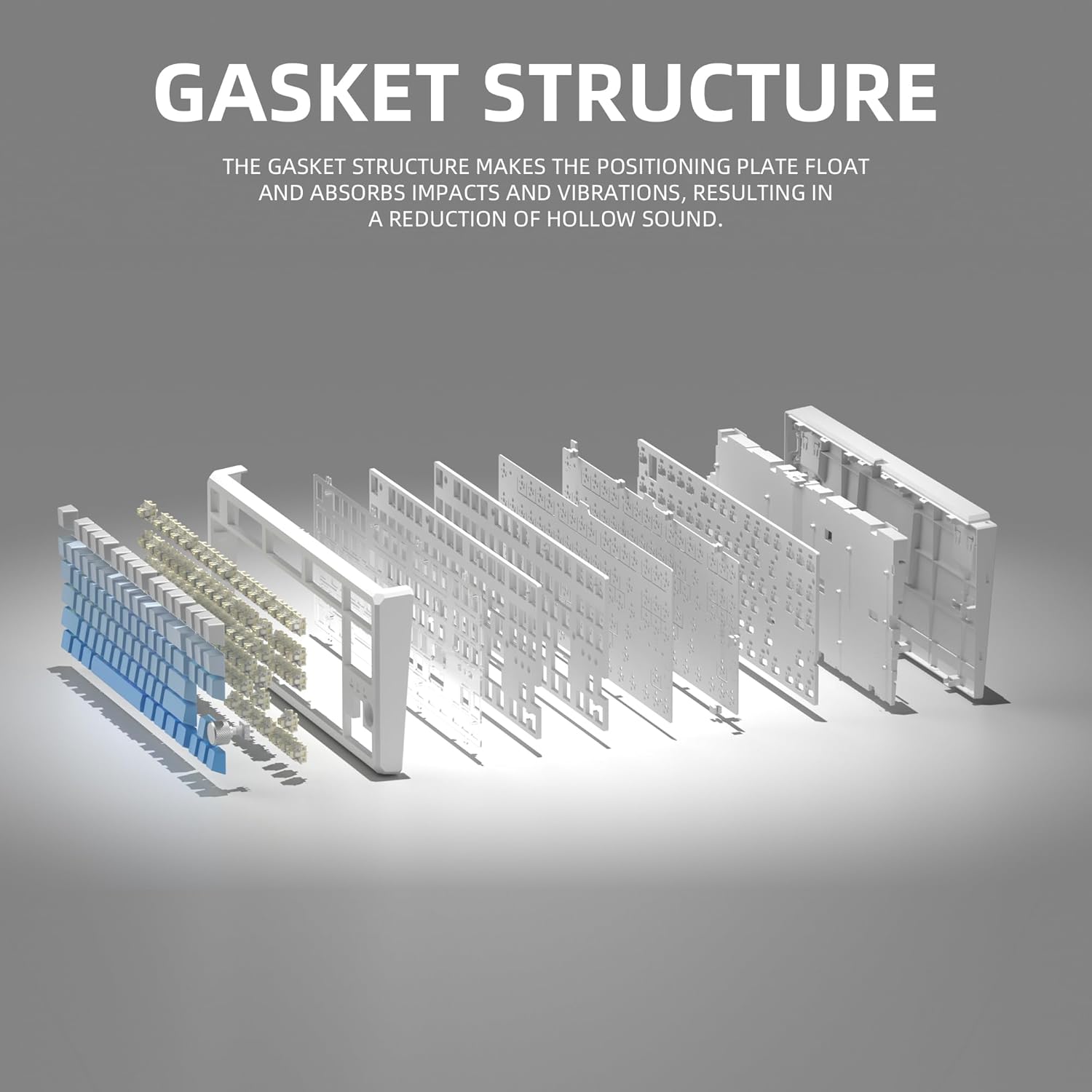
This image illustrates the internal gasket structure of the keyboard, highlighting its components that contribute to a softer and more elastic typing feel.

אן אויפגעריסן view detailing the various layers and components that form the keyboard's gasket structure, including the top case, keycaps, switches, foam pads, and PCB board.
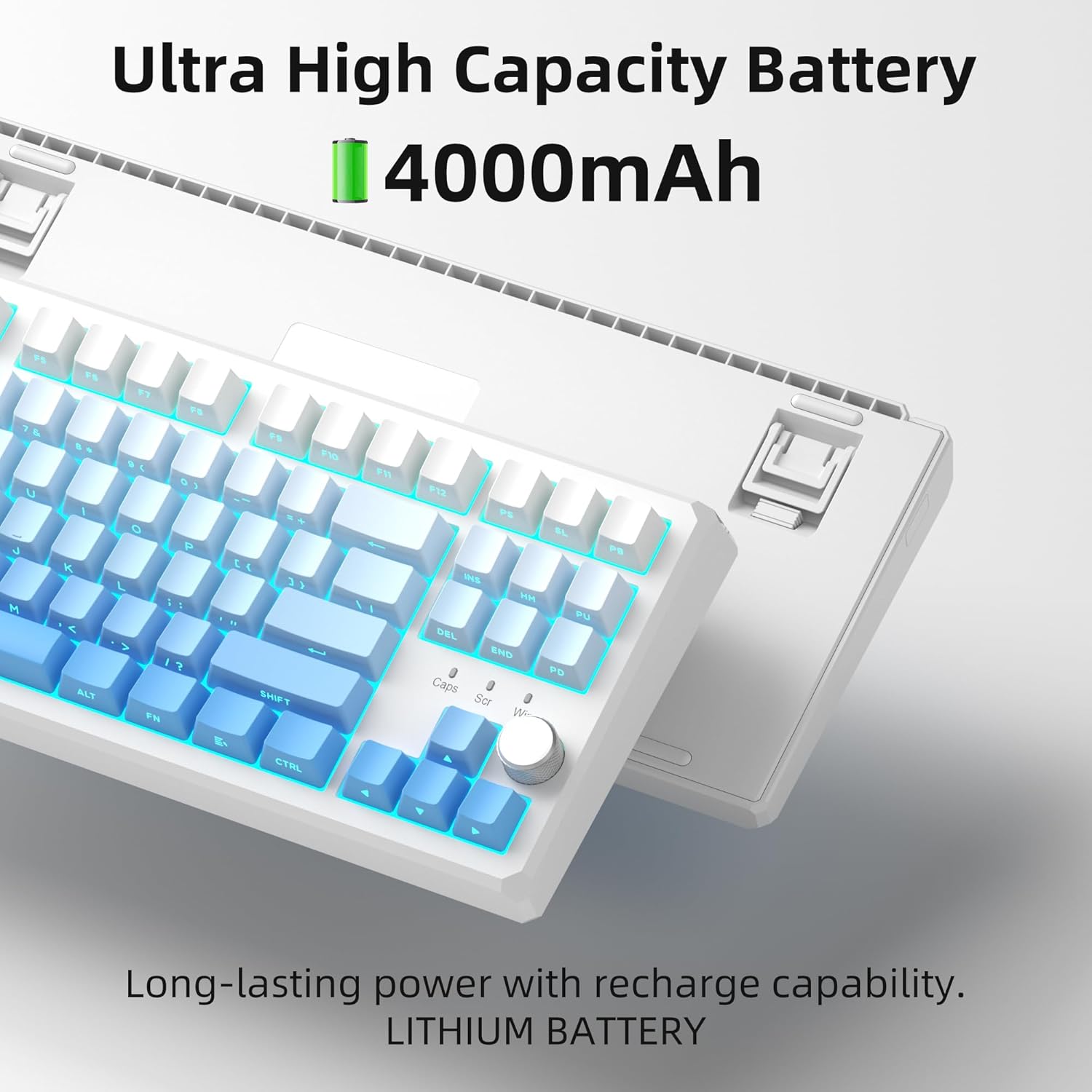
This image highlights the keyboard's internal battery, emphasizing its long-lasting power and rechargeable capability.
4. סעטאַפּ
4.1 קאָנעקטיוויטי מאָדעס
The SKY87 keyboard supports three connection modes:
- 2.4GHz ווירעלעסס מאָדע: For a stable, low-latency connection.
- בלועטוט 5.0 מאָדע: For connecting to multiple devices (up to 5) and easy switching.
- USB Wired Mode: פֿאַר דירעקט פֿאַרבינדונג און טשאַרדזשינג.

This image visually explains the three available connection modes for the keyboard: 2.4GHz wireless, Type-C wired, and Bluetooth 5.1, showing how it connects to different devices like a laptop, monitor, and tablet.
4.2 פֿאַרבינדן דיין קלאַוויאַטור
- 2.4GHz ווירעלעסס קאַנעקשאַן:
- Locate the 2.4GHz USB receiver stored in the magnetic compartment on the back of the keyboard.
- צאַפּן די ופנעמער אין אַ בנימצא וסב פּאָרט אויף דיין קאָמפּיוטער.
- Ensure the keyboard is in 2.4GHz mode (refer to keyboard's mode switch, usually on the back or side).
- די קלאַוויאַטור זאָל זיך אויטאָמאַטיש פֿאַרבינדן.
- בלועטאָאָטה קאַנעקשאַן:
- Turn on the keyboard and switch it to Bluetooth mode.
- On your device (PC, Mac, Xbox, tablet), enable Bluetooth and search for new devices.
- Select 'MageGee SKY87' from the list of available devices to pair.
- You can pair up to 5 Bluetooth devices and switch between them using specific FN key combinations (refer to keyboard's keycap legends or quick guide).
- USB Wired Connection:
- Connect the provided USB-C cable to the keyboard's USB-C port (located on the top edge).
- Connect the other end of the cable to a USB-A port on your computer.
- The keyboard will function in wired mode and charge simultaneously.
4.3 אַדזשאַסטירן קלאַוויאַטור ווינקל
די קלאַוויאַטור פֿאַרמאָגט צוויי-סtage adjustable feet on its underside, allowing you to set your preferred typing angle for ergonomic comfort.

This image shows the adjustable two-stage tripod feet on the underside of the keyboard, designed for ergonomic angle adjustment.
5. אַפּערייטינג ינסטרוקטיאָנס
5.1 RGB לייטינג קאָנטראָל
The keyboard features a multi-function knob and dedicated keys for controlling the RGB backlighting:
- דריי קנעפּ: Turn left/right to adjust backlight brightness.
- קורץ דרוק קנעפּל: Press the knob to cycle through different RGB lighting modes (18+ modes available).
- FN שליסל קאָמבינאַציעס: Use FN + specific keys (refer to keycap legends) to change lighting effects, speed, or color.

This image focuses on the multi-function knob located on the keyboard, indicating its role in controlling the brightness of the RGB lighting.
5.2 הייס-סוואַפּאַבל סוויטשיז
The SKY87 keyboard allows for easy replacement of switches without soldering:
- Use the provided switch puller to gently remove the existing switch.
- גלייכט אויס די פּינס פון דעם נייעם 3-פּין אדער 5-פּין סוויטש מיט די לעכער אויף דער פּקב.
- Press firmly until the switch clicks into place.
- Use the keycap puller to remove and replace keycaps as desired.

This image illustrates the hot-swappable sockets on the keyboard's PCB, demonstrating how switches can be easily inserted and removed, supporting both 3-pin and 5-pin switch types.

This image provides detailed specifications for the 'Blue Whale Switch', including its linear type, pre-travel, end force, tactile position, and total travel, along with a force curve graph.
5.3 סוויטשינג צווישן קייפל דעווייסעס
When in Bluetooth mode, you can quickly switch between paired devices using the designated FN key combinations (e.g., FN + 1, FN + 2, etc.). Refer to the keyboard's quick guide or keycap legends for specific combinations.
5.4 N-Key Rollover
The keyboard supports N-key rollover, meaning it can accurately register multiple simultaneous key presses. This feature is particularly beneficial for fast-paced gaming and touch typing.
5.5 אפיציעלע פּראָדוקט ווידעאָס
Video 5.1: SKY87 Bluetooth Keyboard Overview
דער ווידעא גיט אַן איבערבליקview of the SKY87 Bluetooth Keyboard, demonstrating its features, unboxing, and showcasing the typing sound and RGB lighting effects.
Video 5.2: SKY87 Side Printed PBT Keycaps Keyboard
This video offers a closer look at the SKY87 keyboard, focusing on its side-printed PBT keycaps and demonstrating the typing experience.
6. וישאַלט
To ensure the longevity and optimal performance of your MageGee SKY87 keyboard, follow these maintenance guidelines:
- רייניקונג: Regularly clean the keycaps and keyboard surface with a soft, dry cloth. For deeper cleaning, you can remove keycaps using the provided puller and use compressed air to clear debris from beneath.
- סוויטש קער: If replacing switches, handle them carefully to avoid bending the pins. Ensure switches are fully seated to prevent inconsistent key presses.
- באַטערי זאָרגן: Avoid fully discharging the battery frequently. For long-term storage, charge the keyboard to about 50% and store in a cool, dry place.
- סטאָרידזש: When not in use, especially for extended periods, consider using a dust cover or the original packaging to protect the keyboard from dust and spills.
7. טראָובלעשאָאָטינג
If you encounter any issues with your keyboard, please refer to the following common troubleshooting steps:
- קלאַוויאַטור ניט ריספּאַנדינג:
- זיכער מאַכן אַז די קלאַוויאַטור איז אויפגעלאָדן. פֿאַרבינדט עס דורך אַ USB-C קאַבל.
- Check the connection mode switch (2.4G/BT/Wired) on the keyboard and ensure it matches your intended connection.
- פֿאַר 2.4GHz, זאָרגט אַז דער USB ריסיווער איז זיכער אַרײַנגעשטעקט. פּרוּווט אַן אַנדער USB פּאָרט.
- פֿאַר בלועטוט, זאָרגט אַז בלועטוט איז אַקטיווירט אויף אייער מיטל און די קלאַוויאַטור איז געפּאָרט. פּרוּווט ווידער צו פאַרבינדן דעם מיטל.
- ריסטאַרט דיין קאָמפּיוטער/אַפּאַראַט.
- RGB לייטינג ארבעט נישט/נישט ריכטיג:
- פאַרזיכערן די קלאַוויאַטור איז פּאַוערד אויף.
- Rotate or short press the knob to adjust brightness or change lighting modes.
- Check if any FN key combinations have disabled the lighting.
- שליסלען רעגיסטרירט זיך נישט:
- If specific keys are not working, the switch might be faulty or not properly seated. Use the switch puller to remove and re-insert the switch.
- זיכער מאַכן אַז קיין שמוץ איז נישטאָ אונטערן קלאַוויאַטור אָדער סוויטש.
- Connectivity Issues (Lag/Disconnections):
- For wireless modes, ensure there are no strong interferences (e.g., other 2.4GHz devices, large metal objects) between the keyboard and receiver/device.
- ריקט זיך נענטער צום ריסיווער/אפאראט.
- Ensure the keyboard battery is not low.
If the issue persists after trying these steps, please contact MageGee customer support for further assistance.
8. ספּעסאַפאַקיישאַנז
| שטריך | דעטאַל |
|---|---|
| סאָרט | MageGee |
| מאָדעל | SKY87 |
| קאַנעקטיוויטי טעכנאָלאָגיע | 2.4G ווירעלעס, בלועטוט 5.0, USB-C מיט ווייערס |
| קלאַוויאַטור אויסלייג | 75% (87 Keys), QWERTY |
| באַשטימען טיפּ | Linear (Hot-swappable 3-pin/5-pin) |
| קייקאַפּ מאַטעריאַל | טאָפּל-שאָס PBT |
| באַקלייט | RGB (18+ מאָדעס) |
| באַטאַרייע קאַפּאַציטעט | 8000 מאַה (קריקאָנלאָדלעך) |
| קאַמפּאַטאַבאַל דעוויסעס | PC, Xbox, MAC |
| פּונקט וואָג | 2 פונט |
| פּעקל דימענשאַנז | 13 X 13 X 1 אינטשעס |
| פאַבריקאַנט | MAGEGEE |
| ערשטער בנימצא | אקטאבער 31, 2024 |
9. וואָראַנטי און שטיצן
Your MageGee SKY87 Mechanical Keyboard comes with a 1-יאָר וואָראַנטי פון די דאַטע פון קויפן.
This warranty covers manufacturing defects and issues arising from normal use. It does not cover damage caused by misuse, accidents, unauthorized modifications, or improper maintenance.
For warranty claims, technical support, or any questions regarding your product, please contact MageGee customer support. You can typically find contact information on the manufacturer's official webוועבזייטל אדער דורך אייער קויפן-פונקט.
MageGee aims to respond to inquiries within 12 hours and provide satisfactory solutions.


