הקדמה
This manual provides detailed instructions for the installation, operation, and maintenance of your Carro Smart Ceiling Fan. The Tilbury 52-inch smart ceiling fan is designed to provide efficient cooling and lighting for large indoor and outdoor living spaces. It features a modern design with a white finish, elegant plywood blades, and an integrated 4000K LED cool light. This fan incorporates remote control, Wi-Fi app control, Siri Shortcut, and voice control technology, compatible with Amazon Alexa and Google Home Assistant, to customize your fan preferences.
זיכערקייַט אינפֿאָרמאַציע
ביטע ליינט אלע זיכערהייט אינסטרוקציעס קערפול איידער די אינסטאַלאַציע און באַניץ. נישט נאָכפֿאָלגן די אינסטרוקציעס קען רעזולטירן אין עלעקטרישן קלאַפּ, פייַער אָדער פּערזענלעכע שאָדן.
- זיכער מאַכן אַז די מאַכט איז אויסגעלאָשן בײַם קרייַז ברעאַקער איידער די אינסטאַלאַציע אָדער סערוויסינג.
- אַלע וויירינג מוזן זיין אין לויט מיט נאַציאָנאַלע און לאָקאַלע עלעקטרישע קאָודן.
- באַראַטן זיך מיט אַ קוואַליפֿיצירטן עלעקטריקער אויב איר זענט נישט זיכער וועגן די וויירינג פּראָצעדורן.
- Mount the fan to a structurally sound ceiling capable of supporting the fan's weight.
- Keep hands, hair, and clothing clear of the fan blades during operation.
- פרובירט נישט צו פאררעכטן אדער מאדיפיצירן דעם פען אליין. קאנטאקטירט קאסטומער סופארט פאר הילף.
סעטאַפּ און ינסטאַלירונג
The Carro Smart Ceiling Fan is designed for straightforward installation. The process typically takes about 20 minutes to replace your current ceiling fan.
- אָפּלייגן קאַמפּאָונאַנץ: נעמט פֿאָרזיכטיק אַרויס אַלע טיילן פֿון דער פּאַקעט. קאָנטראָלירט אַז אַלע קאָמפּאָנענטן זענען פֿאַראַן לויט דער פּאַקינג־ליסטע.
- מאַכט דיסקאַנעקשאַן: Before beginning installation, ensure the power supply to the fan location is turned off at the main circuit breaker.
- מאַונטינג בראַקאַץ ינסטאַלירונג: Securely attach the mounting bracket to the ceiling junction box. Ensure the junction box is rated for ceiling fan support.
- וויירינג קאַנעקשאַנז: Connect the fan's electrical wires to the household wiring according to the provided wiring diagram. Ensure all connections are secure and properly insulated.
- פאָכער אַסעמבלי: Attach the fan motor assembly to the mounting bracket. Install the fan blades and light kit as per the instructions.
- מאַכט רעסטאָראַטיאָן: Once installation is complete, restore power at the circuit breaker and test the fan's operation.

בילד: איבערview of Carro Smart Ceiling Fan components and general installation steps.
אַפּערייטינג ינסטראַקשאַנז
Your Carro Smart Ceiling Fan offers multiple control methods for convenience and customization.
1. קאָנטראָל מעטאָדן
The fan can be controlled via the included remote, a mobile app, or voice commands through smart home assistants.
- ווייַט קאָנטראָל: Use the dedicated remote to adjust fan speed, light settings, and turn the fan on/off. This ensures control even without a Wi-Fi connection.
- מאָביל אַפּ: Download the Carro Home app to customize settings remotely. The app allows for advanced control and scheduling.
- קול קאָנטראָל: The fan is compatible with Amazon Alexa, Siri, and Google Assistant. Use voice commands such as "Alexa, set the white ceiling fan in the bedroom to speed 8, turn the yellow light to 75%, and adjust the white light to 36%."

Image: Remote control and mobile phone app interface for fan operation.

Image: Demonstrates voice control functionality with Amazon Alexa, Google Assistant, and Siri Shortcuts.
2. Fan Operation (DC Motor)
The fan is equipped with an efficient DC motor, offering quiet operation and energy savings.
- גיכקייַט סעטטינגס: Choose from 10 adjustable wind speeds, ranging from a maximum airflow of 4500 CFM to a minimum of 980 CFM.
- ריווערסאַבאַל לופטפלוס: The reversible function allows you to change the direction of airflow. Use the downward airflow for cooling in summer and upward airflow to circulate warm air in winter.
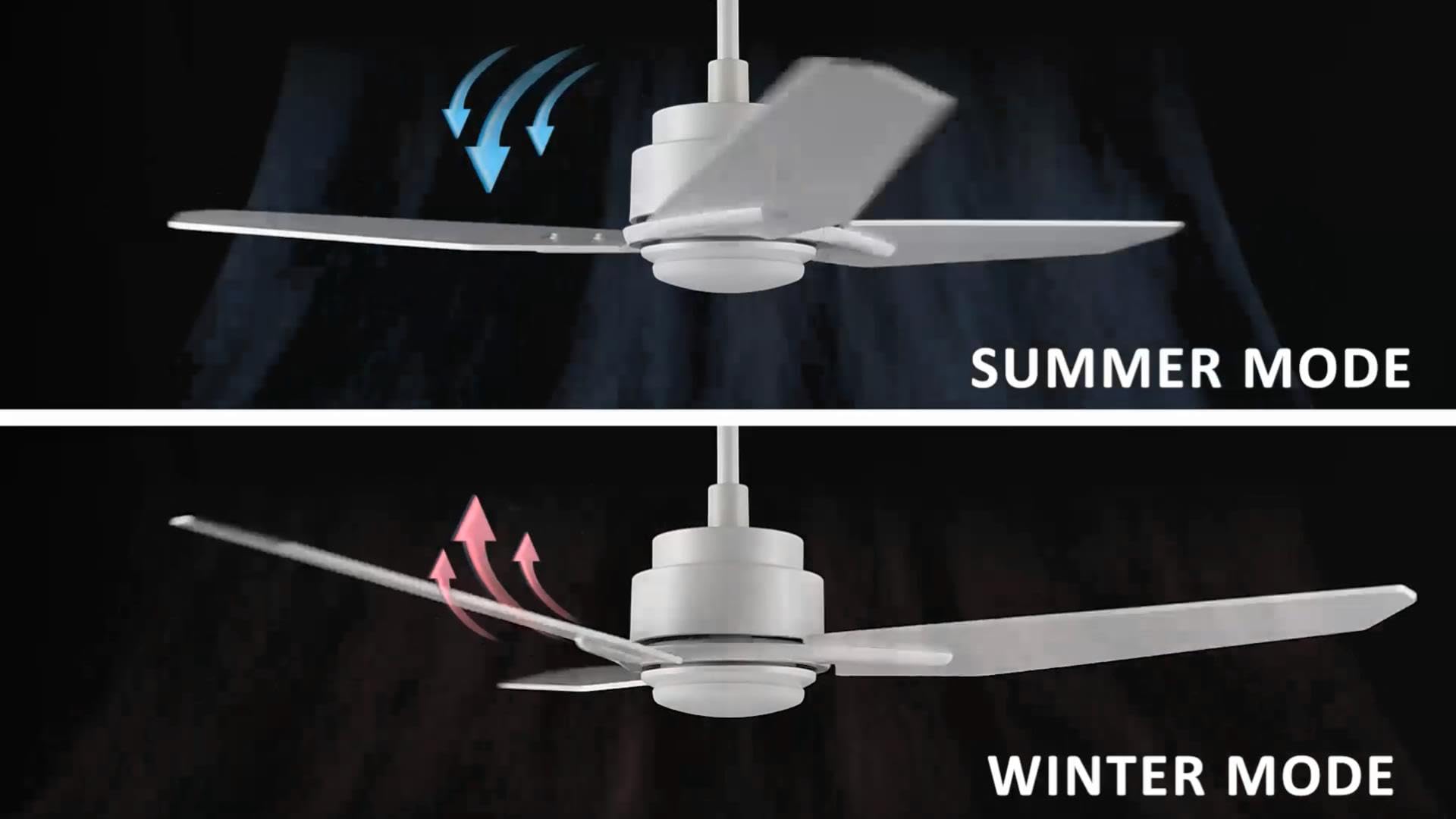
Image: Illustration of summer mode (downward airflow) and winter mode (upward airflow) for optimal air circulation.
3. Adjustable Dimmable LED Lights
Control the fan's lighting independently with ease.
- קאָליר טעמפּעראַטור אָפּציעס: Select from three light colors: 4000K (cool light), 3000K (bright light), and 2700K (warm light).
- דימאַבלע פֿונקציע: The LED lights are dimmable from 1% to 100%, allowing you to adjust brightness for any situation.
- Smart Grouping: Group the LED lights with the fan or other smart devices for unified control via the app or voice commands.

Image: Visual representation of the three dimmable light color options: Cool Light (4000K), Natural Light (3000K), and Warm Light (2700K).
4. Timer and Scheduling Options
Utilize the scheduling feature through the mobile app to automate fan and light operations.
- Set Routines: Program the fan to activate at specific times, with desired light and fan settings, for different areas of your home.
- Exampלאַ: Program the living room fan to turn on daily at 18:00 with both yellow and white lights. Set the study fan to turn on at 21:00 from Monday to Friday, illuminating only the yellow light.
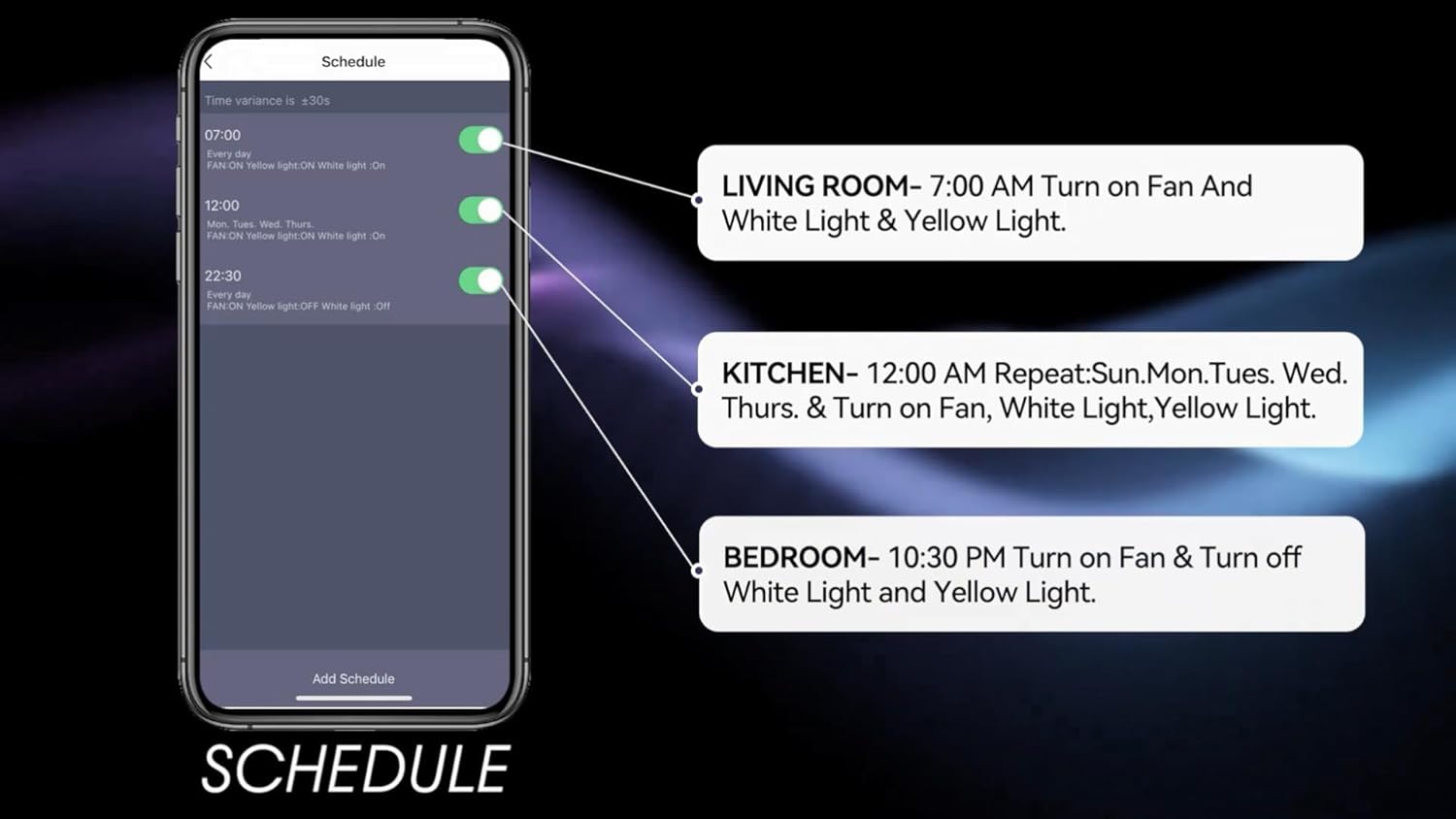
Image: Screenshot of the mobile app's scheduling interface, demonstrating how to set routines for different rooms.
וישאַלט
רעגולערע אויפהאלטונג גאראנטירט אפטימאלע פאָרשטעלונג און לענגלעבעדיקייט פון אייער סופיט ווענטילאַטאָר.
- רייניקונג: שטויב אָפּ די ווענטילאַטאָר בלעטער און מאָטאָר הויזינג פּעריִאָדיש מיט אַ ווייכן, דamp שטאָף. דו זאלסט נישט נוצן אַברייסיוו קלינערז אָדער סאָלוואַנץ.
- בלייד טייטנאַס: Check blade screws annually to ensure they are secure. Loose blades can cause wobbling and noise.
- ליכט קיט: The integrated LED light source is designed for long life and typically does not require replacement. If issues arise, contact customer support.
- מאַכט אַוועק: שטענדיק אויסלעשן די מאַכט ביים קרייַז ברעאַקער איידער איר דורכפירן קיין רייניקונג אָדער וישאַלט.
טראָובלעשאָאָטינג
If you encounter issues with your Carro Smart Ceiling Fan, refer to the following common problems and solutions:
| פּראָבלעם | מעגלעך סיבה | לייזונג |
|---|---|---|
| פאָכער טוט נישט אָנהייבן | קיין שטראָם צום ווענטילאַטאָר; לויזע דראָט פֿאַרבינדונגען; נידעריקע באַטאַרייע אין דער ווײַטקאָנטראָל. | קאָנטראָלירט דעם קרייז ברעיקער; באַשטעטיקט אַז אַלע דראָט פֿאַרבינדונגען זענען זיכער; פאַרבייטן די באַטאַרייע פֿון דער ווײַט קאָנטראָל. |
| פאן װאבלט זיך | Loose blade screws; Improperly balanced blades; Loose mounting bracket. | Tighten all blade screws; Use a balancing kit (not included) to balance blades; Ensure mounting bracket is securely fastened. |
| ליכט טוט נישט אַרבעטן | No power to the light kit; Loose wire connections; Light setting off. | Check power supply; Verify light kit wiring; Ensure light is turned on via remote, app, or voice control. |
| ווייַט קאָנטראָל נישט ארבעטן | נידעריגע באַטעריע; ווייַטקאָנטראָל נישט געפּאָרט. | Replace remote battery; Refer to pairing instructions in the full manual (if applicable). |
| קען נישט פאַרבינדן צו Wi-Fi/אַפּ | אומרעכט Wi-Fi פּאַראָל; ראַוטער צו ווייט; אַפּ נישט דערהייַנטיקט. | Verify Wi-Fi password; Move router closer or use a Wi-Fi extender; Update the Carro Home app to the latest version. |
פּראָדוקט ספּעסאַפאַקיישאַנז
| שטריך | באַשרייַבונג |
|---|---|
| סאָרט | קאַרראָ |
| מאָדעל | 52" White |
| קאָליר | ווייַס |
| עלעקטריק פאַן פּלאַן | Ceiling Fan |
| מאַכט מקור | AC/DC |
| סטייל | מאָדערן |
| פּראָדוקט דימענשאַנז | 52"ד רענטגענ 52"וו רענטגענ 13.4"ה |
| אָרט טיפּ | Bedroom, Dining Room, Home Office, Living Rooms, Study Room |
| ספּעציעלע שטריך | פּראָגראַממאַבלע |
| רעקאָממענדעד ניצט | לופט סערקיאַליישאַן |
| נומער פון בלאַדעס | 3 |
| לופט פלאָו קאַפּאַסיטי | 4500 קוביק פֿיס פּער מינוט |
| בלייד לענג | 22.7 אינטשעס |
| Voltage | 120 וואלטס |
| אַרייַנגערעכנט קאַמפּאָונאַנץ | Ceiling fan X1 |
| באַשרייַבונג באגעגנט | ETL |
| קאָנטראָל מעטאָד | שטימע, ווײַט, אַפּ |
| פּונקט וואָג | 15.7 פונט |
| מאַונטינג טיפּ | דאַונראָד בארג |
וואָראַנטי אינפֿאָרמאַציע
Carro products are manufactured to the highest quality standards. This product comes with a limited warranty against defects in materials and workmanship. Please refer to the warranty card included in your product packaging or visit the official Carro webזייטל פֿאַר דעטאַלירטע וואָראַנטי טערמינען און באדינגונגען.
קונה שטיצן
For technical assistance, troubleshooting, or warranty claims, please contact Carro customer support:
- Webפּלאַץ: Visit the official Carro webוועבזייטל פֿאַר אָפֿט געשטעלטע פֿראַגעס און שטיצע רעסורסן.
- בליצפּאָסט: Refer to your product packaging for customer service email.
- טעלעפֿאָן: Refer to your product packaging for customer service phone number.
Please have your model number (52" White) and purchase date ready when contacting support.


