1. הקדמה
The LOFREE Zero ARTZ is a 75% mechanical keyboard designed for versatile use across multiple operating systems. It features a unique terrazzo-inspired design, hot-swappable linear switches, and multiple connection options for enhanced productivity and user experience.
2. פּעקל אינהאַלט
באַשטעטיקן אַז אַלע זאכן זענען פאַראַן אין דיין פּעקל:
- LOFREE Zero ARTZ Mechanical Keyboard
- Marble Palm Rest
- וסב-C צו וסב-א קאַבלע
- רייניקונג באַרשט
- באַניצער מאַנואַל (דעם דאָקומענט)
- וואָראַנטי קאַרד

Image: Included accessories with the keyboard.
3. סעטאַפּ
3.1. Power On/Off & Connection Mode Selection
Locate the switches on the back edge of the keyboard:
- מאַכט סוויטש: Slide the switch to turn the keyboard ON or OFF.
- OS Switch: Select between "Win/And" (Windows/Android) or "Mac/iOS" (Mac/iOS) to optimize key functions for your operating system.
- קשר מאָדע באַשטימען: קלייַבט אייער בילכער פֿאַרבינדונג מעטאָד:
- WLS (Wireless/Bluetooth): פֿאַר בלועטאָאָטה קשר.
- CAB (Cable): For wired USB-C connection.
- OFF: Turns off the keyboard.
Image: Close-up of the USB-C port, OS switch, and connection mode switch.
3.2. Connecting via Bluetooth (WLS Mode)
- Ensure the keyboard is ON and the Connection Mode Switch is set to "WLS".
- אויף אייער דעווייס (קאמפיוטער, טאַבלעט, סמאַרטפאָון), אַקטיווירט בלועטוט.
- זוכן פֿאַר available Bluetooth devices and select "LOFREE Zero ARTZ" (or similar name).
- גיי קיין פּראַמפּס אויף דעם עקראַן צו פאַרענדיקן דעם פּערינג פּראָצעס.
3.3. Connecting via USB-C Cable (CAB Mode)
- פֿאַרבינדט איין עק פֿון דעם צוגעשטעלטן USB-C קאַבל צום קלאַוויאַטור'ס USB-C פּאָרט.
- Connect the other end (USB-A) to an available USB port on your computer.
- Ensure the Connection Mode Switch is set to "CAB". The keyboard will automatically connect.
4. אַפּערייטינג ינסטרוקטיאָנס
4.1. Backlighting Effects
The keyboard features customizable backlighting:
- טוישן ליכט עפעקט: דרוק Fn + אַרויף עראָו to cycle through 7 distinct lighting effects.
- סטרויערן ברייטנאַס: דרוק Fn + לינקס עראָו or Fn + רעכט עראָו to adjust between 4 brightness levels.
- Adjust Blink Frequency: דרוק Fn + אַראָפּ עראָו to change between 4 blink frequencies for dynamic effects.
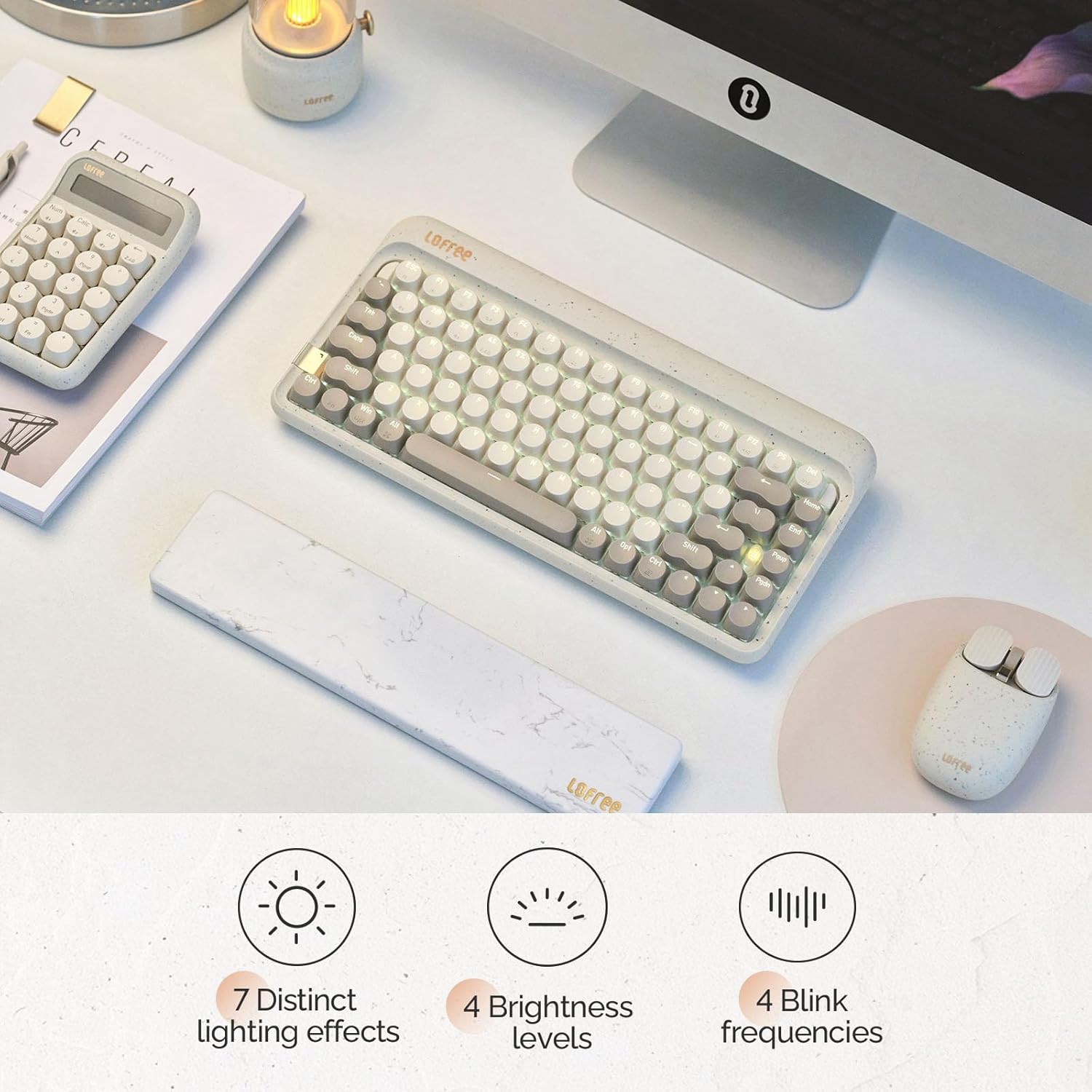
Image: The keyboard displaying its various backlighting options.
4.2. Marble Palm Rest
The included Marble Palm Rest provides ergonomic support and features a natural marble texture. It is equipped with non-slip mats for stability during use.

Image: The marble palm rest showing its non-slip mats.

Image: Close-up of the marble palm rest highlighting its natural texture.
4.3. Hot-swappable Switches
The LOFREE Zero ARTZ keyboard features hot-swappable switches, allowing users to easily change switches without soldering. This enables customization of typing feel and sound.
Video: Demonstrates the hot-swappable feature of the keyboard, showing how switches can be easily removed and replaced.
ווידעא: א קורצע הקדמהview שאָוקasing the hot-swappable switches and customizable keycaps.
5. וישאַלט
צו האַלטן אייער קלאַוויאַטור אין אָפּטימאַלן צושטאַנד:
- Use the provided cleaning brush to remove dust and debris from between the keycaps regularly.
- For deeper cleaning, carefully remove keycaps using a keycap puller (not included) and clean the switches and plate.
- פֿאַרמײַדט אויסשטעלן די קלאַוויאַטור צו פֿליסיקייטן אָדער עקסטרעמע טעמפּעראַטורן.
6. טראָובלעשאָאָטינג
- קלאַוויאַטור רעאַגירט נישט:
- Ensure the keyboard is powered ON.
- Check the connection mode (WLS/CAB) and ensure it matches your connection type.
- For Bluetooth, try re-pairing the device.
- For wired, try a different USB port or cable.
- באַקלייט אַרבעט נישט:
- זייט זיכער אַז די קלאַוויאַטור איז אויפגעלאָדן.
- Try adjusting brightness levels using Fn + לינקס/רעכטס פײַל.
- שליסלען רעגיסטרירט זיך נישט:
- Ensure the OS switch is set correctly for your operating system.
- If a specific key is not working, it might be a faulty switch. Utilize the hot-swappable feature to replace it.
7. ספּעסאַפאַקיישאַנז
| שטריך | דעטאַל |
|---|---|
| סאָרט | לאָפֿריי |
| מאָדעל | Zero ARTZ |
| קלאַוויאַטור טיפּ | 75% Mechanical |
| באַשטימען טיפּ | Linear (Hot-swappable) |
| קאַנעקטיוויטי | בלועטוט, מיט ווייערן (USB-C) |
| קאַמפּאַטאַבאַל דעוויסעס | Android, Laptop, Mac, PC, Smartphone, Tablet |
| אַפּערייטינג סיסטעמס | MacOS, iOS, Windows, Android |
| מאַכט מקור | באַטאַרייע פּאַוערד |
| ספּעציעלע שטריך | Ergonomic Marble Palm Rest |
8. וואָראַנטי & שטיצן
Your LOFREE Zero ARTZ Mechanical Keyboard comes with a manufacturer's warranty. Please refer to the included Warranty Card for details regarding coverage, terms, and conditions.
For technical support or customer service, please visit the official LOFREE website or contact their customer support channels as listed on the product packaging or warranty card.


