1. הקדמה
This manual provides detailed instructions for the proper use and maintenance of your BOTSLAB Accessory Kit for Action Camera V9H. Please read this manual thoroughly before using the accessories to ensure safe and effective operation. This kit is designed to enhance the versatility of your action camera, allowing for various mounting options in different environments.
2. פּעקל אינהאַלט
Carefully unpack the accessory kit and verify that all items listed below are present. If any items are missing or damaged, please contact customer support.
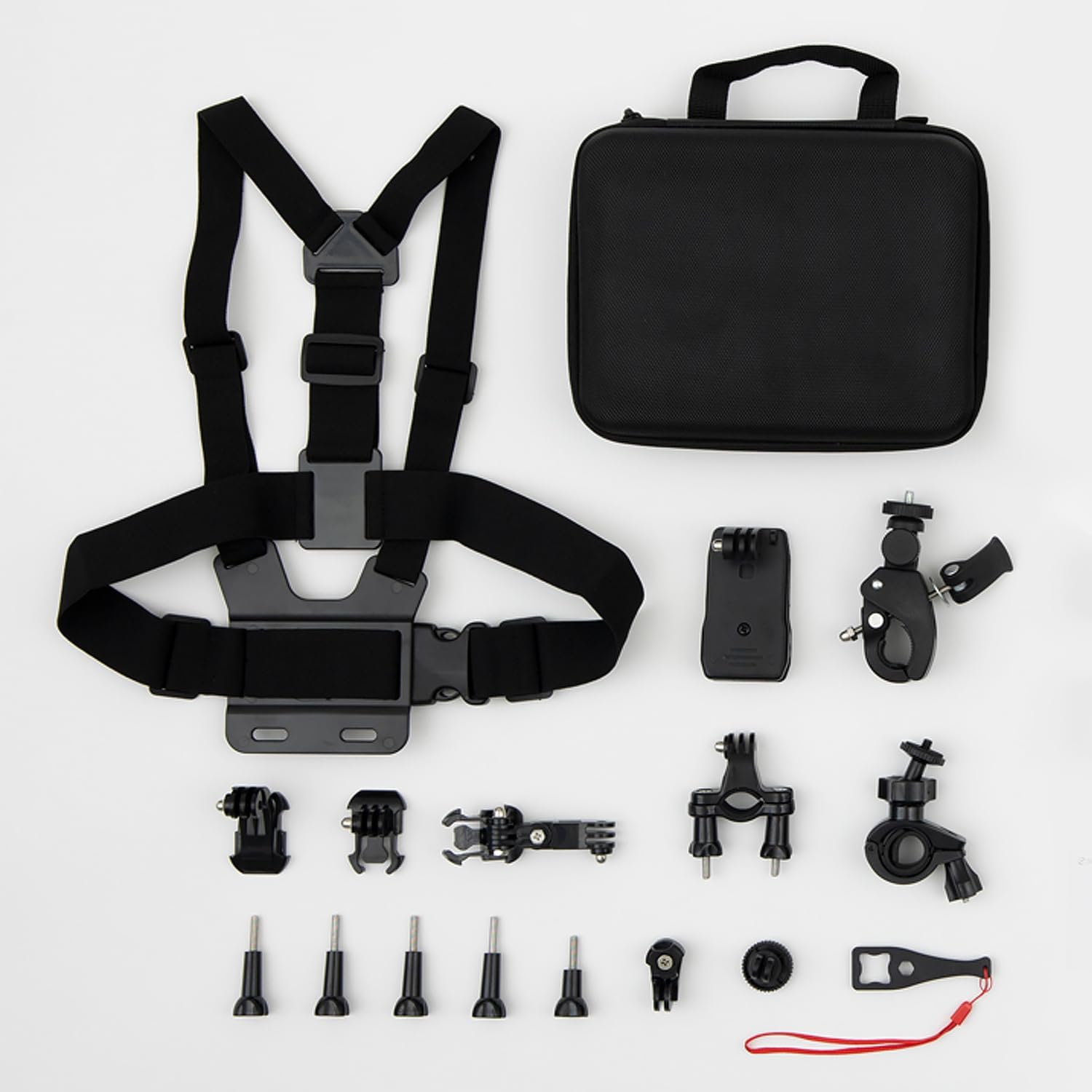
This image displays all components included in the BOTSLAB Accessory Kit for Action Camera V9H. Key items visible are a black chest harness, a compact black zippered carrying case, and a variety of black plastic and metal mounting accessories such as J-hook buckles, quick release buckles, thumb screws, and specialized mounts for bicycles and helmets.
- Adjustable Chest Harness
- Compact Carrying Case
- J-Hook Buckles (2 pieces)
- Quick Release Buckles (2 pieces)
- Thumb Screws (various lengths, 6 pieces)
- וועלאָסיפּעד האַנדלעבאַר בארג
- סאַקשאַן קאַפּ בארג
- העלם רימען בארג
- Wrench Tool for tightening screws
- Various Adapter Mounts and Connectors
3. סעטאַפּ און ייַנמאָנטירונג
3.1 General Mounting Principles
- Identify the Mount: Select the appropriate mount for your intended activity (e.g., chest harness for POV, handlebar mount for cycling).
- Attach Camera to Buckle/Adapter: Secure your action camera to a J-hook buckle or a quick release buckle using a thumb screw. Ensure the screw is tightened firmly.
- Connect Buckle/Adapter to Main Mount: Slide the buckle or adapter into the corresponding slot on the main mount (e.g., chest harness plate, handlebar clamp). A click indicates a secure connection.
- פֿאַרשטאַרקן אַלע פֿאַרבינדונגען: Use the provided wrench tool to ensure all thumb screws are securely tightened. This prevents camera movement during activity.
3.2 Specific Mount Installation
- Chest Harness: Adjust the elastic straps to fit snugly around your torso and shoulders. The camera mounting plate should be centered on your chest.
- Bicycle Handlebar Mount: עפענען די קלamp and position it on your bicycle handlebar. Tighten the screw until the mount is firm and does not rotate.
- סאַקשאַן קאַפּ בארג: Ensure the mounting surface is clean and smooth. Press the suction cup firmly against the surface and engage the lever to create a vacuum seal. Verify stability before attaching the camera.
- Helmet Strap Mount: Thread the straps through the vents of your helmet and secure them tightly. Attach the camera to the mounting plate on the helmet.
4. אַפּערייטינג ינסטרוקטיאָנס
Once your action camera is securely mounted, ensure the following:
- ווינקל אַדזשאַסטמאַנט: Most mounts feature pivot points that allow you to adjust the camera's recording angle. Loosen the thumb screws, set the desired angle, and re-tighten firmly.
- Pre-Activity Check: Before engaging in any activity, always perform a quick check to ensure all connections are tight and the camera is stable. Gently shake the mount to confirm security.
- ענוויראָנמענטאַל קאַנסידעריישאַנז: While the accessories are durable, they are ניט וואַסער קעגנשטעליק. Avoid prolonged exposure to water or extreme weather conditions unless your action camera itself is rated for such use and properly protected.
5. וישאַלט
Proper maintenance will extend the lifespan of your BOTSLAB Accessory Kit.
- רייניקונג: רייניקט די אַקסעסאָריעס מיט אַ ווייכן, דamp cloth. For stubborn dirt, use a mild soap solution. Avoid harsh chemicals or abrasive materials.
- דרייינג: Ensure all components are completely dry before storage, especially metal parts, to prevent corrosion.
- סטאָרידזש: Store the accessories in the provided carrying case in a cool, dry place away from direct sunlight. This protects them from dust and physical damage.
- קאָנטראָלירן קעסיידער: Periodically inspect all mounts and fasteners for signs of wear, cracks, or damage. Replace any compromised components immediately to prevent accidents.
6. טראָובלעשאָאָטינג
If you encounter issues with your accessory kit, consider the following:
- קאַמעראַ נישט זיכער: Ensure all thumb screws are fully tightened. Check that the quick release buckles or J-hook buckles are fully engaged and clicked into place.
- Mount Slipping: For handlebar or helmet mounts, ensure straps or clamps are tightened sufficiently. For suction cup mounts, verify the surface is clean, smooth, and the lever is fully engaged.
- Difficulty Adjusting Angle: Loosen the thumb screws slightly before attempting to adjust the angle. Do not force adjustments.
- פעלנדיק טיילן: Refer to the 'Package Contents' section. If an item is genuinely missing, contact BOTSLAB customer support.
7. ספּעסאַפאַקיישאַנז
| מאָדעל נאָמען | V9H |
|---|---|
| סאָרט | באָטלאַב |
| קאַמפּאַטאַבאַל דעוויסעס | קאַמף קאַמעראַס |
| מאַטעריאַל | פּלאַסטיק |
| וואַסער קעגנשטעל מדרגה | ניט וואַסער קעגנשטעליק |
| פּונקט וואָג | 14.1 אונסעס |
| פּעקל דימענשאַנז | 0.71 X 0.31 X 0.2 אינטשעס |
| פאַבריקאַנט | באָטלאַב |
8. וואָראַנטי און שטיצן
For information regarding product warranty, please refer to the documentation provided with your purchase or visit the official BOTSLAB webזייטל. גאַראַנטיע טערמינען און באדינגונגען קענען זיין אַנדערש.
If you require further assistance, technical support, or have questions not covered in this manual, please contact BOTSLAB customer service through their official channels. You can often find contact information on the manufacturer's webפּלאַץ אָדער פּראָדוקט פּאַקקאַגינג.


