1. וויכטיק סאַפעטי אינסטרוקציעס
Please read these safety instructions carefully before operating the unit. Keep this manual for future reference.
- דו זאלסט נישט ויסשטעלן דעם אַפּפּליאַנסע צו רעגן אָדער נעץ.
- בלאָקירט נישט קיין ווענטילאַציע עפענונגען. אינסטאַלירט לויט די אינסטרוקציעס פונעם פאַבריקאַנט.
- דו זאלסט נישט ינסטאַלירן לעבן קיין היץ קוואלן אַזאַ ווי ראַדיאַטאָרס, היץ רעדזשיסטערז, סטאָוווז אָדער אנדערע אַפּאַראַט (אַרייַנגערעכנט ampליפיערס) וואָס פּראָדוצירן היץ.
- באַשיצן די מאַכט שנור פון אַ גיין אָדער קניפּ פון די מאַכט שנור, דער הויפּט אין פּלאַגז, קאַנוויניאַנס קאַנטיינערז און די פונט ווו זיי אַרויסגאַנג פון די אַפּפּליאַנסע.
- נאָר נוצן אַטאַטשמאַנץ / אַקסעסעריז ספּעסיפיעד דורך דער פאַבריקאַנט.
- אָפּשטויסן דעם אַפּפּליאַנסע בעשאַס בליץ סטאָרמז אָדער ווען אַניוזד פֿאַר לאַנג פּיריאַדז.
- קאָנטאַקט אַלע קוואַלאַפייד סערוויס פּערסאַנעל. סערוויסינג איז פארלאנגט אויב די אַפּאַראַט איז דאַמידזשד אין קיין וועג.
- Do not use batteries (8 x LR20/D) if they show signs of leakage or corrosion.
2. פּעקל אינהאַלט
באַשטעטיקן אַז אַלע זאכן זענען פאַראַן ביים אויספּאַקן:
- Soundmaster SCD8300SW Boombox
- אַק מאַכט קאַבלע
- באַניצער מאַנואַל
3. פּראָדוקט איבערview
Familiarize yourself with the components of your Soundmaster SCD8300SW.
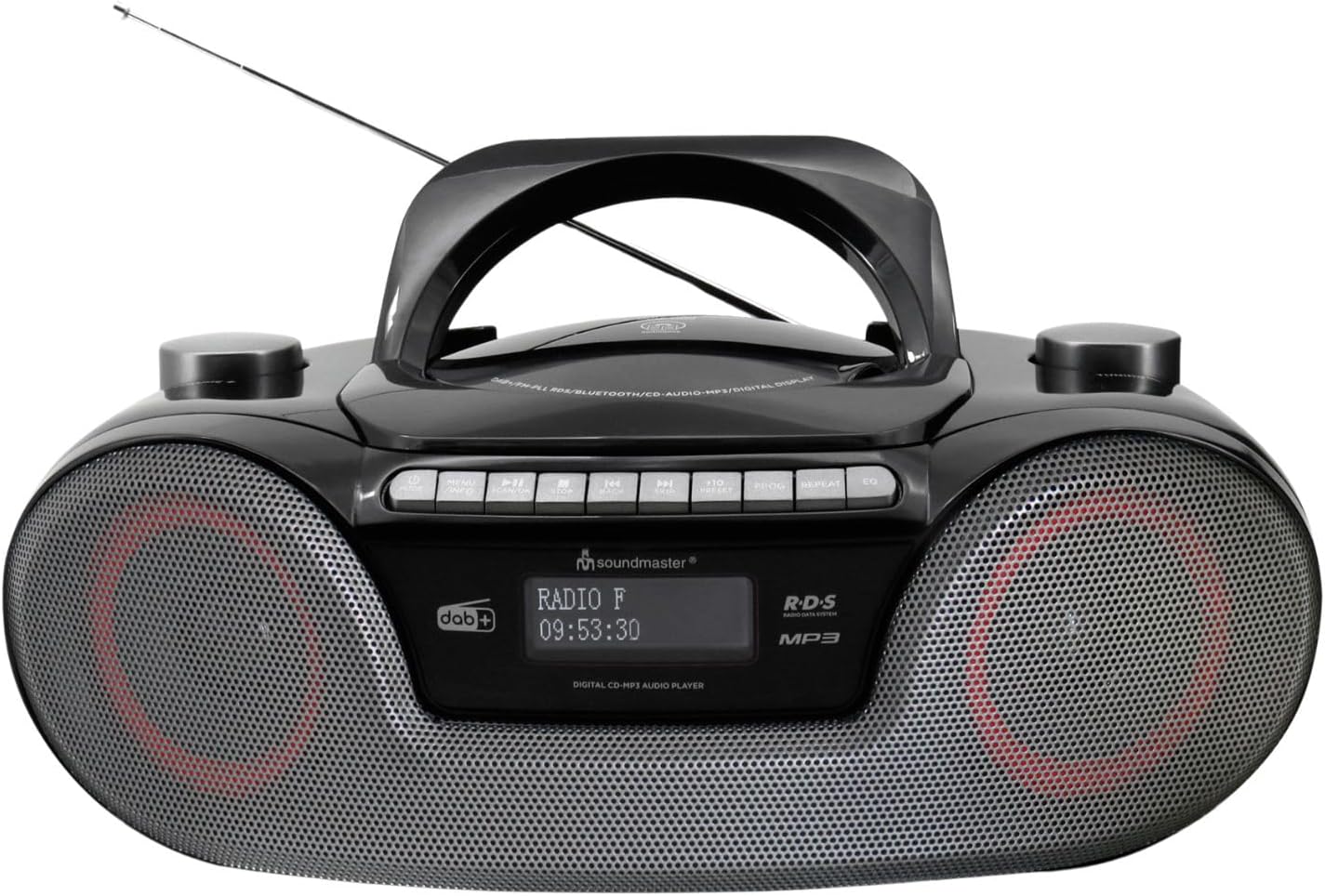
בילד: פראָנט view of the Soundmaster SCD8300SW Boombox. It features a central handle, an extendable antenna, a display screen, control buttons on top, and two speaker grilles on the front. The display shows 'RADIO F' and '09:53:30'.
Front Panel Controls and Features:
- ווייַז פאַרשטעלן: Shows current mode, station information, time, and other relevant data.
- רעדנער גרילז: סטערעאָ רעדנערס פֿאַר אַודיאָ אַרויסגאַנג.
- Control Buttons (Top Panel): Includes Power, Mode, Play/Pause, Stop, Skip/Tune, Volume, EQ, Info, and Alarm functions.
- סי-די קאמפארטמענט: Located on the top, for inserting CDs.
- וסב פּאָרט: פֿאַר פֿאַרבינדן USB סטאָרידזש דעוויסעס.
- SD Card Slot: פֿאַר אַרײַנשטעלן SD זכּרון קאַרטלעך.
- כעדפאָון דזשאַק: פֿאַר פּריוואַט צוגעהערט.
- AUX אַרייַנשרייַב: פֿאַר קאַנעקטינג פונדרויסנדיק אַודיאָ דעוויסעס.
- טעלאַסקאָפּיק אַנטענע: פֿאַר פֿאַרבעסערטן ראַדיאָ אָפּנאַם.
4. סעטאַפּ
4.1 מאַכט צושטעלן
Your boombox can be powered by AC mains or batteries.
AC מאַכט אָפּעראַציע:
- פאַרזיכערן אַז די אַפּאַראַט איז סוויטשט אַוועק.
- Connect the supplied AC power cable to the AC IN socket on the rear of the unit.
- שטעקט אריין דעם אנדערן עק פונעם AC שטראָם קאַבל אין א נאָרמאַלן וואַנט אַוטלעט.
באַטערי אָפּעראַציע:
For portable use, the unit requires 8 x LR20/D size batteries (not included).
- עפֿנט דעם דעקל פֿונעם באַטעריע־אָפּטייל אויף דער אונטערשטער זײַט פֿונעם אַפּאַראַט.
- Insert 8 x LR20/D batteries, ensuring correct polarity (+/-) as indicated inside the compartment.
- פאַרמאַכן די באַטאַרייע אָפּטייל דעקן סיקיורלי.
4.2 אַנטענע סעטאַפּ
For optimal DAB+ and FM radio reception, fully extend the telescopic antenna. Adjust its position for the best signal.
5. אַפּערייטינג ינסטרוקטיאָנס
5.1 אַלגעמיינע אָפּעראַציע
- מאַכט אויף / אַוועק: דרוק די מאַכט קנעפּל צו קער די אַפּאַראַט אויף אָדער אַוועק.
- מאָדע סעלעקציע: דרוק די מאָדע button repeatedly to cycle through available modes: DAB+, FM, CD, Bluetooth, USB, SD, AUX.
- באַנד קאָנטראָל: ניצן די באַנד +/- קנעפּלעך צו סטרויערן די געזונט מדרגה.
5.2 DAB+ ראַדיאָ
- טוישט צו DAB+ מאָדע ניצנדיק די מאָדע קנעפּל.
- The unit will automatically scan for available DAB+ stations on first use.
- ניצן די SKIP/TUNE buttons to navigate through the list of stations.
- דרוק אַרייַן or שפּיל / פּויזע צו סעלעקטירן אַ סטאַנציע.
- צו ראַטעווען אַ סטאַנציע, דריק און האַלט די קנעפּל PRESET קנעפּל, דעמאָלט נוצן SKIP/TUNE to select a preset number (1-40) and press אַרייַן צו באַשטעטיקן.
5.3 עפעם ראַדיאָ
- טוישט צו FM מאָדע ניצנדיק די מאָדע קנעפּל.
- דריקן און האַלטן די SKIP/TUNE buttons to automatically scan for the next available station. Press briefly to manually tune.
- To save an FM station, follow the same procedure as for DAB+ stations (up to 40 presets).
5.4 קאָמפּאַקטדיסק שפּילער
- Switch to CD mode using the מאָדע קנעפּל.
- Open the CD compartment cover and insert a CD (CD, CD-R/RW, or MP3 CD) with the label side facing up. Close the cover.
- The CD will begin playing automatically.
- ניצן שפּיל / פּויזע צו פּויזע / נעמענ זיכ ווידער פּלייבאַק.
- ניצן האַלטן צו האַלטן פּלייבאַק.
- ניצן SKIP/TUNE קנעפּלעך צו האָפּקען טראַקס.
5.5 בלועטוט פּלייבּעק
- איבערגיין צו בלועטוט מאָדע ניצנדיק די מאָדע button. The display will show 'BT' or 'PAIRING'.
- אַקטיווירן בלועטוט אויף דיין סמאַרטפאָון, טאַבלעט, אָדער אַנדער קאָמפּאַטיבל מיטל.
- זוכן פֿאַר 'SCD8300SW' in your device's Bluetooth list and select it to pair.
- Once paired, you can play audio from your device through the boombox.
- Use the boombox's שפּיל / פּויזע און SKIP/TUNE buttons to control playback, or control directly from your paired device.
5.6 USB/SD שפּיל
- אַרײַנשטעלן אַ USB פלאַש דרייוו אין דעם USB פּאָרט אָדער אַן SD קאַרטל אין דעם SD קאַרטל שפּאַלט.
- Switch to USB or SD mode using the מאָדע קנעפּל.
- די אַפּאַראַט וועט אויטאָמאַטיש דעטעקטירן און אָנהייבן שפּילן MP3 fileס פון די סטאָרידזש מיטל.
- ניצן שפּיל / פּויזע, האַלטן, און SKIP/TUNE קנעפּלעך צו קאָנטראָלירן פּלייבאַק.
5.7 Audio Book Mode
The Audio Book mode is designed for optimized playback of audio books, often resuming from the last played position.
- When playing audio from CD, USB, or SD, activate the Audio Book mode (refer to specific button or menu option if available, typically labeled 'Audio Book' or similar).
- This mode may offer features like bookmarking or faster navigation suitable for spoken word content.
5.8 וועקער זייגער פונקציע
The unit features two alarms with a weekend function.
- דרוק די שרעק קנעפּל צו אַרייַן אַלאַרם סעטאַפּ.
- ניצן SKIP/TUNE צו אויסקלייבן אַלאַרם 1 אדער אַלאַרם 2, דאַן דריקן אַרייַן.
- Set the alarm time, source (Buzzer, Radio, CD, USB/SD), and volume using SKIP/TUNE און אַרייַן.
- Activate or deactivate the weekend function as desired.
- דרוק שרעק again to exit setup.
5.9 Equalizer Presets
דרוק די EQ button repeatedly to cycle through various equalizer presets (e.g., Pop, Rock, Jazz, Classic, Flat) to adjust the sound profile.
5.10 Headphone and AUX Connection
- כעדפאָון דזשאַק: Plug 3.5mm headphones into the headphone jack for private listening. The speakers will be muted automatically.
- AUX אַרייַנשרייַב: Connect an external audio device (e.g., MP3 player) to the AUX IN jack using a 3.5mm audio cable. Switch the boombox to AUX mode to play audio from the connected device.
6. וישאַלט
Proper maintenance ensures the longevity of your device.
- רייניקונג: ניצט אַ ווייכע, טרוקענע שטאָף צו רייניקן די אויסערלעכע זייט פון דעם אַפּאַראַט. ניצט נישט קיין שרײַבנדיקע רייניגער אָדער סאָלווענטן.
- סי-די לינז רייניקונג: Use a specialized CD lens cleaner disc periodically to maintain optimal CD playback.
- סטאָרידזש: If storing the unit for an extended period, remove the batteries to prevent leakage. Store in a cool, dry place.
- אַנטענע: ציעט צוריק די טעלעסקאָפּישע אַנטענע ווען זי איז נישט אין באַנוץ צו פאַרמייַדן שאָדן.
7. טראָובלעשאָאָטינג
זעט די טאַבעלע פֿאַר געוויינטלעכע פּראָבלעמען און זייערע לייזונגען.
| פּראָבלעם | מעגלעך סיבה | לייזונג |
|---|---|---|
| קיין מאַכט | שטראָם קאַבל נישט פארבונדן; באַטעריעס אויסגעשעפּט אָדער נישט ריכטיק אַרײַנגעשטעלט. | קאָנטראָלירט די AC מאַכט פֿאַרבינדונג; פאַרבייטן באַטעריעס אָדער זיכער מאַכן די ריכטיקע פּאָלאַריטעט. |
| נעבעך ראַדיאָ אָפּטראָג | Antenna not extended or poorly positioned; Weak signal area. | פֿולשטענדיק אויסציען און צופּאַסן די טעלעסקאָפּישע אַנטענע; פּרוּווט צו באַוועגן דעם אַפּאַראַט צו אַן אַנדער אָרט. |
| סי-די שפּילט נישט | CD inserted incorrectly; CD is dirty or scratched; Incorrect mode selected. | Ensure CD is inserted label-side up; Clean or replace CD; Select CD mode. |
| בלועטאָאָטה פּערינג ניט אַנדערש | בלועטוט נישט איינגעשטעלט אויף דעם אפאראט; איינהייט נישט אין פארבינדונג מאָד; אפאראט צו ווייט. | Ensure Bluetooth is active on your device; Switch boombox to Bluetooth mode; Keep devices within range (approx. 10m). |
| יו-עס-בי/עס-די שפילט נישט | אומרעכט file format; USB/SD card not inserted correctly; Incorrect mode selected. | פאַרזיכערן files are MP3 format; Reinsert USB/SD card; Select USB or SD mode. |
8. ספּעסאַפאַקיישאַנז
Technical specifications for the Soundmaster SCD8300SW.
| שטריך | באַשרייַבונג |
|---|---|
| מאָדעל נומער | SCD8300SW |
| סאָרט | סאָונדמאַסטער |
| קאָליר | שוואַרץ |
| קאַנעקטיוויטי טעכנאָלאָגיע | Bluetooth V5.3, Auxiliary |
| קאַמפּאַטאַבאַל דעוויסעס | MP3 שפּילער, סמאַרטפאָון, טאַבלעט |
| רעדנער טיפּ | סטערעאָ |
| דימענסיעס (L X W X H) | 38 X 22 X 14 סענטימעטער |
| מאַכט מקור | AC Power Cable (included), 8 x LR20/D Batteries (not included) |
| פּונקט וואָג | 2 קילאָגראַמס |
| שטיצט סטאַנדאַרדס | CD, CD-R/RW, CD-MP3, USB/SD-MP3 |
| ראַדיאָ טונער | DAB+, עפעם |
| ווייַז | Dimmable Dot Matrix LCD |
| פּרעסעץ | Up to 40 DAB+ and 40 FM stations |
9. וואָראַנטי און שטיצן
This product comes with a standard manufacturer's warranty. For detailed warranty information, please refer to the documentation included with your purchase or contact Soundmaster customer support.
For technical assistance or service inquiries, please visit the official Soundmaster webפּלאַץ אָדער קאָנטאַקט זייער קונה סערוויס אָפּטיילונג.


