1. הקדמה
This manual provides detailed instructions for the installation, operation, and maintenance of your ieGeek S3 2K Wireless Outdoor Security Camera. Please read this manual thoroughly before using the product to ensure proper function and safety. Keep this manual for future reference.
2. פּראָדוקט איבערview
The ieGeek S3 is a 2K battery-powered wireless security camera designed for both indoor and outdoor use. It features 180° pan rotation, smart motion detection, color night vision, and two-way audio communication.
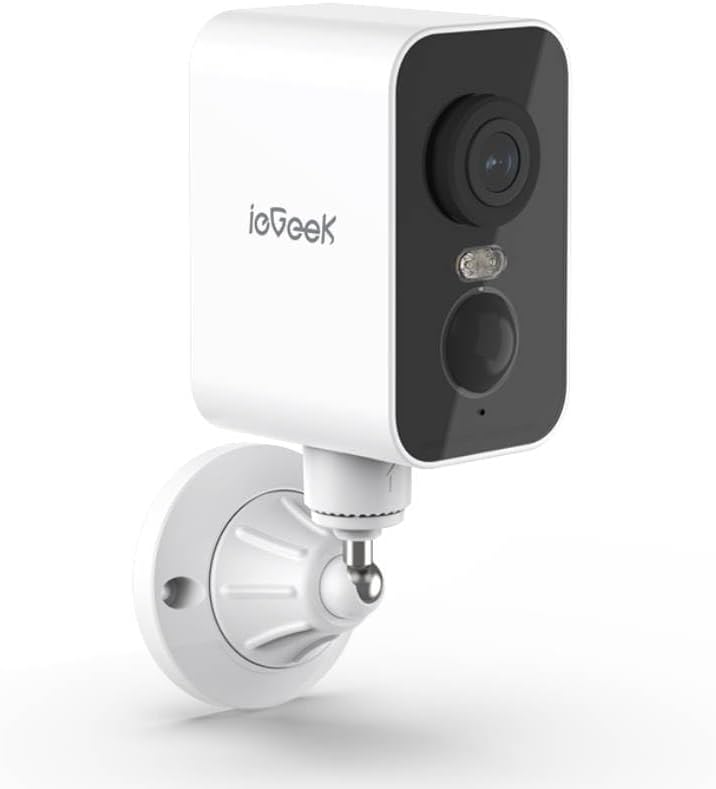
פיגורע 2.1: ieGeek S3 2K Wireless Outdoor Security Camera. This image displays the white rectangular camera body with a black front panel housing the lens, an LED light, and a motion sensor. The camera is attached to a white wall-mount bracket.
2.1 וואָס איז אין דער קעסטל
- ieGeek S3 Battery Security Camera
- Bracket Screw Pack (for wall mounting)
- ינסטאַללאַטיאָן סטיקער
- טשאַרדזשינג קאַבלע
- ינסטרוקטיאָן מאַנואַל (דעם דאָקומענט)
3. סעטאַפּ
3.1 אויפלאָדן די קאַמעראַ
Before initial use, fully charge the camera's built-in 5200 mAh lithium-ion battery using the provided charging cable. Connect the cable to the camera's charging port and a standard USB power adapter (not included). The charging indicator light will provide status.
3.2 אַפּ דאַונלאָודינג און אַקאַונט שאַפונג
- Download the 'CloudEdge' or 'ieGeek Cam' app from your smartphone's app store (iOS or Android).
- עפֿנט די אַפּ און פֿאָלגט די אינסטרוקציעס אויף דעם עקראַן צו שאַפֿן אַ נײַעם חשבון אָדער לאָגט זיך אײַן אויב איר האָט שוין אײנס.
3.3 Physical Installation (Wall Mount)
The ieGeek S3 camera is designed for wall mounting and has an IP65 waterproof rating, making it suitable for outdoor environments.
- Choose a suitable location for installation. Ensure the camera has a clear field of view and good Wi-Fi signal strength.
- Use the provided installation sticker to mark the drill holes on the wall.
- באָרט לעכער און אַרײַנשטעלט די וואַנט אַנקערס.
- Attach the mounting bracket to the wall using the screws from the bracket screw pack.
- Secure the camera to the mounting bracket. Adjust the camera angle as needed.
3.4 Device Pairing with App
- Ensure your smartphone is connected to a 2.4GHz Wi-Fi network. The camera supports 2.4GHz Wi-Fi only.
- Open the 'CloudEdge' or 'ieGeek Cam' app and tap the '+' icon to add a new device.
- אויסקלייבן אייער קאַמעראַ מאָדעל פֿון דער רשימה.
- Follow the in-app instructions to power on the camera and reset it if necessary (usually by pressing a reset button until an indicator light flashes).
- Scan the QR code displayed on your phone screen with the camera lens. Hold the phone approximately 4-8 inches (10-20 cm) from the camera.
- Once the camera confirms successful scanning (e.g., with an audible prompt), proceed in the app to complete the connection.
- Name your camera and set its location.
4. אַפּערייטינג די קאַמעראַ
4.1 לעבן View and Pan Rotation
From the app's main screen, tap on your camera to access the live view. You can use the on-screen controls to pan the camera 180° horizontally to adjust the viewינג ווינקל.
4.2 באַוועגונג דעטעקציע און וואָרענונגען
The camera features AI motion detection. When motion is detected, the camera will record a video clip and send an alert to your smartphone. You can customize motion detection sensitivity and alert settings within the app.
4.3 צוויי-וועג אַודיאָ
Utilize the built-in microphone and speaker for two-way communication. Tap the microphone icon in the live view to speak through the camera, and listen to audio from the camera's location.
4.4 נאַכט זעאונג
The camera automatically switches to color night vision in low-light conditions, providing clear surveillance up to 33 feet (10 meters) using its infrared LEDs.
4.5 ווידעא סטאָרידזש
רעקאָרדעד ווידעאtage קען ווערן אויפגעהיט אויף צוויי וועגן:
- TF Card (MicroSD): Insert a TF card (up to 128GB, not included) into the camera's designated slot for local storage.
- וואָלקן סטאָרידזש: Optional cloud storage services may be available through the app for remote access and backup of recordings.
4.6 אַלעקסאַ אינטעגראַציע
The ieGeek S3 camera is compatible with Amazon Alexa. Follow the instructions in the 'CloudEdge' or 'ieGeek Cam' app to link your camera with your Alexa account for voice control and viewing live feeds on compatible Alexa devices.
5. וישאַלט
5.1 באַטערי טשאַרדזשינג
The camera is battery-powered. When the battery level is low, you will receive an alert via the app. Recharge the camera using the provided charging cable. Battery life varies based on usage and environmental factors.
5.2 רייניקונג
To maintain optimal performance, periodically clean the camera lens and housing with a soft, dry cloth. Avoid using harsh chemicals or abrasive materials that could damage the camera's surface or lens.
6. טראָובלעשאָאָטינג
- קאַמעראַ פֿאַרבינדט זיך נישט צו Wi-Fi: Ensure your Wi-Fi network is 2.4GHz. Check Wi-Fi signal strength at the camera's location. Try resetting the camera and repeating the pairing process.
- נעבעך בילד קוואַליטעט: רייניקט די קאַמעראַ לינז. מאַכט זיכער אַז עס זענען נישטאָ קיין שטערונגען אין דער קאַמעראַ'ס בילדפֿעלד. view. Check your internet connection speed.
- באַוועגונג דעטעקציע אַרבעט נישט: Verify motion detection is enabled in the app settings. Adjust sensitivity levels. Ensure the camera is positioned correctly to capture motion in the desired area.
- די באַטאַרייע פליסן געשווינד: Frequent motion detection events, live view access, and two-way audio use can consume battery faster. Reduce motion detection sensitivity or frequency if possible. Ensure the camera is fully charged.
- אַפּ פּראָבלעמען: Ensure the app is updated to the latest version. Try restarting the app or your smartphone.
7. ספּעסאַפאַקיישאַנז
| מאָדעל נאָמען | ieGeek Battery Cam S3 |
| ווידעא קאַפּטורע רעסאָלוטיאָן | 2K (3 מפּ עפעקטיווע סטיל רעזאָלוציע) |
| דרינענדיק / דרויסנדיק באַניץ | דרינענדיק, דרויסנדיק |
| מאַכט מקור | Battery Powered (5200 mAh Lithium Ion) |
| קאַנעקטיוויטי טעכנאָלאָגיע | 2.4GHz Wi-Fi (Wi-Fi 6 Technology) |
| קאָנטראָללער טיפּ | CloudEdge, Amazon Alexa, ieGeek Cam App |
| מאַונטינג טיפּ | וואנט בארג |
| ספּעציעלע פֿעיִקייטן | Pan Rotating 180°, AI Motion Detection, Color Night Vision, 2-Way Audio |
| Viewינג אַנגלע | 180 גראַד (פּאַן) |
| נאַכט וויזשאַן ראַנגע | 33 פֿיס (10 מעטער) |
| ראַם קורס | 15 ראָמען פּער סעקונדע |
| וואַסער קעגנשטעל מדרגה | וואָטערפּרוף (IP65) |
| סטאָרידזש אָפּציעס | TF Card (MicroSD) up to 128 GB, Cloud Storage (optional) |
| דימענסיעס (L X W X H) | 3.9 X 1 X 3.9 אינטשעס |
| פּונקט וואָג | 11.2 אונסעס |
| קאַמפּאַטאַבאַל דעוויסעס | Alexa, Smartphone, Smartwatch, Tablet |
8. וואָראַנטי און שטיצן
For warranty information, please refer to the specific terms provided at the time of purchase or contact ieGeek customer support directly. If you encounter any issues or have questions regarding your ieGeek S3 camera, please visit the official ieGeek website or contact their customer service team for assistance.
אָנליין שטיצן: Visit the ieGeek Store on Amazon


