הקדמה
Thank you for choosing the JZAQ BT40 Motorcycle Helmet Bluetooth Headset. This manual provides detailed instructions for the proper installation, operation, and maintenance of your device. Please read this manual thoroughly before use to ensure optimal performance and safety.
פּעקל אינהאַלט
באַשטעטיקט אַז אַלע זאכן וואָס זענען אויסגערעכנט אונטן זענען אַרייַנגערעכנט אין אייער פּעקל:
- 1 x Helmet Headset (BT40)
- 6 x Headphone VELCRO (Adhesive Pads)
- 1 x וסב טשאַרדזשינג קאַבלע
- 1 x באַניצער מאַנואַל
- 2 x Noise Reducing Sponge Heads (Microphone Covers)

Image: The JZAQ BT40 Helmet Bluetooth Headset, including the main unit with speakers and microphone, USB charging cable, and various adhesive pads and microphone covers.
ספּעסאַפאַקיישאַנז
| מאָדעל נאָמען | BT40 |
| בלועטאָאָטה ווערסיע | V5.0+EDR |
| דיסטאַנסע פון בלועטאָאָטה | אַרויף צו 10 מעטער (33 פֿיס) |
| באַטערי טיפּ | 3.7V/600mA Lithium Battery |
| טשאַרדזשינג צייט | בעערעך 2 שעה |
| סטאַנדביי צייט | אַרויף צו 500 שעה |
| Working Time (Playtime/Talk Time) | אַרויף צו 90 שעה |
| וואַסער קעגנשטעל | IP67 Deep Waterproof Technology |
| Headphone Thickness | 0.35 אינטשעס (אומגעפער 9 מ״מ) |
| ראַש קאָנטראָל | DSP Noise Cancelling Technology |
| קאַמפּאַטאַבאַל דעוויסעס | Smartphones, MP3 Players, GPS Devices |

Image: A diagram illustrating the dimensions of the headset's earpieces, speaker, microphone, and control unit, highlighting the 0.35-inch thickness of the earpieces.
סעטאַפּ און ינסטאַלירונג
Follow these steps to properly install the BT40 headset into your helmet:
- Prepare Earphones: Take the helmet headphones from the box. Attach the "Magic Tape" (Velcro adhesive pads) to the back of both earphones.
- Position Earphones: Remove the protective tape paper from the Velcro on the earphones. Carefully position and stick the earphones into the helmet's ear recesses on both sides. Ensure proper alignment before pressing firmly.
- Secure Headset: Once the Velcro is attached to the helmet, secure the headset earphones to these Velcro pads.
- מיקראָפאָן אָרט: Position the microphone arm so that the microphone is close to your mouth for clear communication.
- לעצט טשעק: Ensure all components are securely attached and comfortable within the helmet.
וויכטיק באַמערקונג: Before ordering, please check the inner size of your helmet to ensure a comfortable fit for the headset. The headset's ultra-thin design (0.35 inches) is suitable for most helmets without causing discomfort.

Image: The BT40 headset featuring its ultra-thin speakers, designed to fit comfortably within helmet ear spaces without squeezing the ears.

Image: A motorcycle helmet with the JZAQ BT40 headset microphone arm visible, demonstrating typical installation.
אַפּערייטינג ינסטראַקשאַנז
מאַכט אויף / אַוועק און פּערינג
- מאַכט אויף: Press and hold the Power button (usually the middle button on the control unit) until the indicator light illuminates.
- מאַכט אַוועק: דריק און האלט דעם פּאַוער קנעפּל ביז די אינדיקאַטאָר ליכט גייט אויס.
- פּאָרינג: When powered on for the first time or when entering pairing mode, the headset will automatically search for Bluetooth devices. On your smartphone or other Bluetooth-enabled device, search for "BT40" in the Bluetooth settings and select it to connect.
- אָטאַמאַטיק קשר: After initial pairing, the headset will automatically connect to the last paired device when powered on, if the device is within range.
רופן פאַרוואַלטונג
- ענטפער רופן: The headset supports automatic answering of incoming calls.
- סוף רופן: Press the Power button once to end an active call.
- אָפּוואַרפן רופן: Press and hold the Power button for approximately 2 seconds to reject an incoming call.
מוזיק פּלייַבאַקק
- שפּיל / פּויזע: Press the Power button once to play or pause music.
- באַנד אַרויף: Press the "+" button to increase volume.
- באַנד אַראָפּ: Press the "-" button to decrease volume.
- ווייַטער ליד: Press and hold the "+" button for approximately 2 seconds to skip to the next track.
- פֿריִער ליד: Press and hold the "-" button for approximately 2 seconds to go to the previous track.
קול אַססיסטאַנט
- אַקטאַווייט קול אַססיסטאַנט: Double-click the Power button to activate your smartphone's voice assistant (e.g., Siri, Google Assistant).

בילד: א דעטאַלירטע view of the headset's control unit, showing the volume up (+), power/play/pause, and volume down (-) buttons, along with the microphone.
ווידעא: אן איבערview of the JZAQ Motorcycle Helmet Bluetooth Headset BT40, demonstrating its components and basic features.
וישאַלט
- רייניקונג: ניצט אַ ווייכע, טרוקענע שטאָף צו רייניקן די כעדסעט. פֿאַרמייַדט ניצן שטרענגע כעמיקאַלן אָדער שרײַבנדיקע מאַטעריאַלן.
- וואַסער ויסשטעלן: While the headset is IP67 waterproof, prolonged submersion or exposure to high-pressure water jets should be avoided. Ensure the charging port cover is securely closed when not charging.
- סטאָרידזש: האַלט די כעדסעט אין אַ קיל, טרוקן אָרט אַוועק פון דירעקט זונשייַן און עקסטרעמע טעמפּעראַטורן.
- באַטערי זאָרגן: כדי צו פארלענגערן די לעבן פון די באַטעריע, זאָלט איר נישט אָפט אויסלאָדן די באַטעריע. לאָדן די כעדסעט רעגולער, אפילו אויב איר ניצט עס נישט פאר לענגערע צייטן.
- מיקראָפאָן שוואָם: Replace the noise-reducing sponge head on the microphone if it becomes worn or damaged to maintain optimal voice clarity.
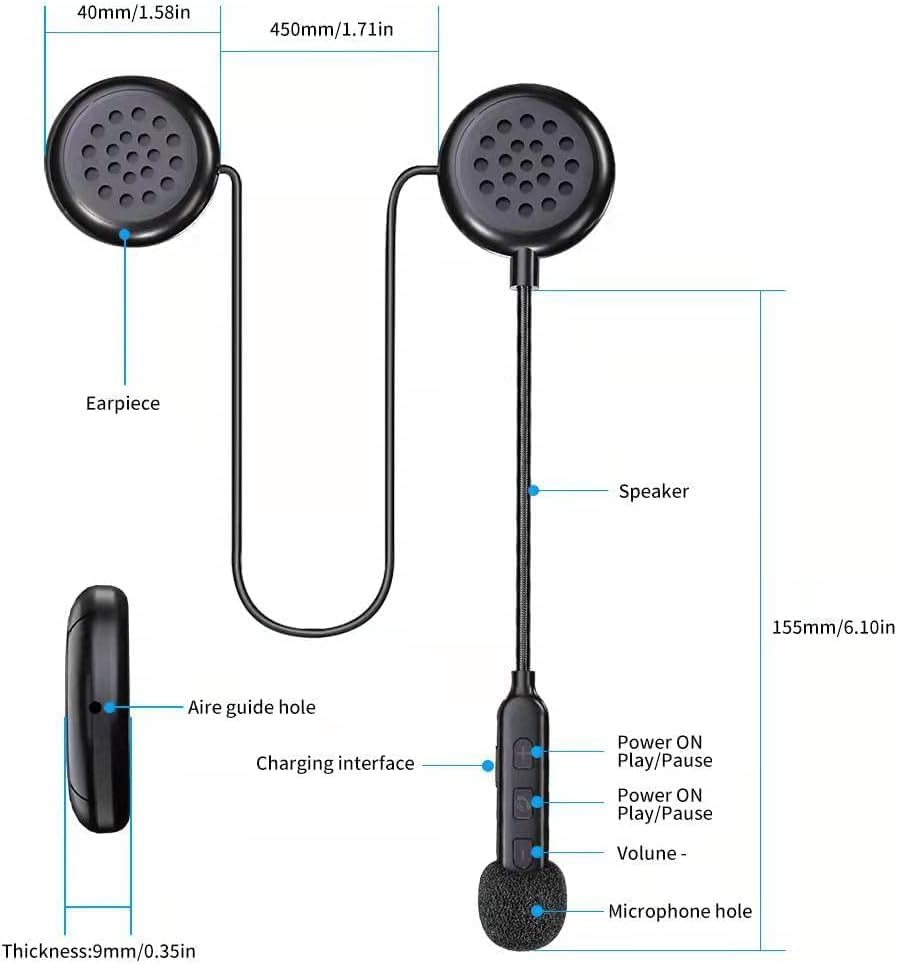
Image: The BT40 headset with water droplets, demonstrating its IP67 deep waterproof capability, suitable for use in rainy or snowy conditions.
טראָובלעשאָאָטינג
| פּראָבלעם | מעגלעך סיבה | לייזונג |
|---|---|---|
| כעדסעט גייט נישט אן. | נידעריק באַטאַרייע. | Charge the headset for at least 2 hours using the provided USB cable. |
| קען נישט צופּאַסן מיטן דעווייס. | Bluetooth is off on the device; headset is not in pairing mode; too far from device. | Ensure Bluetooth is enabled on your device. Make sure the headset is powered on and in pairing mode. Move the headset closer to the device (within 10 meters). Try restarting both devices. |
| קיין קלאַנג אָדער נידעריקע וואָלומען. | Volume too low on headset or connected device; improper connection. | Increase volume using the "+" button on the headset and on your connected device. Re-pair the headset with your device. |
| דער מיקראָפאָן כאַפּט נישט קלאָר אויף די שטימע. | Microphone not positioned correctly; damaged sponge cover. | Adjust the microphone arm so the microphone is close to your mouth. Replace the noise-reducing sponge head if it is worn. |
| אומגעריכטע פֿאַרבינדונג. | אריינמישונג; אפאראט צו ווייט; נידריגע באטעריע. | Move away from sources of strong electromagnetic interference. Ensure the headset is within 10 meters of the connected device. Charge the headset. |
וואָראַנטי און שטיצן
For warranty information or technical support, please refer to the contact details provided with your purchase or visit the official JZAQ website. If you experience any dissatisfaction or issues, please contact customer service for assistance.
קאָנטאַקט: Please refer to your purchase documentation or the seller's information on the platform where you purchased the product.


