1. הקדמה
א דאנק פארן קויפןasing the Soundavo PSB-1000DSP (Version 2) Subwoofer Ampליפיער. דאס amplifier is designed to deliver powerful and precise bass for your home theater and audio systems. Featuring a Class D circuit design, built-in DSP settings, and versatile connectivity options, it provides an exceptional audio experience. This manual will guide you through the setup, operation, and maintenance of your new ampליפער.
2. זיכערקייַט אינפֿאָרמאַציע
Please read all safety instructions carefully before operating the ampלייפיער. האַלט דעם מאַנואַל פֿאַר צוקונפֿטיקע רעפֿערענץ.
- מאַכט מקור: פאַרבינדן די amplifier only to the specified power supply voltage as indicated on the unit. Ensure the AC voltage selector is set correctly for your region (110-120V or 220-240V).
- ווענטילאַטיאָן: בלאָקירט נישט קיין ווענטילאַציע עפענונגען. זאָרגט פֿאַר גענוג לופט שטראָם אַרום דעם אַפּאַראַט צו פאַרמייַדן איבערהיצונג.
- וואַסער און נעץ: דו זאלסט נישט ויסשטעלן די amplifier to rain, moisture, or excessive humidity. Do not place objects filled with liquids, such as vases, on the unit.
- היץ: האַלטן די amplifier away from heat sources such as radiators, heat registers, stoves, or other apparatus that produce heat.
- סערוויס: דו זאלסט נישט פּרווון צו דינען דעם פּראָדוקט זיך. קאָנטאַקט אַלע קוואַלאַפייד סערוויס פּערסאַנעל.
- רייניקונג: Unplug the unit from the power outlet before cleaning. Use a dry cloth for cleaning. Do not use liquid cleaners or aerosol cleaners.
3. פּראָדוקט איבערview
The Soundavo PSB-1000DSP (Version 2) is a high-performance Class D subwoofer amplifier designed for robust bass delivery in home theater environments. It features a 2U rack-mountable design and provides 1000W RMS at 4 Ohms. The integrated Digital Signal Processing (DSP) allows for precise control over audio parameters, ensuring optimal performance with various subwoofer sizes and room acoustics.
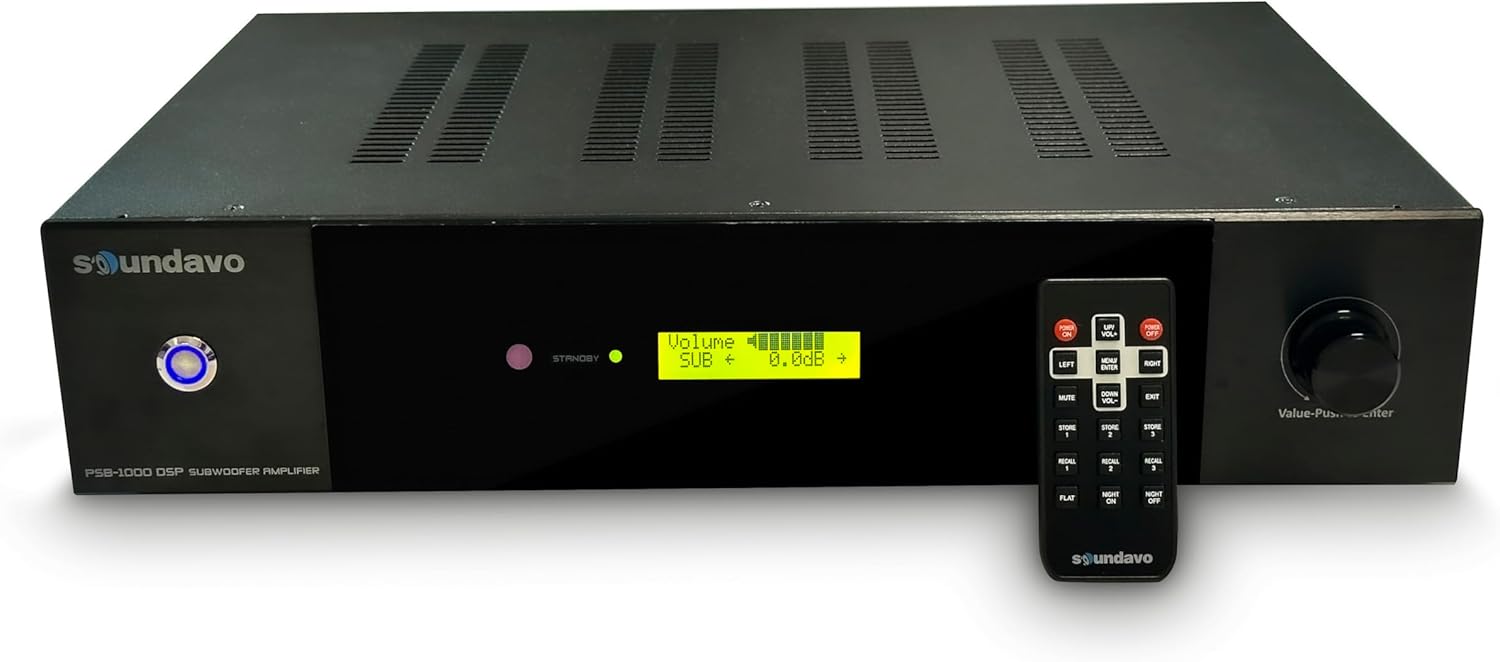
פיגורע 3.1: פראָנט view of the PSB-1000DSP amplifier with its remote control, showcasing the LCD display and control knob.
שליסל פֿעיִקייטן:
- הויך וואַטtagמאַכט אַרויסגאַנג: Delivers 1 x 1000W RMS @ 4 Ohms (or 2 x 500W RMS @ 8 Ohms minimum load).
- ווערסאַטאַל קאַנעקטיוויטי: Stereo/mono line level audio input (RCA), LFE input, stereo speaker level input/outputs.
- RS-232 Control Ports: For integration with control systems, allowing master volume and muting control.
- דיגיטאַל סיגנאַל פּראַסעסינג (DSP): Built-in DSP for adjusting Crossover Frequency, Crossover Slopes, Phase, Low Cut, and storing up to 3 presets.
- Flexible Power Management: Audio On/Off Detects, RS-232, and 12VDC Trigger for automatic power control.
- באַניצער-פרייַנדלעך צובינד: LCD display on the front panel for easy navigation and settings adjustment.
- שוץ פֿעיִקייטן: Short circuit and thermal protection built-in.
4. פּעקל אינהאַלט
Upon unpacking your Soundavo PSB-1000DSP (Version 2) amplifier, please ensure all items are present and in good condition:
- Soundavo PSB-1000DSP (Version 2) Subwoofer Ampליפער
- IR רימאָוט קאָנטראָל
- אַק מאַכט שנור
- באַניצער מאַנואַל (דעם דאָקומענט)
If any items are missing or damaged, please contact your retailer or Soundavo customer support immediately.
5. סעטאַפּ און קאַנעקשאַנז
Proper setup is crucial for optimal performance. Follow these steps to connect your ampליפער.
5.1 דערציען פּאַנעל איבערview

Figure 5.1: Rear panel of the PSB-1000DSP amplifier, detailing the various input, output, and control ports.
5.2 אַק בtage סעלעקטאָר
Before connecting the power cord, ensure the AC VOLTAGE SELECTOR switch on the rear panel is set to the correct voltage for your region (110-120V or 220-240V). Incorrect voltagדי אויסוואל קען שאדן מאכן דעם איינהייט.

Figure 5.2: Detail of the AC Voltage Selector switch on the rear panel.
5.3 אַודיאָ קאַנעקשאַנז
The PSB-1000DSP offers multiple ways to connect to your audio system:
- Line Level Input (RCA): Connect your receiver's LFE (Subwoofer Out) or stereo pre-out to the LINE IN (LFE/MONO or L/R) RCA jacks. If using a single LFE output, connect to the LFE/MONO input.
- רעדנער לעוועל אינפוט: For receivers without line-level outputs, connect the speaker outputs of your receiver to the SPEAKER LEVEL IN terminals. Use the SPEAKER LEVEL OUT terminals to pass the signal through to your main speakers if needed.
- סובוואָאָפער רעזולטאַט: Connect your passive subwoofer(s) to the SUB OUTPUT binding posts. The amplifier supports 1 x 1000W RMS @ 4 Ohms or 2 x 500W RMS @ 8 Ohms. Ensure your subwoofer's impedance matches the amplifier's output capabilities.
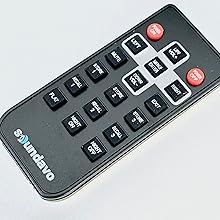
Figure 5.3: Detail of the subwoofer output terminals, indicating connection options for 4 Ohm and 8 Ohm loads.
5.4 קאָנטראָל פֿאַרבינדונגען
- 12V צינגל: Connect a 12V trigger cable from your receiver or control system to the 12V TRIGGER IN jack. This allows the amplifier to power on/off automatically with your main system.
- רס -232: Use the RS-232 port for advanced control integration with home automation systems. Refer to the RS-232 command set documentation for detailed protocols.
- SERVICE USB: This port is for firmware updates and service purposes only. Do not connect consumer devices to this port.
6. אַפּערייטינג די Ampליפער
The PSB-1000DSP (Version 2) can be operated via its front panel controls or the included IR remote control.
6.1 פראָנט פּאַנעל קאָנטראָלס
The front panel features an LCD display and a multi-function knob (Value-Push to Enter).
Figure 6.1: Close-up of the LCD display, showing volume and other DSP settings.
- LCD ווייַז: Shows current settings, menu options, and volume level.
- מולטי-פונקציע קנופּ: Rotate to navigate menu options or adjust values. Push to select an option or confirm a setting.
6.2 רימאָוט קאָנטראָל פאַנגקשאַנז
The IR remote control provides convenient access to all ampליפיער פאַנגקשאַנז.

Figure 6.2: The included IR remote control for the PSB-1000DSP ampליפער.
- מאַכט אויף / אַוועק: טורנס די ampליפער אויף אָדער אַוועק.
- שטיל: מיוטעס אָדער אַנמיוט די אַודיאָ רעזולטאַט.
- UP/VOL+, DOWN/VOL-: אַדזשאַסץ באַנד מדרגה.
- LEFT, RIGHT: Navigates menu options horizontally.
- MENU/ENTER: Enters the menu or confirms a selection.
- אַרויסגאַנג: Exits the current menu or setting.
- STORE 1/2/3: Saves current DSP settings to one of three memory presets.
- RECALL 1/2/3: Recalls one of the three saved DSP presets.
- FLAT: Resets DSP settings to a flat frequency response.
- נאַכט אויף/אַוועק: Activates or deactivates Night Mode, which typically reduces dynamic range for late-night listening.
6.3 DSP Settings
The built-in DSP allows for fine-tuning of your subwoofer's performance. Access the DSP menu via the front panel knob or remote control.
- Master Volume Level: Adjusts the overall output volume of the subwoofer.
- קראָססאָווער אָפטקייַט: Sets the upper frequency limit for the subwoofer. Adjustable to blend seamlessly with your main speakers.
- קראָססאָווער סלאָפּעס: Select from 4 different slopes (e.g., 12dB, 24dB, 36dB, 48dB per octave) to control the steepness of the crossover filter.
- פאַסע: Adjusts the phase (0° or 180°) to ensure the subwoofer's output is in phase with your main speakers, preventing cancellation at the crossover point.
- Low Cut: Sets a high-pass filter to remove extremely low frequencies that may not be reproducible by your subwoofer or could cause distortion.
- פּרעסעץ: Store up to 3 customized DSP settings optimized for different content (e.g., music, movies, late-night listening) or subwoofer sizes (e.g., 8", 10", 12" subs).
6.4 Power Management Modes
The three-way switch on the rear panel allows you to select the amplifier's power-on mode:
- 12V Trigger Mode: די amplifier powers on/off when a 12V trigger signal is detected.
- Auto On/Off (Music Signal Detect): די amplifier automatically turns on when an audio signal is detected and enters standby after a period of no signal. The auto-off delay can be set from 5-30 minutes in 5-minute increments via the DSP menu.
- שטענדיק אויף מאָדע: די amplifier remains powered on continuously.
7. וישאַלט
To ensure the longevity and optimal performance of your Soundavo PSB-1000DSP ampליפיער, פאָלגט די וישאַלט גיידליינז:
- רייניקונג: Regularly wipe the exterior with a soft, dry cloth. Avoid using abrasive cleaners, solvents, or chemical sprays, as they may damage the finish.
- ווענטילאַטיאָן: Ensure that the ventilation grilles are free from dust and obstructions. Periodically use a soft brush or vacuum cleaner to remove any accumulated dust.
- פֿאַרבינדונגען: Occasionally check all cable connections to ensure they are secure and free from corrosion.
- סטאָרידזש: אויב סטאָרינג די amplifier for an extended period, disconnect it from the power supply and store it in a cool, dry place, away from direct sunlight and extreme temperatures.
8. טראָובלעשאָאָטינג
אויב איר טרעפט פראבלעמען מיט אייער ampליפיער, זעט די פאלגענדע אלגעמיינע פראבלעמען און לייזונגען:
| פּראָבלעם | מעגלעך סיבה | לייזונג |
|---|---|---|
| קיין מאַכט / אַפּאַראַט צינדט זיך נישט אָן. | Power cord not securely connected; AC voltage selector incorrect; Power outlet faulty. | Ensure power cord is fully inserted. Verify AC voltage selector matches your region's voltage. Test power outlet with another device. |
| קיין געזונט פון סובוואָאָפער. | Input cables loose or incorrect; Subwoofer cables loose or incorrect; Amplifier muted; Incorrect input selected; DSP settings (e.g., Low Cut too high). | Check all RCA/speaker level input and subwoofer output connections. Ensure amplifier is not muted. Verify correct input source is selected on your receiver/preamp. רעview דספּ סעטטינגס. |
| Ampליפייער טורנס אַוועק אַניקספּעקטידלי. | Overheating; Auto On/Off mode engaged with no signal; Short circuit in speaker wiring. | Ensure adequate ventilation. Check power management mode (12V Trigger, Auto On/Off, Always On). Inspect speaker wiring for shorts. Allow unit to cool if overheated. |
| פארדרייט אדער שלעכטע קלאַנג קוואַליטעט. | Incorrect DSP settings; Overdriving the amplifier/subwoofer; Loose connections. | Adjust DSP settings (Crossover, Phase, Volume). Reduce input level from source. Check all audio connections. |
| ווייַט קאָנטראָל נישט ארבעטן. | Batteries dead or inserted incorrectly; Obstruction between remote and amplifier; Remote sensor blocked. | Replace batteries. Ensure clear line of sight to the amplifier's IR sensor. |
| Difficult menu navigation. | User unfamiliarity with sequential menu access. | Familiarize yourself with the menu structure. Use the remote control for easier navigation. Note that some settings require sequential scrolling. |
9. ספּעסאַפאַקיישאַנז
| שטריך | באַשרייַבונג |
|---|---|
| מאָדעל נומער | PSB-1000DSP(Version 2) |
| רעזולטאַט מאַכט | 1000 Watts RMS @ 4 Ohms (1 x 1000W) or 500 Watts RMS @ 8 Ohms (2 x 500W) |
| Ampליפיער קלאַס | קלאַס די |
| קאַנעקטיוויטי טעכנאָלאָגיע | RCA |
| קאָנטראָללער טיפּ | Foot Control (referring to the knob, not a literal foot pedal) |
| ספּעציעלע שטריך | סובוואָאָפער Ampליפיער מיט דספּ |
| קאַמפּאַטאַבאַל דעוויסעס | Amplifier, Receivers, Pre-amps |
| אַודיאָ רעזולטאַט מאָדע | אַרומרינגלען |
| אַרומרינגלען סאָונד קאַנאַל קאַנפיגיעריישאַן | 5.1 (typical system integration) |
| קאָליר | שוואַרץ |
| פּונקט וואָג | 17.69 פונט |
| פּעקל דימענשאַנז | 22.36 X 17.63 X 9.29 אינטשעס |
| פאַבריקאַנט | Soundavo |
10. וואָראַנטי און שטיצן
Soundavo products are designed and manufactured to the highest quality standards. This product is covered by a limited warranty against defects in materials and workmanship. Please refer to the warranty card included with your product or visit the official Soundavo webזייטל פֿאַר דעטאַלירטע וואָראַנטי טערמינען און באדינגונגען.
For technical support, troubleshooting assistance, or warranty claims, please contact Soundavo customer service through their official website or the contact information provided with your purchase. When contacting support, please have your product model number (PSB-1000DSP Version 2) and purchase details ready.
פֿאַר מער אינפֿאָרמאַציע, באַזוכן די Soundavo Store on Amazon.


