1. הקדמה
Thank you for choosing the FLEXISPOT Office Pod Booth. This soundproof enclosure is designed to provide a private and productive space for solo phone calls, virtual meetings, and focused work. This manual provides essential information for the safe and efficient setup, operation, and maintenance of your new office pod. Please read this manual thoroughly before assembly and use, and retain it for future reference.
2. זיכערקייַט אינפֿאָרמאַציע
כדי צו זיכער מאַכן זיכערע אָפּעראַציע און פאַרמייַדן שאָדן, ביטע האַלטן זיך צו די פאלגענדע זיכערהייט גיידליינז:
- שטענדיק פאָלגן אַלע פֿאַרזאַמלונג אינסטרוקציעס קערפֿול.
- Ensure the pod is placed on a stable, level surface capable of supporting its weight (approximately 584 pounds).
- Do not attempt to move the assembled pod without proper equipment or assistance.
- Keep all electrical components dry and away from liquids.
- דו זאלסט נישט פאַרשפּאַרן ווענטאַליישאַן אָופּאַנינגז.
- Use only the provided power cords and adapters.
- Keep children and pets away from the pod during assembly and operation.
- In case of malfunction or damage, disconnect power immediately and contact customer support.
3. פּעקל אינהאַלט
Please verify that all components are present and undamaged before beginning assembly. If any parts are missing or damaged, contact FLEXISPOT customer support.
- FLEXISPOT Office Pod Booth components (panels, door, frame, etc.)
- Integrated lighting system
- ווענטילאַטיאָן סיסטעם
- מאַכט צושטעלן און קייבאַלז
- אַסעמבלי ייַזנוואַרג
- פיליפּס שרויפנ-ציער
- באַניצער מאַנואַל (דעם דאָקומענט)
4. סעטאַפּ און אַסעמבלי
Assembly of the FLEXISPOT Office Pod requires multiple individuals due to its size and weight. Follow the detailed assembly instructions provided in the separate assembly guide included with your product. Ensure you have adequate space for assembly.
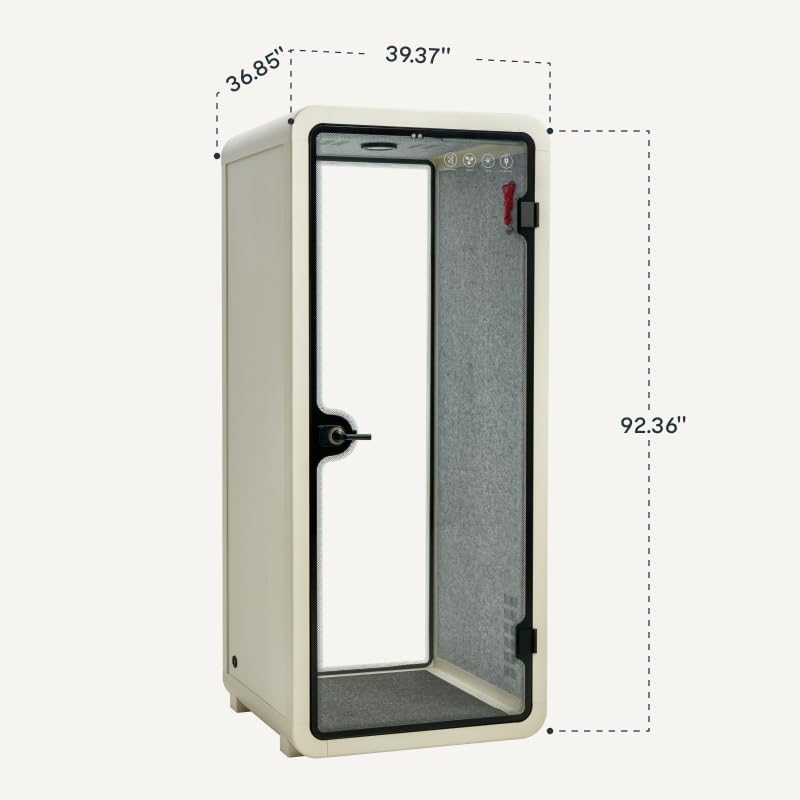
This diagram illustrates the external dimensions of the FLEXISPOT Office Pod: 36.85 inches in width, 39.37 inches in depth, and 92.36 inches in height. Plan your space accordingly.

An interior shot of the FLEXISPOT Office Pod, featuring a compact desk and a high stool, designed for comfortable and productive solo work. These internal components are installed during the assembly process.
4.1 ערשטע פּלאַצירונג
Choose a location with sufficient clearance around the pod for door operation and ventilation. Ensure the floor is capable of supporting the pod's weight. Avoid placing the pod in direct sunlight or near heat sources.
4.2 מאַכט קאַנעקשאַן
Once assembled, connect the power cable to a standard 100-240V AC outlet. Ensure the cable is not pinched or damaged.
5. אַפּערייטינג ינסטרוקטיאָנס
The FLEXISPOT Office Pod is designed for intuitive operation, primarily managed by its integrated smart motion sensor system.
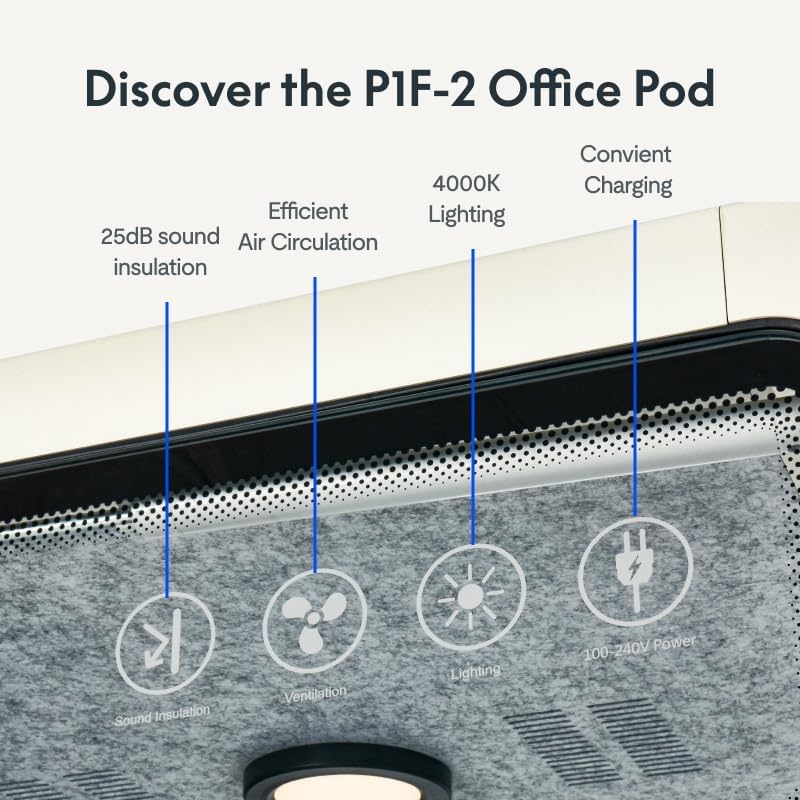
א דיטיילד view of the top interior panel of the FLEXISPOT Office Pod, highlighting its key features: 25dB sound insulation, efficient air circulation, 4000K lighting, and convenient charging ports.
5.1 Smart Motion Sensor Activation
The pod features a smart motion sensor. When you enter the pod, the internal lighting and ventilation system will automatically activate. Upon exiting, the systems will automatically turn off after a short delay to conserve energy.
5.2 לייטינג סיסטעם
The integrated lighting system provides 4000K clear lighting, designed to reduce eye strain and enhance focus. This system is controlled by the motion sensor for automatic operation.
5.3 ווענטילאַטיאָן סיסטעם
An advanced ventilation system ensures a constant flow of fresh air, circulating at 81m³/h. This system operates automatically when the pod is occupied, maintaining a comfortable and productive environment.

This close-up image shows the ventilation fan component within the FLEXISPOT Office Pod, responsible for maintaining fresh air circulation.
5.4 Integrated Charging Solutions
The pod includes built-in charging ports to keep your devices powered. Locate the charging ports on the interior panel and connect your devices as needed. These ports are active when the pod is powered.
6. וישאַלט
Regular maintenance will help prolong the life and performance of your FLEXISPOT Office Pod.
- רייניקונג: ניצן אַ ווייך, דamp cloth with a mild, non-abrasive cleaner to wipe down interior and exterior surfaces. Avoid harsh chemicals that may damage the finish or materials.
- גלאז פּאַנעלן: Clean glass surfaces with a standard glass cleaner and a lint-free cloth.
- ווענטאַליישאַן סיסטעם: Periodically check the ventilation grilles for dust accumulation. Gently clean with a soft brush or vacuum cleaner attachment. Do not attempt to disassemble the ventilation unit.
- טיר מעקאַניזאַם: Ensure the door hinges and latch operate smoothly. Do not apply excessive force when opening or closing the door.
- עלעקטריקאַל קאַמפּאָונאַנץ: Ensure all cables are securely connected and free from damage. Do not attempt to repair electrical components yourself.
7. טראָובלעשאָאָטינג
If you encounter issues with your FLEXISPOT Office Pod, refer to the following table for common problems and solutions.
| פּראָבלעם | מעגלעך סיבה | לייזונג |
|---|---|---|
| Lights/Ventilation not turning on automatically. | No power; Motion sensor obstructed or faulty. | Check power connection. Ensure nothing is blocking the motion sensor. If problem persists, contact support. |
| Unusual noise from ventilation. | Dust accumulation; Loose component. | Clean ventilation grilles. If noise continues, contact support. |
| טשאַרדזשינג פּאָרץ אַרבעטן נישט. | No power; Device compatibility issue. | Ensure pod is powered on. Try a different device or cable. |
| טיר ניט קלאָוזינג רעכט. | Obstruction; Misalignment. | Check for any obstructions. Inspect hinges for damage or misalignment. |
If the issue is not resolved by the above steps, please contact FLEXISPOT customer support for assistance.
8. ספּעסאַפאַקיישאַנז
Detailed technical specifications for the FLEXISPOT Office Pod Booth P1F-2:
| שטריך | באַשרייַבונג |
|---|---|
| מאָדעל נומער | P1F-2 |
| סאָרט | FLEXISPOT |
| פּראָדוקט דימענשאַנז (L x W x H) | 36.85 X 39.37 X 90.55 אינטשעס |
| פּונקט וואָג | 584 פונט |
| מאַטעריאַל | Glass, Plastic Panel |
| קאָליר | ווייַס |
| Lighting Temperature | 4000K |
| לופט סערקיאַליישאַן קורס | 81 מ³/ה |
| UPC | 840460412285 |
9. וואָראַנטי און שטיצן
FLEXISPOT products are manufactured to high-quality standards and are backed by a limited warranty. For specific warranty terms and conditions, please refer to the warranty card included with your product or visit the official FLEXISPOT webפּלאַץ.
For technical support, troubleshooting assistance, or to inquire about replacement parts, please contact FLEXISPOT customer service:
- אָנליין שטיצן: Visit the FLEXISPOT official webוועבזייטל פֿאַר אָפֿט געשטעלטע פֿראַגעס און שטיצע רעסורסן.
- קונה סערוויס: Refer to your product packaging or the FLEXISPOT website for contact phone numbers and email addresses.
When contacting support, please have your model number (P1F-2) and purchase information readily available.