הקדמה
די אַקקאָאָן סינעView Master 4K is a state-of-the-art wireless video transmission system designed for professional video production. It offers 4K UHD video transmission, tri-band connectivity (2.4GHz, 5GHz, and 6GHz), and ultra-low latency for reliable and high-quality monitoring and streaming. This manual provides detailed instructions for setting up, operating, and maintaining your CineView בעל 4 ק סיסטעם.

Image: The Accsoon CineView Master 4K transmitter and receiver units, showcasing their compact design and multiple antennas.
וואָס איז אין די קעסטל
באַשטעטיקט אַז אַלע זאכן וואָס זענען אויסגערעכנט אונטן זענען אַרייַנגערעכנט אין אייער פּעקל:
- אַקקסאָן סינעView Master 4K Transmitter (x1)
- אַקקסאָן סינעView Master 4K Receiver (x1)
- Cold Shoe Adapter (x2)
- יו-עס-בי-סי צו יו-עס-בי-סי קאַבל (x1)
- USB-C to Lightning Cable (x1)
- L-shape Wrench (x1)
- באַניצער מאַנואַל (x1)
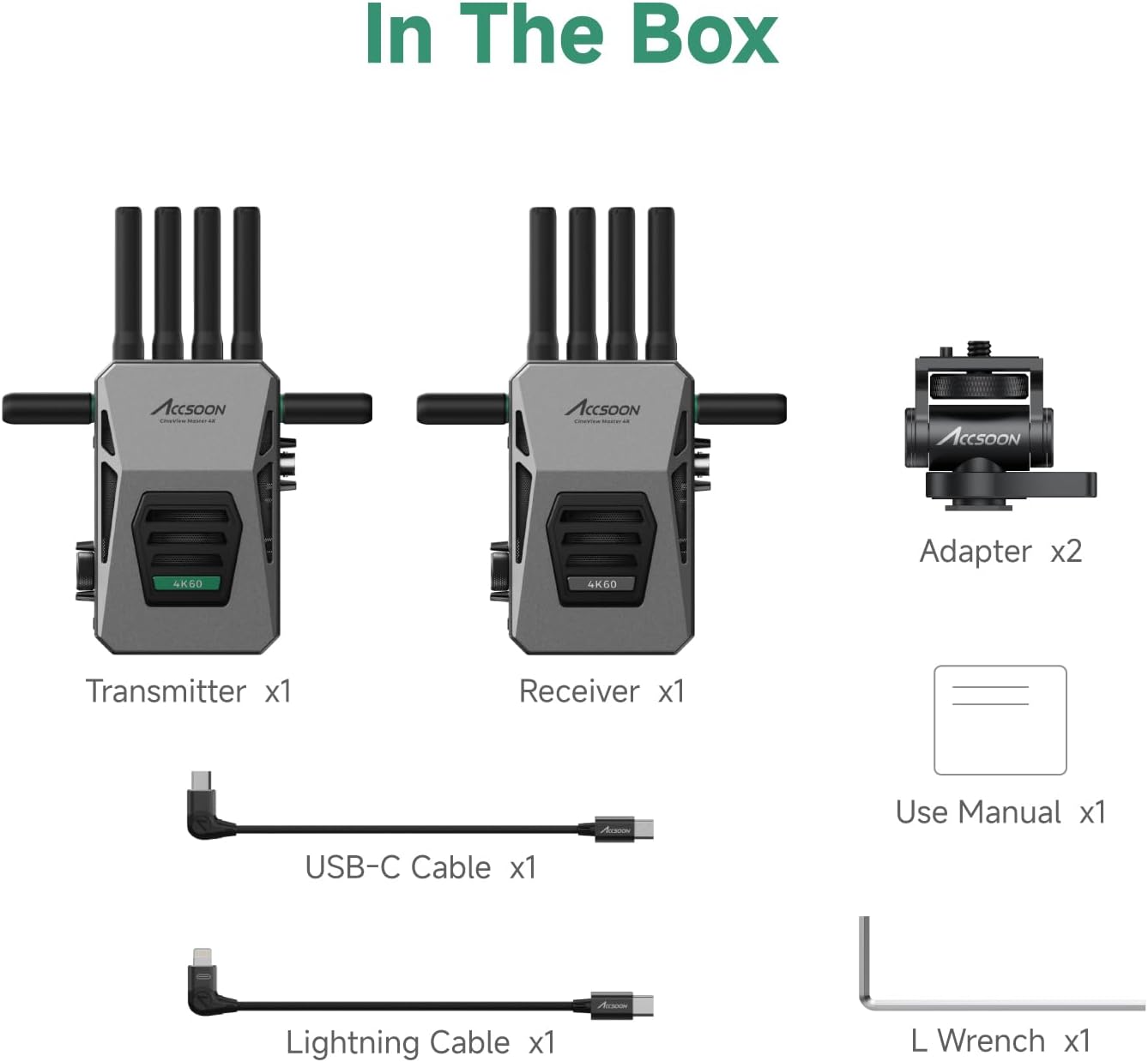
Image: A visual representation of all components included in the Accsoon CineView Master 4K package, laid out clearly.
סעטאַפּ
1. Powering the System
די סינעView Master 4K units offer flexible power options:
- NP-F באַטעריע: Compatible with NP-F970/750/550 series batteries (not included). Attach the battery to the designated slot on the rear of the unit.
- דק ינפּוט: Use a 12V 2A DC power adapter (not included) connected to the DC input port.
- V-מאָונט באַטאַרייע: Compatible with Accsoon V-lock battery adapter (not included) for extended power.

Image: An illustration detailing the various power input methods for the CineView Master 4K, including NP-F batteries, DC input, and V-mount battery compatibility.
2. קאַנעקטינג דעוויסעס
The system supports various input and output configurations:
- HDMI אַרייַנשרייַב / רעזולטאַט: Connect your camera's HDMI output to the transmitter's HDMI input. Connect the receiver's HDMI output to your monitor. Supports up to 4K60 (3840x2160) video formats.
- 3G SDI: Both transmitter and receiver feature 3G SDI ports for professional camera and monitoring setups.
- Wired iOS Connection: The transmitter can connect directly to compatible iOS devices (iPhone 12 or later, various iPad Pro/Air/mini models) via a USB-C cable for wired monitoring with no latency.

בילד: א דעטאַלירטע view of the video transmission interfaces on both the transmitter and receiver units, highlighting HDMI, SDI, and USB-C ports.
אַפּערייטינג די סיסטעם
1. Tri-band Transmission
די סינעView Master 4K utilizes 2.4GHz, 5GHz, and 6GHz frequencies for enhanced stability and performance. The system intelligently adjusts data across these bands to ensure robust connections, faster pairing, and lower latency.

Image: The Accsoon CineView Master 4K system with icons indicating its key features: 4K60 resolution, Tri-Band (2.4GHz+5GHz+6GHz), <25ms latency, and 8202ft/2.5km range.

Image: A visual representation of the cutting-edge wireless technology, illustrating how 2.4GHz, 5GHz, and 6GHz frequencies are integrated for faster connections and lower latency.
2. Monitoring Capabilities
The Master 4K system allows simultaneous monitoring on up to five devices:
- 1 דראָט פֿאַרבינדונג: Connect the transmitter to an iOS device (iPhone/iPad) via USB-C for direct, low-latency monitoring.
- 4 Wireless Connections: Wirelessly connect to CineView Master 4K receivers, iOS devices, or Android devices.

Image: A flow chart illustrating how one CineView Master 4K transmitter can connect to up to five devices simultaneously, including wired iOS and multiple wireless receivers or mobile devices.
3. Accsoon SEE App
The Accsoon SEE app provides professional monitoring features for your iOS/Android devices, including:
- Live streaming and recording
- Focus peaking, pinch-to-magnify, image-flip
- Waveforms, audio level meters, false color
- Grids, screenshots, desqueeze

Image: Screenshots of the Accsoon SEE app interface displayed on a tablet and a smartphone, showcasing various monitoring tools and controls.
4. פאָכער קאָנטראָל
די סינעView Master 4K features flexible fan control to manage device temperature in various scenarios:
- שטאַנד מאָדע: Automatically adjusts fan speed.
- שטיל מאָדע: רעדוצירט די ווענטילאַטאָר גיכקייט פֿאַר שטילער אָפּעראַציע.
- אויסגעלאשן: Turns off the fan (use with caution in hot environments).

Image: A visual guide to the flexible fan control settings on the CineView Master 4K, showing 'Stand mode', 'Quiet mode', and 'Off' options with corresponding usage scenarios.
וישאַלט
- האַלט די אַפּאַראַטן ריין און פֿרײַ פֿון שטויב. ניצט אַ ווייכן, טרוקענעם שטאָף פֿאַר רייניקונג.
- פֿאַרמײַדן אויסצושטעלן די דעווײַסעס צו עקסטרעמע טעמפּעראַטורן, פֿײַכטקייט, אָדער דירעקטער זון.
- Ensure proper ventilation, especially when operating for extended periods.
- Store the system in a protective case when not in use to prevent damage.
טראָובלעשאָאָטינג
| פּראָבלעם | מעגלעך סיבה | לייזונג |
|---|---|---|
| קיין ווידעא סיגנאַל | Incorrect cable connection; Low battery; Out of range | Check HDMI/SDI cables; Recharge/replace battery; Move transmitter and receiver closer |
| Video stuttering/lag | Interference; Too many connected devices; Weak signal | Change wireless channel; Reduce number of monitoring devices; Ensure clear line of sight |
| אַפּ איז נישט קאַנעקטינג | Bluetooth/Wi-Fi off; App not updated; Device incompatibility | Enable wireless connections on device; Update Accsoon SEE app; Verify device compatibility |
| אַפּאַראַט אָוווערכיטינג | Poor ventilation; Fan off/low speed | Ensure adequate airflow; Adjust fan mode to 'Stand' or higher speed |
ספּעסאַפאַקיישאַנז
- מאָדעל: סינעView בעל 4 ק
- ווידעא טראַנסמיסיע: 4K60/1080p60 HDMI Transmitter Receiver
- אָפטקייַט באַנדס: 2.4GHz, 5GHz, 6GHz (Tri-Band)
- טראַנסמיסיע קייט: אַרויף צו 8202 פט (2.5 קילאמעטער)
- לייטאַנס: 25ms
- מאָניטאָרינג: 1 Wired iOS + 4 Wireless iOS/Android/Receiver
- מאַכט אָפּציעס: NP-F Battery, DC Input (12V 2A), V-Mount Battery (via adapter)
- דימענסיעס: 9.84 x 6.3 x 2.36 אינטשעס (פּאַקעט)
- וואָג: 2.86 פונט (אייטעם)
- פאַבריקאַנט: אַקקסאָון
וואָראַנטי און שטיצן
Accsoon products are designed for reliability and performance. For specific warranty details, please refer to the warranty card included with your product or visit the official Accsoon website. For technical support, troubleshooting assistance, or service inquiries, please contact Accsoon customer support through their official channels.
קיין אפיציעלע פארקויפער ווידעאס זענען נישט געפונען געווארן פארן איינלייגן אין דעם מאנואל.


