1. הקדמה
א דאנק פארן קויפןasing the Homary Modern Narrow White Nightstand. This manual provides detailed instructions for assembly, operation, maintenance, and troubleshooting to ensure safe and efficient use of your new nightstand. Please read this manual thoroughly before assembly and use, and retain it for future reference.

Image 1: Homary Modern Narrow White Nightstand, showcasing its design and features like the USB port and sensor light.
2. זיכערקייַט אינפֿאָרמאַציע
Caution: This product requires assembly. Follow the instructions carefully to avoid injury.
- שטענדיק צוזאַמענשטעלן דעם פּראָדוקט אויף אַ ווייכער, ריינער ייבערפלאַך צו פאַרמייַדן קראַצן.
- זיכער מאַכן אַז אַלע שרויפן און פֿאַרשטאַרקערס זענען זיכער צוגעצויגן איידער נוצן.
- איבערלאָדן נישט די שופלאָדן אָדער פּאָליצעס.
- האַלטן קליין טיילן אַוועק פון קינדער בעשאַס פֿאַרזאַמלונג.
- Do not stand or climb on the nightstand.
- Disconnect from power outlet before cleaning or moving the unit.
3. פּעקל אינהאַלט
איידער איר הייבט אן צוזאמענשטעלן, זיכערט זיך אז אלע טיילן וואס זענען אויסגערעכנט אונטן זענען פאראן און נישט באשעדיגט. אויב עפעס טיילן פעלן אדער זענען באשעדיגט, ביטע קאנטאקטירט קאסטומער סופארט.
- Nightstand panels (top, bottom, sides, back)
- שופלאד קאמפאנענטן (פראנט, הינטן, זייטן, אונטן)
- שופלאָד סליידז
- וסב טשאַרדזשינג מאָדולע
- Sensor light module
- Nightlight module
- האַרדווער פּאַק (שרויף, דאַוועלז, קאַם לאַקס, אאז"ו ו)
- Wheels (pre-installed or separate)
- אינסטרוקציע מאַנואַל
4. אַסעמבלי אינסטרוקציעס
Assembly typically requires two people. Please follow the step-by-step diagrams provided in the separate assembly guide included in your package. The following tools are recommended for assembly:
- Allen Key (often included)
- האַמער
- שרויפנ - ציער (פיליפּס קאָפּ)
- שליסל
אַלגעמיינע פֿאַרזאַמלונג טריט:
- אויספּאַקן אַלע קאָמפּאָנענטן און קאָנטראָלירן קעגן דער טיילן־ליסטע.
- Attach drawer slides to the side panels of the nightstand.
- Assemble the main frame of the nightstand (side panels, top, bottom, back).
- Assemble the drawers and install them onto the drawer slides.
- Install the USB charging module into the designated slot on the top panel.
- Install the sensor light module within the drawer area.
- Install the nightlight module on the top surface.
- Connect all electrical components as per the wiring diagram in the assembly guide.
- Ensure all connections are secure and all fasteners are tightened.
5. אַפּערייטינג ינסטרוקטיאָנס
5.1. וסב טשאַרדזשינג פּאָרט
The nightstand is equipped with a built-in USB charging station. To use:
- Plug the nightstand's main power cord into a standard wall outlet.
- Connect your electronic devices (e.g., smartphone, tablet) to the USB ports using their respective charging cables.
- Ensure devices are charging correctly.

Image 2: Close-up of the nightstand's top surface showing a smartphone charging via the integrated USB port.
5.2. Sensor Light for Drawers
The drawers feature an automatic sensor light that illuminates when the drawer is opened, providing visibility for stored items.
- The sensor light activates automatically when the drawer is pulled open.
- The light will turn off automatically when the drawer is closed.
- No manual operation is required for the drawer sensor light.

Image 3: An open drawer of the nightstand, showing the sensor light illuminating the interior.
5.3. Top Nightlight with Switch
A nightlight is integrated into the top surface of the nightstand, providing a gentle ambient glow. It is operated by a manual switch.
- Locate the switch on the nightlight module on the top surface.
- Press the switch to turn the nightlight ON or OFF.

Image 4: Illustration of both the top nightlight with its switch and the sensor light within the drawer.
6. וישאַלט
- רייניקונג: ווישן סערפאַסיז מיט אַ ווייך, דamp שטאָף. פֿאַרמײַדט שאַרפֿע כעמיקאַלן אָדער אַברייסיוו רייניגער.
- שטויב: רעגולער ווישן שטויב מיט אַ טרוקענעם, ווייכן שטאָף.
- ספּילז: Immediately wipe up any spills to prevent staining, especially on the wood surfaces. The product is not stain resistant.
- פאַסטענערס: קאָנטראָלירט פּעריִאָדיש אַלע שרויפן און פֿאַרשטאַרקער צו זיכער מאַכן אַז זיי בלייבן פֿעסט. פֿעסטשטײַערט ווידער אויב נייטיק.
- עלעקטריקאַל קאַמפּאָונאַנץ: Ensure the power cord and USB ports are free from damage. Do not attempt to repair electrical components yourself.
7. טראָובלעשאָאָטינג
| פּראָבלעם | מעגלעך סיבה | לייזונג |
|---|---|---|
| USB פּאָרטן לאָדן זיך נישט אויף. |
|
|
| Drawer sensor light not working. |
|
|
| Top nightlight not turning on. |
|
|
| שופלאדן זענען שטייף אדער שווער צו עפענען/פארמאכן. |
|
|
8. ספּעסאַפאַקיישאַנז
| שטריך | דעטאַל |
|---|---|
| סאָרט | homary |
| מאָדעל נומער | JJ763B905B |
| דימענשאַנז (ב x ד x ה) | 17W x 17D x 23H inches (Approx. 43.2W x 43.2D x 58.4H cm) |
| ראַם מאַטעריאַל | האלץ |
| שפּיץ מאַטעריאַל טיפּ | האלץ |
| קאָליר | White (Off-White) |
| נומער פון גאַטקעס | 2 |
| טשאַרדזשינג פֿעיִקייטן | געבויט-אין וסב פּאָרט |
| ליגהטינג פֿעיִקייטן | Sensor Light for Drawers, Top Nightlight with Switch |
| מאָביליטי | Hidden Wheels for Smooth Movement |
| סאַסטיינאַביליטי | FSC-סערטיפיצירט האָלץ |
| פלעק קעגנשטעליק | ניין |
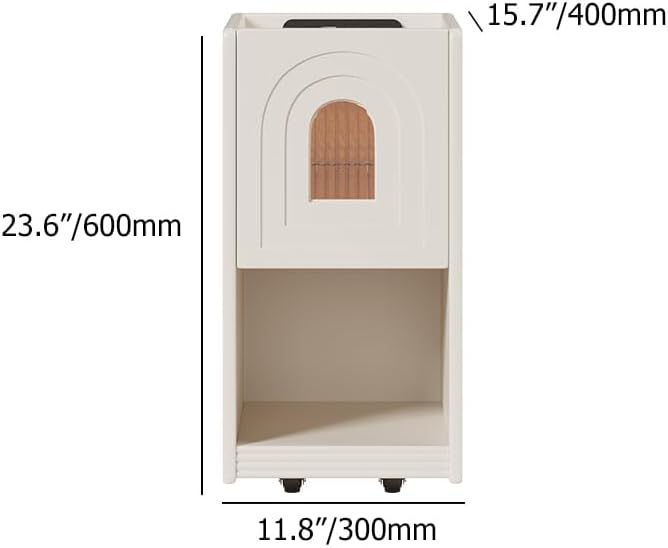
Image 5: Diagram illustrating the dimensions of the nightstand (23.6" H x 11.8" W x 15.7" D).

בילד 6: נאָענט־אַרויף view of the hidden wheels at the base of the nightstand, indicating easy mobility.
9. וואָראַנטי און שטיצן
Homary products are designed for quality and durability. For warranty information, please refer to the warranty card included with your product or visit the official Homary website. For any questions, missing parts, or technical support, please contact Homary customer service:
- בליצפּאָסט: service@homary.com
- סערוויס צייט: Reply within 24 hours (excluding public holidays).
- Please provide your order number when contacting customer service.


