1. הקדמה
א דאנק פארן קויפןasing the Karlsson Alarm Clock Duo. This manual provides detailed instructions for setting up, operating, and maintaining your new alarm clock. Please read this manual thoroughly before use and retain it for future reference.
2. זיכערקייַט אינפֿאָרמאַציע
- האַלטן די מיטל אַוועק פון וואַסער און הויך הומידיטי.
- דו זאלסט נישט ויסשטעלן די מיטל צו דירעקט זונשייַן אָדער עקסטרעם טעמפּעראַטורעס.
- פרובירט נישט צו צענעמען אדער פאררעכטן דעם אפאראט אליין. לאָזט איבער אלע סערוויסעס צו קוואַליפֿיצירטע פּערסאָנעל.
- ניצט נאָר די ספּעציפֿיצירטע באַטעריע טיפּ. זאָרגט זיך פֿאַר די ריכטיקע פּאָלאַריטעט ווען איר לייגט אַרײַן באַטעריעס.
- אַראָפּנעמען באַטעריז אויב די מיטל וועט נישט זיין געוויינט פֿאַר אַ לאַנג צייַט.
3. פּעקל אינהאַלט
ביטע קאָנטראָלירט אַז אַלע זאכן זענען פאַראַן:
- Karlsson Alarm Clock Duo (Model KA5954BK)
- באַניצער מאַנואַל (דעם דאָקומענט)
באַמערקונג: באַטעריעס זענען נישט אַרייַנגערעכנט און מוזן זיין געקויפט באַזונדער.
4. פּראָדוקט איבערview
The Karlsson Alarm Clock Duo features a classic analog clock face combined with a modern digital display for temperature and humidity. Its compact design makes it suitable for various settings.

פיגורע 1: פראָנט view of the Karlsson Alarm Clock Duo. The top section features an analog clock with a white face and black numbers, while the bottom section has a digital display showing temperature (e.g., 22.0 °C) and relative humidity (e.g., 58%).

פיגורע 2: The alarm clock viewed from the side, demonstrating its compact size and matte black finish. It is shown on a surface next to a white desk lamp, indicating its suitability for bedside tables or desks.
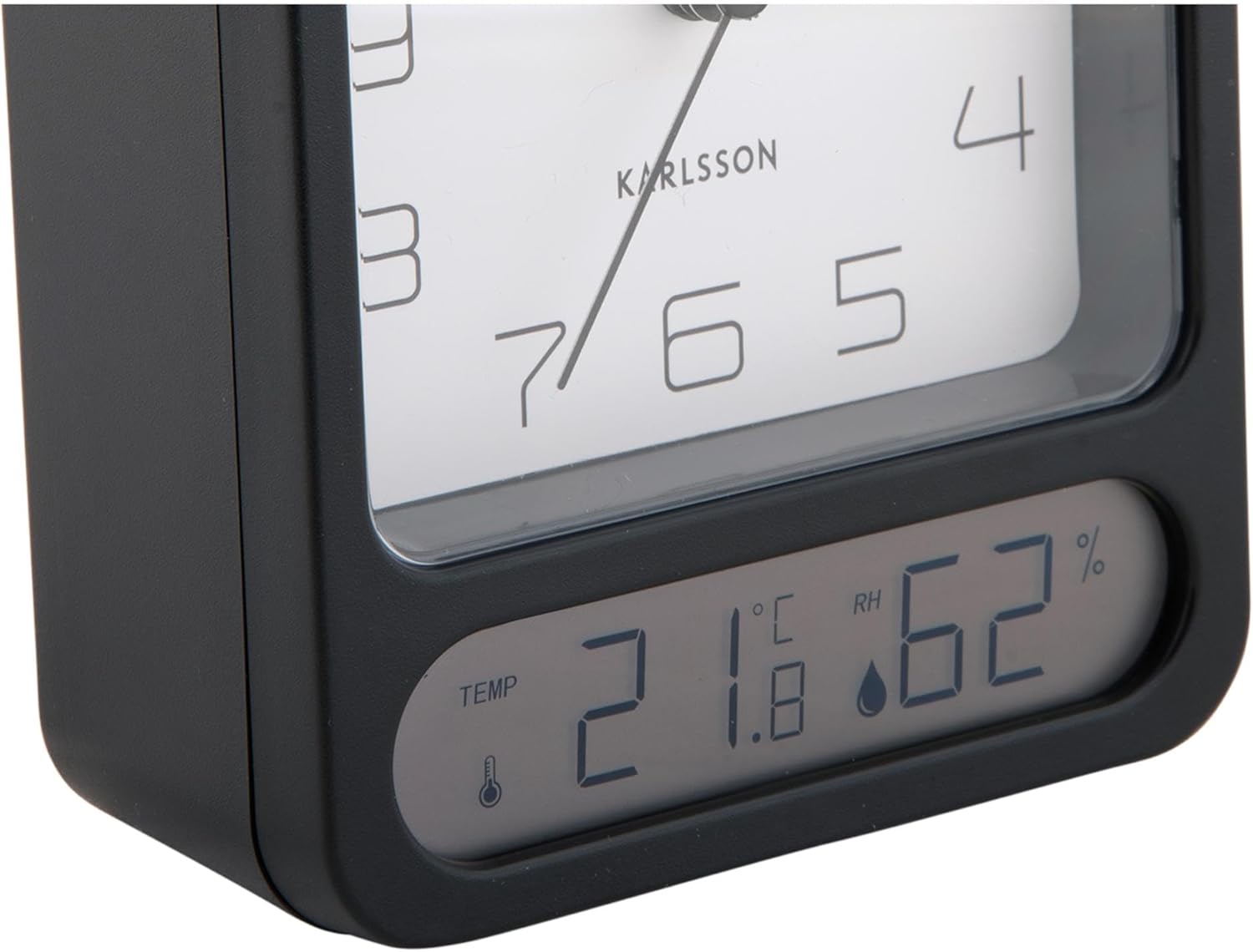
פיגורע 3: A detailed close-up of the digital display, clearly showing the temperature in Celsius (e.g., 21.8 °C) and the relative humidity percentage (e.g., 62% RH). Small icons for temperature and humidity are also visible.

פיגורע 4: An angled perspective of the alarm clock, providing a comprehensive view of its design, including the square analog clock face and the rectangular digital display below it, all encased in a matte black frame.
5. סעטאַפּ
5.1. באַטאַרייע ייַנמאָנטירונג
- געפינט דעם דעקל פון דעם באַטעריע אָפּטייל אויף דער צוריקזייט פון דעם וועקער זייגער.
- אַראָפּנעמען דעם דעקל דורך אים צו שלעפּן אָדער אויפהייבן לויט די מאַרקירונגען.
- Insert the required batteries (typically 1x AA for the analog clock and 2x AAA for the digital display, though specific types may vary - refer to the compartment markings) ensuring correct polarity (+ and -).
- פאַרבייַטן די באַטאַרייע אָפּטייל דעקן סיקיורלי.
5.2. באַשטעטיקן די צייט
- On the back of the clock, locate the time setting knob (usually labeled "TIME SET" or similar).
- Rotate the knob in either direction to adjust the hour and minute hands to the current time.
5.3. באַשטעטיקן די שרעק
- Locate the alarm setting knob (usually labeled "ALARM SET" or similar) on the back of the clock.
- Rotate this knob to set the alarm hand to your desired alarm time.
- Locate the alarm ON/OFF switch (often a small slider or button). Slide it to the "ON" position to activate the alarm.
6. אַפּערייטינג ינסטרוקטיאָנס
6.1. לייענען די צייט
The current time is displayed on the analog clock face with hour, minute, and second hands.
6.2. לייענען טעמפּעראַטור און הומידיטי
The digital display at the bottom of the clock shows the current room temperature (in Celsius or Fahrenheit, depending on model) and relative humidity percentage. There may be a button (e.g., "°C/°F") to switch between temperature units if applicable.
6.3. שרעק פֿונקציע
- When the alarm is set to "ON", it will sound at the designated alarm time.
- To stop the alarm, slide the alarm ON/OFF switch to the "OFF" position.
- סנוז פונקציע: If your model includes a snooze button (often a large button on top), pressing it during an active alarm will temporarily silence the alarm for a few minutes before it sounds again.
7. וישאַלט
7.1. רייניקונג
Wipe the clock with a soft, dry cloth. Do not use abrasive cleaners or solvents, as these may damage the finish or display.
7.2. באַטערי פאַרבייַט
Replace batteries when the clock hands slow down, the alarm becomes weak, or the digital display fades or stops working. Follow the battery installation steps in Section 5.1.
8. טראָובלעשאָאָטינג
| פּראָבלעם | מעגלעך סיבה | לייזונג |
|---|---|---|
| Clock not working / Digital display off | טויטע אדער נישט ריכטיק אריינגעשטעלטע באַטעריעס. | פאַרבייַטן באַטעריעס, זיכער מאַכן אַז די פּאָלאַריטעט איז ריכטיק. |
| דער שרעק קלינגט נישט | Alarm is not activated (OFF position) or set incorrectly. | Ensure alarm switch is ON and alarm time is set correctly. |
| אומרעכט צייט געוויזן | Time was not set correctly or batteries are low. | Reset the time. Replace batteries if necessary. |
| ומפּינקטלעך טעמפּעראַטור / הומידיטי | סענסאָר שטערונג אָדער עקסטרעמע סביבה באדינגונגען. | Ensure the clock is in a well-ventilated area, away from direct heat sources or drafts. Allow time for readings to stabilize. |
9. ספּעסאַפאַקיישאַנז
| מאָדעל נומער | KA5954BK |
| סאָרט | קאַרלסאָן |
| דימענסיעס (L X W X H) | 9.7 X 4.5 X 12 סענטימעטער |
| וואָג | 600 ג |
| מאַכט מקור | באַטאַרייע (ניט אַרייַנגערעכנט) |
| ASIN | B0DHL8TMB6 |
10. וואָראַנטי און שטיצן
This Karlsson product is covered by a manufacturer's warranty. Please refer to the warranty card included with your purchase or visit the official Karlsson webזייטל פֿאַר דעטאַלירטע וואָראַנטי טערמינען און באדינגונגען.
For technical support, troubleshooting assistance, or inquiries regarding your product, please contact Karlsson customer service through their official webוועבזייטל אדער די קאָנטאַקט אינפֿאָרמאַציע וואָס איז צוגעשטעלט געוואָרן מיט אייערע קויף דאָקומענטאַציע.


