1. הקדמה
Thank you for choosing Blackview Smart Glasses. These innovative sunglasses combine stylish design with advanced audio technology, allowing you to enjoy music, make calls, and interact with your voice assistant while staying aware of your surroundings. This manual provides detailed instructions for setup, operation, and maintenance to ensure optimal performance and longevity of your device.

פיגורע 1: פראָנט view of Blackview Smart Glasses.
2. פּראָדוקט פֿעיִקייטן
- בלועטאָאָטה 5.3 טעכנאָלאָגיע: Ensures faster and more stable signal transmission with low latency, offering a connection range of up to 12 meters.
- IP65 וואָטערפּרוף שאַץ: Protects against sweat and small raindrops, suitable for outdoor activities and gym use.
- איין-שריט פּאָרינג: After initial pairing, the glasses automatically reconnect to the last paired device upon opening.
- ברייט קאַמפּאַטאַבילאַטי: Compatible with various devices including smartphones and computers.
- Immersive Open Ear Sound: Features an open headphone speaker design, dynamic drivers, and ultra-sensitive polymer diaphragms for rich, balanced audio without isolating you from your environment.
- Unparalleled Call Clarity: Advanced microphone design with noise reduction technology suppresses up to 90% of background noise for clear communication.
- ינטויטיווע ריר קאָנטראָלס: Manage playback, volume, calls, and voice assistant activation directly from the glasses.
- עקסטענדעד אַרבעט שעה: Equipped with 80mAh+80mAh rechargeable batteries, providing approximately 7 hours of communication, 6 hours of music playback, and 160 hours of standby time.
3. פּראָדוקט איבערview
Familiarize yourself with the components of your Blackview סמאַרט ברילן:

Figure 2: Key components of the Smart Glasses.
- לענס: TAC+UV400 (UV resistant)
- Nose Bridge: Provides comfortable fit.
- ריר קנעפּל: For various control functions.
- Stereo-speaker: Delivers open-ear audio.
- געבויט-אין מיק: פֿאַר קלאָרע רוף קוואַליטעט.
- Charging Indicator Port: For magnetic charging.
- שפּיגל ראַם: PC+light steel construction.
4. ספּעסאַפאַקיישאַנז
Refer to the following specifications for your Blackview סמאַרט ברילן:
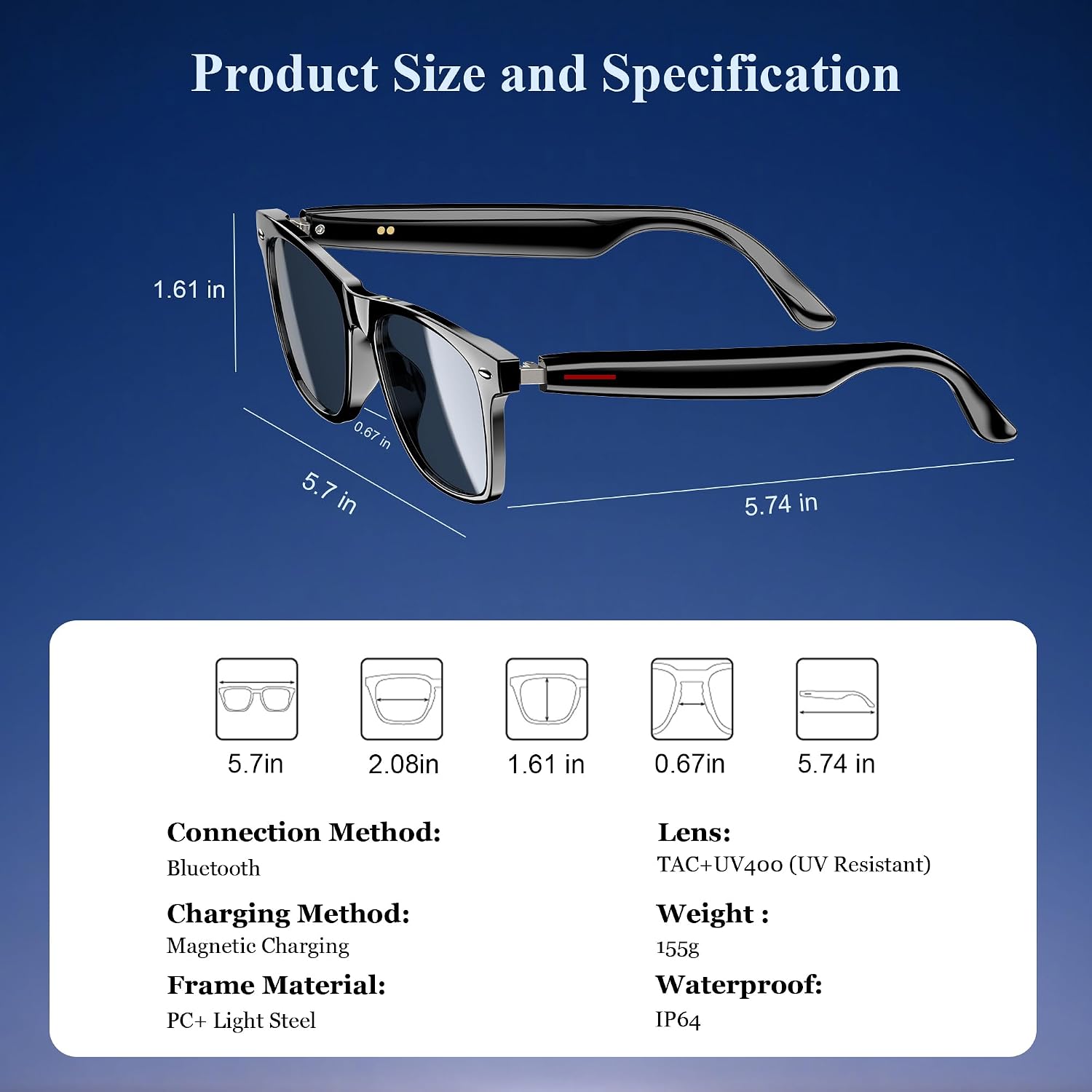
פיגור 3: פּראָדוקט דימענסיעס און שליסל ספּעסיפיקאַציעס.
| באַשרייַבונג | ווערט |
|---|---|
| בלועטאָאָטה ווערסיע | 5.3 |
| וואָטערפּרוף רייטינג | IP65 |
| באַטאַרייע קאַפּאַציטעט | 80mAh+80mAh |
| קאָמוניקאַציע צייט | בעערעך. 7 שעה |
| מוזיק פּלייַבאַקק צייט | בעערעך. 6 שעה |
| סטאַנדביי צייט | בעערעך. 160 שעה |
| טשאַרדזשינג צייט | Approx. 1.2 hours (magnetic charge) |
| לענס טיפּ | TAC+UV400 (UV Resistant) |
| ראַם מאַטעריאַל | PC + Light Steel |
| פּונקט וואָג | 4.6 אונסעס |
| פּעקל דימענשאַנז | 6.65 X 2.36 X 1.93 אינטשעס |
5. וואָס איז אין דער קעסטל
Your Blackview Smart Glasses package includes:
- קלוג זונברילן
- מאַגנעטיק טשאַרדזשינג קאַבלע
- רייניקונג קלאָט
- באַניצער מאַנואַל
6. סעטאַפּ
6.1. אויפלאָדן די ברילן
Before first use, fully charge your Blackview Smart Glasses. Use the provided magnetic charging cable.
- Connect the magnetic charging cable to the charging port on the temple of the glasses.
- פאַרבינדן די אנדערע סוף פון די קאַבלע צו אַ וסב מאַכט מקור (למשל, קאָמפּיוטער, וואַנט אַדאַפּטער).
- The charging indicator light will illuminate (usually red) during charging and turn off or change color (usually blue/green) when fully charged.
- א פול אָפּצאָל נעמט בעערעך 1.2 שעה.

Figure 4: Magnetic charging connection.
6.2. מאַכט אויף / אויסגעלאשן
- מאַכט אויף: Long touch the touch button on the temple for 5 seconds until you hear a power-on prompt.
- מאַכט אַוועק: Long touch the touch button for 5 seconds until you hear a power-off prompt.
6.3. בלועטאָאָטה פּערינג
- זיכער מאַכן אַז די ברילן זענען אויפגעלאָדן און אנגעצינדן.
- אויף דיין סמאַרטפאָנע אָדער מיטל, געבן בלועטאָאָטה און זוכן פֿאַר בנימצא דעוויסעס.
- Select "Blackview Smart Glasses" (or similar name) from the list to pair.
- Once paired, the glasses will automatically reconnect to your device when powered on and within range.
7. אַפּערייטינג ינסטרוקטיאָנס
Your Blackview Smart Glasses feature intuitive touch controls located on the temples:

Figure 5: Touch control functions.
- שפּיל / פּויזע מוזיק: One-tap the touch button on either temple.
- ווייַטער שפּור: Twice-tap the touch button on the right temple.
- פֿריִערדיקע שפּור: Twice-tap the touch button on the left temple.
- באַנד אַרויף / אַראָפּ: (Specific gesture not detailed in image, typically long press or swipe, refer to quick start guide if included).
- ענטפֿערן / הענגען אַרויף רופן: One-tap the touch button on either temple.
- אַקטאַווייט קול אַססיסטאַנט: Long touch the touch button for 2 seconds.
- ווייַט פאָטאָגראַפיע: Double click the touch button to trigger your phone's camera shutter.

Figure 6: Voice assistant activation example.
8. קער און וישאַלט
To ensure the longevity and optimal performance of your smart glasses, follow these care guidelines:
- רייניקונג: Use the provided cleaning cloth to gently wipe the lenses and frame. Avoid using abrasive materials or harsh chemicals.
- וואַסער קעגנשטעל: The glasses have an IP65 rating, meaning they are resistant to sweat and light splashes of water. Do not submerge them in water or expose them to heavy rain.
- סטאָרידזש: Store the glasses in a protective case when not in use to prevent scratches and damage. Avoid exposing them to extreme temperatures.
- ויסמיידן פּראַל: While the lenses are strong, avoid dropping the glasses or subjecting them to strong impacts.

Figure 7: Smart Glasses demonstrating water resistance.
9. טראָובלעשאָאָטינג
If you encounter any issues with your Blackview Smart Glasses, refer to the following common solutions:
- קיין מאַכט: Ensure the glasses are fully charged. Connect them to the magnetic charger and check the indicator light.
- קען נישט פארבינדן:
- זיכער מאַכן אַז בלועטוט איז ענייבאַלד אויף אייער מיטל און די ברילן זענען אין פּערינג מאָדע (געוויינטלעך אנגעצייכנט מיט אַ בלינקנדיק ליכט).
- Make sure the glasses are not already connected to another device. Turn off Bluetooth on other nearby devices.
- ריסטאַרט ביידע די ברילן און דיין דעווייס, און פּרוּווט ווידער צו פאַרבינדן.
- קיין קלאַנג/נידעריק באַנד:
- קאָנטראָלירט די וואָלומען לעוועלס אויף ביידע די ברילן און אייער פֿאַרבונדענעם מיטל.
- Ensure the glasses are properly positioned on your ears for optimal open-ear audio.
- Verify that the glasses are correctly paired and selected as the audio output device on your phone.
- רופן קוואַליטי ישוז:
- זיכער מאַכן אַז דער מיקראָפאָן איז נישט פֿאַרשטאָפּט.
- אריבערגיין צו א געגנט מיט ווייניגער הינטערגרונט גערוישן.
- קאָנטראָלירט די סיגנאַל שטאַרקייט פון אייער טעלעפאָן.
- ניט ריספּאַנדאַבאַל ריר קאָנטראָלס:
- זיכער מאַכן אַז אייערע פינגער זענען ריין און טרוקן.
- ריסטאַרט די ברילן.
If these steps do not resolve the issue, please contact Blackview קונה שטיצן פֿאַר ווייַטער הילף.
10. אפיציעלע פּראָדוקט ווידעאָ
זעט דעם אפיציעלן פראדוקט ווידעא פאר אן איבערבליקview of the Blackview Smart Glasses features and usage:
Video 1: Blackview Polarized Sport Smart Sunglasses for Men and Women. This video highlights the design and features of the smart sunglasses, including their polarized lenses and smart capabilities.


