הקדמה
This manual provides essential information for the safe assembly, operation, and maintenance of your COSTWAY Vanity Desk with Lights. Please read all instructions carefully before use and retain this manual for future reference.
The vanity desk features a 2-in-1 design, allowing it to function as both a makeup table and a writing desk. It includes a mirror with 10 LED bulbs offering 3 adjustable light modes and brightness, a cushioned stool, and ample storage with three drawers, including removable dividers.
וויכטיק סאַפעטי אינפֿאָרמאַציע
Always assemble the vanity according to the instructions provided. Ensure the vanity is stable and secure before use. Do not place heavy objects on the vanity to prevent tipping. Be cautious when adjusting the lighting to avoid electrical hazards. Keep the vanity and its components away from water and heat sources.
An anti-tipping device is included to enhance safety. It is crucial to install this device to prevent accidental collisions and ensure stability, especially in households with children or pets.

Image: Installation of the anti-tipping device to secure the vanity to the wall.
פּעקל אינהאַלט
Please verify that all components listed below are present before beginning assembly. If any parts are missing or damaged, contact customer support.
- 1 x Vanity Desk
- 1 x Vanity Stool
- 1 x באַניצער מאַנואַל
- Necessary hardware and tools for assembly
אינסטרוקציעס פֿאַר אויפֿשטעלן און פֿאַרזאַמלען
The vanity set is designed for hassle-free setup. All necessary parts are labeled, and detailed instructions are provided in the included user manual. Follow the step-by-step guide for proper assembly.
- אָפּלייגן קאַמפּאָונאַנץ: פֿאָרזיכטיק אַרויסנעמען אַלע טיילן פֿון דער פֿאַרפּאַקונג און לייגן זיי אויס אויף אַ ריינער, ווייכער ייבערפֿלאַך כּדי צו פֿאַרמייַדן קראַצן.
- צוזאַמענשטעלן דעם טיש ראַם: Attach the legs to the main tabletop using the provided hardware. Ensure all connections are secure.
- אינסטאַלירן שופלאדן: Insert the drawers into their respective slots. The large drawer includes removable dividers for customizable organization.
- צוטשעפּען שפּיגל פֿאַרזאַמלונג: Secure the mirror frame with LED bulbs to the tabletop. The mirror can be rotated 360 degrees for optimal viewינג אַנגלעס.
- צוזאַמענשטעלן דעם בענקל: Attach the legs to the cushioned stool seat.
- אינסטאַלירן אַנטי-טיפּינג מיטל: For safety, fix the vanity table to the wall using the anti-tipping device as illustrated in the safety section.
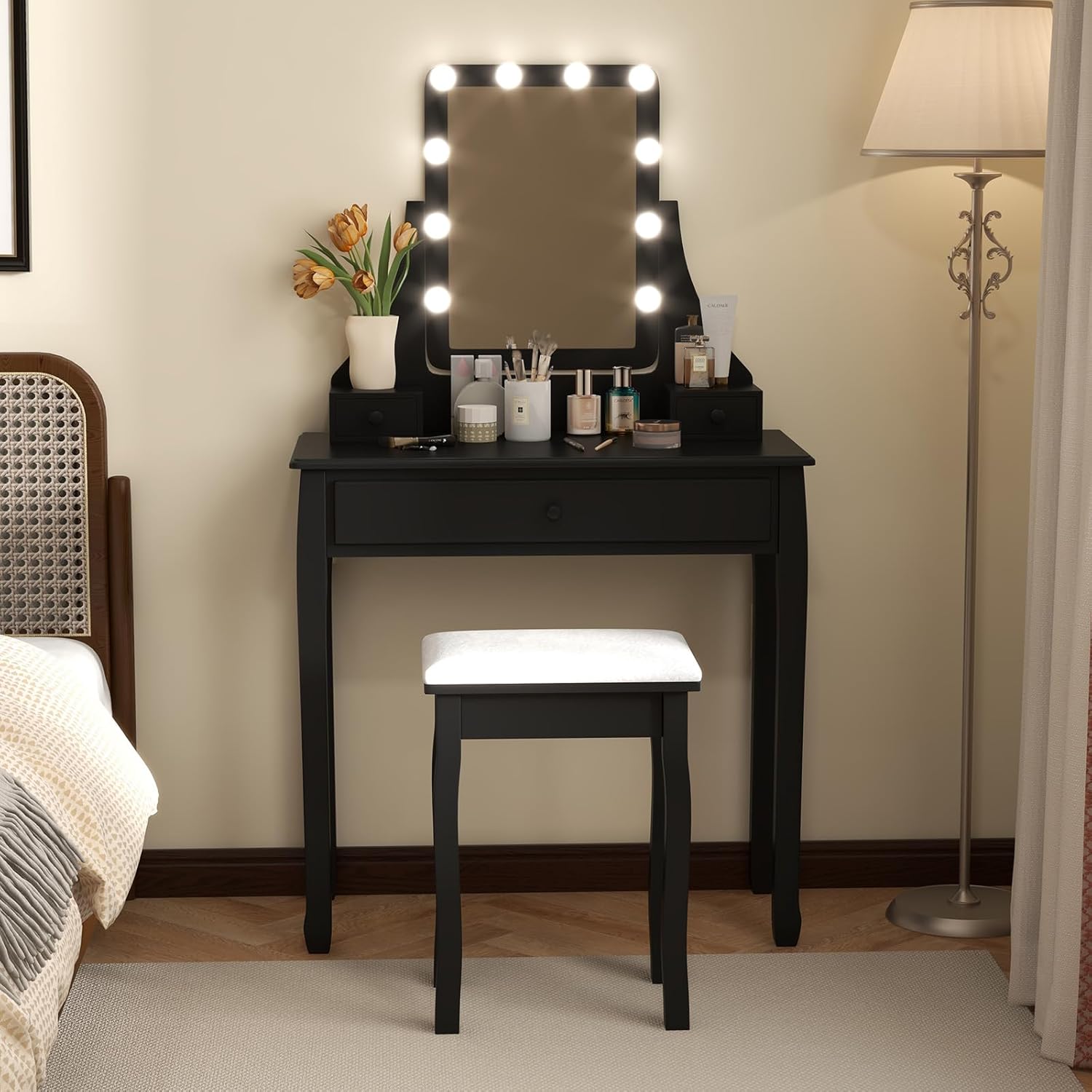
Image: Fully assembled COSTWAY Vanity Desk with Lights and stool.

Image: Detail of the vanity desk's storage drawers, including removable dividers.
אַפּערייטינג ינסטראַקשאַנז
געפירט שפּיגל ליגהץ
The mirror is equipped with 10 LED bulbs offering adjustable lighting to suit various preferences and needs.
- מאַכט אויף / אַוועק: Press the power button on the controller to turn the lights on or off.
- טוישן ליכט מאָדע: Briefly press the mode button on the controller to cycle through the 3 light modes: Warm Yellow, Warm White, and Cool White.
- סטרויערן ברייטנאַס: Press and hold the power button on the controller to continuously adjust the brightness level from 0% to 100%. Release the button when the desired brightness is reached.

Image: LED mirror light modes and brightness control.
שפּיגל אַדזשאַסטמאַנט
The mirror features a 360-degree rotatable design, allowing you to adjust it to the most suitable angle for your comfort and makeup application.
- Gently grasp the sides of the mirror and rotate it to your desired position.
- Ensure the mirror is stable in its adjusted position before use.

Image: Key features including the 360-degree rotatable mirror.
וישאַלט
Cleaning the Vanity Desk
- ווישט די האָלצערנע ייבערפלאַכן מיט אַ ווייכן, דamp שטאָף. פֿאַרמײַדט שרײַבנדיקע רייניקונגס־מיטלען אָדער שאַרפֿע כעמיקאַלן וואָס קענען שאַטן דעם ענדיקונג.
- For the mirror, use a glass cleaner and a lint-free cloth to prevent streaks.
- Regularly dust the desk to maintain its appearance.
Cushioned Stool Care
- Spot clean the upholstered stool cushion with a mild fabric cleaner as needed.
- פֿאַרמײַדן פֿאַרלענגערטע אויסשטעלונג צו דירעקטער זון צו פֿאַרמײַדן פֿאַרבלאַסונג.

Image: Details of the cushioned stool, including padding and non-slip feet.
טראָובלעשאָאָטינג
| פּראָבלעם | מעגלעך סיבה | לייזונג |
|---|---|---|
| געפירט לייץ נישט אויסגעדרייט אויף | Power cable not connected; Faulty power adapter; Bulb issue | Ensure power cable is securely plugged in. Check power adapter for damage. Contact customer support if lights remain off. |
| לייץ פליקקערינג אָדער טונקל | Loose connection; Low power supply | Check all connections. Ensure the power source is stable. Adjust brightness settings. |
| Vanity desk feels unstable | Loose assembly; Uneven floor; Anti-tipping device not installed | Tighten all screws and bolts. Place on a level surface. Install the anti-tipping device as instructed. |
| Drawers not sliding smoothly | Misalignment; Obstruction; Damaged runners | Ensure drawers are correctly aligned. Remove any obstructions. Check drawer runners for damage. |
ספּעסאַפאַקיישאַנז
| שטריך | דעטאַל |
|---|---|
| מאָדעל נומער | 1054US-CYHU |
| קוילעלדיק דימענשאַנז (L X W X H) | 32'' x 16'' x 54.5'' (81 ס״מ x 40 ס״מ x 137 ס״מ) |
| Tabletop Dimensions (L x W x H) | 32'' x 16'' x 30.5'' (81 ס״מ x 40 ס״מ x 77 ס״מ) |
| שפּיגל דימענסיעס (ברייט x הויך) | 11'' x 17'' (28cm x 43cm) |
| Stool Dimensions (W x D x H) | 15.5'' x 11.5'' x 20'' (39 ס״מ x 29 ס״מ x 51 ס״מ) |
| נעץ וואָג | 37.5 לבס (17 קג) |
| מאַטעריאַל | Wood, Pine |
| קאָליר | שוואַרץ |
| אַסעמבלי פארלאנגט | יא |
| Weight Capacity of Tabletop | 110 לבס |
| Weight Capacity of Stool | 240 לבס |
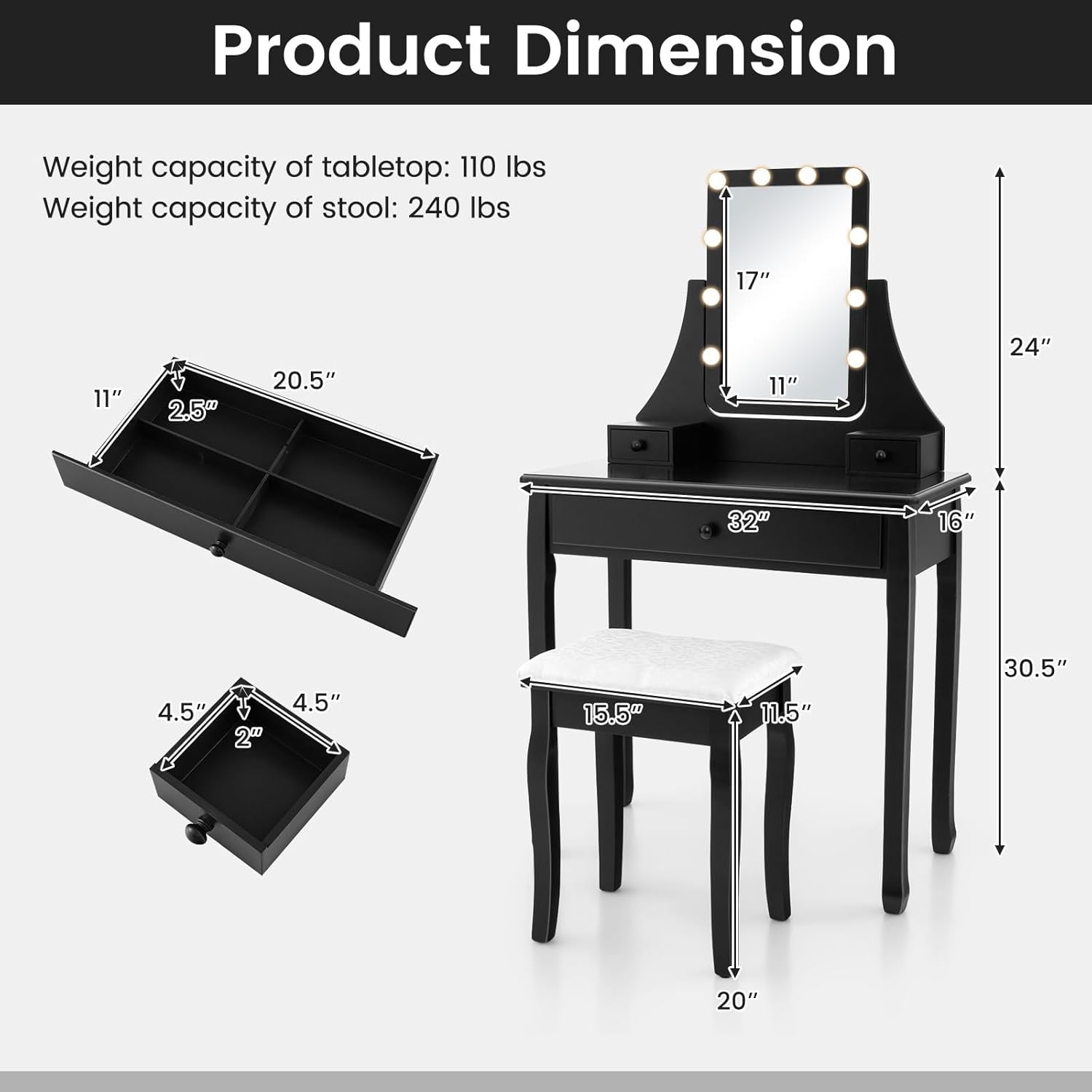
Image: Detailed product dimensions and weight capacities.
וואָראַנטי און שטיצן
Specific warranty information for this product is not provided in this manual. For details regarding warranty coverage, please refer to the product packaging or contact COSTWAY customer service directly.
If you encounter any issues or have questions not addressed in this manual, please contact COSTWAY customer support through their official website or the retailer where the product was purchased. Please have your model number (1054US-CYHU) and purchase date ready when contacting support.


